
Batch Processing 2D Floor Plan to 3D Software Solutions
Automating High-Volume Architectural Visualization for Unprecedented Scale
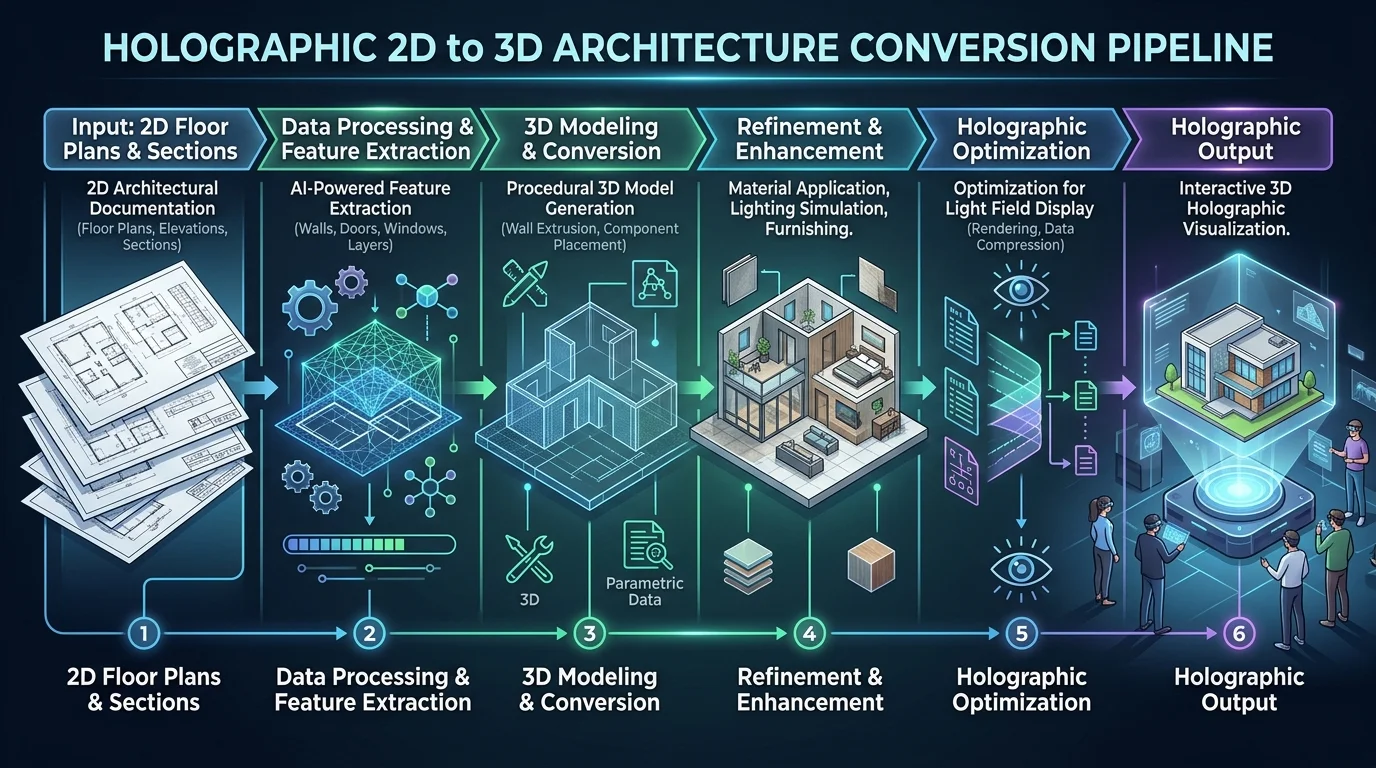
Architectural firms and real estate developers face critical bottlenecks when manually converting massive archives of flat blueprints into spatial models. As project volumes expand, relying on traditional drafting methods creates unsustainable friction, delaying virtual staging and prototyping. By integrating modern ai 3d home design workflows, automated pipelines resolve this by instantly translating bulk floor plan datasets into fully realized structural environments without human intervention. This systematic approach allows technical directors to bypass repetitive extrusion tasks, focusing instead on high-level spatial analysis and interactive presentation.
In 2026, the transition from manual modeling to automated systems has redefined architectural visualization. Utilizing advanced 2D to 3D conversion protocols allows technical directors to ingest hundreds of rasterized or vectorized floor plans simultaneously. This shift not only accelerates pre-construction planning but also guarantees structural consistency across large-scale residential developments. By removing the need for individualized, manual drafting on every blueprint, organizations can scale their visualization capacities linearly with their project acquisition rates.
Key Insights
- Automated bulk conversion eliminates manual drafting bottlenecks in high-volume architectural visualization.
- Enterprise pipelines rely on robust API endpoints rather than web-based editors to handle massive blueprint datasets.
- Standardizing input blueprints ensures consistent topological generation and accurate scale across all output models.
- Seamless integration into existing design platforms requires strict adherence to industry-standard 3D export formats.
- Programmatic quality assurance scripts guarantee that generated structural geometry meets rigorous commercial standards.
The Shift to Batch Processing in AI 3D Home Design
Scaling real estate and architectural projects demands efficient 2D floor plan to 3D software solutions for batch processing. Automating bulk conversions eliminates manual modeling bottlenecks, allowing teams to instantly transform hundreds of 2D layouts into spatial 3D environments for rapid prototyping and virtual staging.
The demand for rapid architectural visualization has rendered single-file processing obsolete for large agencies. Historically, 3D artists spent hours meticulously extruding walls, cutting out window frames, and placing structural elements based on flat CAD drawings or scanned PDFs. This manual methodology introduced severe scaling limitations.
Today, high-throughput generation systems can parse complex architectural blueprints in seconds. These systems utilize sophisticated neural networks to identify load-bearing walls, window placements, and door frames across hundreds of files concurrently. Powering these high-throughput systems requires immense computational resources. For instance, Tripo AI utilizes Algorithm 3.1 with over 200 Billion parameters to accurately interpret spatial relationships from flat architectural schematics. Learn more about integrated solutions at our AI 3D Home Design hub.
Core Features of Batch 2D Floor Plan to 3D Software Solutions
Effective batch processing software must offer robust API integrations, consistent topological generation, and versatile export capabilities.
Enterprise Automation vs Individual Studio Tools
When architects evaluate 2D to 3D automation, distinguishing between enterprise-grade APIs and consumer-facing interfaces is critical. Commercial volume requires programmatic access where thousands of files can be queued, processed, and retrieved via automated scripts.
In contrast, an online 3D studio is designed for individual artists who need to manually tweak single assets. It is essential to note that these platforms are entirely independent. For example, the Tripo AI API built for enterprise automation operates separately from the individual artist web studio. Upgrading a standard web interface subscription does not grant programmatic access.
Interoperability and Exporting Pipelines
To maintain interoperability, batch processing systems must support a comprehensive array of file extensions. The output pipeline typically requires exporting to USD, FBX, OBJ, STL, GLB, and 3MF formats. Incorporating a robust 3D format conversion step ensures that the generated assets can be immediately ingested by programs like Unreal Engine.
Implementing a High-Volume 2D to 3D Workflow
To successfully deploy 2D floor plan to 3D software solutions for batch processing, teams must standardize input blueprints and configure automated API parameters.
Standardizing 2D Inputs for AI Recognition
The reliability of automated batch processing is directly proportional to the quality of the input data. Before initiating a bulk conversion, technical teams must establish strict guidelines for the 2D blueprints. This involves removing extraneous annotations and ensuring all wall lines are fully connected.
Bulk Exporting and Quality Assurance
Once the generation phase completes, the workflow transitions to automated quality assurance. Scripts can be deployed to verify that the bounding box of the resulting 3D structure matches the scaled dimensions of the original 2D layout. Within the Tripo ecosystem, currency is credits. A standard individual account provides 300/mo (no commercial use), while a professional setup allocates 3000/mo. Enterprise teams must monitor these credit expenditures to ensure cost-effectiveness.
FAQ
Q: How do I maintain scale accuracy when batch processing 2D floor plans to 3D? A: Maintaining scale accuracy requires rigorous preprocessing of the input blueprints. Technical teams must normalize all 2D files to a uniform pixel-to-meter ratio and embed explicit metadata regarding wall heights into the batch request payload.
Q: Which export formats should I use for batch integration into home design platforms? A: For optimal compatibility, workflows should default to FBX, GLB, and OBJ formats. FBX is recommended for professional rendering engines, while GLB serves as the standard for web-based property viewers.
Q: Can I run batch processing workflows through standard web studio interfaces? A: No. Batch automation strictly requires dedicated API integration. Standard web studio interfaces are engineered for single-asset creation and lack the queuing architecture necessary for bulk processing.
