Types of 3D Modeling: 8 Techniques Explained (2026)
TL;DR
3D modeling creates digital objects for games, animation, design, engineering, and 3D printing.
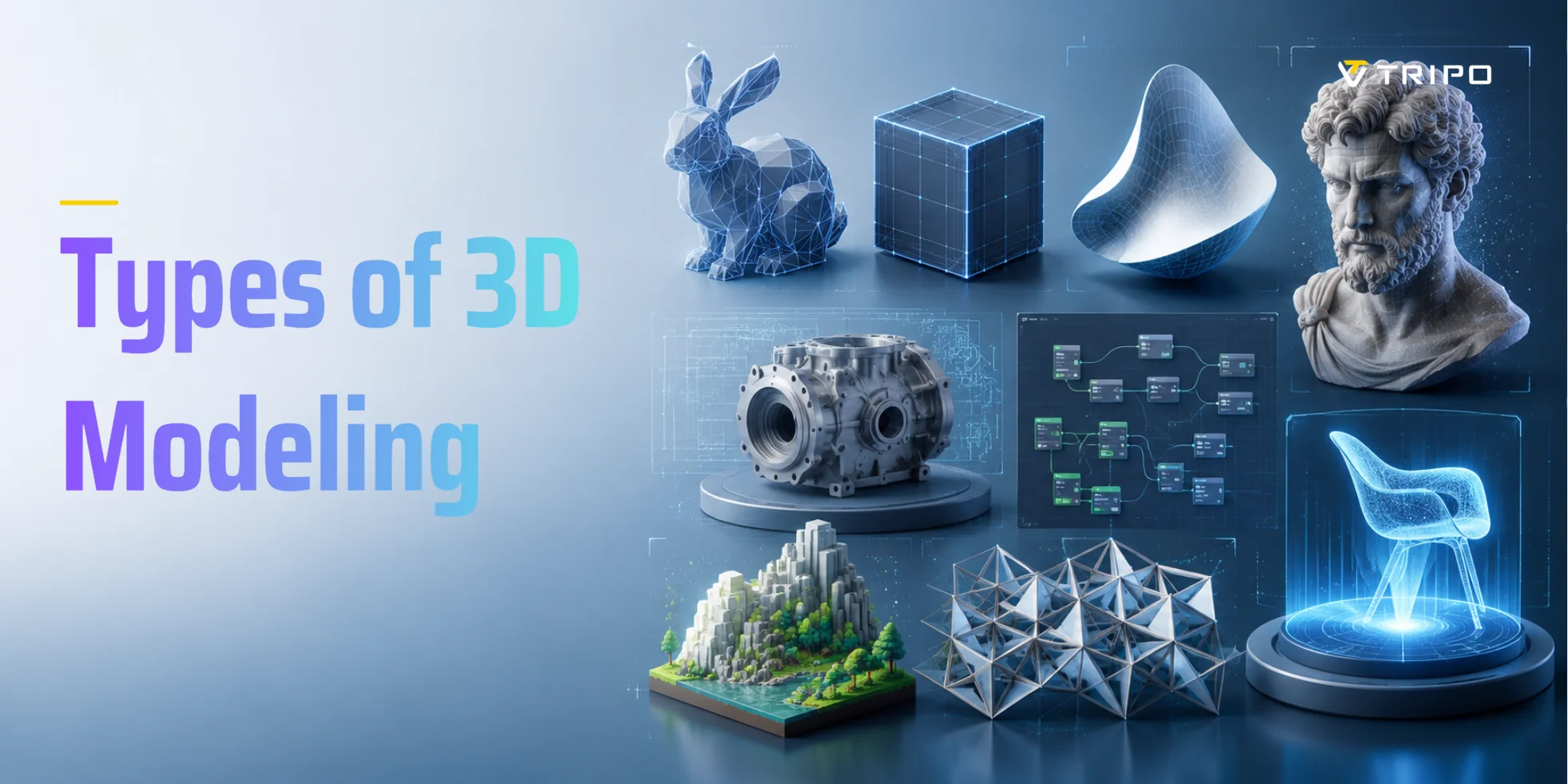
This guide covers polygonal, box, NURBS, surface, sculpting, CAD, parametric, procedural, and AI-powered modeling.
Each method supports different needs, from game assets and characters to manufacturing parts and large environments.
A comparison table highlights each technique's use cases, difficulty, efficiency, and common tools.
For beginners, Tripo AI offers a fast route from text or images to editable 3D starting models.
The main types of 3D modeling are polygonal modeling, NURBS modeling, digital sculpting, CAD modeling, procedural modeling, and AI-powered modeling. Each suits different use cases—games favor polygonal, engineering uses CAD, organic characters use sculpting, and AI modeling is the fastest route for beginners. This guide breaks down all eight techniques, compares them in a side-by-side table, and shows you how to choose the right one for your goal.
What Is 3D Modeling?
3D modeling is the process of using specialized software to create a mathematical, three-dimensional representation of an object in a virtual environment. The resulting digital asset is known as a 3D model and can represent anything from a simple household item to a detailed character, building, vehicle, or mechanical component.
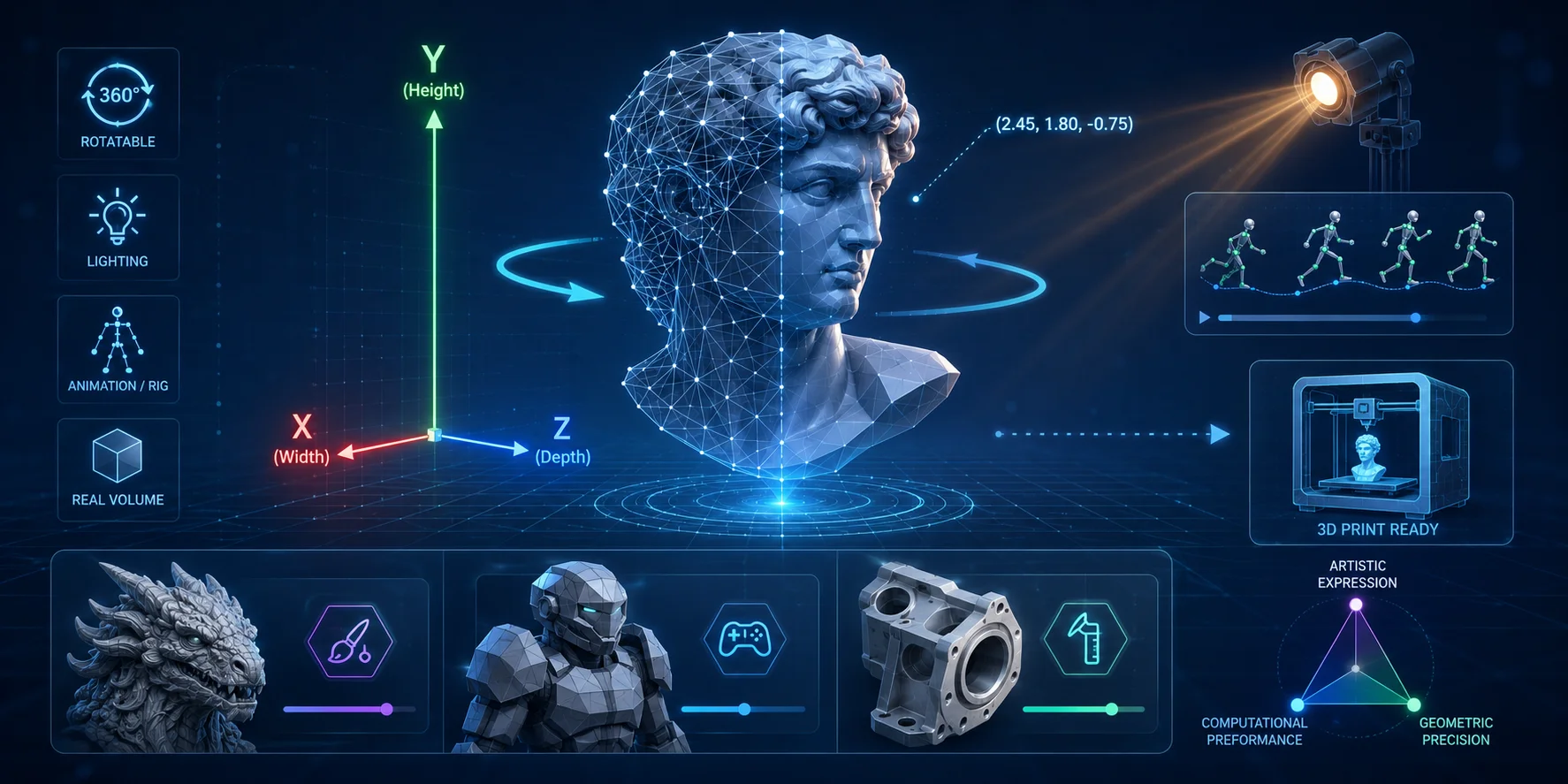
Unlike a 2D illustrator, who creates the illusion of depth on a flat surface, a 3D modeler works within a virtual space defined by three axes: X (width), Y (height), and Z (depth). Every model has measurable digital volume, surface area, and spatial coordinates, allowing it to be viewed from any angle, rotated 360 degrees, textured, animated, lit, rendered, or prepared for 3D printing.
3D models are used across games, animation, film, architecture, engineering, manufacturing, product design, virtual reality, and digital art. Depending on the intended use, a model may need to prioritize visual realism, low polygon counts, precise dimensions, smooth surfaces, or efficient performance in real-time software.
This is why multiple 3D modeling methods exist. Different industries require different balances of artistic freedom, computational efficiency, geometric accuracy, and production speed, leading to workflows such as polygonal modeling, sculpting, CAD, procedural generation, and AI-powered modeling.
The Main Types of 3D Modeling
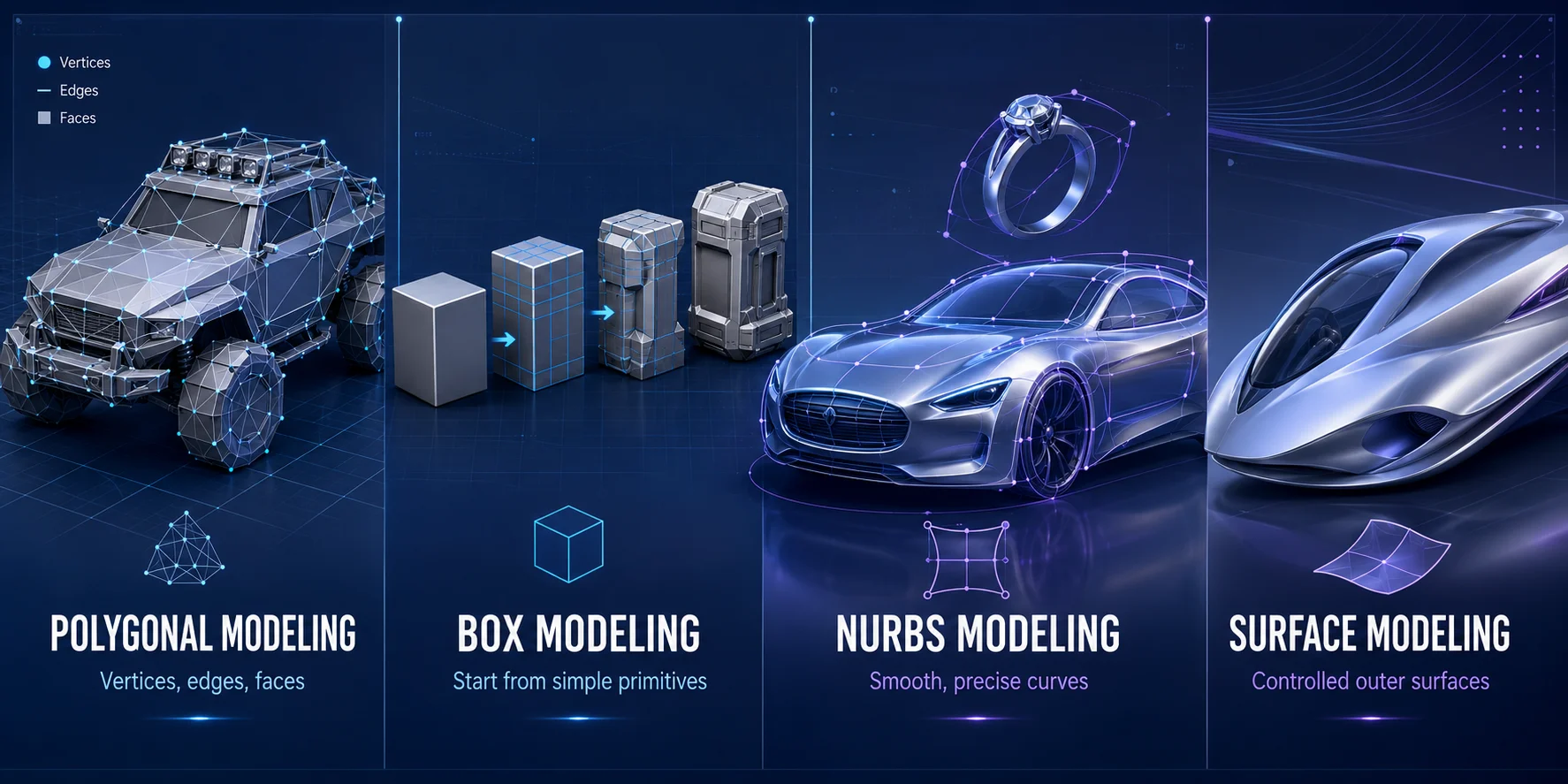
1. Polygonal Modeling
Polygonal modeling creates objects from vertices, edges, and faces. It is the most common method for games because real-time engines render polygon meshes efficiently.
It is suitable for props, environments, vehicles, weapons, and character base meshes. The main skill is topology: clean edge flow helps models shade correctly and deform properly during animation.
Common tools include Blender, Maya, 3ds Max, and Cinema 4D.
2. Box Modeling
Box modeling is a polygonal workflow that starts with simple shapes such as cubes, cylinders, or planes. Artists reshape these primitives using extrusion, scaling, bevels, and loop cuts.
It is ideal for furniture, weapons, buildings, electronics, vehicles, and stylized game props. Beginners often start here because it teaches proportions, mesh structure, and basic modeling tools.
3. NURBS Modeling
NURBS modeling uses curves and mathematical surfaces instead of visible polygon faces. It is designed for smooth, precise shapes.
It is commonly used in automotive design, product design, jewelry, and industrial modeling. NURBS models are usually converted into polygon meshes before being used in games or real-time engines.
Common tools include Rhino, Alias, and Maya.
4. Surface Modeling
Surface modeling focuses on the outer skin of an object. It is used when reflections, curves, and smooth transitions must look highly controlled.
This method is common in vehicle design, consumer products, aircraft, and premium product visualization. Subdivision surface modeling is a related workflow that smooths a polygon cage into a cleaner surface.
5. Digital Sculpting
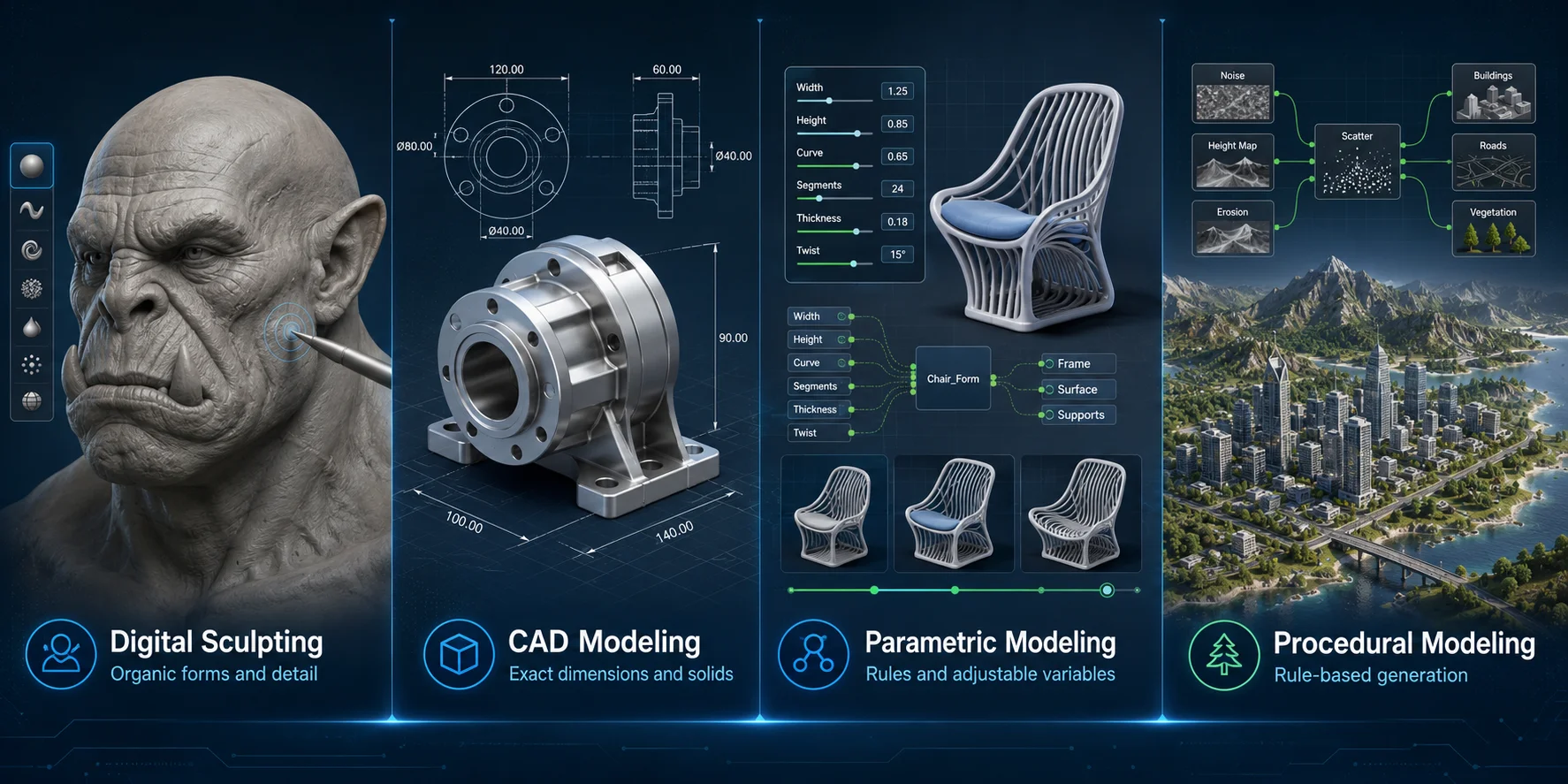
Digital sculpting works like digital clay. Artists use brushes to push, pull, smooth, carve, and add detail to a dense mesh.
It is best for characters, creatures, faces, anatomy, cloth folds, rocks, and organic objects. Sculpted models usually need retopology before they can be animated or used efficiently in games.
Popular sculpting tools include ZBrush, Blender, 3DCoat, Mudbox, and Nomad Sculpt.
6. CAD Modeling
CAD, or Computer-Aided Design, creates models using exact dimensions, sketches, constraints, and solid features.
It is used for engineering, architecture, manufacturing, machinery, product design, and functional 3D printing. CAD is the best choice when measurements, tolerances, or part assembly matter.
Common CAD tools include Fusion, SolidWorks, Onshape, Rhino, and FreeCAD.
7. Parametric Modeling
Parametric modeling creates objects through variables, rules, and relationships. Instead of manually rebuilding a model, you can change a parameter and update the entire design.
It is useful for product families, furniture systems, architecture, configurable parts, and repeated design variations. Parametric modeling is especially valuable when a project requires frequent revisions.
Common tools include Fusion, SolidWorks, Grasshopper, Geometry Nodes, and Python-based workflows.
8. Procedural Modeling
Procedural modeling uses rules, node systems, scripts, or algorithms to generate geometry automatically.
It is useful for forests, terrain, cities, roads, buildings, rocks, and repeated environmental assets. Procedural modeling does not simply create random results; it creates controlled variation based on rules.
Common tools include Houdini, Blender Geometry Nodes, Unreal Engine procedural tools, and custom scripts.
AI-Powered 3D Modeling
As a disruptive standalone category separate from all traditional manual modeling pipelines, AI-powered 3D modeling eliminates the requirement for users to master vertex, spline, or sculpt brush manipulation entirely, generating complete textured, watertight 3D meshes within minutes via artificial neural network training datasets. Tripo AI stands as the most accessible representative of this workflow, splitting its core functionality into two core production pipelines: Text to 3D and Image to 3D, both designed for absolute beginners with zero 3D software experience.
Two Core AI 3D Generation Modes (Practical Workflow)
Tripo AI offers two production-ready generation modes that cover the full range of beginner and prototyping use cases.
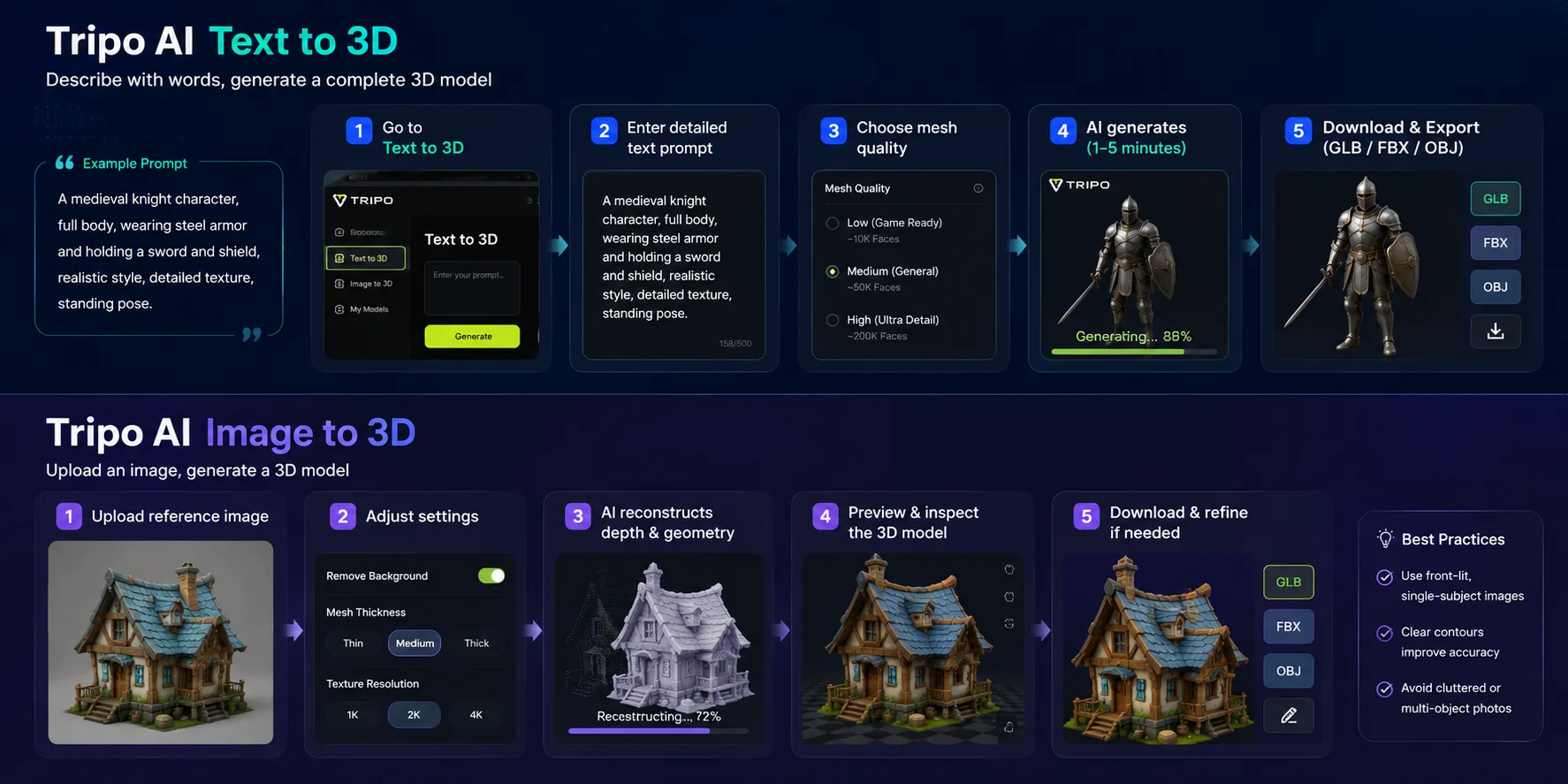
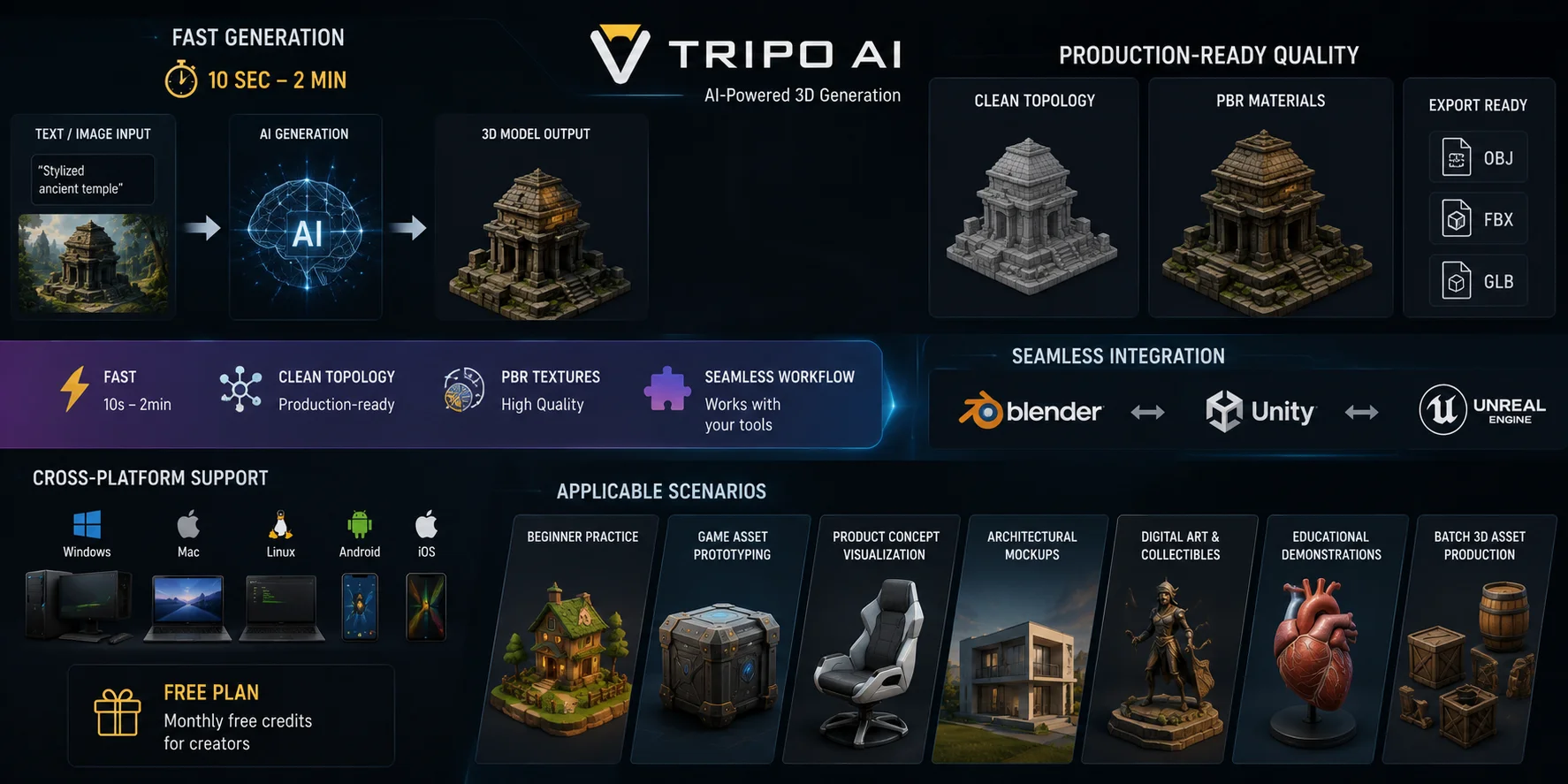
The text-to-3D pipeline accepts natural language descriptive prompts as input—users write plain text detailing object shape, material, style, scale, and texture, and the AI model reconstructs a full colored 3D mesh automatically without any manual geometry editing. The practical step-by-step operation process is straightforward: 1) Log into Tripo AI Studio and navigate to the Text to 3D workspace; 2) Input detailed descriptive prompts (including object type, stylistic direction, material, lighting, and edge smoothness); 3) Select target mesh quality preset (low-poly for games, high-detail for rendering/3D printing); 4) Initiate AI generation, with full textured mesh ready for download in 1–5 minutes; 5) Export the finished asset in GLB, FBX, or OBJ format for direct import into Blender, Unity, Unreal, or 3D print slicers. Tripo AI's official documentation confirms text prompts support stylistic keywords ranging from low-poly cartoon, photorealistic industrial products, fantasy creatures, to architectural decor, covering nearly all common asset categories for hobbyists and student creators.
Image-to-3D modeling uses a single 2D reference image (photograph, concept painting, sketch, product render) as input, with AI analyzing perspective, depth, color, and contour data to reverse-engineer a corresponding volumetric 3D model. This workflow solves a major pain point for beginner creators who struggle to translate flat reference art into consistent 3D geometry manually. Step-by-step operation guide: 1) Upload a clear front-facing reference image to Tripo AI's Image to 3D module; 2) Toggle auxiliary settings such as background removal, mesh thickness, texture resolution; 3) Start AI depth reconstruction; 4) Preview the generated mesh, download and retouch minor geometry flaws in lightweight post-processing tools if needed.
Core Advantages of Tripo AI (Official Verified Features)
As a leading tool in the field of AI 3D generation, Tripo AI has obvious advantages in generation speed, model quality, and beginner friendliness. According to official platform data and functional specifications, Tripo AI can complete model generation in 10 seconds to 2 minutes depending on complexity. The generated models have clean, production-ready topology, and complete PBR material textures, which can be directly put into Blender, Unity, Unreal and other professional software for secondary refinement, integrates directly with Blender, Unity, and Unreal with traditional modeling workflows.
Tripo AI supports full-platform use on Windows, Mac, Linux, Android, iOS and other devices, with a free basic plan that provides monthly free generation credits, meeting the daily creation needs of beginners.
Applicable Scenarios & Beginner Value
AI modeling is not just an auxiliary tool—it is the fastest entry point for absolute beginners. Traditional 3D modeling takes months of practice before you can produce usable results, while Tripo AI lets beginners generate professional-quality models in minutes and build confidence by iterating on real assets. For experienced artists, it significantly shortens concept prototyping and batch production cycles.
Core use cases: Beginner practice, rapid game asset prototyping, product concept visualization, architectural mockups, digital art, educational demos, and batch 3D asset production.
Comparison Table
This table integrates all seven traditional modeling types and AI intelligent modeling, focusing on core indicators that beginners care about: applicable scenarios, learning difficulty, production efficiency, precision, mainstream tools, and output characteristics.
| Modeling Type | Use Case | Learning Difficulty | Production Efficiency | Mainstream Tools |
|---|---|---|---|---|
| Polygonal/Box Modeling | Game assets, animation models, daily scene props, real-time rendering content | Low-Medium | Medium | Blender, Maya, 3ds Max, C4D |
| NURBS/Surface Modeling | Product appearance design, automobile curved surface, precision curved rigid body | Medium | Medium-Low | Rhino, Alias, SolidWorks Surface |
| Digital Sculpting | Organic characters, creatures, portrait details, natural texture models | Medium-High | Low (detailed polishing takes time) | ZBrush, Blender Sculpt, Mudbox |
| CAD Industrial Modeling | Mechanical parts, industrial equipment, mold design, engineering processing | High | Low (strict parameter verification) | SolidWorks, AutoCAD, UG, Creo |
| Parametric Modeling | Architectural parametric structure, variant design, modular combination | High | High (iterative modification efficient) | Grasshopper, Dynamo, Fusion 360 |
| Procedural Modeling | Large scenes, batch assets, natural environment, urban simulation | Ultra-High | Ultra-High (batch automatic generation) | Houdini, Blender Geometry Nodes |
| AI-Powered Modeling | Beginner entry, rapid prototyping, concept verification, batch lightweight assets | Ultra-Low (zero professional threshold) | Ultra-High (minute-level generation) | Tripo AI, AI 3D generation platform |
How to Choose the Right Technique
Most beginner tutorials only introduce modeling types in isolation, without providing targeted selection logic, leading many learners to learn difficult professional software blindly and waste time. The table below matches the most suitable modeling technology according to your creation goals, industry direction, and technical foundation.
| Your Creation Goal / Industry | First Choice Modeling Technique | Secondary Alternative | Selection Reason & Learning Suggestion |
|---|---|---|---|
| Zero-based entry, quick to produce works, beginner practice | AI-Powered Modeling (Tripo AI) | Polygonal Box Modeling | No software operation and topological knowledge required, generate professional models in minutes, quickly build creative confidence. |
| Game asset production (props, scenes, characters) | Polygonal Box Modeling | AI Modeling (prototyping) + Sculpting (details) | Polygon modeling has flexible topology, supports UV animation and real-time rendering, and is the industry standard for game assets. AI can be used for rapid prototype generation, and digital sculpting assists in polishing high-precision details. |
| Film and television animation, organic character/creature production | Digital Sculpting | Polygon Modeling (topology optimization) | Organic models such as characters and creatures have complex irregular details, which can only be perfectly presented by sculpting. After sculpting, polygon topological optimization is needed to adapt to rendering and animation. |
| Industrial design, mechanical parts, mold manufacturing, engineering | CAD Industrial Modeling | NURBS Surface Modeling (appearance optimization) | Industrial scenarios require ultra-high precision and manufacturability, which can only be met by CAD modeling with engineering constraints. NURBS can assist in optimizing product surface smoothness. |
| Architectural design, curved facade, parametric art design | Parametric Modeling + NURBS | Polygon Modeling (auxiliary construction) | Architectural curved surfaces and modular structures require parametric iterative design and NURBS smooth surface support, which can efficiently complete complex architectural form creation. |
| Large scenes, batch assets, environmental simulation production | Procedural Modeling | AI Modeling (batch lightweight assets) | Large-scale repetitive scene assets are not suitable for manual production. Procedural rule generation realizes batch automatic output, and AI assists in rapid production of lightweight scene assets. |
| Product appearance visualization, curved commodity design | NURBS Surface Modeling | AI Modeling (concept prototype) | Commodity appearance pursues smooth and perfect curved surface effect. NURBS mathematical curved surface has no serrations and high precision, which is suitable for product rendering and display. AI is used for early concept rapid prototyping. |
Frequently Asked Questions
What are the three types of 3D modeling?
The three broad categories are polygonal modeling, surface or curve-based modeling, and solid or CAD modeling. Polygonal modeling is widely used for games and animation, surface modeling is best for smooth products and vehicles, and CAD modeling supports precise engineering and manufacturing work.
How many types of 3D models are there?
There is no fixed number because 3D models can be classified by creation method, industry use, or data structure. From a data perspective, common representations include wireframe, surface, solid, and volumetric formats such as voxels or point clouds.
What are the four types of modeling?
A common four-part classification includes polygonal modeling, NURBS or surface modeling, digital sculpting, and CAD modeling. Modern workflows also use parametric modeling, procedural generation, and AI-powered modeling for specialized tasks.
What is the easiest type of 3D modeling for beginners?
Box modeling is generally the easiest starting point because it works with simple primitive shapes and teaches core skills like extrusion, scaling, and loop cuts. For the fastest route to a finished model without any geometry work, AI-powered tools like Tripo AI let beginners generate results from a text prompt or reference image.
Which type of 3D modeling is used for games?
Polygonal modeling is the industry standard for game assets because real-time engines render polygon meshes efficiently. Box modeling is a common starting technique, and digital sculpting is often used to create high-detail versions that are baked down into lower-polygon game-ready meshes.
What is the difference between polygonal and NURBS modeling?
Polygonal modeling builds objects from vertices, edges, and faces, making it flexible and compatible with games, animation, and real-time engines. NURBS uses mathematical curves to define smooth, continuous surfaces, which suits product design, automotive work, and industrial applications where surface precision matters.
Which type of 3D modeling is best for 3D printing?
CAD modeling is best for functional prints because it works with exact dimensions, tolerances, and engineering constraints. For decorative or artistic prints, digital sculpting and AI-powered generation also produce printable results when exported as watertight STL or 3MF files.
What is the most commonly used 3D modeling technique?
Polygonal modeling is the most widely used technique across industries, covering game development, animation, visual effects, and product visualization. Its flexibility, broad software support, and compatibility with most rendering and real-time engines make it the standard starting point for most 3D artists.
Conclusion
There is no single best type of 3D modeling. The right method depends on whether you need creative flexibility, precise dimensions, smooth surfaces, scalable variations, or fast concept generation.
For beginners who want the fastest way to create a first 3D model, Tripo AI Studio can turn a text prompt or image into a 3D starting point in minutes.