Der Stand der KI-3D-Generierung: Trends, Workflows & Anwendungsfälle (2026)
TL;DR
- Die KI-3D-Generierung hat den Sprung von Forschungsdemos zu produktionsreifen Tools geschafft: Text-, Image- und Multi-View-to-3D liefern heute in Sekunden bis Minuten nutzbare Meshes.
- Zwei technische Strömungen prägen 2026: diffusionsbasierte 3D-Generierung und Radiance-Field-Methoden (NeRF und 3D Gaussian Splatting) für die Erfassung.
- Das Segment der KI-generierten 3D-Inhalte ist klein, aber schnell wachsend – je nach Definition rund 1–2,5 Mrd. USD im Jahr 2025, mit einem Wachstum von etwa 15–31 % CAGR.
- Die größten Erfolge in der Praxis: Game-Assets, E-Commerce/AR, Film/VFX-Previz und 3D-Druck.
- Weiterhin schwierig: saubere, game-ready Topology, zuverlässiges Rigging und wasserdichte Präzision – deshalb ergänzt KI 3D-Artists, statt sie zu ersetzen.
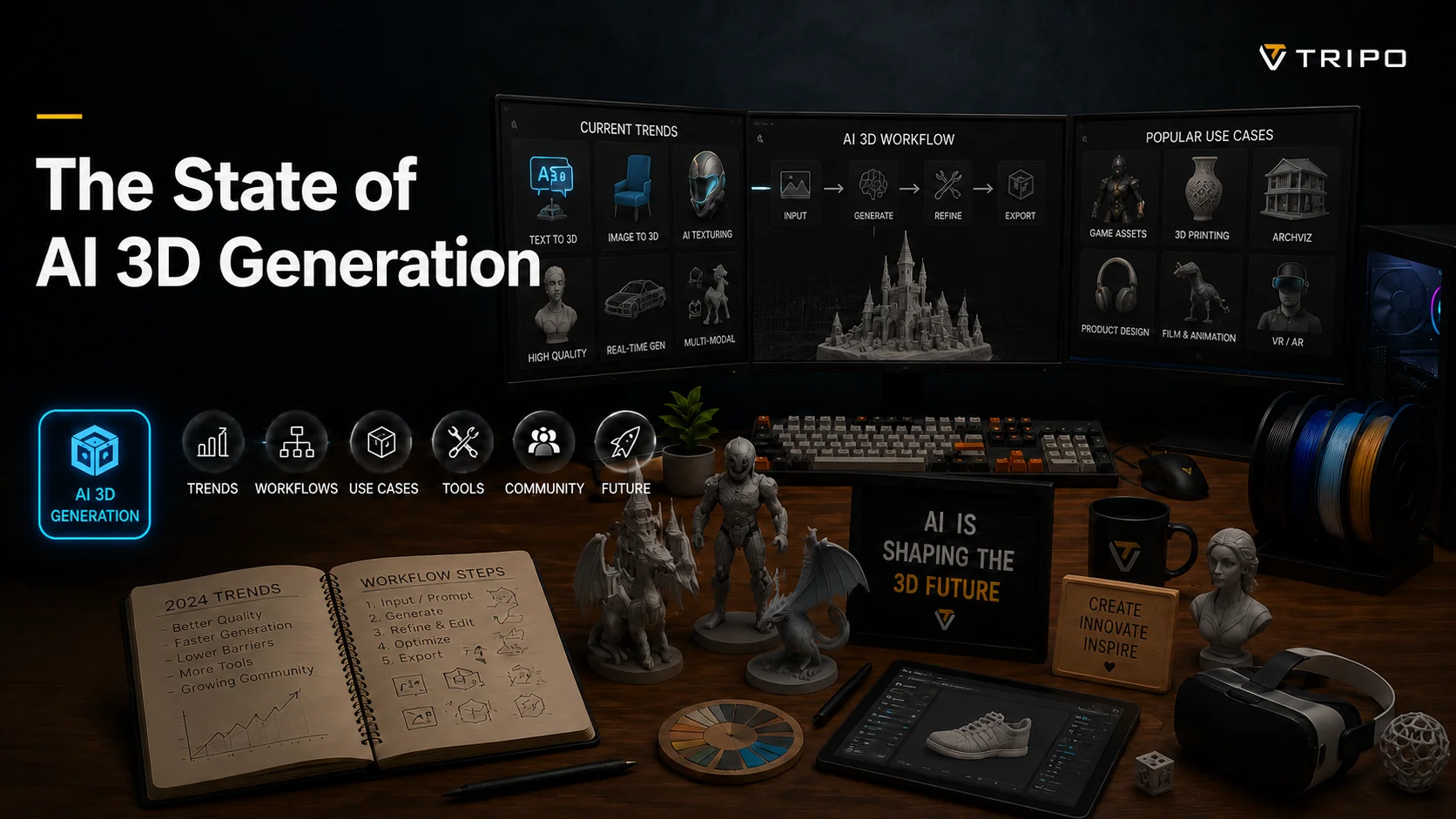
Der Stand der KI-3D-Generierung im Jahr 2026 lässt sich am besten mit „nutzbar, aber nicht fertig" beschreiben. In wenigen Jahren hat sich das Feld von unscharfen Forschungs-Blobs zu Tools entwickelt, die einen Prompt oder ein einzelnes Foto in ein texturiertes, manchmal rig-fertiges 3D-Modell in unter einer Minute verwandeln. Dieser Bericht behandelt die Trends, die Technologie, die realen Workflows, die Einsatzgebiete und die Bereiche, in denen sie noch an ihre Grenzen stößt.
Was „KI-3D-Generierung" wirklich bedeutet
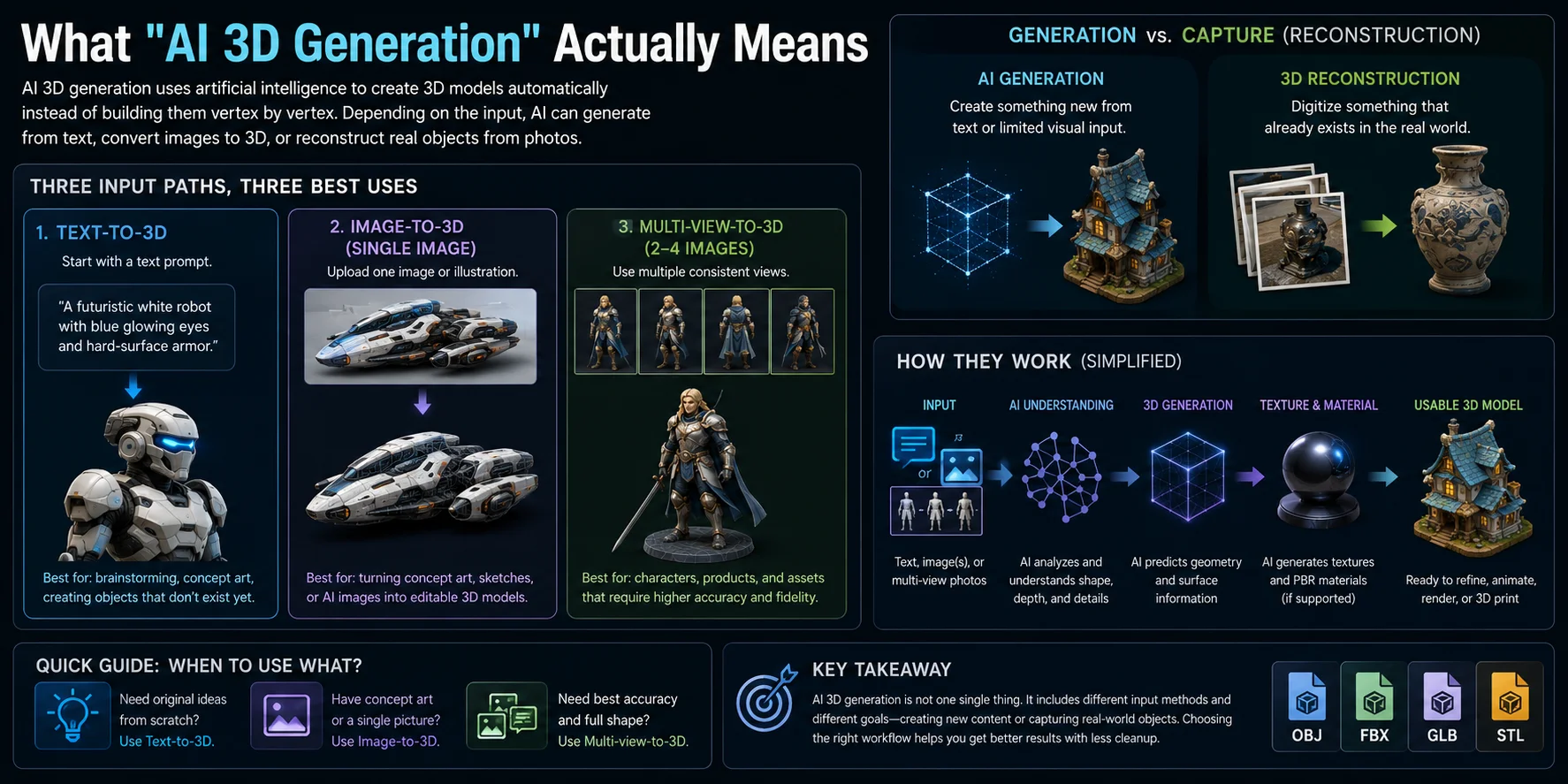
KI-3D-Generierung ist der Prozess, bei dem künstliche Intelligenz genutzt wird, um ein 3D-Modell automatisch zu erstellen, statt es Vertex für Vertex in klassischer Modellierungssoftware aufzubauen. Je nach Eingabe kann die KI ein Modell aus einer Textbeschreibung generieren, es aus einem oder mehreren Bildern rekonstruieren oder die Form eines realen Objekts erfassen. Obwohl diese Workflows oft ähnlich aussehende Ergebnisse liefern, lösen sie unterschiedliche Probleme und sollten nicht verwechselt werden.
Text-to-3D, Image-to-3D und Multi-View-to-3D
Moderne KI-3D-Generatoren unterstützen in der Regel drei Eingabemethoden, die jeweils für eine andere Aufgabe geeignet sind.
Text-to-3D
Du beginnst mit einem geschriebenen Prompt, etwa „ein futuristischer weißer Roboter mit blau leuchtenden Augen und Hard-Surface-Rüstung." Die KI interpretiert die Beschreibung und generiert ein brandneues 3D-Mesh. Dieser Ansatz eignet sich ideal für Brainstorming, Concept-Art und das Erstellen von Objekten, die es noch nicht gibt.
Image-to-3D
Statt Text lädst du ein einzelnes Bild, eine Illustration oder ein Foto hoch. Die KI schätzt Tiefe, verdeckte Flächen und Proportionen des Objekts, um ein 3D-Modell zu rekonstruieren. Dieser Workflow ist nützlich, wenn du bereits Concept-Art, Skizzen oder KI-generierte Bilder hast, die du in editierbare Geometrie umwandeln möchtest.
Multi-View-to-3D
Diese Methode nutzt zwei bis vier konsistente Referenzbilder, etwa Vorder-, Seiten- und Rückansicht. Da die KI mehr visuelle Informationen erhält, kann sie die Form des Objekts genauer rekonstruieren und erzeugt sauberere Geometrie mit weniger fehlenden Details. Sie ist oft die beste Wahl für Charaktere, Produkte und Assets, die eine höhere Detailtreue erfordern.
Generierung vs. Erfassung (Rekonstruktion)
Eine weitere häufige Verwechslungsquelle ist der Unterschied zwischen Generierung und Rekonstruktion.
KI-Generierung erstellt ein neues 3D-Modell aus Text oder begrenzter visueller Vorgabe. Die KI sagt vorher, wie das Objekt aussehen sollte, selbst wenn es zuvor nie existiert hat.
3D-Rekonstruktion beginnt mit Fotografien eines realen Objekts und baut dessen Geometrie digital nach. Verfahren wie Photogrammetrie, Neural Radiance Fields (NeRF) und Gaussian Splatting analysieren mehrere Bilder, um die tatsächliche Form und Erscheinung des Objekts wiederherzustellen, statt neue Details zu erfinden.
Eine einfache Merkregel für den Unterschied:
- Generierung = etwas Neues aus Text oder begrenzter visueller Eingabe erstellen.
- Rekonstruktion = etwas digitalisieren, das in der realen Welt bereits existiert.
Wer diese Unterscheidung versteht, kann den passenden Workflow deutlich leichter wählen. Nutze Text-to-3D für originelle Ideen, Image-to-3D, wenn du bereits Concept-Art oder Referenzbilder hast, und Multi-View-Rekonstruktion, wenn Genauigkeit oberste Priorität hat.
Wie wir hierher kamen – eine kurze Geschichte
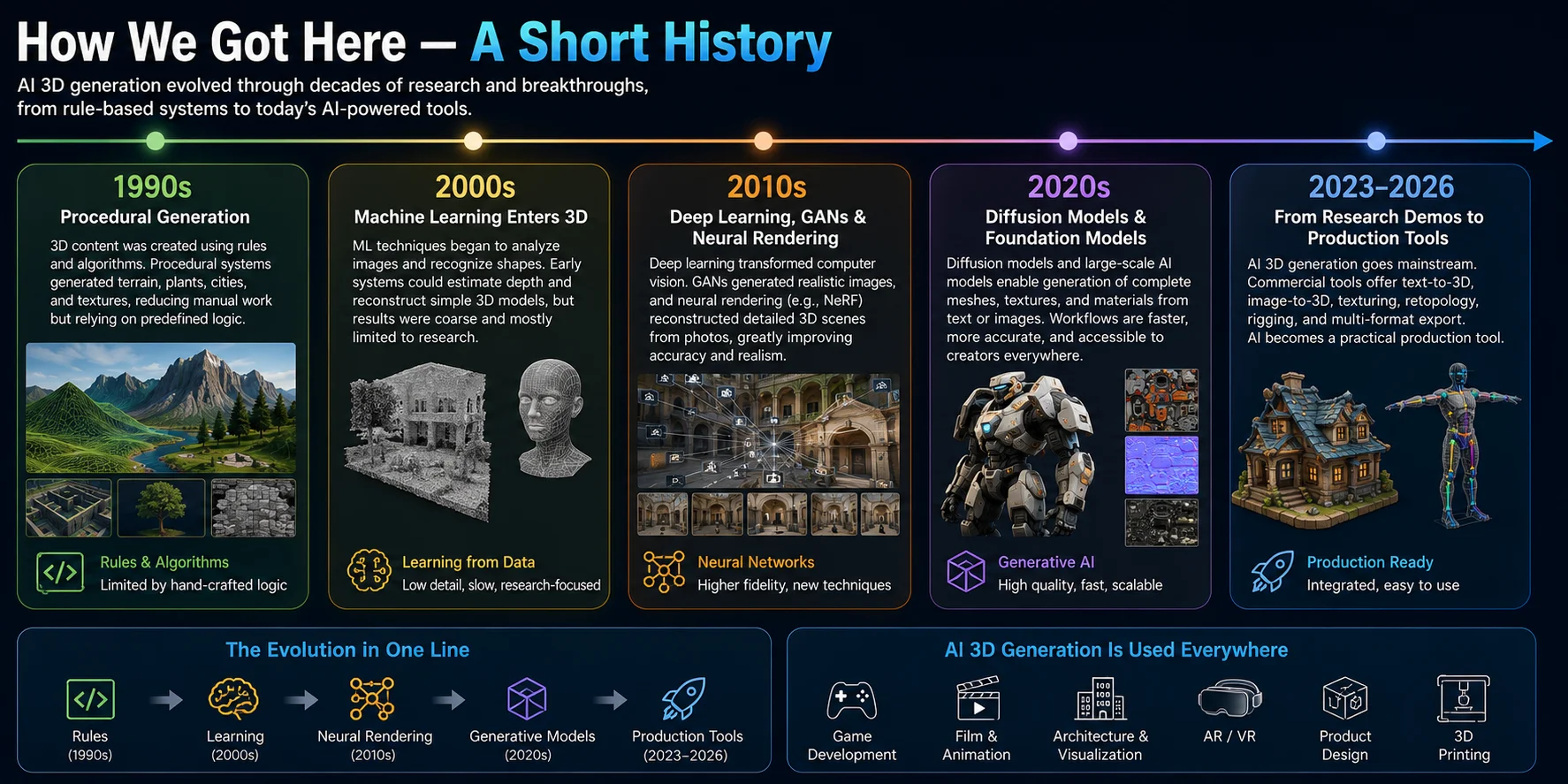
Die KI-3D-Generierung vereint prozedurale Content-Erstellung, Computer Vision, neuronales Rendering und generative Modellierung. Die große Veränderung der 2020er-Jahre besteht darin, dass diese Fähigkeiten über kommerzielle Text-, Image- und Multi-View-to-3D-Tools zugänglich geworden sind.
Die 1990er – Prozedurale Generierung
1990er: Prozedurale Systeme erzeugten Gelände, Vegetation und andere wiederholbare Inhalte aus Regeln statt aus gelernten Daten.
Das machte große Spielwelten günstiger im Aufbau, doch die Artists steuerten weiterhin die Regeln und das Endergebnis.
Die 2000er – Machine Learning kommt ins 3D
2000er: Machine-Learning-Forschung verbesserte bildbasierte Erkennung, Tiefenschätzung und grobe Rekonstruktion.
Diese Systeme waren langsam und detailarm und blieben daher weitgehend Forschungswerkzeuge.
Die 2010er – Deep Learning, GANs und neuronales Rendering
2010er: Deep Learning, GANs und neuronales Rendering verbesserten Bildsynthese und Szenenrekonstruktion.
NeRF stellte Szenen als kontinuierliche neuronale Funktionen dar und trug dazu bei, die heutigen bildbasierten Rekonstruktions-Workflows zu etablieren.
Die 2020er – Diffusionsmodelle und Foundation-Modelle
2020er: Diffusionsmodelle, Foundation-Modelle und schnellere Rekonstruktions-Pipelines machten Text-, Image- und Multi-View-to-3D für mehr Kreative praktikabel.
Sie senkten die Kosten für die Erstellung eines ersten 3D-Assets, doch die Ergebnisse variieren weiterhin je nach Motiv und nachgelagerter Verwendung.
Von Forschungsdemos zu Produktionswerkzeugen
KI wird heute in Games, Film, Visualisierung, AR/VR und 3D-Druck als schnellerer Ausgangspunkt eingesetzt – nicht als Ersatz für die finale Handwerkskunst.
Ab 2023 kombinierten kommerzielle Tools zunehmend Generierung, Texturierung, Retopology, Rigging und Export in einem einzigen Workflow.
Die Technologie hinter KI-3D im Jahr 2026 (Trends)
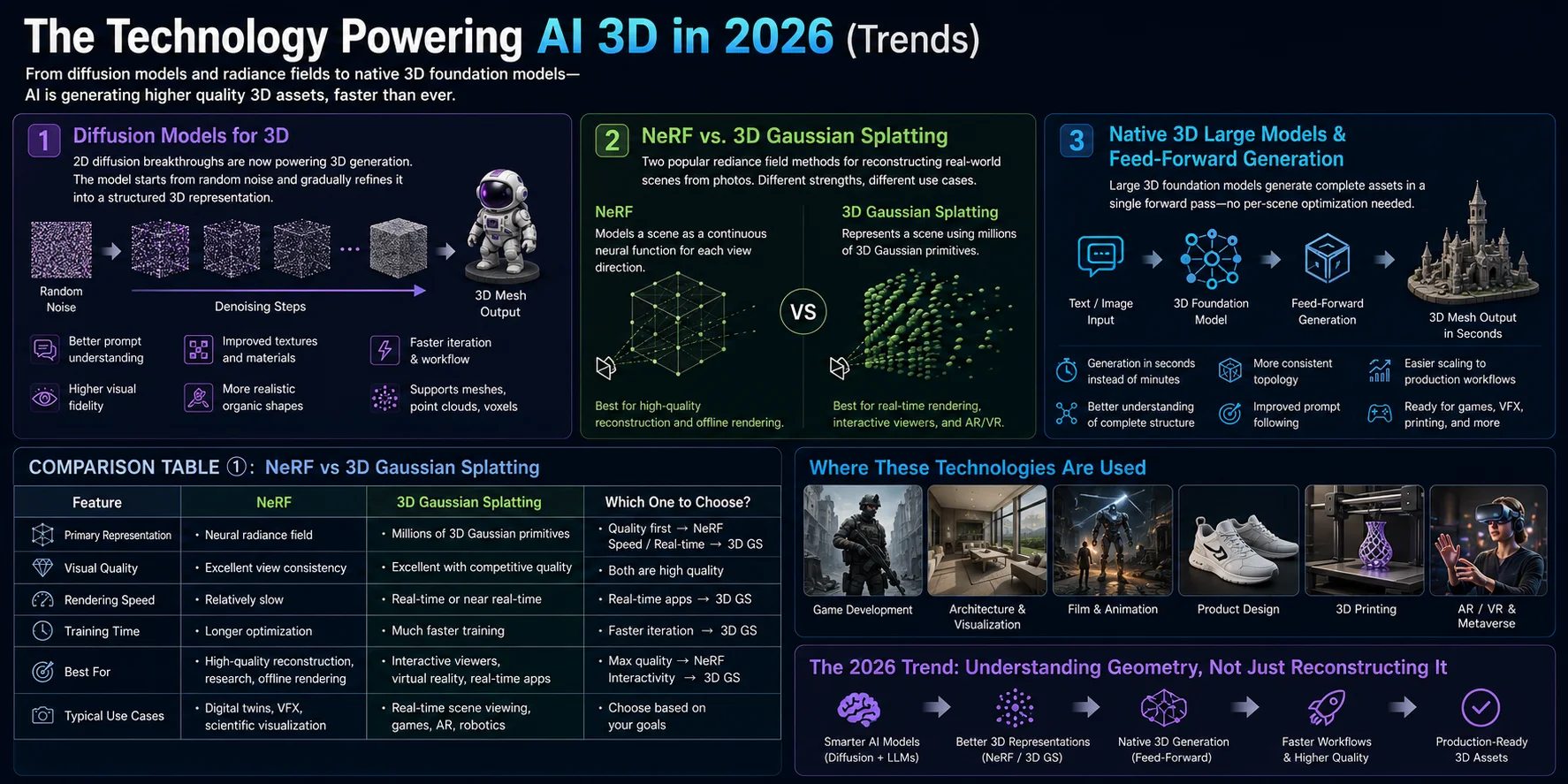
Die KI-3D-Generierung entwickelt sich über die einfache Mesh-Rekonstruktion hinaus. 2026 zählen zu den wichtigen Richtungen 3D-Diffusionsmodelle, Radiance-Field-Rendering und native 3D-Foundation-Modelle, die schnell nutzbare Ausgangs-Meshes erzeugen können. Diese Ansätze lösen unterschiedliche Probleme und erfordern für die Produktion unterschiedlich viel Nachbearbeitung.
Diffusionsmodelle für 3D
Diffusionsmodelle wurden zunächst für die Generierung hochwertiger 2D-Bilder populär, doch dieselbe Idee wurde inzwischen für 3D-Inhalte adaptiert.
Statt jedes Polygon manuell vorherzusagen, startet ein Diffusionsmodell von zufälligem Rauschen und verfeinert es schrittweise zu einer strukturierten 3D-Repräsentation. Je nach System kann die Ausgabe sein:
- Ein Polygon-Mesh
- Eine Punktwolke
- Eine Voxel-Repräsentation
- Eine neuronale Zwischenrepräsentation, die später in ein Mesh umgewandelt wird
Im Vergleich zu früheren Methoden erzeugen diffusionsbasierte Systeme detailliertere Geometrie, glattere Oberflächen und eine stärkere Konsistenz zwischen Form und Textur.
Zu ihren größten Vorteilen zählen:
- Besseres Prompt-Verständnis
- Höhere visuelle Detailtreue
- Verbesserte Texturgenerierung
- Realistischere organische Formen
- Schnellere Iteration in kreativen Workflows
Diffusionsbasierte Systeme können aus Text oder Bildern brauchbare Geometrie und Texturen erzeugen, doch die Ausgabequalität und der nötige Nachbearbeitungsaufwand variieren weiterhin je nach Modell, Motiv und nachgelagerter Verwendung.
NeRF vs. 3D Gaussian Splatting
Neural Radiance Fields (NeRF) und 3D Gaussian Splatting sind zwei populäre Methoden, um reale Szenen aus Fotografien darzustellen. Obwohl beide 3D-Informationen rekonstruieren, priorisieren sie unterschiedliche Stärken.
| Merkmal | NeRF | 3D Gaussian Splatting |
|---|---|---|
| Primäre Repräsentation | Neuronales Radiance Field | Millionen von 3D-Gauß-Primitiven |
| Visuelle Qualität | Exzellente Konsistenz über Blickwinkel | Exzellent bei konkurrenzfähiger Qualität |
| Rendering-Geschwindigkeit | Relativ langsam | Echtzeit oder nahezu Echtzeit |
| Trainingszeit | Längere Optimierung | Deutlich schnelleres Training |
| Am besten für | Hochwertige Rekonstruktion, Forschung, Offline-Rendering | Interaktive Viewer, Virtual Reality, Echtzeit-Anwendungen |
| Typische Anwendungsfälle | Digital Twins, Visual Effects, wissenschaftliche Visualisierung | Echtzeit-Szenenbetrachtung, Games, Augmented Reality |
NeRF modelliert eine Szene als kontinuierliche neuronale Funktion, die Farbe und Dichte für jede Blickrichtung vorhersagt. Das erzeugt hochrealistische neue Ansichten, erfordert aber üblicherweise längere Optimierung und langsameres Rendering.
3D Gaussian Splatting stellt eine Szene mit Tausenden oder Millionen kleiner Gauß-Primitive dar. Da diese Primitive direkt von moderner Grafikhardware gerendert werden können, erreicht die Technik deutlich höhere Rendering-Geschwindigkeiten bei beeindruckender visueller Qualität.
In der Praxis bleibt NeRF attraktiv, wenn maximale Rekonstruktionsqualität das Ziel ist, während 3D Gaussian Splatting zunehmend für interaktive Anwendungen bevorzugt wird, bei denen Geschwindigkeit entscheidend ist.
Native 3D-Großmodelle & Feed-Forward-Generierung
Eine der größten Veränderungen 2026 ist das Aufkommen nativer 3D-Großmodelle.
Frühere KI-Pipelines rekonstruierten jedes Objekt oft einzeln über langwierige Optimierung. Moderne Systeme setzen zunehmend auf Feed-Forward-Generierung, bei der ein trainiertes Modell ein komplettes 3D-Asset in einem einzigen Forward-Pass vorhersagt.
Dieser Wandel bringt mehrere Vorteile:
- Generierung in Sekunden statt Minuten
- Besseres Verständnis der vollständigen Objektstruktur
- Konsistentere Topology
- Verbessertes Prompt-Following
- Einfachere Skalierung auf große Produktions-Workflows
Viele der neuesten KI-3D-Tools kombinieren Feed-Forward-Generierung mit diffusionsbasierter Verfeinerung und erlauben es, fast sofort nutzbare Meshes zu erstellen, bevor optional Nachbearbeitung oder Optimierung erfolgt.
Schlüsseltrend für 2026
Die KI-3D-Branche bewegt sich vom Rekonstruieren von Geometrie hin zum Verstehen von Geometrie. Diffusionsmodelle verbessern weiterhin die Mesh-Qualität, 3D Gaussian Splatting macht Echtzeit-Szenenrekonstruktion praktikabel, und native 3D-Foundation-Modelle verkürzen die Generierungszeit dramatisch. Zusammen sorgen diese Fortschritte dafür, dass KI-generierte 3D-Assets schneller zu erstellen, leichter zu editieren und zunehmend für Produktions-Workflows in Games, Visualisierung, Animation und 3D-Druck geeignet sind.
Wie groß ist der Markt? (In Zahlen)
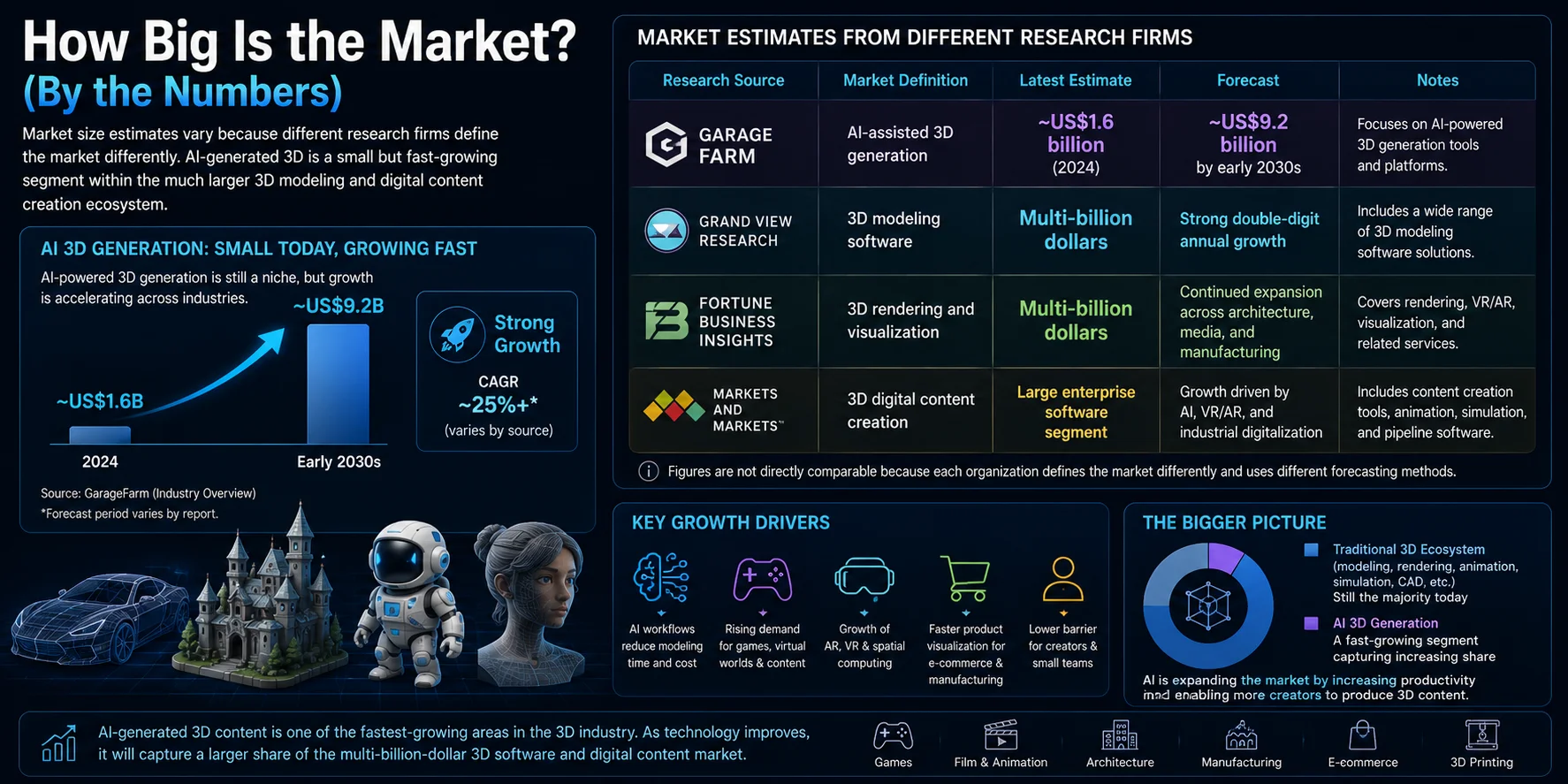
KI-generiertes 3D wächst schnell, doch es gibt keine einzelne maßgebliche Marktgröße. Marktforschungsfirmen messen unterschiedliche Kategorien: Manche erfassen KI-generierte 3D-Modelle, andere schließen breitere Märkte für 3D-Assets, Mapping oder Modellierungssoftware ein. Der nützliche Vergleich ist daher der jeweilige Umfang, das Jahr und die Prognose jeder Schätzung – nicht eine einzelne Schlagzeilenzahl.
Marktschätzungen verschiedener Marktforschungsfirmen
| Quelle und Umfang | Aktuelle Schätzung | Prognose |
|---|---|---|
| 360iResearch: KI-generierte 3D-Modelle | 1,00 Mrd. USD in 2025; 1,16 Mrd. USD in 2026 | 2,78 Mrd. USD bis 2032; 15,62 % CAGR |
| The Business Research Company: generative KI für 3D-Assets | 1,89 Mrd. USD in 2024; 2,47 Mrd. USD in 2025 | 7,21 Mrd. USD bis 2029; etwa 31 % CAGR |
| Mordor Intelligence: 3D-Mapping und -Modellierung | 8,57 Mrd. USD in 2025; 9,74 Mrd. USD in 2026 | 18,44 Mrd. USD bis 2031; 13,62 % CAGR |
Die Zahlen sind nicht direkt vergleichbar, da jede Organisation den Markt anders definiert und unterschiedliche Prognosemethoden verwendet.
Wie KI-3D-Generierung tatsächlich funktioniert (Der Workflow)
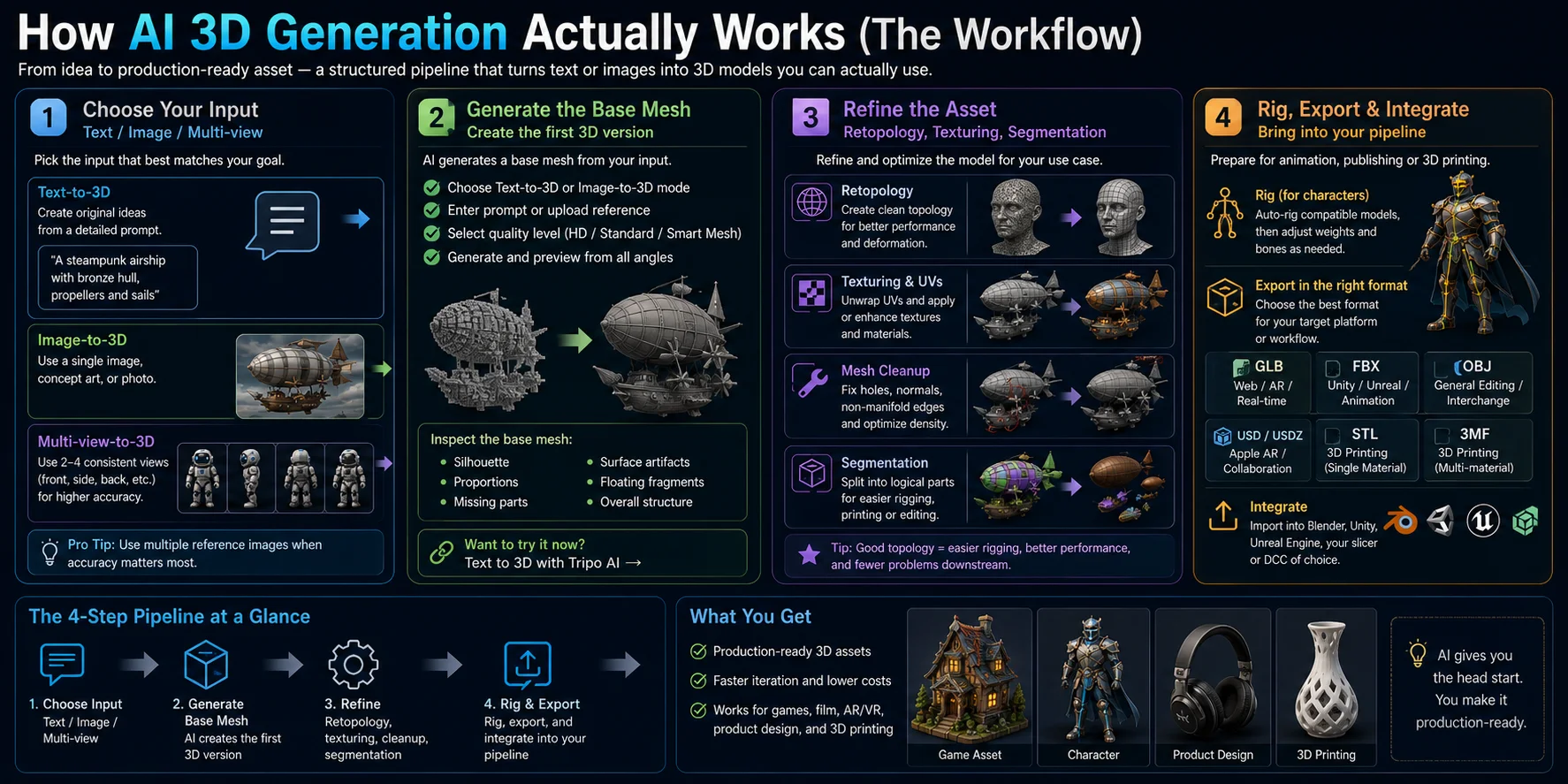
Moderne KI-3D-Generierung ist mehr als ein Klick auf Generieren. In der Produktion folgt sie einem strukturierten Workflow, der einen Text-Prompt oder ein Referenzbild in ein nutzbares Asset für Games, Animation, AR/VR oder 3D-Druck verwandelt. Verschiedene Tools haben zwar leicht unterschiedliche Oberflächen, doch die Gesamt-Pipeline ist bemerkenswert ähnlich: Eingabe wählen, Basis-Mesh generieren, Asset verfeinern und in die Produktions-Pipeline exportieren.
Schritt 1 – Eingabe wählen (Text, Bild oder Multi-View)
Der erste Schritt ist die Entscheidung, wie die KI deine Idee verstehen soll.
- Text-to-3D eignet sich ideal, um originelle Konzepte aus einem geschriebenen Prompt zu erstellen.
- Image-to-3D funktioniert am besten, wenn du bereits Concept-Art, ein Foto oder ein KI-generiertes Bild hast.
- Multi-View-to-3D nutzt zwei bis vier konsistente Bilder, etwa Vorder-, Seiten- und Rückansicht, um genauere Geometrie mit weniger fehlenden Details zu erzeugen.
Wähle die Eingabe nach deinem Ziel und nicht nach Bequemlichkeit. Wenn Genauigkeit wichtig ist, verwende nach Möglichkeit mehrere Referenzbilder. Wenn du Ideen schnell erkundest, reicht ein detaillierter Text-Prompt oft aus, um einen starken Ausgangspunkt zu generieren.
Schritt 2 – Basis-Mesh generieren
Sobald die Eingabe bereitsteht, generiert die KI ein Basis-Mesh – die erste editierbare Version des 3D-Modells.
Ein empfohlener Workflow ist:
- Wähle den Modus Text-to-3D oder Image-to-3D.
- Gib einen detaillierten Prompt ein oder lade dein Referenzbild hoch.
- Wähle die Qualitätsstufe, die zu deinem Projekt passt.
- Generiere das Mesh und prüfe es aus mehreren Blickwinkeln.
Für die Spieleentwicklung empfehlen viele Workflows die Option Smart Mesh oder ein optimiertes Mesh, da sie sauberere Topology mit weniger Polygonen erzeugt. Für 3D-Druck oder hochdetailliertes Rendering wähle ein höher aufgelöstes oder HD-Modell, um feine Oberflächendetails zu bewahren.
Prüfe nach der Generierung:
- Gesamtsilhouette
- Objektproportionen
- Fehlende Geometrie
- Oberflächenartefakte
- Freischwebende Mesh-Fragmente
Eine kurze Inspektion in dieser Phase spart Zeit bei der späteren Bearbeitung.
Schritt 3 – Verfeinern: Retopology, Texturierung und Segmentierung
Das generierte Mesh ist selten das finale Asset. Die Verfeinerung bereitet es für die Produktion vor.
Typische Verbesserungen umfassen:
- Retopologisierung des Meshes für einen saubereren Polygon-Flow
- Reparatur von Löchern und non-manifold Geometrie
- Neuberechnung der Normals
- Optimierung der Polygondichte
- Erstellen oder Verbessern von UV-Maps
- Bearbeiten oder Ersetzen von Texturen
- Aufteilen des Modells in mehrere Teile für Animation, Fertigung oder einfachere Bearbeitung
Für Game-Assets verbessert saubere Topology Rigging und Performance. Für den 3D-Druck helfen die Reparatur des Meshes und die Prüfung der Wandstärke, Druckfehler zu vermeiden.
Schritt 4 – Riggen, exportieren und in die Pipeline bringen
Die letzte Phase bereitet das Modell für seinen vorgesehenen Einsatz vor.
Ist das Asset ein Charakter, kannst du ein automatisches Rig auf kompatible humanoide oder standardmäßige vierbeinige Modelle anwenden, bevor du bei Bedarf manuelle Weight-Painting-Anpassungen vornimmst.
Exportiere anschließend das Modell im passenden Format:
- GLB für Web, Augmented Reality und leichtgewichtige Echtzeit-Anwendungen
- FBX für Unity, Unreal Engine und Animations-Pipelines
- OBJ für allgemeine Bearbeitung und Asset-Austausch
- USD für Visual-Effects-, Animations- und kollaborative Workflows
- STL für standardmäßigen 3D-Druck mit einem Material
- 3MF für Farb- und Multimaterial-Druck
Importiere das Modell schließlich in Blender, Unity, Unreal Engine, Godot oder deinen bevorzugten Slicer, führe eine finale Qualitätsprüfung durch und nimm vor der Produktion alle projektspezifischen Anpassungen vor.
Dieser vierstufige Workflow verwandelt die KI-Generierung von einer einfachen Demo in eine praktische Produktions-Pipeline. Indem du mit der richtigen Eingabe startest, ein sauberes Basis-Mesh generierst, Topology und Texturen verfeinerst und im richtigen Format exportierst, kannst du KI-generierte 3D-Assets erstellen, die sich reibungslos in professionelle kreative Workflows integrieren.
Wo es eingesetzt wird – Branchenanwendungsfälle
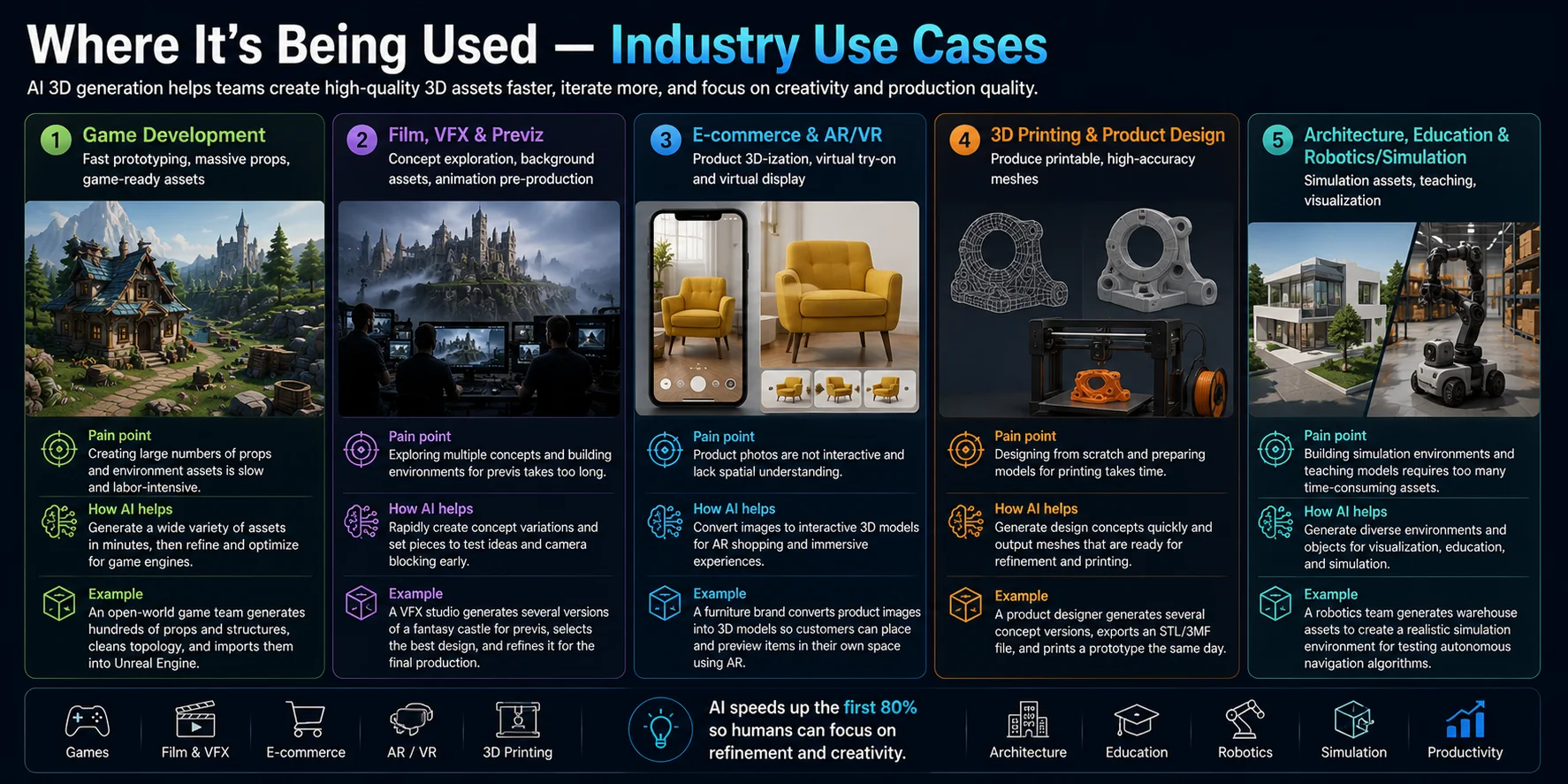
KI-generierte 3D-Modelle sind nicht länger auf Forschungslabore oder experimentelle Projekte beschränkt. Sie sind heute Teil alltäglicher Produktions-Workflows in Unterhaltung, Handel, Fertigung, Bildung und Ingenieurwesen. Statt klassische 3D-Artists zu ersetzen, hilft KI Teams, Assets schneller zu erstellen, repetitive Arbeit zu reduzieren und Ideen in Minuten statt Tagen zu iterieren.
Spieleentwicklung
Game-Studios nutzen KI-3D-Generierung, um schnell Prototypen, Umgebungs-Assets und große Bibliotheken von Props zu erstellen. Statt jede Kiste, jeden Baum, jeden Felsen oder jedes Möbelstück von Hand zu modellieren, können Entwickler einen starken Ausgangspunkt generieren und ihn für die Produktion verfeinern.
Warum KI nützlich ist: Sie reduziert die Zeit für den Aufbau großer Asset-Bibliotheken drastisch und erlaubt es Artists, sich auf Gameplay und visuelle Qualität zu konzentrieren.
Beispiel: Ein Open-World-Game-Team generiert Hunderte von Hintergrund-Props mit KI, bereinigt die Topology und exportiert game-ready Assets für Unity oder Unreal Engine.
Film, VFX & Previz
Film- und Visual-Effects-Teams nutzen KI oft in der Vorproduktion, um Konzepte zu erkunden, bevor sie sich auf detaillierte Modellierung festlegen. KI kann schnell Charaktere, Fahrzeuge, Umgebungen und Set-Pieces generieren, die Regisseuren helfen, Szenen und Kamerawinkel zu visualisieren.
Warum KI nützlich ist: Schnelle Iteration erlaubt kreativen Teams, mehrere Ideen zu testen, ohne Stunden in manuelle Modellierung zu investieren.
Beispiel: Ein VFX-Studio erstellt mehrere Versionen einer Fantasy-Burg für die Previz, wählt das stärkste Design aus und verfeinert es dann zu einem Asset in Produktionsqualität.
E-Commerce & AR/VR
Händler verlassen sich zunehmend auf KI, um Produktfotos in interaktive 3D-Modelle für Online-Shopping und immersive Erlebnisse zu verwandeln. Diese Modelle können in Produktbetrachtern, Augmented-Reality-Anwendungen oder virtuellen Showrooms angezeigt werden.
Warum KI nützlich ist: Sie reduziert Kosten und Zeit für den Aufbau digitaler Produktkataloge und steigert zugleich das Kundenengagement.
Beispiel: Ein Möbelunternehmen wandelt Produktbilder in 3D-Modelle um, damit Kunden Sofas und Tische vor dem Kauf per Augmented Reality in ihren eigenen vier Wänden ansehen können.
3D-Druck & Produktdesign
KI-generierte Meshes werden zu wertvollen Ausgangspunkten für Designer, Maker und Ingenieure. Dekorative Objekte, Figuren, Cosplay-Props und Konzept-Prototypen lassen sich oft nach einer kurzen Mesh-Inspektion und Reparatur drucken.
Warum KI nützlich ist: Designer kommen viel schneller von einer Idee zu einem druckbaren Modell, als wenn sie mit einem leeren CAD-Projekt beginnen.
Beispiel: Ein Produktdesigner generiert mehrere Konzeptversionen eines Konsumprodukts, wählt das beste Design, verfeinert das Mesh, exportiert eine STL- oder 3MF-Datei und fertigt noch am selben Tag einen physischen Prototyp auf einem 3D-Drucker.
Architektur, Bildung & Robotik/Simulation
Architekten, Lehrende und Robotik-Forschende übernehmen ebenfalls KI-generierte 3D-Assets für Visualisierung und Simulation.
Architekten können Gebäude, Landschaften und Interieur-Konzepte für Präsentationen generieren. Lehrkräfte nutzen KI-erstellte Modelle, um Ingenieurwesen, Biologie, Archäologie und Geschichte durch interaktive Visualisierung zu erklären. Robotik- und Simulationsteams bauen virtuelle Umgebungen, um autonome Systeme zu trainieren, ohne jedes Objekt manuell zu modellieren.
Warum KI nützlich ist: KI beschleunigt die Content-Erstellung für Visualisierung, Digital Twins, Simulationen und Bildungserlebnisse, bei denen große Mengen an Assets benötigt werden.
Beispiel: Ein Robotik-Team generiert Lagerregale, Paletten und Ausrüstung, um eine realistische Simulationsumgebung zum Testen autonomer Navigationsalgorithmen aufzubauen, bevor Roboter in der realen Welt eingesetzt werden.
Ist KI-generiertes 3D produktionsreif? (Die schwierigen Teile)
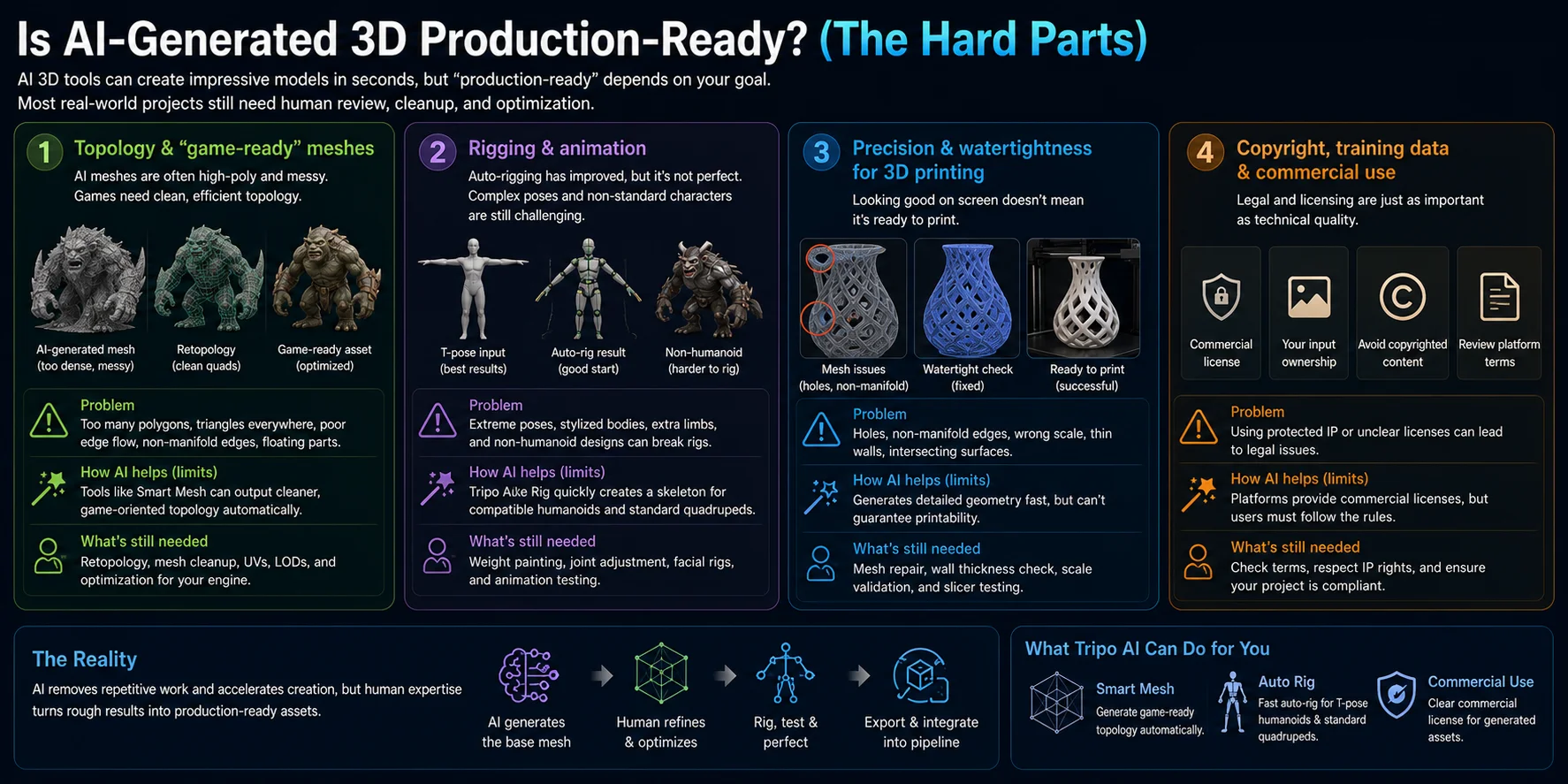
KI-generierte 3D-Modelle haben sich in den letzten Jahren dramatisch verbessert, doch „produktionsreif" bedeutet je nach Projekt Unterschiedliches. Ein Konzeptmodell für die Visualisierung hat ganz andere Anforderungen als ein Game-Charakter, ein Film-Asset oder ein funktionales 3D-gedrucktes Bauteil. KI kann heute zwar exzellente Ausgangspunkte liefern, doch die meisten professionellen Workflows umfassen weiterhin Review, Cleanup und Optimierung, bevor ein Asset ausgeliefert wird. Wer diese Grenzen versteht, kann besser entscheiden, wann KI ausreicht – und wann manuelle Arbeit noch nötig ist.
Topology & „game-ready" Meshes
Eine der größten Herausforderungen ist die Topology. KI erzeugt oft dichte, dreiecksbasierte Meshes, die visuell gut aussehen, aber schwer zu animieren oder für Echtzeit-Rendering zu optimieren sind.
Häufige Probleme sind:
- Übermäßige Polygondichte
- Schlechter Edge-Flow
- Unregelmäßige Dreiecke
- Freischwebende Geometrie
- Non-manifold Edges
Für Games führen Artists in der Regel eine Retopology durch, um saubere quad-basierte Geometrie zu erstellen, die sich während der Animation korrekt verformt. Moderne Workflows können diesen Schritt mit Tools wie Smart Mesh beschleunigen, die automatisch sauberere, game-orientierte Topology erzeugen. Dennoch inspizieren professionelle Teams das Mesh weiterhin, bevor sie es in Unity oder Unreal Engine importieren.
Rigging & Animation
Automatisches Rigging hat sich deutlich verbessert, ist aber nicht perfekt.
Für Tripo Auto-Rig sind die kompatiblen Ausgangspunkte:
- Ein Humanoid in einer T-Pose
- Ein standardmäßiger Vierbeiner mit klarer Körperstruktur
Deutlich weniger zuverlässig werden sie bei:
- Charakteren in extremen Posen
- Stilisierten Körperproportionen
- Kreaturen mit mehreren Gliedmaßen
- Nicht-humanoiden Designs
Moderne Tools wie Tripo Auto Rig können schnell ein nutzbares Skelett für kompatible Humanoide und standardmäßige Vierbeiner generieren, doch manuelles Weight Painting und Gelenkanpassung sind in professionellen Animations-Pipelines weiterhin üblich. Auto-Rigging ist ein exzellenter Ausgangspunkt, kein vollständiger Ersatz für das Rigging von Charakteren.
Präzision & Wasserdichtheit für den 3D-Druck
Ein Modell, das auf dem Bildschirm korrekt aussieht, ist nicht immer druckbereit.
Prüfe vor dem Export für die additive Fertigung, dass das Mesh:
- Wasserdicht ist (geschlossene Geometrie)
- Frei von non-manifold Edges ist
- Korrekt skaliert ist
- Dick genug ist, um erfolgreich zu drucken
- Frei von Löchern und sich schneidenden Flächen ist
Für dekorative Drucke benötigen KI-generierte Meshes oft nur geringfügige Reparaturen. Für Ingenieurteile, mechanische Baugruppen oder toleranzkritische Komponenten bleibt CAD-Software die bevorzugte Lösung, da sie präzise Maße und parametrische Kontrolle garantiert.
Urheberrecht, Trainingsdaten & kommerzielle Nutzung
Technische Qualität ist nur ein Teil der Produktionsreife. Rechtliche Aspekte sind ebenso wichtig.
Bevor du ein KI-generiertes Modell kommerziell nutzt, überprüfe:
- Die kommerzielle Lizenz der Plattform
- Die Eigentumsrechte an hochgeladenen Referenzbildern
- Ob urheberrechtlich geschützte Charaktere, Logos oder geschützte Designs beteiligt sind
- Alle Export- oder Abonnementanforderungen, die für deinen Workflow gelten
Die meisten kommerziellen KI-Plattformen bieten Lizenzbedingungen, die erklären, wann generierte Assets für private oder kommerzielle Projekte genutzt werden dürfen. Diese Bedingungen vor dem Veröffentlichen, Verkaufen oder Verteilen von Assets zu prüfen, ist ein wichtiger Teil jeder professionellen Pipeline.
Die Realität produktionsreifer KI
KI-generierte Modelle können in Concept-Art, Umgebungs-Assets, Visualisierung und Rapid Prototyping nutzbar sein, doch die Eignung hängt vom Projekt ab. Professionelle Pipelines prüfen vor der Freigabe weiterhin Topology, Rigging, Druckbarkeit und Lizenzierung.
Statt klassische 3D-Artists zu ersetzen, nimmt KI einen großen Teil der repetitiven Arbeit bei der Erstellung der ersten Asset-Version ab. Mit Mesh-Cleanup, Retopology, Rigging-Anpassungen und den richtigen Lizenzprüfungen können KI-generierte Modelle zu verlässlichen Produktions-Assets in Games, Animation, Visualisierung und 3D-Druck werden.
Wird KI 3D-Artists ersetzen?
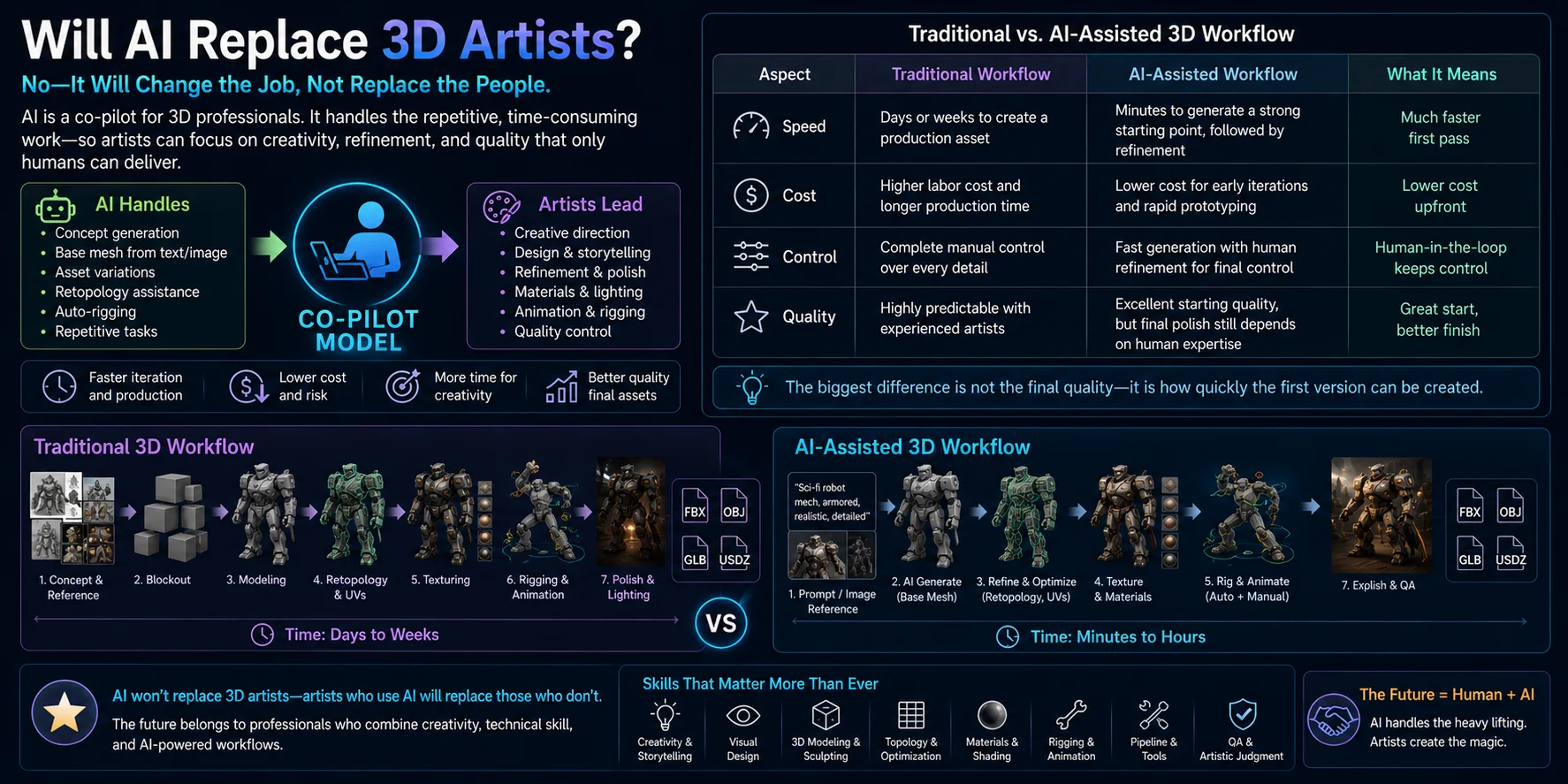
Die kurze Antwort ist nein. KI verändert, wie 3D-Inhalte erstellt werden, ersetzt aber keine erfahrenen Artists. Stattdessen verschiebt sie den Workflow, indem sie repetitive Aufgaben wie Konzeptgenerierung, Basis-Mesh-Erstellung und Asset-Variationen automatisiert, während Artists weiterhin für Kreativität, Verfeinerung, technische Qualität und künstlerische Leitung verantwortlich bleiben. Statt Menschen zu ersetzen, wird KI zu einem Co-Piloten, der Profis hilft, schneller zu arbeiten und sich auf höherwertige Entscheidungen zu konzentrieren.
KI verändert den Job – sie eliminiert ihn nicht
Die klassische 3D-Produktion verlangt von Artists, nahezu alles von Grund auf aufzubauen, einschließlich Blockouts, Modellierung, Retopology, UV-Mapping, Texturierung und Optimierung. Viele dieser Schritte sind repetitiv und zeitaufwendig.
KI hilft nun, die frühen Phasen zu beschleunigen, durch:
- Generieren von Konzeptmodellen in Minuten
- Sofortiges Erzeugen mehrerer Designvarianten
- Erstellen von Basis-Meshes aus Text oder Bildern
- Unterstützung bei Texturierung, Retopology und Auto-Rigging
So können Artists mehr Zeit für kreative Problemlösung, Storytelling, visuellen Stil, Performance-Optimierung und finale Qualitätskontrolle aufwenden.
Klassischer vs. KI-gestützter 3D-Workflow
| Aspekt | Klassischer Workflow | KI-gestützter Workflow |
|---|---|---|
| Geschwindigkeit | Tage oder Wochen bis zu einem Produktions-Asset | Minuten für einen starken Ausgangspunkt, gefolgt von Verfeinerung |
| Kosten | Höhere Arbeitskosten und längere Produktionszeit | Geringere Kosten für frühe Iterationen und Rapid Prototyping |
| Kontrolle | Vollständige manuelle Kontrolle über jedes Detail | Schnelle Generierung mit menschlicher Verfeinerung für die finale Kontrolle |
| Qualität | Sehr vorhersehbar mit erfahrenen Artists | Exzellente Ausgangsqualität, doch der finale Schliff hängt weiterhin von menschlicher Expertise ab |
Der größte Unterschied ist nicht die finale Qualität – es ist, wie schnell die erste Version erstellt werden kann.
Das Co-Piloten-Modell
In der Praxis nutzen Teams KI oft als kreativen Assistenten statt als autonomen Ersteller.
Ein typischer Workflow sieht so aus:
- Nutze KI, um Konzepte oder ein Basis-Mesh zu generieren.
- Wähle das stärkste Design aus.
- Bereinige die Topology und optimiere die Geometrie.
- Verbessere Materialien und Texturen.
- Riggen, animieren und Qualitätssicherung durchführen.
- Exportiere das fertige Asset für die Produktion.
In dieser Pipeline beschleunigt KI repetitive Arbeit, während Artists die kreativen und technischen Entscheidungen treffen, die das Endergebnis bestimmen.
Was kommt als Nächstes – Die Zukunft der 3D-KI
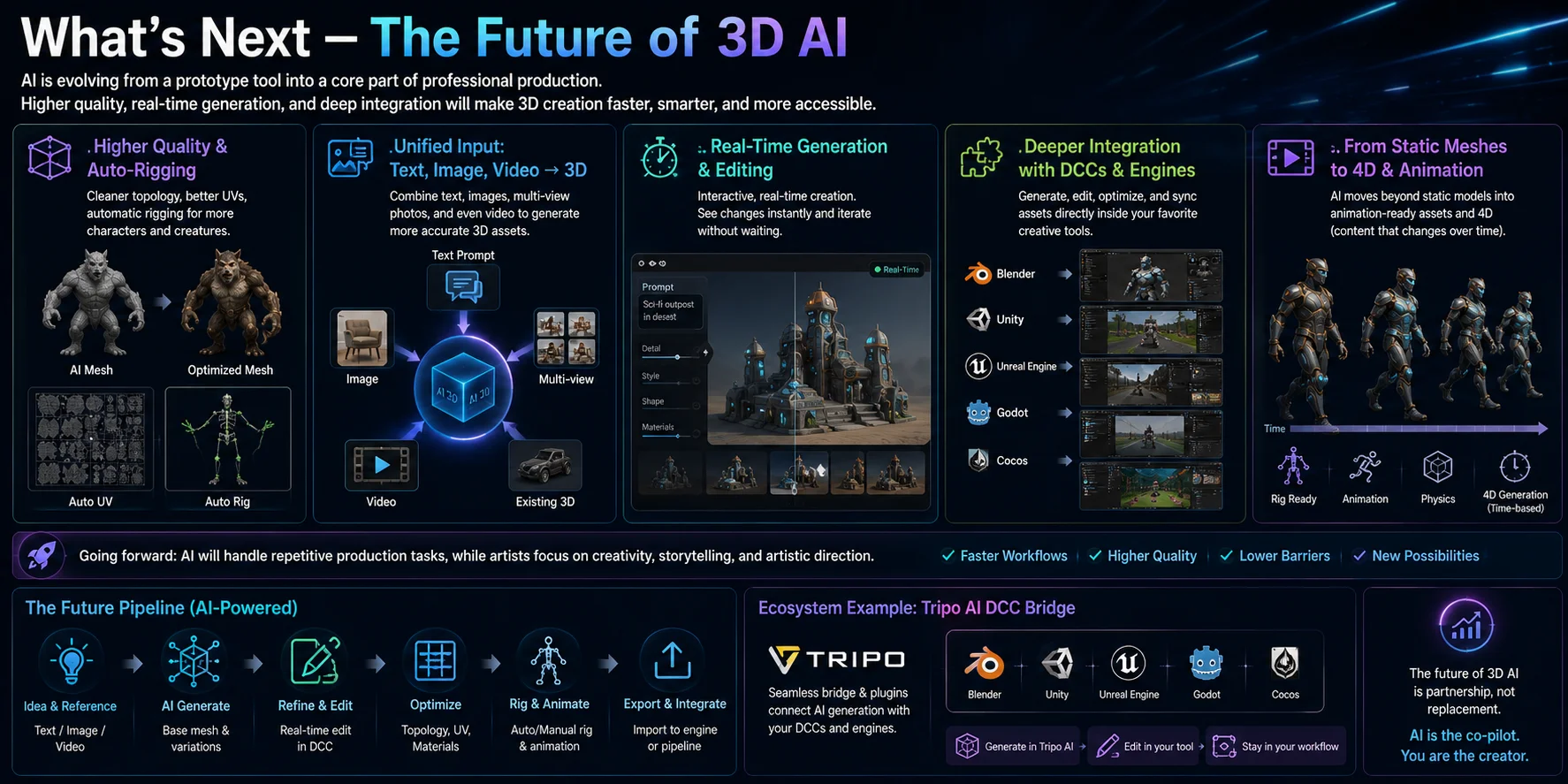
Kurzfristige Fortschritte konzentrieren sich wahrscheinlich auf bessere Topology, mehr Automatisierung, multimodale Eingaben und eine engere Integration mit DCC-Tools. Diese Fortschritte sollten die Iterationszeit verkürzen, doch Produktionsteams werden die Ausgabe weiterhin an ihren eigenen technischen Anforderungen messen.
Von statischen Meshes zu animationsfertig & 4D
Eine der größten Verschiebungen ist der Schritt über statische 3D-Modelle hinaus hin zu animationsfertigen Assets.
Zu den wahrscheinlichen Verbesserungen zählen sauberere Topology, bessere UV- und Material-Automatisierung, zuverlässigeres Charakter-Rigging und einfache Bewegungsgenerierung.
- Topology in Produktionsqualität mit weniger manuellen Korrekturen
- Automatisches UV-Mapping und PBR-Material-Generierung
- Verbessertes automatisches Rigging für humanoide Charaktere
- Bessere Unterstützung für Vierbeiner und stilisierte Kreaturen
- Grundlegende Animationsgenerierung, etwa Geh-, Lauf- und Idle-Zyklen
Die Forschung schreitet auch in Richtung 4D-Generierung voran, bei der KI Objekte erzeugt, die sich über die Zeit verändern, statt ein einzelnes statisches Mesh zu produzieren. Das könnte es Kreativen ermöglichen, animierte Charaktere, verformbare Objekte oder komplette Bewegungssequenzen direkt aus Text oder Bildern zu generieren.
Einheitliche Eingabe: Text, Bilder und Video
Aufkommende Workflows kombinieren Text, Einzel- oder Multi-View-Bilder, Video und bestehende 3D-Assets, um eine stärkere Vorgabe zu bieten als eine einzelne Eingabe allein.
- Text-Prompts
- Einzelne Referenzbilder
- Multi-View-Bilder
- Videoclips
- Bestehende 3D-Assets
Echtzeit-Generierung und -Bearbeitung
Ein weiterer wichtiger Trend ist die Echtzeit-KI-Generierung.
Schnellere Generierung und Bearbeitung kann prompt- und referenzgesteuerte Iteration interaktiver wirken lassen.
Tiefere Integration mit DCC-Tools und Game-Engines
Ausblick
Die Zukunft der KI-3D-Generierung geht nicht einfach darum, Modelle schneller zu erstellen – es geht darum, produktionsreife Assets mit minimaler manueller Arbeit zu erstellen. Höherwertige Topology, intelligenteres automatisches Rigging, einheitliche multimodale Eingaben, Echtzeit-Generierung und tiefere Softwareintegration bewegen die Branche allesamt in Richtung Workflows, in denen KI repetitive Produktionsaufgaben übernimmt, während Kreative sich auf Design, Storytelling und künstlerische Leitung konzentrieren.
Häufig gestellte Fragen
Kann KI aktuell wirklich nutzbare 3D-Modelle generieren?
Ja. Moderne KI kann nutzbare 3D-Modelle für Games, Visualisierung, Animation und 3D-Druck generieren, doch die Ausgabe braucht vor der Produktion oft geringfügige Verfeinerung. Für beste Ergebnisse nutze einen detaillierten Text-Prompt oder zwei bis vier konsistente Referenzbilder und prüfe das Mesh nach der Generierung auf Topology, fehlende Geometrie, Normals und Skalierung. Dekorative Assets und Konzeptmodelle sind oft nach kurzem Cleanup bereit, während Game-Charaktere, Animations-Assets und präzise mechanische Bauteile vor dem finalen Einsatz meist Retopology, Rigging oder CAD-Verfeinerung erfordern.
Wird KI die 3D-Modellierung und 3D-Artists ersetzen?
Nein. KI verändert, wie 3D-Modelle erstellt werden, doch sie wird professionelle 3D-Artists wahrscheinlich nicht ersetzen. Heute kann KI Konzepte, Basis-Meshes, Texturen und Asset-Variationen in Minuten generieren, während Artists weiterhin kreative Leitung, Retopology, Rigging, Animation, Optimierung und finale Qualitätskontrolle übernehmen. In den meisten Produktions-Pipelines dient KI als Co-Pilot, der repetitive Arbeit automatisiert und Artists erlaubt, sich auf Design, Storytelling und produktionsreife Assets zu konzentrieren, statt ihre Expertise zu ersetzen.
Sind KI-generierte 3D-Modelle game-ready (gute Topology)?
Nicht immer. KI-generierte 3D-Modelle haben oft dichte Dreiecks-Meshes, ungleichmäßigen Edge-Flow oder non-manifold Geometrie und sind daher nicht automatisch game-ready. Bevor du sie in einer Game-Engine verwendest, inspiziere die Topology, reduziere unnötige Polygone, führe bei Bedarf eine Retopology durch und überprüfe, ob sich das Mesh nach dem Rigging korrekt verformt. Viele moderne KI-Tools bieten auch optimierte oder Smart Mesh-Ausgaben, die sauberere Topology für Games liefern, doch eine finale Qualitätsprüfung wird vor dem Import in Unity oder Unreal Engine weiterhin empfohlen.
Kann KI vollständig geriggte 3D-Modelle für Animation generieren?
Teilweise. Tripo Auto-Rig unterstützt kompatible humanoide Charaktere in einer T-Pose und standardmäßige Vierbeiner. Das generierte Rig kann ein nützlicher Ausgangspunkt sein, doch Gelenkplatzierung, Weight Painting und Deformation benötigen vor animationsreifer Produktionsqualität oft manuelle Anpassung. Extreme Posen, nicht-humanoide Anatomie und komplexe Kreaturen erfordern in der Regel weiterhin manuelles Rigging.
Was ist der Unterschied zwischen NeRF und 3D Gaussian Splatting?
Neural Radiance Fields (NeRF) stellen eine Szene als kontinuierliche neuronale Funktion dar, die Farbe und Dichte für jede Blickrichtung vorhersagt, und erzeugen hochrealistische Rekonstruktionen, erfordern aber längeres Training und langsameres Rendering. 3D Gaussian Splatting stellt die Szene mit Millionen kleiner dreidimensionaler Gauß-Primitive dar und ermöglicht Echtzeit- oder nahezu Echtzeit-Rendering bei exzellenter visueller Qualität. Generell eignen sich Neural Radiance Fields besser für maximale Rekonstruktionsqualität und Offline-Rendering, während 3D Gaussian Splatting für interaktive Viewer, Virtual Reality und Anwendungen bevorzugt wird, bei denen die Rendering-Geschwindigkeit entscheidend ist. Keine der beiden Methoden erzeugt direkt ein sauberes Polygon-Mesh, sodass oft ein zusätzlicher Schritt zur Mesh-Extraktion oder -Konvertierung nötig ist, wenn das finale Asset editiert, animiert oder in einer Game-Engine verwendet werden soll.
Was sind die wichtigsten Grenzen der KI-3D-Generierung heute?
Die aktuelle KI-3D-Generierung hat weiterhin mehrere Grenzen. Generierte Meshes können unsaubere Topology, Löcher, non-manifold Geometrie oder übermäßige Dreiecksdichte enthalten und erfordern daher vor der Produktion oft Retopology und Cleanup. KI tut sich außerdem schwer mit präzisen mechanischen Bauteilen, dünnen Strukturen, kleinem Text und komplexen technischen Details, bei denen CAD-Software die bessere Wahl bleibt. Tripo Auto-Rig eignet sich am besten für kompatible T-Pose-Humanoide und standardmäßige Vierbeiner, und kommerzielle Projekte sollten vor der Freigabe die Plattformlizenzierung und die Rechte an Referenzbildern überprüfen.
Wie groß ist der Markt für KI-3D-Generierung?
Der Markt für KI-3D-Generierung ist ein kleiner Teil der breiteren 3D-Software-Wirtschaft, und die veröffentlichten Schätzungen sind nicht direkt vergleichbar, da Marktforschungsfirmen unterschiedliche Definitionen verwenden. Zum Beispiel schätzt 360iResearch KI-generierte 3D-Modelle 2025 auf 1,00 Milliarden USD, während The Business Research Company generative KI für 3D-Assets 2025 bei 2,47 Milliarden USD ansetzt. Nutze die obige Markttabelle, um Umfang, Jahr und Prognose hinter jeder Zahl zu vergleichen, statt eine einzelne Zahl als die maßgebliche Marktgröße zu behandeln.
Fazit
Die KI-3D-Generierung hat Forschungsdemos hinter sich gelassen und kann heute in realen kreativen Projekten Concepting, Visualisierung und viele Asset-Produktions-Workflows beschleunigen. Die stärksten Ergebnisse hängen weiterhin von menschlicher Leitung, Cleanup, Optimierung und finalen Qualitätsprüfungen ab.
Der beste Weg, den aktuellen Stand der KI-3D-Generierung zu verstehen, ist, sie selbst auszuprobieren. Erstelle ein Modell in Tripo AI Studio, verfeinere es bei Bedarf und exportiere es im Format, das zu deinem Workflow passt – du wirst schnell sehen, wie weit die Technologie gekommen ist und wo menschliche Handwerkskunst noch den größten Mehrwert schafft.