2D vs 3D Animation: Differences, Cost & Which to Choose
TL;DR
- 2D favors stylized expression and simpler production, while 3D offers depth, reusable assets, and flexible cameras.
- Your choice should depend on style, budget, timeline, audience, and the type of final deliverable.
- 2D demands drawing, timing, and visual consistency; 3D requires modeling, rigging, technical setup, and rendering.
- Neither medium is universally harder or better—each creates different production trade-offs and creative strengths.
- AI tools can reduce 3D modeling and rigging barriers, making early experiments more accessible without replacing artistic judgment.
What Is 2D Animation?
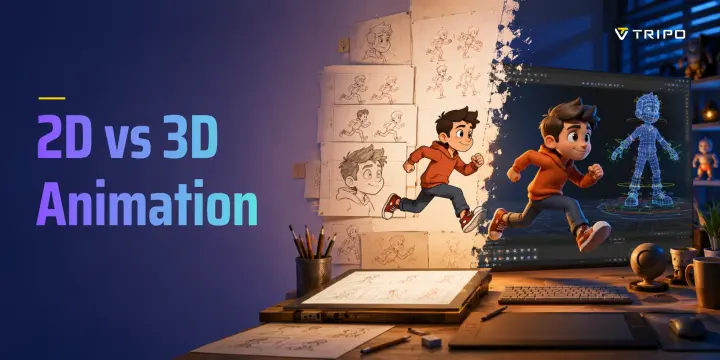
2D animation creates movement on a flat plane defined by width and height. Characters, objects, backgrounds, and effects are drawn, painted, or assembled as digital illustrations, then animated frame by frame or through a 2D rig.
Traditional hand-drawn animation works by creating a sequence of drawings that change over time. The animator controls poses, timing, spacing, squash and stretch, anticipation, holds, and transitions between key actions. Modern digital 2D animation uses the same visual principles, but software can make drawing, cleanup, coloring, compositing, and export more efficient.
Common 2D workflows include:
- frame-by-frame animation;
- cutout or puppet animation;
- motion graphics;
- vector animation;
- pixel-art animation;
- 2D skeletal animation;
- whiteboard and explainer animation.
Frame-by-frame animation offers a high degree of expressive control because each drawing can change shape, pose, and line quality. It is well suited to expressive character acting, anime, cartoons, music videos, short films, and stylized advertising.
Cutout animation uses separate body parts or illustration layers. An arm, head, hand, torso, or facial feature can be moved independently, often with bones or deformers. This reduces redraw work and is common in web animation, mobile games, explainer videos, and TV production.
Classic Disney films, many anime productions, hand-drawn shorts, and modern motion-design campaigns all demonstrate the range of 2D animation. The defining quality is not that it looks “simple.” It is that depth is represented through drawing, perspective, layering, and visual design rather than through a fully navigable 3D scene.
Common tools include Toon Boom Harmony, Adobe Animate, TVPaint, After Effects, Krita, OpenToonz, Moho, and Spine for 2D game animation.
What Is 3D Animation?
3D animation creates movement inside a digital space with width, height, and depth. Instead of drawing a character repeatedly from each angle, artists create a 3D model that can be viewed, lit, posed, and animated from many directions.
A useful analogy is a digital sculpture or virtual puppet.
The usual workflow begins with a model. The model is then rigged with a virtual skeleton, often called an armature or rig. Animators pose the rig at key moments, and the software calculates many of the in-between transformations. The final result is lit, rendered, and composited into a shot or integrated into a game engine.
A typical 3D pipeline includes:
- Modeling or sculpting
- Retopology and UV preparation
- Texturing and materials
- Rigging and skinning
- Keyframe animation or motion capture
- Lighting and rendering
- Compositing or engine integration
3D animation is common in feature films, visual effects, product visualization, architecture, modern games, AR and VR projects, and advertisements that need a realistic or spatially dynamic look.
Its core advantage is that the same character, product, or environment can be reused across many shots. Once a character is modeled and rigged, it can be animated from different camera angles without redrawing every view.
That reuse is powerful, but it comes with upfront work. A 3D character must be built, structured, textured, rigged, and tested before animation becomes efficient. Common software includes Blender, Autodesk Maya, 3ds Max, Cinema 4D, Houdini, ZBrush, and game engines such as Unity and Unreal Engine.
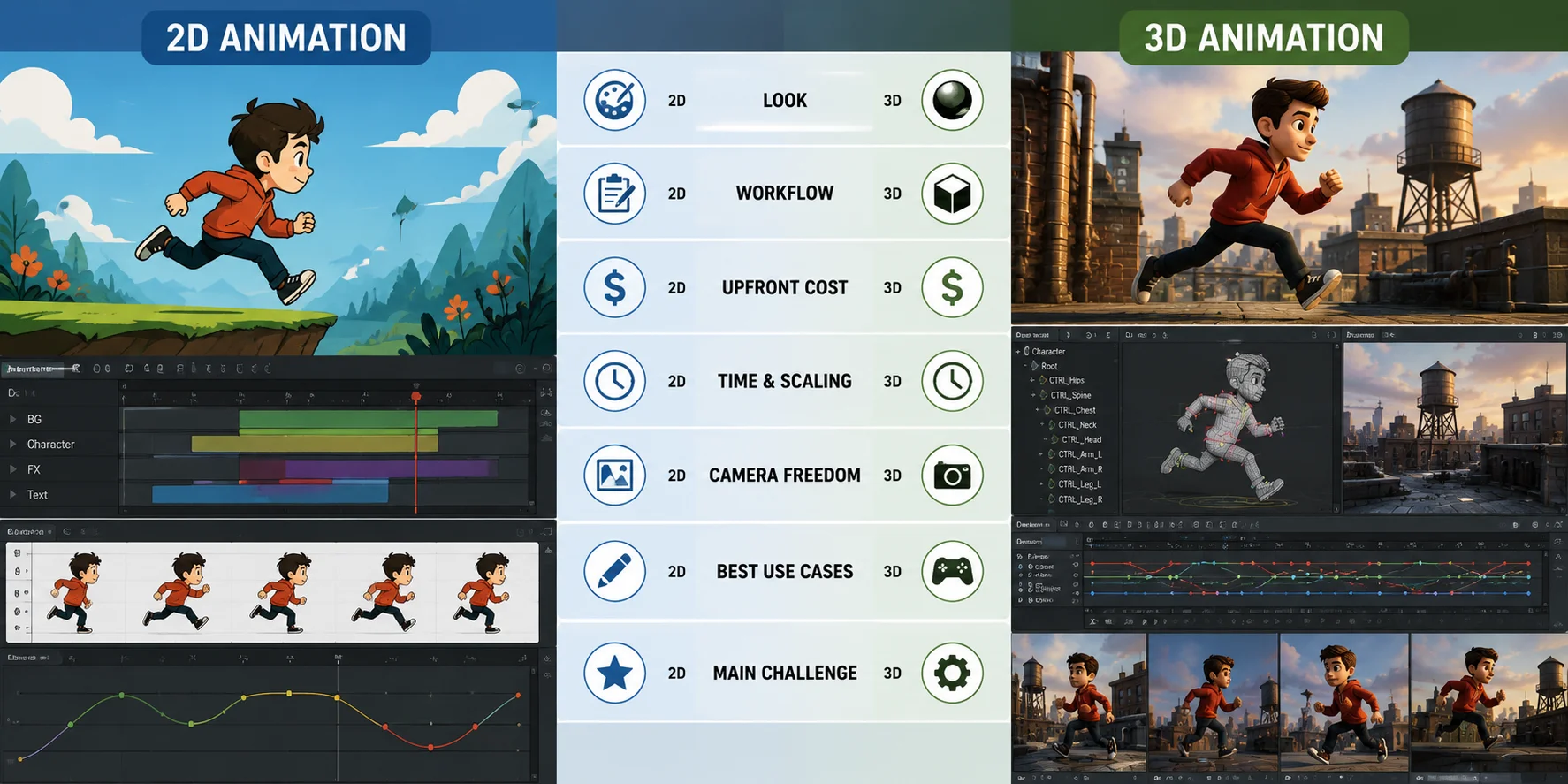
2D vs 3D Animation: Head-to-Head Comparison
| Dimension | 2D Animation | 3D Animation |
|---|---|---|
| Look / aesthetics | Usually stylized, graphic, and expressive, with visual identity driven by drawing, linework, color, and shape. | Uses depth, lighting, materials, and camera perspective to create realistic or stylized dimensional worlds. |
| Workflow | Artists draw individual frames or animate layered artwork, cutout characters, or vector elements. | Artists typically model, rig, animate, light, render, and sometimes export assets into a game engine. |
| Cost to start | Often has lower upfront costs because simple drawing software and lightweight hardware can support early projects. | Usually has higher upfront costs because modeling, rigging, rendering, and technical software skills add production overhead. |
| Time & scaling | New scenes, angles, poses, or camera changes may require new artwork or additional drawing time. | Assets take longer to create initially, but models and rigs can be reused across many scenes, shots, and camera angles. |
| Difficulty / learning curve | The main challenge is drawing skill, timing, acting, visual consistency, and frame-by-frame patience. | The main challenge is the technical pipeline, including modeling, topology, rigging, materials, rendering, and scene management. |
| Best use cases | Explain videos, cartoons, anime, web animation, social content, graphic storytelling, and 2D games. | Games, VFX, product visualization, realistic advertisements, AR/VR, architecture, and cinematic spatial scenes. |
Neither format is inherently easier, cheaper, or better in every situation. A short explainer may benefit from 2D because it can communicate an idea quickly with a focused visual style. A product launch, game trailer, or interactive experience may benefit from 3D because it needs reusable assets, rotating views, lighting changes, and flexible camera movement.
The best choice depends on the output you need, the skills available, the timeline, and whether the project benefits more from illustration-led expression or dimensional space.
Pros and Cons of 2D vs 3D Animation
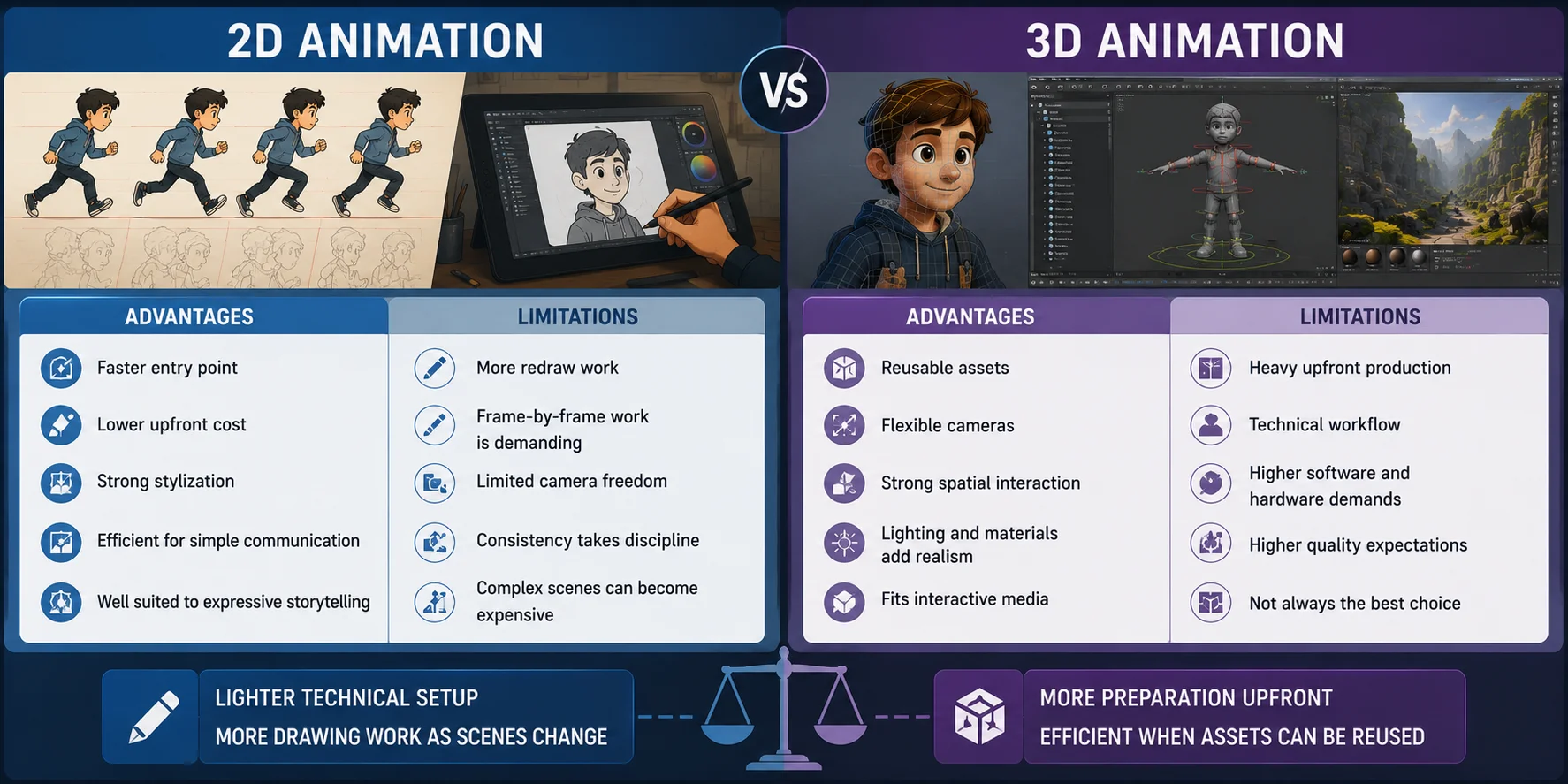
2D Animation: Pros and Cons
| Advantages | Limitations |
|---|---|
| Lower barrier to begin: Basic drawing software and simple timelines are enough to create short tests, loops, explainers, and character studies. | More redraw work: New camera angles, costume changes, perspective shifts, and detailed actions may require new illustrations. |
| Strong visual identity: Artists can directly control linework, shape, color, exaggeration, and graphic style. | Frame-by-frame work is demanding: Smooth movement requires careful drawing, cleanup, timing, and revision. |
| Efficient for direct communication: Short explainers, web animations, animated icons, social clips, and educational content can be produced with a focused workflow. | Limited camera freedom: Pans, zooms, and parallax can create depth, but they do not provide the same flexibility as a full 3D scene. |
| Highly stylized: 2D can intentionally simplify anatomy, lighting, perspective, and movement to support humor, emotion, or abstraction. | Consistency takes discipline: Larger teams need clear character sheets, color guides, and art direction to keep drawings visually consistent. |
| Lighter technical requirements: Many projects can be produced without complex rendering pipelines, large scene files, or high-end hardware. | Scaling can become labor-intensive: A long project with many unique scenes may require substantial drawing and cleanup effort. |
2D is often the stronger choice when the project depends on illustration, expressive acting, graphic storytelling, or a fast communication format. Its apparent simplicity can be misleading: high-quality 2D animation still requires strong fundamentals in drawing, timing, staging, and performance.
3D Animation: Pros and Cons
| Advantages | Limitations |
|---|---|
| Reusable assets: A modeled and rigged character, product, or environment can appear in multiple shots, campaigns, games, or interactive experiences. | Heavy upfront production: Modeling, UVs, texturing, rigging, skinning, lighting, and rendering must often be completed before animation becomes efficient. |
| Flexible cameras: Once the scene exists, artists can test different camera angles, close-ups, and movements without redrawing the subject. | More technical workflow: Artists need to manage geometry, transforms, topology, shaders, files, scene structure, and export requirements. |
| Strong for complex motion: 3D is effective for vehicles, machines, game characters, crowds, product demonstrations, and objects interacting in depth. | Higher hardware and rendering demands: Detailed scenes may require stronger workstations, longer render times, or additional cloud-rendering costs. |
| Lighting and materials add realism: Shadows, reflections, surface detail, depth of field, and physically based materials can create believable visual worlds. | Realism exposes mistakes: Weak skinning, awkward movement, poor lighting, or low-quality materials are easier to notice in realistic work. |
| Good fit for real-time projects: The same assets can support games, AR, VR, virtual showrooms, and interactive training content. | Not always the efficient choice: A simple 2D animation may communicate an idea more clearly and at lower production cost. |
3D becomes especially valuable when a project needs assets to be reused across many outputs. A product model can support multiple advertisements, camera angles, color variations, web experiences, and real-time demonstrations. A game character can be animated repeatedly once the rig is working.
However, the early stages are often slower and more technical than 2D. Building a usable 3D character or object requires planning before the animator can begin, which is why modeling and rigging are often seen as the main 3D production barrier.
That trade-off is important for the next section: newer AI-assisted workflows are beginning to reduce some of the time required for model generation and rigging, but they do not eliminate the need for animation judgment, art direction, cleanup, or technical review.
Which Is Harder to Learn—2D or 3D?
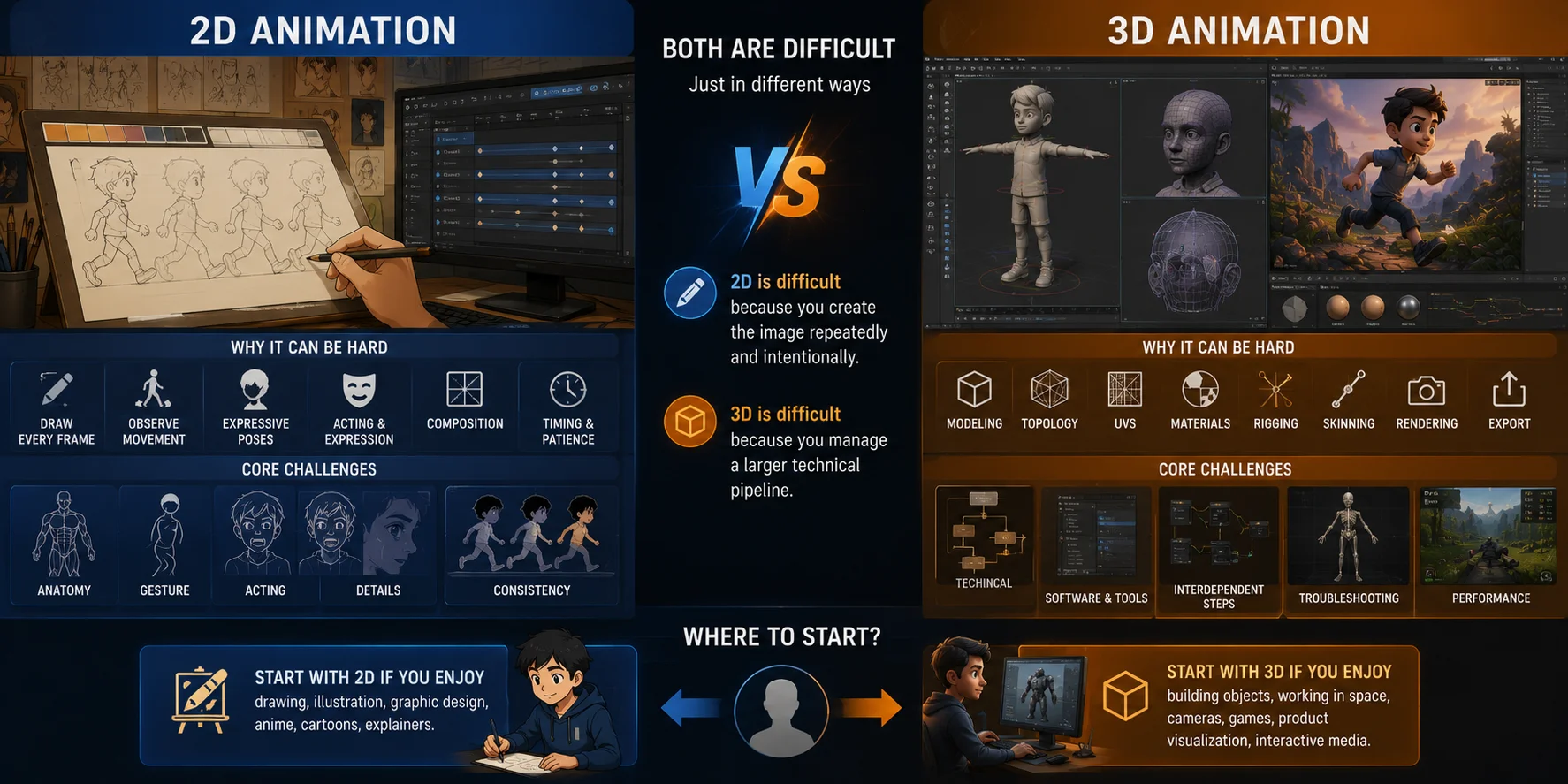
Neither is objectively harder. They are difficult in different ways.
2D animation is often harder for people who do not enjoy drawing, observing movement, or creating expressive poses. Its challenge is closely tied to visual fundamentals: anatomy, gesture, perspective, timing, spacing, acting, composition, and the patience to refine many drawings.
3D animation can feel more approachable at first because the model already exists and the software can interpolate between poses. However, the broader 3D pipeline is technically demanding. Before animating a character, someone usually needs to model it, prepare its topology, create UVs, texture it, build or obtain a rig, test skinning, and manage rendering or engine export.
In simple terms:
- 2D is difficult because it asks you to create the image repeatedly and intentionally.
- 3D is difficult because it asks you to manage a larger technical production pipeline.
For beginners deciding what to learn first, choose based on the kind of work you want to make.
Start with 2D if you enjoy drawing, illustration, graphic design, expressive acting, anime, cartoons, or short-form explainer content.
Start with 3D if you enjoy building objects, working in space, using software tools, experimenting with cameras, making games, product renders, VFX, or interactive experiences.
The core animation principles still transfer. Timing, weight, anticipation, follow-through, staging, and clarity matter in both mediums. Learning one discipline does not trap you there.
How AI Is Lowering the 3D Barrier
The traditional 3D barrier is real. Modeling and rigging require time, technical knowledge, and often specialized software. For a student, solo creator, or small marketing team, those stages can make 3D feel impractical even when the desired output would benefit from depth, reusable assets, or camera freedom.
AI-assisted 3D tools can now generate a starting model from a written prompt or a reference image. They can also automate parts of rigging and mesh preparation. This does not eliminate the need for review, cleanup, art direction, or animation skill, but it can reduce the time needed to reach a workable 3D asset.
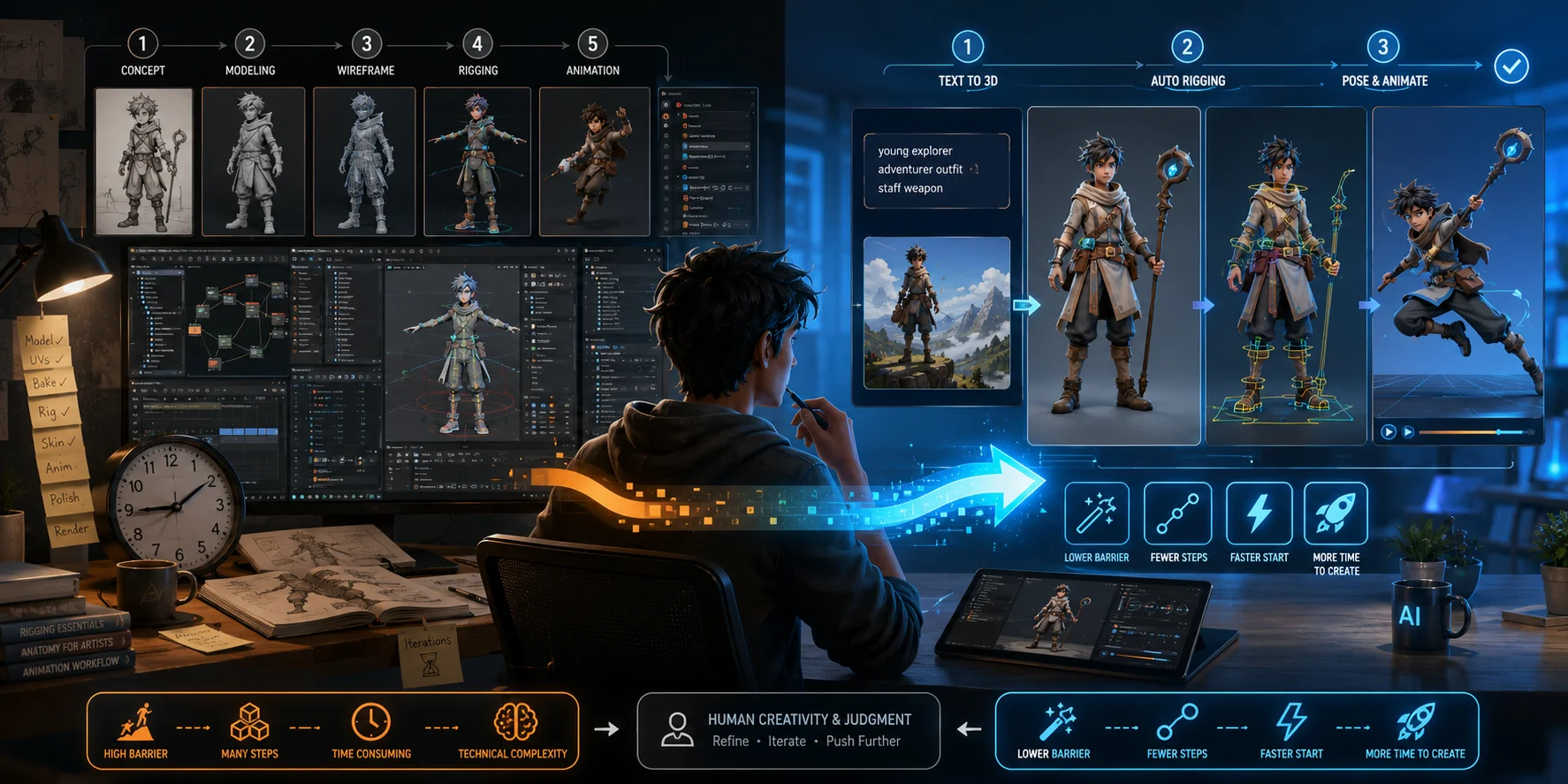
For example, Tripo AI Text to 3D can create a 3D starting model from a text description, while Tripo AI Auto-Rigging can automate skeleton and skinning steps for supported models.
This changes the practical question for some projects. Instead of asking whether a team can afford to build every character or prop from scratch, it can ask whether an AI-generated base model is sufficient for prototyping, previsualization, lightweight content, or an early production pass.
The limitation is equally important: AI reduces part of the entry barrier, not the need for judgment.
A generated model may still need topology review, material work, proportion changes, rig testing, animation cleanup, and style adjustment. It may not match a brand guide or game art direction without further work. For complex hero characters, close-up product shots, or high-end film work, manual refinement remains central.
AI also does not make 3D inherently superior to 2D. Hand-drawn performance, graphic abstraction, line quality, and stylized timing remain strengths that 2D can deliver more naturally.
The practical outcome is not “3D wins.” It is that the old assumption—3D always requires a long manual modeling-and-rigging runway—is becoming less absolute.
Which Should You Choose or Learn First?
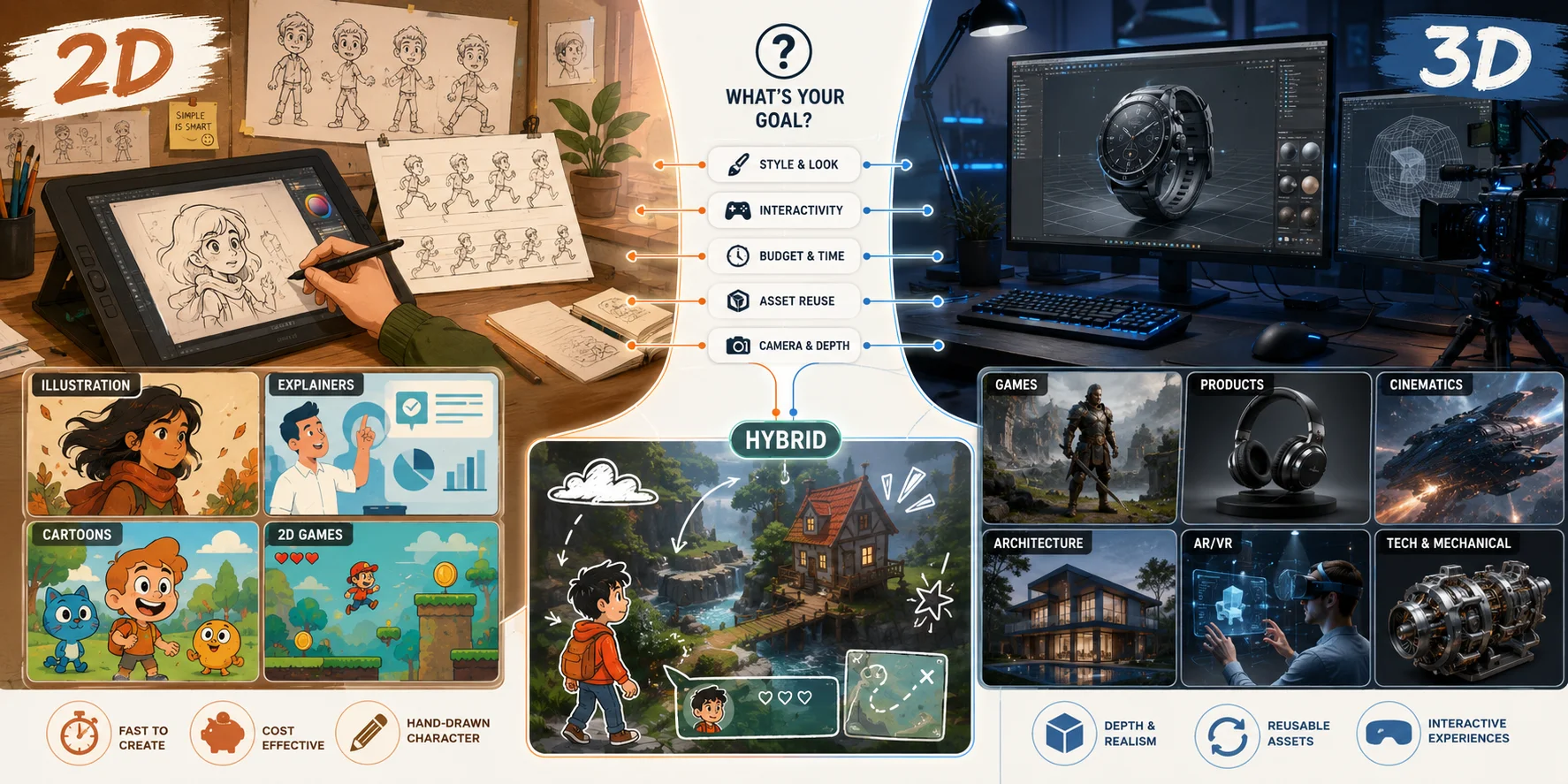
Use the following framework to choose based on the project you need to deliver, rather than assuming that 2D or 3D is always the stronger option. The best medium depends on visual style, production scope, budget, timeline, asset reuse, and the skills available in your team.
Choose 2D when
Choose 2D when you have a tight budget, a strong illustrative style, a short production timeline, or a message that benefits from clarity, abstraction, and direct visual communication.
2D is often a strong fit for:
- explainers;
- educational content;
- social ads;
- animated presentations;
- web content;
- cartoons;
- anime-inspired work;
- visual novels;
- 2D games;
- brand storytelling with a graphic look.
It is particularly effective when the audience needs to understand an idea quickly. A short animated explainer, product tutorial, educational sequence, or social-media campaign often benefits from simplified shapes, controlled color, readable typography, and visual metaphors rather than realistic lighting or complex spatial scenes.
2D can also be the more efficient choice when the project has a fixed camera angle, limited character movement, or an illustration-led identity. For example, a brand with established mascot artwork may gain more value from expressive 2D animation than from rebuilding the character as a fully modeled 3D asset.
For students, 2D is a practical starting point when you want to strengthen drawing, gesture, posing, timing, acting, and staging. These foundations transfer to 3D later, but 2D makes them especially visible because every movement must be designed deliberately.
Choose 3D when
Choose 3D when your project needs camera movement, reusable assets, realistic products, complex mechanical motion, spatial environments, or interactive experiences.
3D is often a strong fit for:
- product visualization;
- games;
- architecture;
- VFX;
- AR and VR;
- automotive or mechanical animation;
- realistic advertisements;
- 3D explainers;
- virtual showrooms;
- cinematic camera work.
3D becomes especially valuable when one asset needs to support multiple outputs. A product model can be reused for a website animation, commercial, product configurator, virtual showroom, training video, and social-media clip. A game character can be animated in many scenes once its model and rig are complete.
It is also the better fit when the camera needs to move naturally around objects, when lighting and material realism are central to the message, or when the viewer needs to understand how a mechanism works in physical space. Mechanical assemblies, vehicles, architectural walkthroughs, medical visualizations, and immersive environments often benefit from 3D because depth is part of the explanation.
However, choose 3D because the project needs its strengths, not simply because it looks more modern. A realistic 3D scene can add unnecessary production work when a simple illustrated animation would communicate the same idea more clearly.
Choose Based on Your Role
For a student or job seeker, the best path depends on what you enjoy practicing and the type of work you want in your portfolio.
Choose 2D if you want to draw, design poses, create expressive characters, explore visual storytelling, and work with graphic visual language. A 2D portfolio can include character loops, short scenes, animatics, motion graphics, frame-by-frame exercises, and stylized explainer work.
Choose 3D if you enjoy building scenes, working with software, designing objects, solving technical problems, and creating movement in space. A 3D portfolio can include character animation, product renders, camera studies, game-ready props, environment scenes, motion graphics, or short cinematic shots.
For brands, agencies, and clients, choose based on the deliverable rather than trends. Ask whether the audience needs emotional illustration, product realism, an interactive environment, a fast social clip, a detailed product demonstration, or multiple reusable camera views.
A useful client-side question is: Will the asset be used once, or will it need to support several campaigns, formats, and future revisions? If reuse is important, 3D may justify its higher setup cost. If the message is short, graphic, and campaign-specific, 2D may be more efficient.
Consider Hybrid Workflows
2D and 3D do not need to compete. Many successful projects combine 2D and 3D animation to use the strengths of both approaches.
A 3D environment may use hand-drawn textures, illustrated UI, 2D particle effects, graphic overlays, or frame-by-frame character accents. A 2D animation may use 3D models for vehicles, architecture, camera moves, lighting reference, or complex objects that would be time-consuming to redraw from many angles.
Hybrid workflows are especially useful when a project needs dimensional structure without losing a stylized visual identity. For example, a 3D product model may be rendered with flat colors and illustrated outlines, while a hand-drawn character may be composited into a 3D environment. Games frequently combine 3D worlds with 2D icons, effects, portraits, and interface elements.
The practical rule is simple: use 3D where depth, reuse, camera flexibility, or technical motion matter; use 2D where expressive drawing, graphic clarity, and stylized performance matter most.
The goal is not to choose a winner. It is to choose the production method that gives your project the strongest result within its available time, budget, and creative direction.
Frequently Asked Questions
Why did Disney stop with 2D animation?
Disney did not permanently abandon 2D animation. Its feature films shifted heavily toward CG for creative and business reasons, while hand-drawn expertise still appears in selected work.
Which is better, 2D or 3D?
Neither is better in every situation. 2D suits graphic style and clear communication, while 3D suits spatial scenes, reusable assets, products, and interactive media.
How to tell if animation is 2D or 3D?
2D usually looks like flat artwork with drawn or layered depth. 3D shows modeled volume, surface lighting, and camera movement around forms in space.
What are examples of 2D and 3D animation?
2D examples include anime, motion graphics, explainer videos, sprites, and vector web animation. 3D examples include game cinematics, VFX, product renders, AR/VR scenes, and architectural walkthroughs.
What software is used for 2D vs 3D animation?
2D tools include Toon Boom Harmony, Adobe Animate, TVPaint, After Effects, Krita, OpenToonz, Moho, and Spine. 3D tools include Blender, Maya, 3ds Max, Cinema 4D, Houdini, ZBrush, Unity, and Unreal Engine.
Is 2D animation cheaper than 3D animation?
2D is often cheaper to start because it needs lighter tools and hardware. 3D costs more upfront, but reusable models and rigs can save time later.
Should beginners learn 2D or 3D animation first?
Choose 2D if you enjoy drawing, design, anime, cartoons, or explainers. Choose 3D if you enjoy objects, cameras, games, product renders, or interactive scenes.
Can 2D and 3D animation be combined?
Yes. Hybrid workflows can mix cel-shaded 3D, 2D effects, painted textures, flat artwork in 3D cameras, or composited characters and backgrounds.
Can AI replace 2D or 3D animators?
AI can speed up concepting, model generation, rigging assistance, and iteration. It still needs human judgment for timing, acting, cleanup, style, and production review.
Which is better for marketing videos, 2D or 3D animation?
Use 2D for explainers, education, brand stories, and fast social content. Use 3D for product demos, realistic scenes, dynamic cameras, and reusable assets.
Conclusion
2D and 3D each win in different situations—pick by budget, style, and goals. A strong 2D project can be more expressive, direct, and efficient than a poorly justified 3D one, while a 3D workflow can be more practical when you need reusable assets, depth, camera movement, or product realism.
If 3D's modeling-and-rigging hurdle is what is holding you back, AI tools can help you create a usable 3D starting asset from a prompt or image, then refine topology, rigging, and export settings for game, animation, or visualization workflows. Start with a small test asset, evaluate whether it suits your style and production needs, and explore the workflow in Tripo AI Studio.