애니메이션 유형: 5가지 주요 스타일 설명(2026)
TL;DR
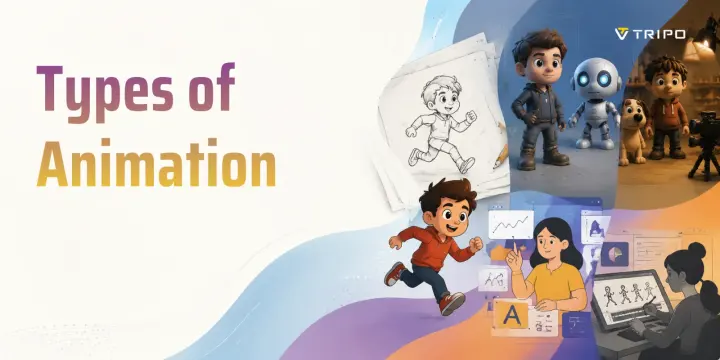
- 애니메이션 유형은 보통 제작 방식에 따라 traditional hand-drawn, 2D digital, 3D/CGI, Motion Graphics, Stop Motion 으로 나뉩니다.
- Traditional animation 과 2D animation 은 모두 그려진 시각 요소를 사용하지만, 현대 2D 는 재사용 가능한 digital rig 와 vector asset 에 많이 의존합니다.
- 3D/CGI animation 은 digital model, rig, camera, lighting, rendering 을 사용하며 영화, 게임, VFX, AR/VR 의 핵심 방식입니다.
- Motion Graphics 는 텍스트, 도형, 아이콘, 데이터를 움직여 아이디어를 설명하는 데 적합하고, Stop Motion 은 촉감 있는 수작업 비주얼에 강합니다.
- 알맞은 스타일은 스토리, 예산, 팀 규모, 일정, 학습 경로에 따라 달라집니다.
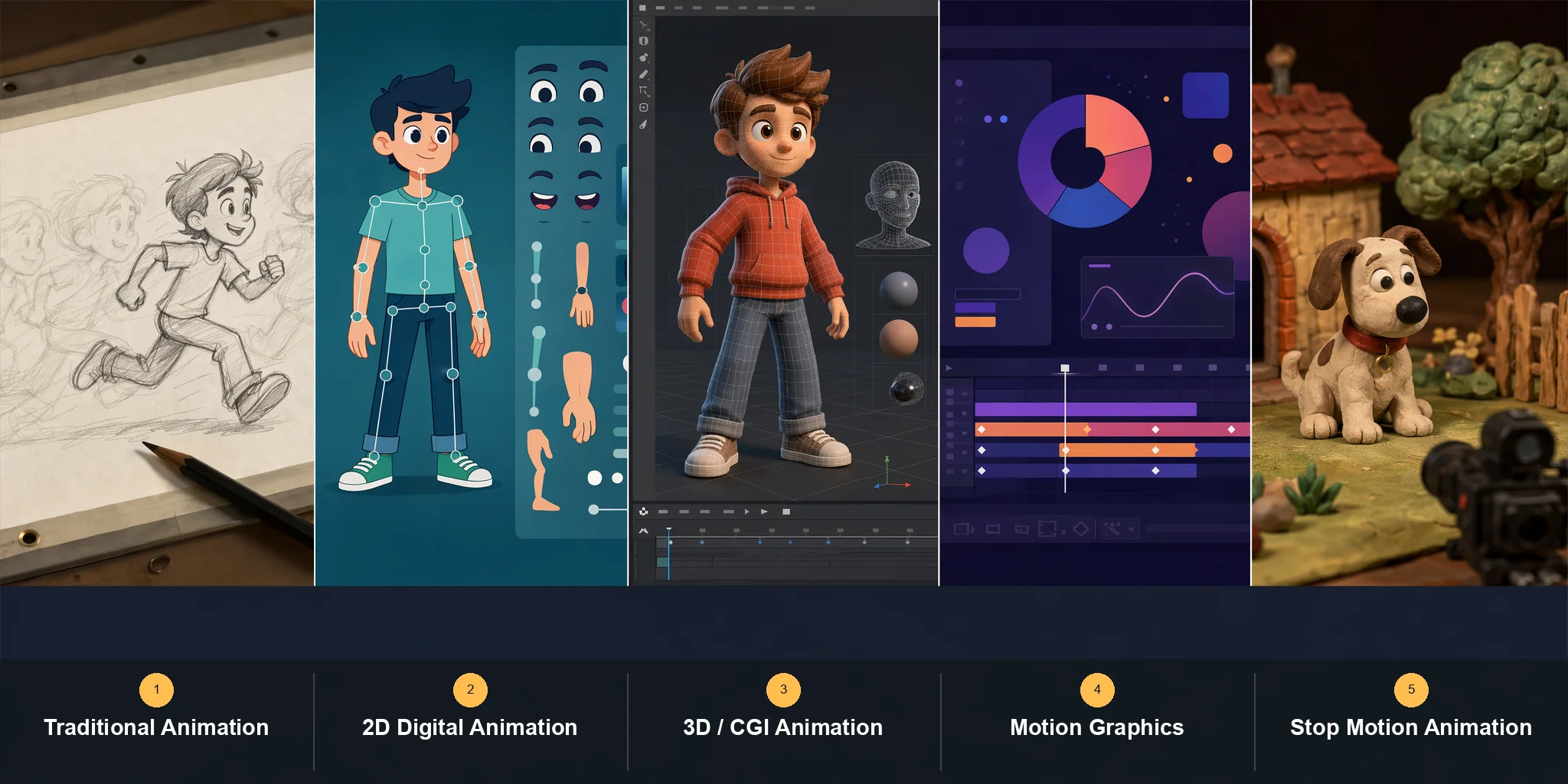
애니메이션은 여러 이미지를 빠르게 연속으로 보여 주어 움직임의 착시를 만드는 예술입니다. 대표적인 다섯 가지 애니메이션 유형은 traditional(hand-drawn), 2D vector, 3D(CGI), Motion Graphics, Stop Motion 입니다. 각각 사용하는 도구, 시각적 느낌, 적합한 용도가 다릅니다.
애니메이션이란?
애니메이션은 정지 이미지(frame)를 연속으로 보여 주어 사람의 눈이 이를 끊기지 않는 움직임으로 인식하게 만드는 방식입니다. 이 효과는 흔히 persistence of vision 으로 설명됩니다. 각 frame 이 뇌에 잠시 남아 다음 frame 과 섞이면서 생명감과 움직임처럼 보이는 것입니다.
사람들이 types of animation 을 검색할 때 궁금해하는 것은 애니메이션이 어떻게 “보이는지”뿐 아니라 어떻게 “만들어지는지”입니다. 그래서 다양한 types of animation styles 은 단순한 외형보다 기술과 제작 과정으로 정의됩니다. 즉 cartoon, realistic CGI scene, cut-out puppet film 은 화면상으로 완전히 달라 보여도, 핵심 차이는 각 frame 이 어떻게 만들어지고 조립되는지에 있습니다.
예를 들어 types of animation in computer graphics 에서는 2D 또는 3D software, keyframe, physics system 을 사용해 motion 을 생성합니다. 반면 traditional hand-drawn animation 은 종이나 태블릿에 frame-by-frame 으로 그려지고, Stop Motion 은 실제 물체를 조금씩 움직여 촬영합니다.
자료마다 분류 방식은 조금씩 다릅니다. 어떤 곳은 네 가지로, 어떤 곳은 여섯 가지 이상으로 나누기도 합니다. 하지만 오늘날 가장 널리 인정되는 다섯 가지 스타일은 traditional(hand-drawn) animation, 2D digital animation, 3D(CGI) animation, Motion Graphics, Stop Motion 입니다. 아래에서는 각 유형이 무엇인지, 어떻게 만들어지는지, 실제 예시, 도구, 활용 분야를 설명합니다.
Traditional(Hand-Drawn / Cel) Animation
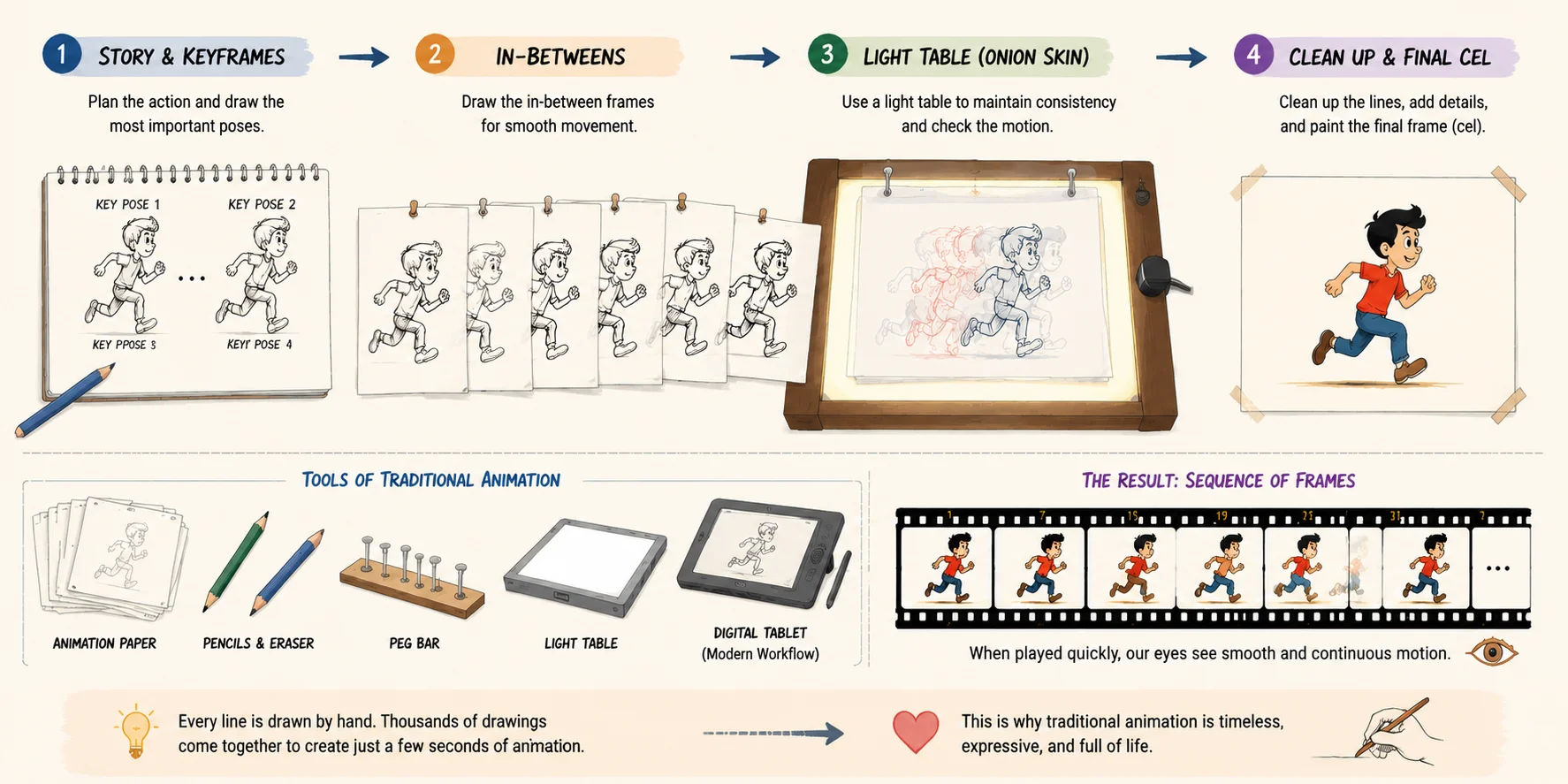
Traditional animation 은 hand-drawn 또는 cel animation 이라고도 하며, 모든 types of animation styles 중 가장 오래되고 기본이 되는 형태입니다. 각 frame 을 하나씩 그린 뒤 순서대로 배열해 움직임의 착시를 만듭니다. 이는 what are the 4 types of animation 이라는 질문에 대한 가장 분명한 답 중 하나이기도 합니다. 애니메이션 산업의 역사적 출발점이며, 오늘날 types of animation in computer graphics 에도 계속 영향을 주고 있기 때문입니다.
핵심은 frame-by-frame 제작입니다. 아티스트는 먼저 중요한 자세(keyframes)를 스케치하고, 그 사이 움직임(in-betweens)을 채워 부드러운 motion 을 만듭니다. 고전적인 studio workflow 에서는 animator 가 light table 을 사용해 trace 하며 frame 간 일관성을 유지했습니다. 캐릭터가 튀거나 비율이 흔들리지 않도록 하기 위해서입니다. 디지털 workflow 에서도 원리는 그대로이며, 종이가 tablet 으로 바뀌었을 뿐입니다.
이 스타일은 유려하고 표현력이 풍부하며, 약간의 불완전함 덕분에 유기적이고 살아 있는 느낌을 줍니다. 모든 움직임을 수작업으로 그리기 때문에 traditional animation 은 강한 예술적 개성을 담습니다. 하지만 매우 노동집약적이어서 대형 studio 는 한 편의 장편 영화를 위해 수백 명의 아티스트를 투입하기도 합니다.
가장 상징적인 types of animation examples 중 다수가 이 스타일에서 나왔습니다. Disney 의 Snow White and the Seven Dwarfs(1937)는 초기 Hollywood cel-animated feature 의 이정표이자 Disney 의 첫 장편 애니메이션입니다. 이후 The Lion King 과 초기 Tom and Jerry shorts 는 hand-drawn animation 이 storytelling, emotion, timing 에서 얼마나 강력한지 보여 주었습니다.
현대 제작에서도 이 방식은 계속 사용되지만, 도구는 바뀌었습니다. Toon Boom Harmony 와 TVPaint 같은 software 가 종이 기반 workflow 의 상당 부분을 대체해 협업과 수정은 더 빨라졌고, traditional aesthetic 은 유지할 수 있게 되었습니다.
Traditional animation 은 feature film, stylized storytelling, artistic shorts 에 적합하며, 제작 속도보다 감정 표현이 더 중요한 작업에 특히 좋습니다. 디지털 시대에도 품질과 장인정신의 기준으로 남아 있으며, 2D animation 과 현대 hybrid workflow 전반에 영향을 줍니다.
Traditional (Hand-Drawn / Cel) Animation
2D Animation(Vector & Frame-by-Frame)
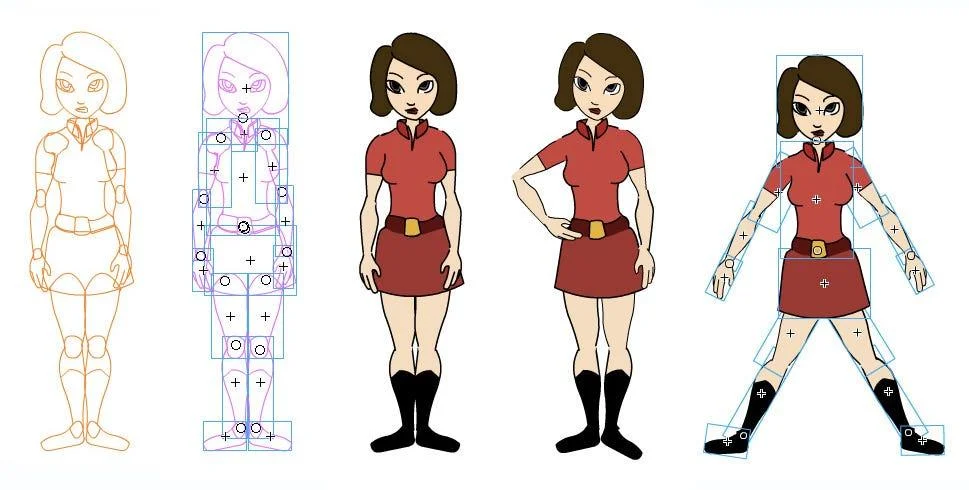
2D animation 은 가장 널리 쓰이는 types of animation styles 중 하나로, 깊이 없이 높이와 너비만 있는 평면 공간에서 움직임을 만드는 방식입니다. traditional hand-drawn animation 이 주로 종이에 완전한 frame-by-frame 방식으로 그려졌다면, 현대 2D animation 은 대부분 디지털이며 크게 frame-by-frame drawing 과 rigged vector animation 두 방식으로 제작됩니다.
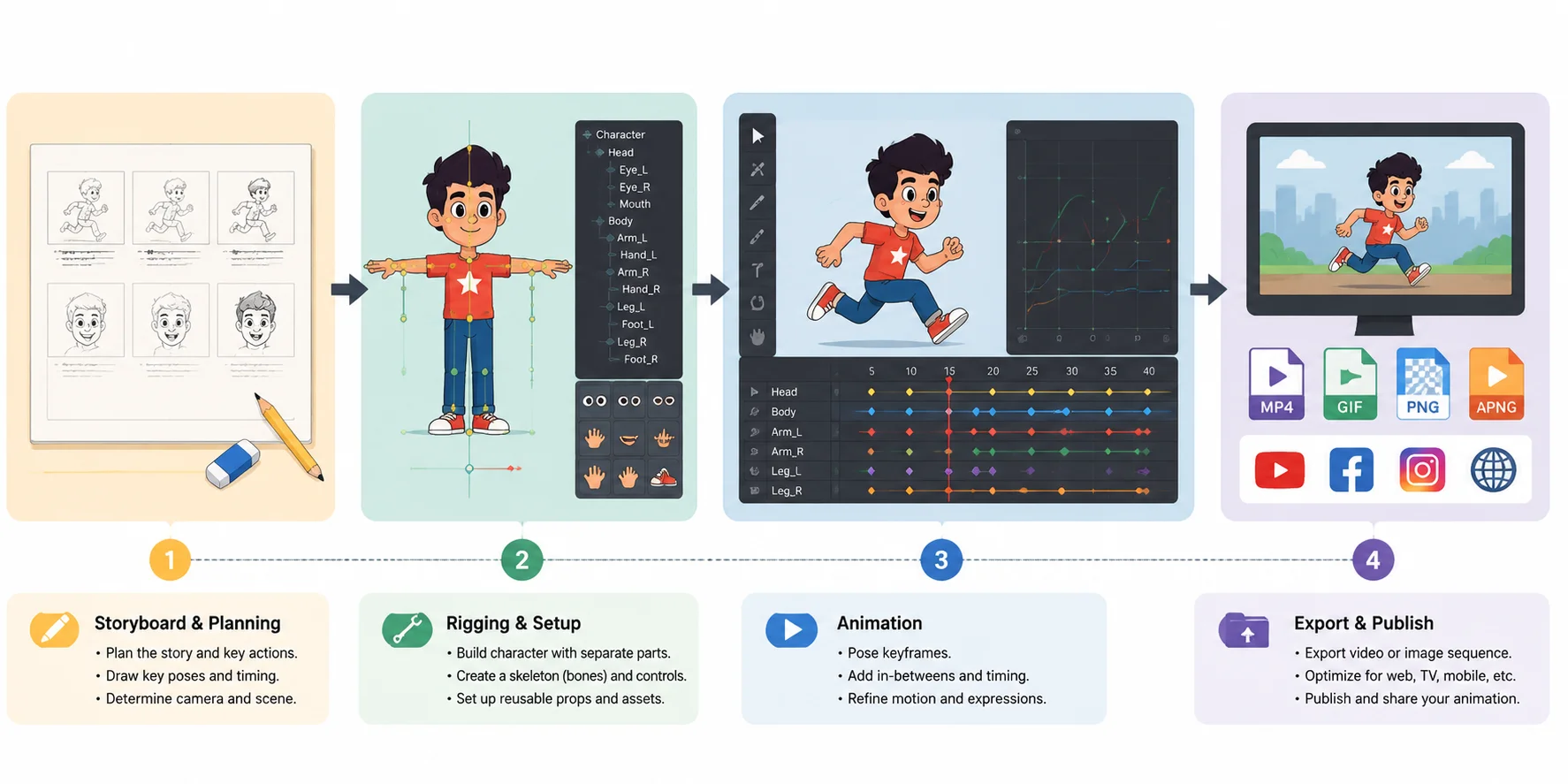
Frame-by-frame 2D animation 은 traditional animation 과 비슷하게 각 움직임을 하나씩 그립니다. 이 방식은 매우 유기적이고 표현력이 좋아 timing 과 emotion 을 완전히 제어하고 싶을 때 사용됩니다. 하지만 현대 pipeline 에서는 vector-based rigged animation 이 훨씬 흔합니다. 캐릭터를 매 frame 다시 그리는 대신, 팔, 다리, 얼굴 요소를 skeleton(rig)에 연결해 digital puppet 처럼 움직입니다. 이렇게 하면 제작이 더 빠르고 확장하기 쉽습니다.
여기서 2D animation vs traditional animation 의 차이가 중요해집니다. Traditional animation 은 보통 완전한 hand-drawn frame-by-frame 방식이지만, 2D digital animation 은 asset 을 재사용하고 character rig 를 활용하며 software tool 에 크게 의존합니다. 즉 2D animation 은 단순히 “old-school drawing” 이 아니라, traditional motion 을 흉내 내면서 훨씬 높은 효율을 낼 수 있는 유연한 digital system 입니다.
types of animation examples 로 보면 2D animation 은 TV cartoon, web series, explainer video, YouTube content, mobile ads 등 어디에나 있습니다. Adventure Time 같은 작품이나 많은 현대 anime production 은 2D pipeline 에 크게 의존하고, corporate explainer video 는 clarity 와 speed 를 위해 단순화된 vector motion graphics 를 자주 사용합니다.
이 카테고리의 대표 도구는 Adobe Animate 와 Toon Boom Harmony 입니다. 두 도구 모두 frame-by-frame drawing 과 advanced rigging system 을 지원합니다. serialized content 를 만드는 studio 에서는 일관성과 production speed 가 순수한 handcrafted frame 보다 더 중요할 때가 많기 때문에 업계 표준으로 쓰입니다.
전반적으로 2D animation 은 traditional artistry 와 modern digital efficiency 사이에 있으며, types of animation in computer graphics 중에서도 가장 다재다능한 유형입니다. TV production, explainer content, comedic storytelling, web-based series 처럼 visual clarity 와 빠른 turnaround 가 필요한 곳에 특히 적합합니다.
2D Animation Pipeline
3D Animation(CGI)
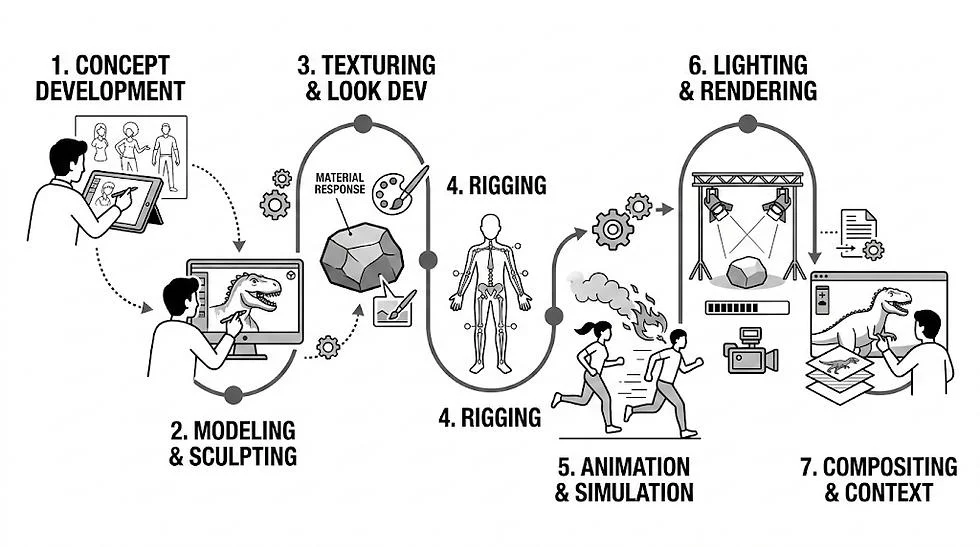
3D animation, 즉 CGI(Computer-Generated Imagery)는 현대 film, game, digital media 에서 가장 널리 쓰이는 types of animation styles 중 하나입니다. 3차원 공간에 digital object 를 만들고, depth(Z-axis), lighting, camera movement, physically based material 을 제어해 현실적이거나 stylized 된 결과를 만듭니다.
3D animation 은 구조화된 production pipeline 을 따릅니다. 먼저 model 을 만들고(modeling), 움직일 수 있도록 digital skeleton 을 추가한 뒤(rigging), keyframe-based animation 으로 시간에 따라 character pose 를 설정합니다. 마지막으로 rendering 단계에서 lighting, texture, effect 가 계산되어 최종 image 또는 video 가 만들어집니다. 간단히 말해 pipeline in one line 은 modeling → rigging → animation → rendering 입니다.
이 workflow 는 다른 types of animation in computer graphics 와 비교해 매우 강력하고 유연합니다. full camera control, realistic physics simulation, reusable assets 를 제공하기 때문입니다. 캐릭터가 한 번 만들어지면, 다시 그릴 필요 없이 어떤 각도에서도 animation 할 수 있습니다.
가장 상징적인 types of animation examples 중 일부도 이 카테고리에 속합니다. Pixar 의 Toy Story 는 최초의 fully 3D-animated feature film 이었고, 이후 Pixar 와 DreamWorks 는 CGI storytelling 의 글로벌 표준을 만들었습니다. 영화 외에도 3D animation 은 video game, architectural visualization, product design, AR/VR experience 에 많이 쓰입니다.
이 pipeline 의 대표 도구는 Blender 와 Autodesk Maya 입니다. Blender 는 free and open-source 라서 indie creator 에게 널리 쓰이고, Maya 는 large studio 의 character animation 과 production pipeline 에서 여전히 industry standard 입니다.
AI 도 이 pipeline 의 일부를 빠르게 바꾸고 있습니다. 최신 도구는 text prompt 나 image prompt 로 몇 초 만에 base 3D model 을 생성해 modeling stage 를 크게 단축할 수 있습니다. Auto-rigging 은 skeleton 을 자동으로 추가해 수동 setup 없이도 character 를 animation-ready 상태로 만들 수 있습니다. 다만 현재 지원은 T-pose humanoid characters 와 standard standing quadruped animals 중심입니다. 이는 빠른 prototyping 이 필요한 indie creator 와 small team 에 특히 유용합니다.
이 workflow 는 Tripo AI Text to 3D 와 Tripo AI Auto-Rigging 같은 도구로 탐색할 수 있습니다. 몇 시간 걸리던 작업을 몇 분으로 줄이는 데 도움이 됩니다.
전체적으로 3D animation(CGI)은 모든 types of animation styles 중 가장 고도화되고 production-heavy 한 범주이며, 현대 feature film, AAA game, immersive digital experience 의 핵심 기반입니다.
Motion Graphics
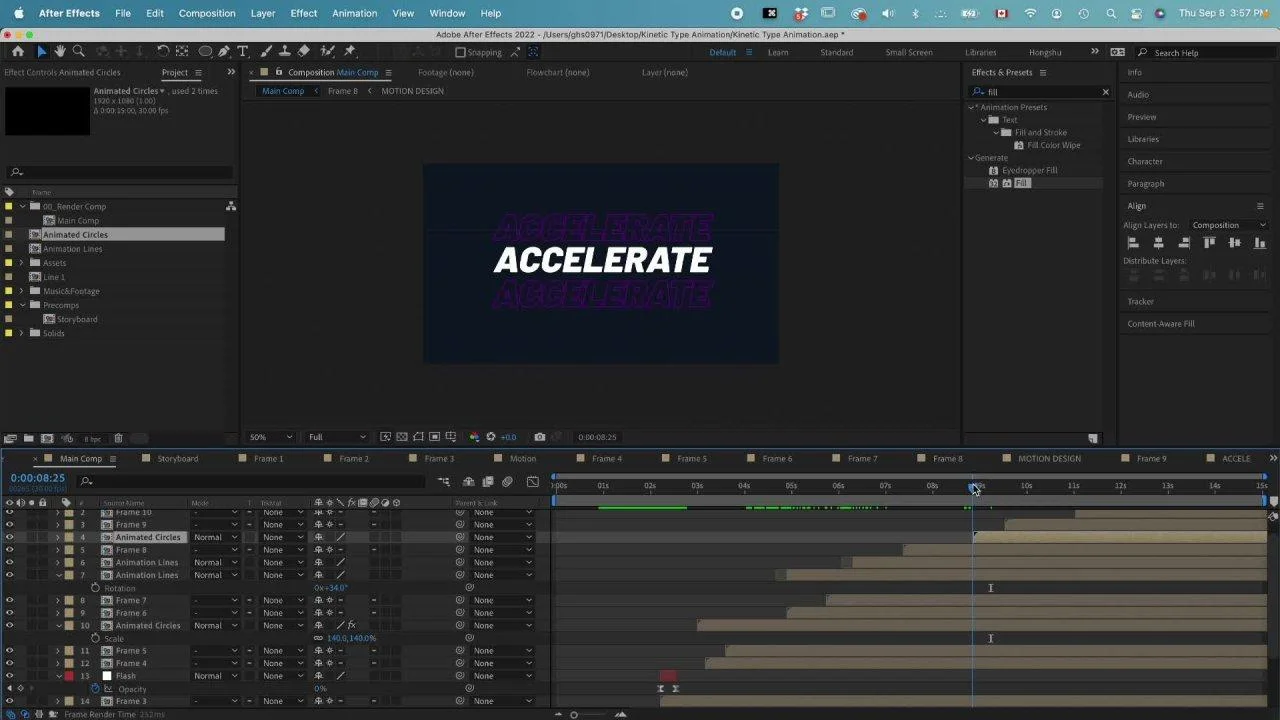
Motion Graphics 는 types of animation styles 중 독특한 범주입니다. character 나 storytelling 보다 graphic design elements 를 움직이는 데 집중하기 때문입니다. 감정을 가진 character 의 narrative 를 따라가는 대신, shape, icon, typography, data-driven visual 을 움직입니다. 그래서 비슷한 software 와 technique 을 사용하더라도 character animation 과는 근본적으로 다릅니다.
핵심은 간단합니다. Motion Graphics 는 움직이는 design 입니다. “감정을 가진 character” 를 animate 하는 것이 아니라 text transition, geometric shape, UI component, infographic data 같은 visual element 로 movement 를 만드는 것입니다. 그래서 대부분의 types of animation in computer graphics 에서 Motion Graphics 는 performance 나 storytelling 이 아니라 communication 과 design clarity 중심의 별도 category 로 여겨집니다.
motion graphics vs character animation 을 이해하려면 목표를 비교하면 됩니다. Character animation 은 emotion, acting, narrative performance 에 집중합니다. Motion Graphics 는 정보를 빠르고 명확하게 전달하는 데 집중합니다. 그래서 commercials, corporate explainers, product demos, UI/UX animations, film and television title sequences 에 널리 쓰입니다.
예를 들어 많은 advertising videos 는 animated typography 로 product benefit 을 강조하고, SaaS 기업은 Motion Graphics 로 data 나 workflow 를 시각화합니다. 영화의 opening credits 에서도 character 를 도입하지 않고 tone 과 mood 를 만들기 위해 Motion Graphics 를 자주 사용합니다.
이 카테고리의 industry-standard tool 은 Adobe After Effects 입니다. keyframe, effect, expression 으로 layer, text, vector shape 를 animate 할 수 있습니다. 또한 Illustrator 및 Premiere Pro 와 결합해 full production pipeline 을 구성하는 경우도 많습니다.
모든 types of animation examples 중 Motion Graphics 는 상업적으로 매우 중요합니다. 제작이 빠르고 scale 하기 쉬우며 communication 에 매우 효과적이기 때문입니다. branding, data visualization, explainer videos, marketing content 처럼 narrative depth 보다 clarity 가 중요한 곳에 특히 적합합니다.
Stop Motion(+ Sub-Styles)
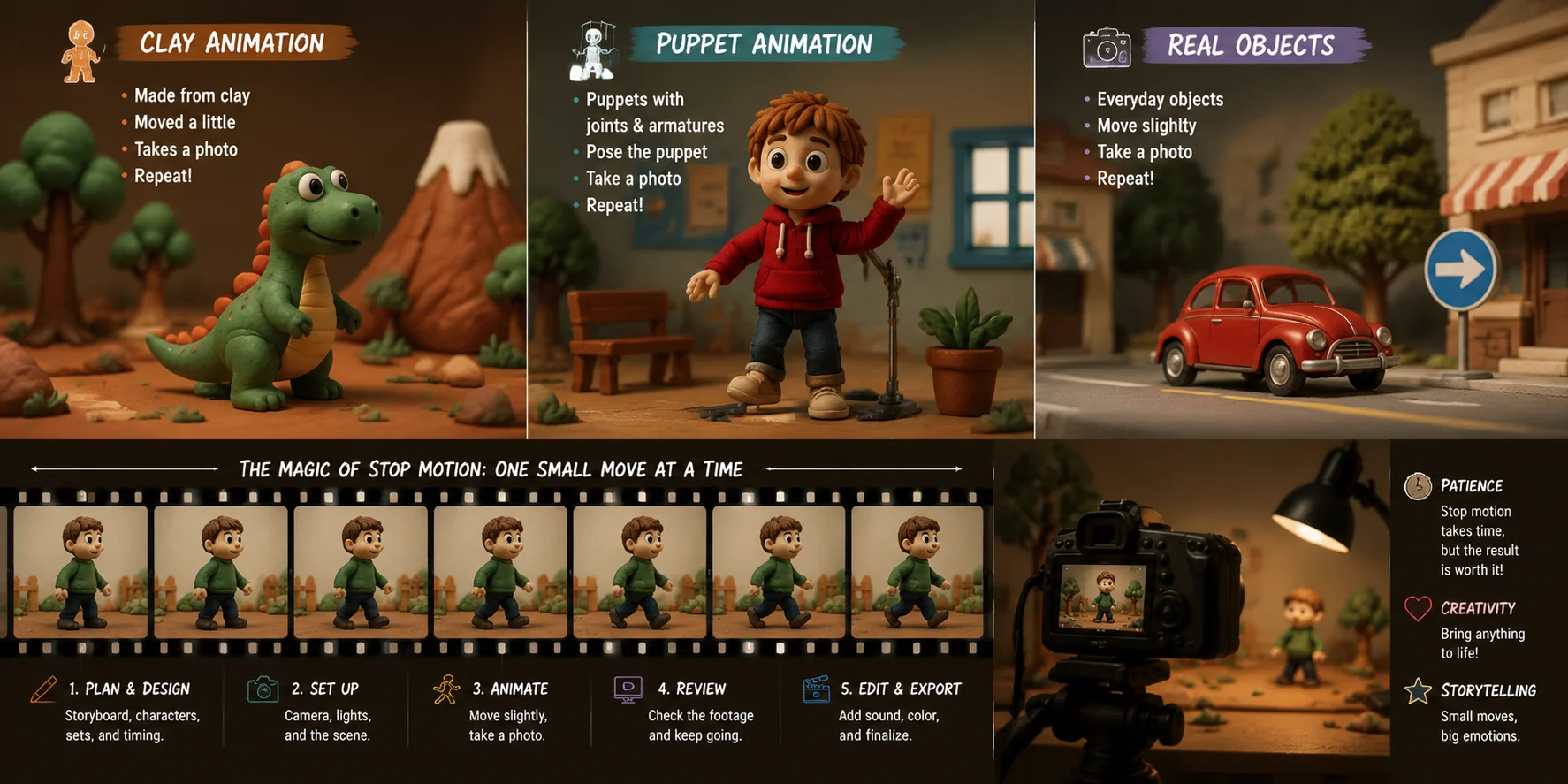
Stop Motion animation 은 가장 뚜렷한 types of animation styles 중 하나입니다. 실제 물체를 frame-by-frame 으로 물리적으로 조작해 움직임을 만들기 때문입니다. 컴퓨터 안에서 drawing 하거나 modeling 하는 대신, animator 는 clay figures, puppets, toys, paper cutouts, 심지어 real actors 를 조금씩 움직이고 각 변화를 camera 로 촬영합니다. 이 still images 를 연속으로 재생하면 motion 의 착시가 생깁니다. 그래서 Stop Motion 은 가장 “tactile” 한 animation 형태로 설명되기도 합니다.
다른 types of animation in computer graphics 와 달리 Stop Motion 은 완전히 physical reality 에 기반합니다. 화면에 보이는 모든 것은 촬영 전에 실제 세계에 존재해야 합니다. 그래서 제작 과정은 매우 시간이 많이 들고 detail-sensitive 합니다. frame rate 에 따라 animation 1초에는 12장, 24장, 또는 그 이상의 개별 사진이 필요할 수 있습니다. lighting, object position, camera alignment 의 작은 변화도 continuity 를 깨뜨릴 수 있으므로 precision 이 필수입니다.
이 handcrafted nature 덕분에 Stop Motion 은 고유한 visual identity 를 갖습니다. 약간 불완전해 보일 수 있지만, 바로 그 불완전함이 매력입니다. texture, weight, authenticity 를 만들어내며 digital animation 이 쉽게 복제하지 못하는 느낌을 줍니다. 그래서 handcrafted aesthetic 으로 차별화하고 싶은 artistic projects, indie films, high-end commercials 에 자주 사용됩니다.
Stop Motion Animation 의 Sub-styles
Stop Motion 은 단일 technique 이 아니라, 서로 다른 material 과 creative approach 를 사용하는 types of animation styles with examples 의 family 입니다.
- Claymation(clay figures) — Wallace & Gromit, Shaun the Sheep
- Puppet animation — The Nightmare Before Christmas, Coraline
- Cutout animation — flat paper 나 fabric pieces 를 frame by frame 으로 움직이는 방식(예: early South Park)
- Brickfilm(Lego animation) — LEGO bricks 와 mini-figures 를 조금씩 움직이는 방식
- Pixilation(real people frame-by-frame) — real actors 를 stop-motion puppets 처럼 움직이는 방식(예: experimental films, music videos)
이 sub-styles 는 매우 다르게 보이지만, 기본 원리는 같습니다. physical movement + sequential photography = animation 입니다.
Production tools and workflow
전문 production pipeline 에서 Stop Motion 은 traditional animation program 보다 hardware 와 specialized software 의 조합을 필요로 합니다. DSLR 또는 mirrorless camera 를 안정적인 rig 나 tripod 에 고정해 frame 사이의 의도치 않은 움직임을 방지합니다. Lighting setup 도 수천 장의 image 에서 일관성을 유지하도록 세밀하게 관리됩니다.
Dragonframe 은 studio 에서 널리 사용되는 software 입니다. animator 가 onion-skin frame 을 preview 하고, camera capture 를 제어하며, timing 을 정밀하게 조정할 수 있기 때문입니다. 복잡한 jump, facial expression, environment interaction 이 포함된 scene 에서는 puppet 을 고정하기 위해 physical rig 도 자주 사용됩니다.
Stop Motion 이 사용되는 곳
모든 types of animation examples 중 Stop Motion 은 특별한 artistic niche 를 차지합니다. 널리 사용되는 분야는 다음과 같습니다.
- Feature films, 특히 stylized 또는 fantasy storytelling
- Indie short films 와 festival projects
- High-end advertising campaigns
- Music videos 와 experimental art films
수작업 특성 덕분에 브랜드나 filmmaker 가 시각적으로 돋보이고 싶을 때 특히 효과적입니다. polished CGI 나 flat Motion Graphics 와 달리, Stop Motion 은 관객이 즉시 알아볼 수 있는 human touch 를 가집니다.
Bonus Techniques(Rotoscoping & Whiteboard)
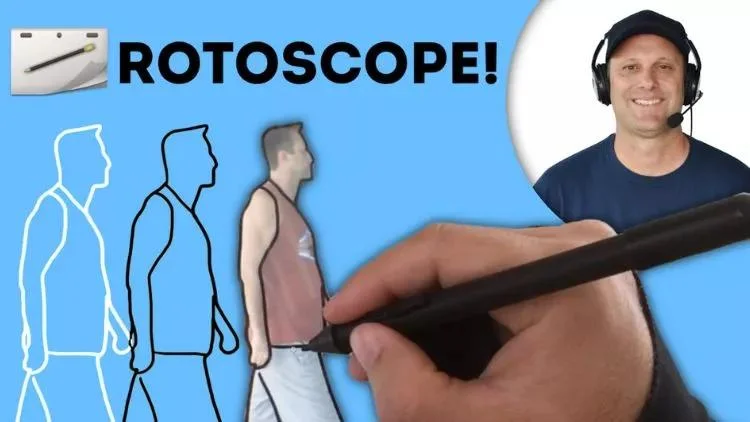
주요 types of animation styles 외에도, 항상 독립 category 로 분류되지는 않지만 professional pipeline 에서 널리 쓰이는 몇 가지 bonus techniques 가 있습니다. 이 방법들은 traditional 과 digital workflow 사이에 위치하며, 독특한 visual effect 와 실용적인 production advantage 를 제공합니다.
가장 잘 알려진 technique 중 하나는 rotoscoping 입니다. 이는 live-action footage 를 frame by frame 으로 tracing 하여 매우 fluid 하고 realistic 한 animation 을 만드는 방법입니다. 실제 움직임을 기반으로 하기 때문에 rotoscoping 은 pure keyframe animation 으로 만들기 어려운 natural timing, physics, human motion 을 포착합니다. A Scanner Darkly 는 live footage 위에 surreal 하고 painterly 한 look 을 만들었고, Loving Vincent 는 모든 frame 을 Van Gogh 의 화풍처럼 그렸습니다. 현대 pipeline 에서는 VFX, motion tracking, types of animation in computer graphics workflow 의 character animation refinement 에도 사용됩니다.
또 다른 인기 technique 은 whiteboard animation 입니다. 흰 표면 위에 hand-drawn illustration 이 만들어지는 과정을 시뮬레이션하며, 보통 narration 또는 voiceover 와 동기화됩니다. 교육 영상, corporate training content, marketing explainers 에 많이 쓰이며, 복잡한 아이디어를 명확한 visual storytelling 으로 단순화하는 데 도움이 됩니다. “live drawing” 효과는 시청자의 집중을 유지하면서 정보를 단계적으로 강화합니다.
이 technique 들은 항상 core types of animation styles 로 분류되지는 않지만, production environment 에서는 매우 유용합니다. 기존 animation type 을 대체하기보다 realism, clarity, instructional value 를 더하는 역할을 합니다.
Rotoscoping 과 Whiteboard Animation 은 animation 이 얼마나 유연한지 보여 줍니다. traditional craftsmanship 과 digital tools 를 결합해 storytelling, education, visual communication 을 지원할 수 있습니다.
All Animation Techniques Map
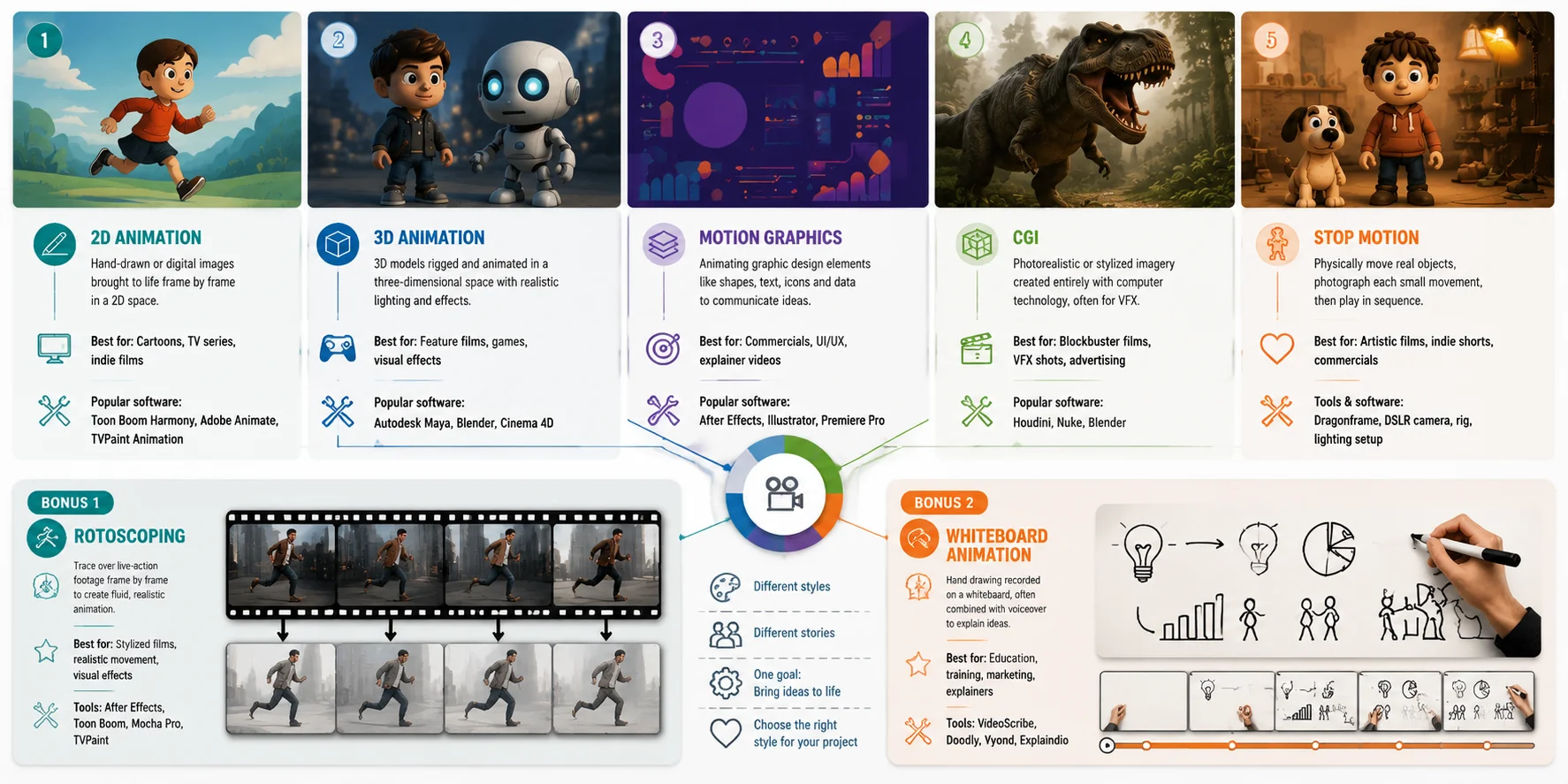
애니메이션 유형 비교(Quick Table)
모든 types of animation styles 를 나란히 이해하려면, 각각을 따로 외우기보다 structure, look, tools, use cases 로 비교하는 것이 좋습니다. 애니메이션은 외형만으로 정의되지 않습니다. 그려지는지, modeling 되는지, 촬영되는지, 또는 digital design 으로 만들어지는지에 따라 달라집니다. 아래 표는 다섯 가지 주요 animation type 을 빠르게 훑어보고 project 에 맞는 approach 를 고르는 데 도움이 됩니다.
Quick Comparison Table
| Type | Dimension | Look | Typical Software | Best For | Difficulty |
|---|---|---|---|---|---|
| Traditional Animation | 2D(frame-by-frame) | 손그림, 유기적, 표현력 높음 | Pencil / paper, Toon Boom Harmony | Classic films, artistic shorts | High |
| 2D Digital Animation | 2D(vector / rigged) | 깔끔함, stylized, 유연함 | Adobe Animate, Toon Boom Harmony | TV series, explainers, web content | Medium |
| 3D / CGI Animation | 3D(digital space) | realistic 또는 stylized, cinematic | Blender, Autodesk Maya | Films, games, VFX | High |
| Motion Graphics | 2D / 2.5D(design-based) | graphic, minimal, data-driven | After Effects, Illustrator | Ads, branding, UI, explainer videos | Medium |
| Stop Motion Animation | Physical(real world) | 촉감 있음, handmade, textured | Dragonframe, DSLR camera | Indie films, commercials, artistic shorts | High |
이 quick table 은 types of animation in computer graphics 와 physical animation 을 함께 이해하는 데 도움을 줍니다. 각 style 은 외형뿐 아니라 workflow 와 production logic 도 다릅니다. 예를 들어 traditional animation 과 2D digital animation 은 화면에서는 비슷해 보일 수 있지만, 하나는 완전히 hand-drawn 이고 다른 하나는 reusable rig 를 자주 사용합니다. 3D CGI 는 depth 와 camera freedom 을 제공하고, Motion Graphics 는 design communication 에 집중하며, Stop Motion 은 real object 의 physical manipulation 에 의존합니다.
types of animation styles with examples 를 볼 때 이 비교는 각 style 이 왜 존재하고 어디에서 효과적인지 명확히 해 줍니다. 중요한 질문은 “어떤 animation 이 최고인가”가 아니라 “어떤 animation style 이 story, budget, purpose 에 맞는가”입니다.
어떤 Animation Type 을 선택하거나 배워야 할까?
여러 types of animation styles 중에서 선택할 때 중요한 것은 무엇이 “최고”인지가 아니라, project goals, resources, learning path 에 맞는지입니다. 각 animation style 은 서로 다른 creative problem 을 해결합니다. 어떤 것은 storytelling 에, 어떤 것은 speed 에, 어떤 것은 realism 이나 artistic expression 에 적합합니다. 아래는 실제 production needs 를 기준으로 한 실용적인 정리입니다.
Project goal 기준(무엇을 만들고 싶은가)
- 목표가 explainer videos, marketing content, SaaS demos → Motion Graphics 라면
(빠르고 design-driven 이며 communication 과 branding 에 적합) - 목표가 feature films, AAA games, cinematic storytelling → 3D / CGI Animation 라면
(realistic lighting, camera control, 현대 entertainment 의 industry-standard) - 목표가 TV series, episodic content, web animation → 2D Digital Animation 라면
(효율적인 production, scalable workflow, quality 와 speed 의 균형) - 목표가 artistic shorts 또는 highly stylized storytelling → Traditional 또는 Stop Motion 라면
(manual craftsmanship, unique visual identity, strong artistic impact)
Budget & team size 기준
- High resource / large teams: 3D CGI, Stop Motion
(modeling, rigs, physical sets, complex pipelines 필요) - Medium resources: Traditional animation
(labor-heavy 하지만 style 에 따라 유연) - Low to medium resources / small teams: 2D digital, Motion Graphics
(빠른 production, reusable assets, software-driven workflow)
Learning path 기준(beginner)
애니메이션을 처음 배우는 경우, 가장 쉬운 진입점은 다음과 같습니다.
- Motion Graphics → 가장 시작하기 쉬움
(keyframes + shapes + text, drawing skill 최소) - 2D Digital Animation → 다음 단계
(timing, character movement, basic rigging concepts 학습) - 3D Animation → intermediate to advanced
(space, lighting, rigging, rendering 이해 필요) - Stop Motion / Traditional → advanced artistic learning path
(patience, physical setup, frame-by-frame discipline 필요)
어떤 Animation Type 을 선택하거나 배워야 할까?
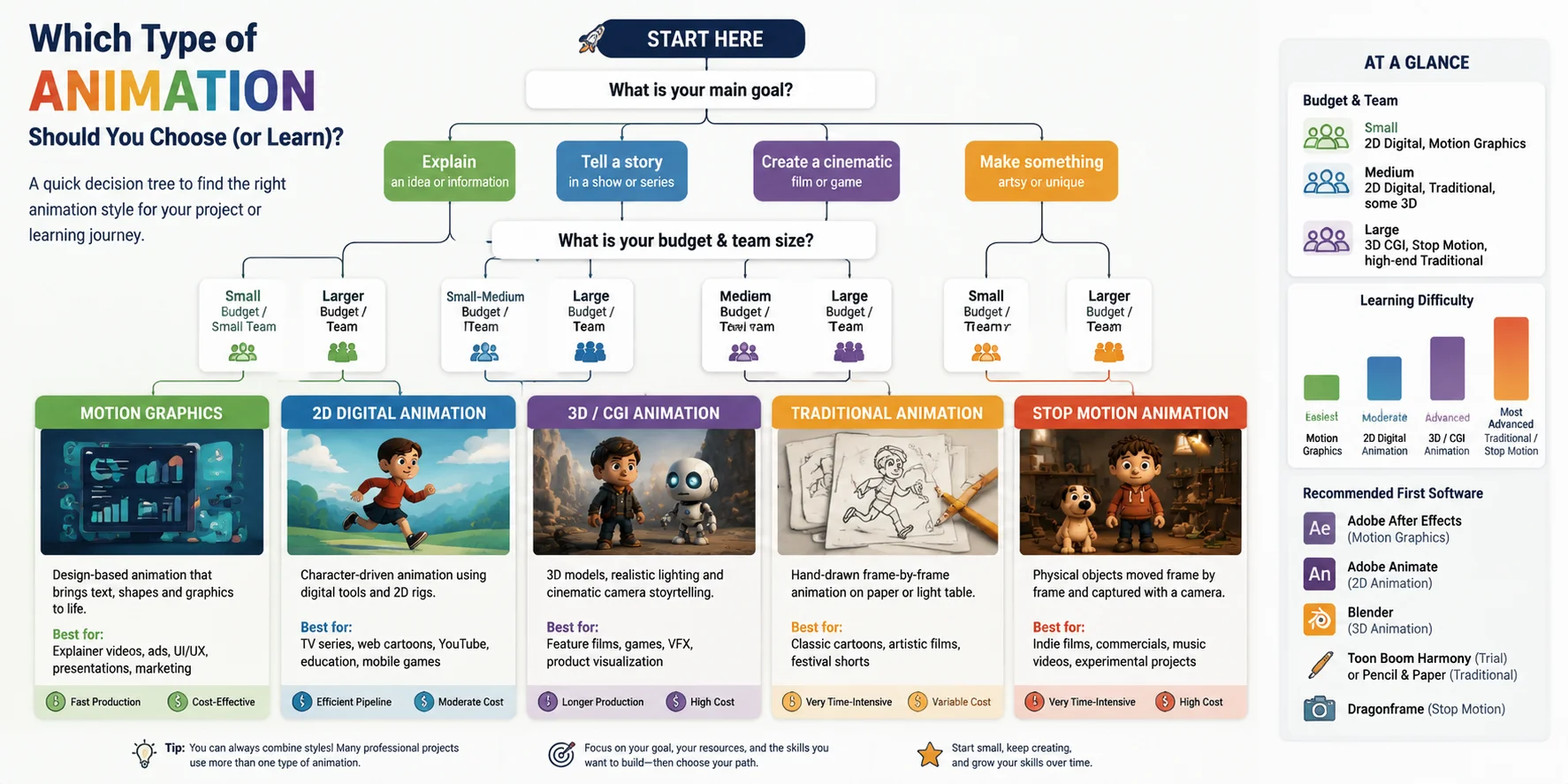
자주 묻는 질문
다섯 가지 주요 애니메이션 유형은 무엇인가요?
다섯 가지 주요 animation type 은 traditional animation, 2D digital animation, 3D(CGI) animation, Motion Graphics, Stop Motion animation 입니다. 각 유형은 외형보다 technique 에 따라 다릅니다. Traditional 과 2D 는 drawing 에, 3D 는 digital modeling 에, Motion Graphics 는 design-based communication 에, Stop Motion 은 real-world objects 를 frame by frame 으로 촬영하는 방식에 기반합니다.
4가지 애니메이션 유형은 무엇인가요?
일반적인 단순 분류에서는 traditional animation, 2D animation, 3D animation, Stop Motion 네 가지를 말합니다. 이 버전은 Motion Graphics 를 digital 또는 2D animation 의 일부로 묶습니다. film production, computer graphics, design workflow 중 무엇에 초점을 두는지에 따라 분류는 달라질 수 있습니다.
애니메이션의 12가지 기본 원칙은 무엇인가요?
애니메이션의 12 principles 는 2D 와 3D animation 모두에서 쓰이는 기본 규칙입니다. squash and stretch, anticipation, staging, straight ahead action and pose to pose, follow through and overlapping action, slow in and slow out, arcs, secondary action, timing, exaggeration, solid drawing, appeal 이 포함됩니다. 이 원칙들은 motion 을 더 realistic 하고 engaging 하게 만듭니다.
세계에서 가장 오래된 cartoon 은 무엇인가요?
가장 초기의 animated films 중 하나는 Émile Cohl 의 Fantasmagorie(1908)로, 최초의 fully animated cartoon 으로 자주 언급됩니다. hand-drawn frame-by-frame technique 으로 제작되었습니다. 그 이전에도 실험적인 motion visuals 는 있었지만, Fantasmagorie 는 animation history 의 중요한 milestone 으로 널리 인정됩니다.
2D animation 과 3D animation 의 차이는 무엇인가요?
2D animation 은 drawing 또는 digital illustration 으로 평면 2D space 에 움직임을 만듭니다. 3D animation 은 3D digital environment 에 object 를 만들고 움직이며 depth, camera freedom, realistic lighting 을 더합니다. 2D pipeline 은 illustration-driven 이고 더 빠르게 제작되는 편입니다. 3D 는 setup 이 더 technical 하지만, scene 을 어떤 각도에서도 볼 수 있고 다시 그릴 필요가 없습니다. 둘 다 keyframe 을 사용하지만 dimension 이 다릅니다.
애니메이션 제작에는 어떤 software 가 사용되나요?
적합한 tool 은 animation type 에 따라 다릅니다. 2D 는 Adobe Animate 와 Toon Boom Harmony, 3D 및 CGI 는 Blender(free, open-source)와 Autodesk Maya, Motion Graphics 는 Adobe After Effects, Stop Motion 은 professional studio 에서 Dragonframe 이 흔히 쓰입니다. 대부분의 beginner 는 무료 학습 커뮤니티가 큰 Blender 또는 After Effects 로 시작합니다.
Stop Motion animation 은 무엇이며 어떻게 작동하나요?
Stop Motion 은 clay figures, puppets, paper cutouts, everyday items 같은 real objects 를 아주 조금씩 움직이고 각 위치를 촬영하는 방식입니다. 이미지를 보통 초당 1224 frame 으로 재생하면 움직임의 착시가 생깁니다. 완성 영상 1초에 1224장의 사진이 필요할 수 있어 가장 시간이 많이 드는 animation techniques 중 하나입니다.
Motion Graphics 는 무엇이며 character animation 과 어떻게 다른가요?
Motion Graphics 는 text, shapes, icons, data visualizations 같은 graphic design elements 를 animate 하여 character 나 storyline 없이 정보를 명확히 전달합니다. Character animation 은 performance, emotion, narrative 에 집중합니다. 쉽게 말해 animation 이 story 를 말하면 character animation, idea 를 설명하면 Motion Graphics 입니다. 둘 다 keyframe 과 timing 을 사용하지만 goal 과 tool 이 다릅니다.
초보자가 가장 배우기 쉬운 animation type 은 무엇인가요?
Motion Graphics 가 일반적으로 가장 접근하기 쉽습니다. drawing skill 보다 keyframes, shapes, text 에 의존하며, 주요 tool 은 Adobe After Effects 입니다. rigged characters 를 사용하는 2D digital animation 이 다음 단계입니다. 3D animation(Blender 는 무료)은 modeling, rigging, rendering 에 대한 더 많은 technical knowledge 가 필요합니다. Traditional 과 Stop Motion 은 모두 강한 artistic discipline 과 많은 hands-on setup time 을 요구합니다.
Animation 에서 rotoscoping 이란 무엇인가요?
Rotoscoping 은 animator 가 live-action footage 를 frame by frame 으로 trace 하여 fluid 하고 realistic 한 movement 를 만드는 technique 입니다. Max Fleischer 가 1900년대 초에 발전시켰으며, pure keyframe animation 으로는 재현하기 어려운 natural human motion 을 포착합니다. A Scanner Darkly 와 Loving Vincent 처럼 creative visual style 로 쓰이기도 하고, 현대 VFX 에서 subject 를 background 로부터 분리하는 실용 작업에도 쓰입니다.
Conclusion
적합한 animation type 은 story, budget, skills 에 따라 달라지며, 하나의 “best” 는 없습니다. 3D/CGI route 를 탐색하고 있다면 Tripo AI Studio 로 text prompt 나 image 를 몇 분 만에 animation-ready 3D model 로 바꿀 수 있습니다.