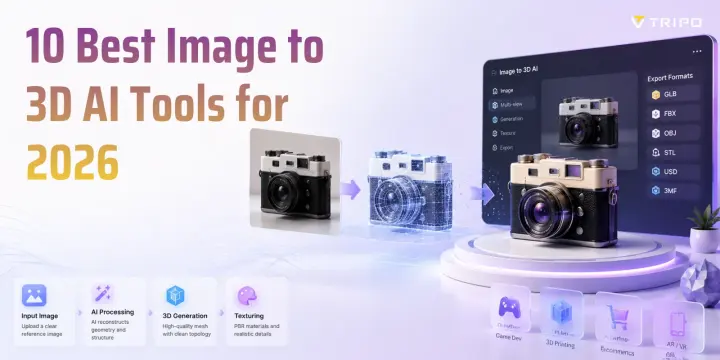
2026년 최고의 Image-to-3D AI 도구 10가지 비교
TL;DR
- Image-to-3D AI는 기존 모델링 없이도 단일 사진이나 스케치를 몇 초 만에 3D 초안으로 바꿀 수 있습니다.
- 2026년 에디터 추천은 Tripo AI입니다. image-to-3D 생성, 저폴리곤 출력을 위한 Smart Mesh 워크플로, 최대 2M 폴리곤 HD Model, STL/3MF를 포함한 6가지 export format을 지원합니다.
- 목표에 따라 선택하세요. 게임 개발자는 깔끔한 topology가 필요하고, 3D 프린팅 사용자는 watertight mesh가 필요하며, 이커머스에는 photoreal texture가 필요합니다.
- 도입 전에 세 가지를 확인하세요. export formats(GLB/FBX/OBJ/STL), 가격/credit, 상업적 사용 권리입니다.
- 무료 tier는 테스트에 유용하지만, export 제한, 다운로드 제한, 고해상도 옵션은 도구와 plan에 따라 다릅니다.
소개
평면 이미지를 3D 모델로 바꾸는 일은 예전에는 수작업 모델링이나 photogrammetry rig에 몇 시간이 걸리는 작업이었습니다. 오늘날 image-to-3D AI tool은 사진이나 스케치를 몇 초 만에 초기 3D 모델로 바꿀 수 있지만, 특정 workflow에 맞게 사용하려면 여전히 결과물을 점검하고 정리해야 할 수 있습니다. 이 가이드는 2026년 기준 10가지 image-to-3D AI 도구를 비교해, 프로젝트에 맞는 생성기를 선택할 수 있도록 돕습니다.
도구 비교 방식과 좋은 도구를 판단하는 기준
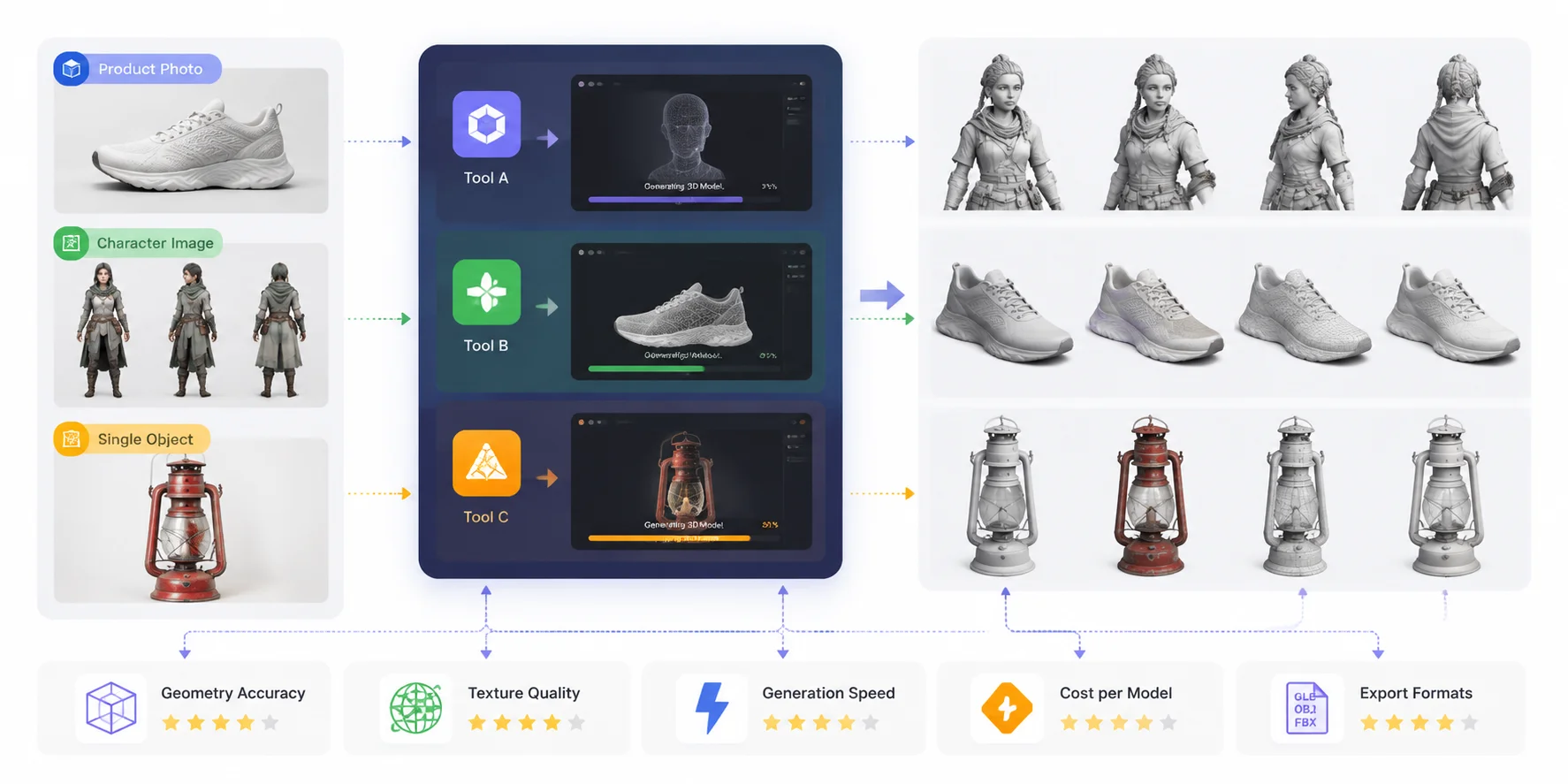
best image to 3D AI tools를 고르는 일은 단순히 가장 인상적인 preview를 만드는 platform을 찾는 것이 아닙니다. 3D model은 screenshot에서는 좋아 보일 수 있지만, 지저분한 geometry, 약한 texture, 제한적인 export option, 높은 generation cost 때문에 실제 workflow에서는 실패할 수 있습니다. 이 비교에서는 모든 도구에 동일한 평가 기준을 적용했습니다. geometry accuracy, texture quality, generation speed, cost, export formats입니다.
이 비교는 다섯 가지 핵심 요소에 집중합니다. 첫 번째 우선순위는 geometry accuracy였습니다. 각 도구가 원본 shape, proportion, 작은 detail, 전체 structure를 얼마나 잘 포착하는지 확인했습니다. texture quality는 생성된 material, color, surface detail이 input image와 얼마나 현실적으로 일치하는지를 기준으로 평가했습니다. generation speed는 이미지에서 사용 가능한 3D model을 얼마나 빠르게 만들 수 있는지에 따라 평가했습니다. cost per model은 free credit, subscription plan, 대규모 asset 생성 시의 실질 비용을 고려했습니다. 마지막으로 GLB, OBJ, FBX 같은 일반 format과 game, AR, animation, 3D printing에 필요한 기타 workflow 지원을 포함해 export formats를 비교했습니다.
하지만 모든 사용자에게 맞는 단 하나의 승자는 없습니다. game developer에게 가장 좋은 photo to 3D tools가 e-commerce brand나 3D printing hobbyist에게 가장 좋은 image to 3D generator와 같을 필요는 없습니다. 어떤 도구는 speed와 automation을 우선시하고, 다른 도구는 더 높은 quality의 mesh, 더 나은 texture, 또는 professional pipeline compatibility에 집중합니다.
이 기준을 바탕으로 아래 섹션에서는 각 도구의 공개된 기능과 의도된 workflow를 기준으로 비교합니다. 아래의 각 도구는 동일한 기준으로 리뷰되어, 빠른 concept model, production-ready asset, 또는 프로젝트에 맞는 최고의 image to 3D model conversion tool이 필요할 때 적합한 solution을 찾는 데 도움을 줍니다.
Image-to-3D AI 도구 벤치마크 워크플로
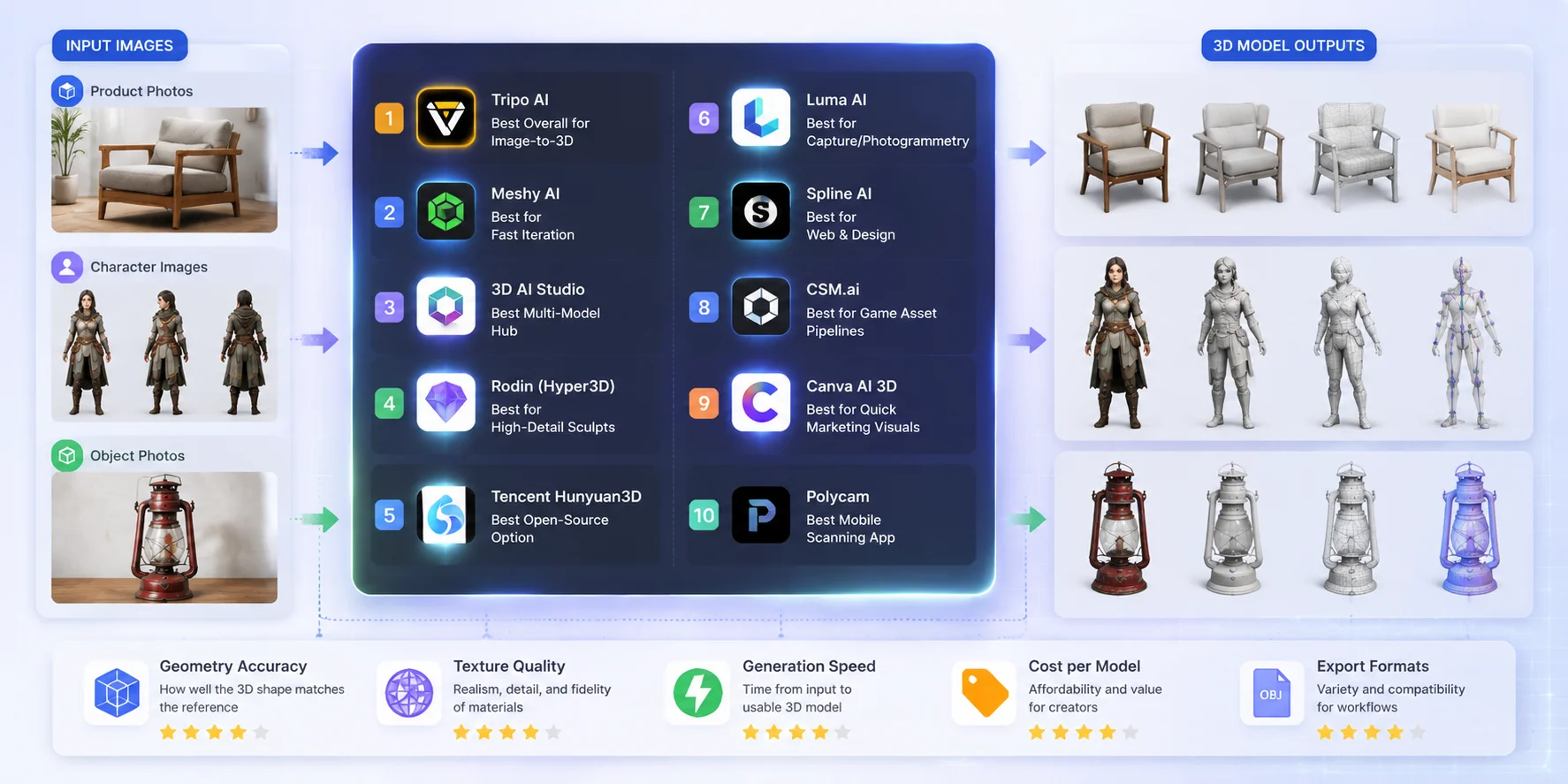
빠른 비교 — 최고의 Image to 3D AI 도구 10가지 한눈에 보기
각 도구를 자세히 살펴보기 전에, 이 표는 지원 input, export 기능, 가격 접근성, 적합한 use case를 기준으로 상위 image to 3D AI tools를 빠르게 개요로 보여줍니다. 올바른 선택은 game-ready asset, product visualization, creative experiment, 또는 빠른 conversion을 위한 best photo to 3D tools 중 무엇이 필요한지에 따라 달라집니다.
| Tool | Best For | Input | Key Export Formats | Plan / Access | Free Access |
|---|---|---|---|---|---|
| Tripo AI | Image-to-3D, game 및 3D-printing workflow | Image, text, 2-4 multi-view images | GLB, USD, FBX, OBJ, STL, 3MF | 무료 및 유료 access; 현재 plan 제한 확인 필요 | 예; plan별 제한 상이 |
| Meshy | Beginner, concept model, game prop | Image, text | FBX, OBJ, USDZ, GLB, STL, BLEND, 3MF | Free, Pro, Studio, Enterprise | 예; 현재 Free plan은 제한된 월간 credit 포함 |
| 3D AI Studio | Multi-model AI 3D experiment | Image, text | 선택한 model 및 workflow에 따라 다름 | 현재 공식 가격 확인 필요 | 제한 access는 달라질 수 있음 |
| Hunyuan3D | Open-source research 및 custom deployment | Image | Mesh export는 local implementation에 따라 다름 | Open-source model; compute cost 발생 | Hosted free tier 아님 |
| Rodin (Hyper3D) | Detailed AI 3D generation | Image, text | 현재 공식 export option 확인 필요 | Credit 및 subscription option은 다양함 | 현재 access 확인 필요 |
| Luma AI | Real-world capture 및 creative 3D workflow | Product에 따라 image, video, text | Export option은 현재 Luma product에 따라 다름 | 현재 공식 가격 확인 필요 | 현재 product access 확인 필요 |
| Spline AI | Web 3D design 및 interactive scene | Spline 내부 prompt 및 asset | GLTF, GLB, STL, USDZ, .spline | 무료 및 유료 plan; 일부 export는 유료 plan 필요 | 예; 기능 제한 적용 |
| CSM (Common Sense Machines) | AI 3D creation workflow | Product에 따라 image, text, video | 현재 공식 export 및 plan option 확인 필요 | 현재 공식 가격 확인 필요 | 현재 access 확인 필요 |
| Canva AI 3D | 3D-style marketing image 및 design asset | Image, prompt, design asset | Image 및 Canva design output; 표준 3D mesh export 아님 | 무료 및 유료 Canva plan | 예; AI 제한은 다양함 |
| Polycam | Mobile scanning 및 photogrammetry | Photo, LiDAR scan, video | Format은 capture type 및 plan에 따라 다름 | 무료 및 유료 plan | 예; capture 및 export 제한 적용 |
2026년 최고의 Image to 3D AI 도구 10가지 리뷰
최고의 image to 3D AI 도구 목록을 만들기 위해, 공개적으로 제공되는 feature, 지원 workflow, export 기능, pricing model, 그리고 대상 사용자 유형을 기준으로 주요 platform을 비교했습니다. 하나의 도구를 보편적인 승자로 다루기보다, game asset creation과 product visualization부터 mobile scanning 및 web design까지 각 platform이 가장 잘 수행하는 영역을 기준으로 평가했습니다.
Tripo AI — Image-to-3D 에디터 추천
**Positioning:**현재 feature set을 기준으로 Tripo AI는 빠른 image-to-3D generation과 Smart Mesh, high-detail model generation, PBR texturing, AI-assisted rigging workflow 같은 production-focused tool을 결합한다는 점에서 돋보입니다.
Best for: 복잡한 modeling pipeline을 구축하지 않고 빠른 image-to-3D generation이 필요한 game developer, designer, creator, business에 가장 적합합니다. 단순 preview를 넘어 실제 workflow에 들어갈 수 있는 model이 필요할 때 특히 유용합니다.
Input & output formats: Tripo는 image-to-3D workflow를 지원하며 GLB, USD, FBX, OBJ, STL, 3MF의 6가지 format으로 export합니다. 또한 Smart Mesh, texture generation, rigging 관련 workflow도 제공합니다.
Pricing / free tier: Tripo는 사용량 요구에 따라 무료 access option과 유료 plan을 제공합니다. API 또는 production-scale workflow의 경우 pricing은 usage-based이므로, 상업용 plan을 선택하기 전에 현재 공식 billing page를 확인하세요. (Tripo 3D)
Limitations: 다른 single-image generation tool과 마찬가지로 복잡한 object, 숨겨진 surface, 매우 세밀한 mechanical structure는 여전히 수작업 cleanup이 필요할 수 있습니다. professional pipeline의 경우 일부 asset은 추가 retopology나 optimization이 필요할 수 있습니다.
Tripo Image to 3D로 reference image를 3D asset으로 빠르게 변환해 보세요.
Meshy AI — 빠른 반복 작업에 최적
Positioning: Meshy는 간단한 browser-based workflow로 빠르게 AI-generated 3D model을 만들고 싶은 creator에게 인기 있는 선택입니다.
Best for: Beginner, indie developer, concept artist, 여러 아이디어를 빠르게 테스트해야 하는 사용자에게 잘 맞습니다. 빠른 generation process 덕분에 character, prop, product concept prototyping에 유용합니다.
Input & output formats: Meshy는 일반 image format을 사용한 image-to-3D generation을 지원하며 FBX, OBJ, GLB, USDZ, STL, BLEND, 3MF 같은 format으로 model을 export합니다.
Pricing / free tier: Meshy는 Free, Pro, Studio, Enterprise plan을 제공합니다. free plan은 테스트용 제한 credit을 포함하며, 유료 plan은 더 많은 generation capacity와 commercial-use option을 제공합니다.
Limitations: Meshy는 빠르고 접근성이 좋지만, 복잡한 topology나 production-level asset은 professional pipeline에 들어가기 전에 refinement가 필요할 수 있습니다.
3D AI Studio — 최고의 Multi-Model Hub
Positioning: 3D AI Studio는 하나의 platform에서 여러 AI generation model을 제공하는 데 집중해, 사용자가 다양한 creation task에서 유연성을 가질 수 있도록 합니다.
Best for: 단일 generation engine에 의존하지 않고 다양한 AI model을 실험하고 싶은 creator에게 적합합니다. Designer, marketer, hobbyist는 넓은 creative workflow에서 이점을 얻을 수 있습니다.
Input & output formats: 이 platform은 image-based generation workflow를 지원하며, 일반적으로 digital content creation에서 쓰이는 common 3D asset format에 집중합니다. 사용자는 특정 project requirement에 맞는 현재 export availability를 확인해야 합니다.
Pricing / free tier: Pricing은 사용 가능한 credit과 subscription option에 따라 달라집니다. 현재 plan에 따라 free trial 또는 제한된 generation access가 제공될 수 있습니다.
Limitations: 여러 generation option은 flexibility를 높일 수 있지만, 결과는 model마다 달라질 수 있습니다. 매우 일관된 production asset이 필요한 사용자는 추가 테스트가 필요할 수 있습니다.
Rodin (Hyper3D) — High-Detail Sculpt에 최적
Positioning: Hyper3D의 Rodin은 강한 visual quality와 artistic detail을 갖춘 세밀한 3D model 생성을 위해 설계되었습니다.
Best for: 최대 production automation보다 appearance와 surface detail을 우선시하는 artist, designer, creator에게 강력한 option입니다.
Input & output formats: Rodin은 image 및 text-based 3D generation workflow와 common 3D export format을 지원합니다. 정확한 export option과 commercial usage term은 현재 plan을 기준으로 확인해야 합니다.
Pricing / free tier: Rodin은 사용 가능한 credit과 subscription option을 통해 access를 제공합니다. 대규모 generation에 도입하기 전에 현재 pricing을 검토해야 합니다.
Limitations: 매우 세밀한 output도 real-time engine, mobile application, 엄격한 polygon budget에 맞추려면 optimization이 필요할 수 있습니다.
Tencent Hunyuan3D — 최고의 Open-Source 옵션
Positioning: Tencent Hunyuan3D는 AI 3D generation을 실험하려는 developer와 researcher를 위한 open-source-oriented solution으로 돋보입니다.
Best for: model, deployment, customization에 대해 더 많은 control을 원하는 technical user, AI researcher, developer에게 가장 적합합니다.
Input & output formats: Workflow는 AI-based 3D generation에 집중하며, implementation requirement에 따라 custom pipeline으로 조정할 수 있습니다.
Pricing / free tier: Open-source project로서 availability와 usage는 공개된 model, licensing term, 필요한 computing resource에 따라 달라집니다.
Limitations: fully managed SaaS platform과 비교하면, open-source tool은 일반적으로 더 많은 technical knowledge, setup time, hardware resource가 필요합니다.
Luma AI — Capture/Photogrammetry에 최적
Positioning: Luma AI는 AI-powered 3D reconstruction workflow를 통해 실제 scene과 object를 capture하는 것으로 잘 알려져 있습니다.
Best for: 실제 object, environment, physical space를 digitize하려는 creator, photographer, professional에게 잘 맞습니다.
Input & output formats: Luma는 single-image generation만이 아니라 image 또는 video를 활용한 capture-based workflow에 더 집중합니다. Export option은 현재 product feature에 따라 달라집니다.
Pricing / free tier: Luma는 사용량 및 product requirement에 따라 다른 access level을 제공합니다. commercial project의 경우 현재 pricing을 확인하세요.
Limitations: Capture-based workflow는 일반적으로 더 나은 image coverage와 lighting condition이 필요합니다. 단순한 one-image asset creation에는 항상 가장 빠른 선택은 아닙니다.
Spline AI — Web & Design에 최적
Positioning: Spline AI는 web experience에 집중한 interactive 3D design environment와 AI generation을 결합합니다.
Best for: traditional game engine workflow 없이 lightweight 3D content를 원하는 designer, UI creator, web developer에게 적합합니다.
Input & output formats: browser-based 3D design workflow와 interactive content creation에 집중합니다.
Pricing / free tier: Spline은 collaboration 및 feature requirement에 따라 무료 및 유료 plan을 제공합니다.
Limitations: highly optimized game asset이나 professional character pipeline보다는 web design과 interactive scene에 더 적합합니다.
CSM.ai — Game Asset Pipeline에 최적
Positioning: CSM.ai는 digital asset과 game development use case를 중심으로 설계된 AI-powered 3D creation workflow에 집중합니다.
Best for: 더 빠른 concept-to-asset workflow가 필요한 game developer와 creator에게 적합합니다.
Input & output formats: image-based 3D generation과 digital production에 적합한 format을 사용하는 asset creation workflow를 지원합니다.
Pricing / free tier: Pricing은 제공 plan과 usage requirement에 따라 달라집니다.
Limitations: 생성된 asset은 final deployment 전에 cleanup, optimization, engine-specific adjustment가 여전히 필요할 수 있습니다.
Canva AI 3D — 빠른 3D-Style 마케팅 비주얼에 최적
Positioning: Canva AI 3D feature는 production-ready 3D model이나 다운로드 가능한 mesh asset을 생성하기보다, 주로 3D-style graphic, visual effect, marketing content를 만드는 데 맞춰져 있습니다.
Best for: professional 3D software를 사용하지 않고 presentation, advertisement, product mockup, campaign design에 시선을 끄는 3D-inspired visual이 필요한 marketer, social media creator, brand team, small business에 가장 적합합니다.
Input & output formats: Canva의 AI feature는 image creation과 design workflow에 집중합니다. 사용자는 Tripo AI나 Meshy 같은 dedicated AI 3D tool이 제공하는 image-to-3D mesh generation pipeline과 동일한 것을 기대해서는 안 됩니다. Output은 GLB, FBX, OBJ 같은 standard 3D model file보다 주로 design asset과 image입니다.
Pricing / free tier: Canva는 무료 및 유료 plan을 제공하며, AI feature와 usage limit은 현재 subscription tier에 따라 달라집니다. 대규모 commercial use를 계획하기 전에 현재 pricing과 feature availability를 확인하세요.
Limitations: editable 3D geometry, game-ready asset, animation rig, 또는 3D printing용 file이 필요할 때 Canva는 dedicated image to 3D AI tools를 대체할 수 없습니다. full image to 3D generator라기보다 3D-style content를 만드는 빠른 visual design tool로 보는 것이 더 적절합니다.
Polycam — 최고의 Mobile Scanning App
Positioning: Polycam은 smartphone으로 real-world object를 capture할 수 있도록 돕는 mobile-first 3D scanning application입니다.
Best for: portable scanning capability가 필요한 hobbyist, designer, architect, professional에게 적합합니다.
Input & output formats: Polycam은 camera-based scanning에 집중하며, plan에 따른 export option을 통해 common 3D workflow를 지원합니다.
Pricing / free tier: Polycam은 서로 다른 scanning 및 export feature를 갖춘 무료 및 유료 version을 제공합니다.
Limitations: Mobile scanning quality는 lighting, object texture, camera movement, capture condition에 크게 좌우됩니다.
어떤 Image to 3D 도구를 선택해야 할까? (Use Case별)
최고의 image to 3D AI 도구 사이에 보편적인 승자는 없습니다. 올바른 선택은 generation 이후에 무엇을 할지에 따라 달라집니다. game engine에는 optimized topology가 필요하고, 3D printing에는 watertight geometry가 필요하며, e-commerce에는 realistic material과 AR-ready format이 필요합니다. 반면 beginner는 보통 simplicity와 cost를 더 중요하게 봅니다. 가장 인상적인 demo를 가진 도구를 고르기보다, 먼저 workflow requirement에 맞추세요.
Game Developer를 위한 선택 — Game-Ready Asset 우선
Game developer는 clean geometry, 합리적인 polygon count, real-time engine에 맞는 format을 만들 수 있는 도구에 집중해야 합니다. 시각적으로 세밀한 model이 항상 usable game asset인 것은 아닙니다. optimized topology, 관리 가능한 file size, Unity 및 Unreal Engine 같은 engine과의 compatibility가 필요합니다.
Tripo AI와 Meshy AI 같은 도구는 game workflow를 지원할 수 있습니다. Tripo의 Smart Mesh와 AI Auto-Retopology workflow는 lower-poly mesh와 FBX, GLB 같은 common export를 만드는 데 도움을 줄 수 있지만, game-ready로 간주하기 전에 topology, UV, polygon count, engine performance를 여전히 확인해야 합니다.
기존 development pipeline으로 이동할 수 있는 character, prop, environment asset을 빠르게 만들어야 한다면 game-focused image-to-3D generator를 선택하세요.
3D Printing을 위한 선택 — Printable Geometry 우선
3D printing에서 가장 중요한 요소는 visual quality만이 아니라 model을 실제로 제조할 수 있는지 여부입니다. 좋은 AI-generated model은 closed geometry, watertight surface, proper thickness, 그리고 printer process에 충분한 detail을 갖춰야 합니다.
Tripo AI와 Rodin (Hyper3D) 같은 high-detail generation platform은 세밀한 printable object를 만들 때 유용할 수 있습니다. Tripo는 surface detail이 중요한 application을 위해 더 높은 polygon density를 가진 HD Model을 포함한 high-detail model generation workflow를 지원합니다. professional printing의 경우 사용자는 slicing 전에 mesh inspection tool로 model을 확인해야 합니다.
Printing workflow에서는 export support도 중요합니다. STL과 3MF 같은 format은 slicing software 및 manufacturing workflow와 잘 통합되기 때문에 일반적으로 선호됩니다.
E-Commerce & Product Visualization을 위한 선택 — Realistic Material 우선
E-commerce brand에는 기본적인 3D shape 이상이 필요합니다. model은 color, material, texture, lighting response를 포함해 product appearance를 정확하게 표현해야 합니다. 고객이 interactive product preview를 점점 더 기대하기 때문에 AR-ready format도 중요합니다.
이 use case에서는 workflow가 product image에서 시작하는지 real-world capture에서 시작하는지에 따라 Tripo AI, Meshy AI, Luma AI 같은 도구가 효과적일 수 있습니다. Tripo는 textured model과 web viewer용 GLB export를 포함한 image-to-3D workflow를 지원합니다. 게시 전에 각 target platform이 요구하는 AR format과 GLB 또는 다른 USD-based format을 허용하는지 확인하세요.
Product visualization용 도구를 선택할 때는 최대 geometric detail보다 texture quality와 material accuracy를 우선하세요. 빠르게 로드되는 깔끔하고 현실적인 model이 불필요하게 무거운 asset보다 더 나은 customer experience를 만드는 경우가 많습니다.
Beginner & Hobbyist를 위한 선택 — Simplicity와 Free Access 우선
Beginner는 보통 traditional 3D modeling software를 배우지 않고도 실험할 수 있는 쉬운 방법이 필요합니다. beginner-friendly photo to 3D tools는 간단한 upload process, automatic generation, 다양한 아이디어를 테스트할 수 있을 만큼의 free access를 제공해야 합니다.
Tripo AI, Meshy AI, Polycam 같은 platform은 접근하기 쉬운 interface를 제공하고 advanced modeling skill을 요구하지 않기 때문에 좋은 출발점입니다. 사용자는 image를 upload하고, model을 generate하고, result를 preview한 뒤, 복잡한 pipeline을 구축하지 않고 export할 수 있습니다.
Hobby project, learning, quick prototype에서는 professional control보다 convenience가 더 중요합니다. creative goal에 맞는 도구로 시작한 뒤, 더 나은 topology, texture, production feature가 필요해지면 advanced workflow로 이동하세요.
Image-to-3D AI 도구: Use Case별 최적 선택
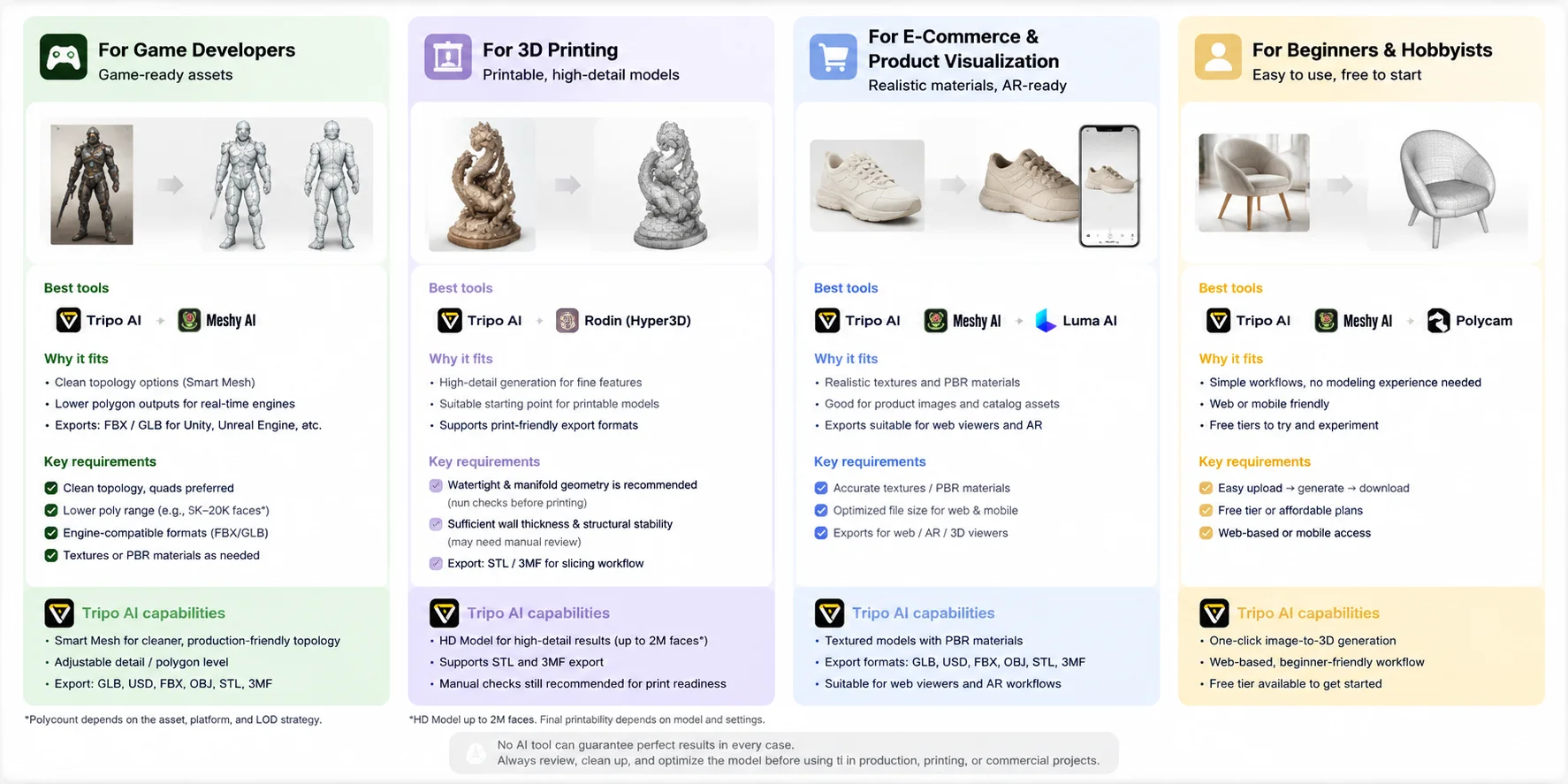
Image-to-3D AI 도구에서 확인해야 할 것
올바른 image to 3D AI 도구를 선택하는 일은 generation quality만의 문제가 아닙니다. 유용한 도구는 model export부터 editing, publishing, printing, commercial use까지 전체 workflow에 맞아야 합니다. 최고의 image to 3D generator를 선택하기 전에 다음 네 가지 요소를 고려하세요.
Export Formats & Compatibility
3D model은 downstream software에서 작동할 때만 유용합니다. 도구가 workflow에 맞는 format을 지원하는지 확인하세요. 예를 들어 web과 AR에는 GLB, game engine과 animation에는 FBX, 일반 3D editing에는 OBJ, 3D printing에는 STL/3MF, Apple 및 AR workflow에는 USD/USDZ가 사용됩니다.
예를 들어 game developer는 보통 FBX 또는 GLB가 필요하고, product visualization team은 interactive experience를 위해 GLB 또는 USDZ를 선호할 수 있습니다. export option이 더 많은 도구는 asset을 여러 platform 사이에서 이동할 때 더 큰 flexibility를 제공합니다.
Topology & Polygon Count
Generated model은 mesh quality가 크게 다를 수 있습니다. 어떤 workflow에는 매우 세밀한 geometry가 필요하고, 어떤 workflow에는 optimized low-poly asset이 필요합니다.
3D printing에서는 특히 세밀한 sculpture나 collectible의 경우 높은 polygon count와 surface detail이 가치 있을 수 있습니다. Game과 real-time application에서는 asset을 효율적으로 load해야 하므로 optimized topology와 낮은 polygon count가 더 중요합니다.
Tripo AI 같은 도구는 production scenario에서 더 깔끔하고 사용하기 쉬운 model을 만들 수 있도록 Smart Mesh 같은 workflow를 제공합니다. 올바른 선택은 maximum detail이 필요한지, better performance가 필요한지에 따라 달라집니다.
Pricing & Credits
AI 3D 도구는 보통 subscription plan, credit-based generation, 또는 둘의 조합을 사용합니다. 도입 전에 포함된 generation 수, free credit 제공 여부, commercial usage 포함 여부를 확인하세요.
Free tier는 image quality와 workflow compatibility를 테스트하는 데 유용하지만, 자주 사용하는 사용자는 monthly subscription price만 보지 말고 generated model당 cost를 비교해야 합니다.
Commercial-Use Rights
Commercial licensing은 AI-generated asset을 사용하는 business에 중요한 고려 사항입니다. 생성된 model의 소유자가 누구인지, 어떤 usage right가 포함되는지, asset 판매 또는 배포에 제한이 있는지 항상 확인하세요.
Tripo AI의 경우 commercial use는 source material에 대한 권리, 사용자의 현재 plan, 최신 platform term에 따라 달라집니다. 생성된 asset을 판매하거나 배포하기 전에 적용되는 term을 검토하세요.
AI-generated 3D model을 상업적으로 사용하기 전에는 예기치 않은 제한을 피하기 위해 해당 도구의 최신 licensing term을 검토하세요.
Image-to-3D AI 도구 선택 체크리스트
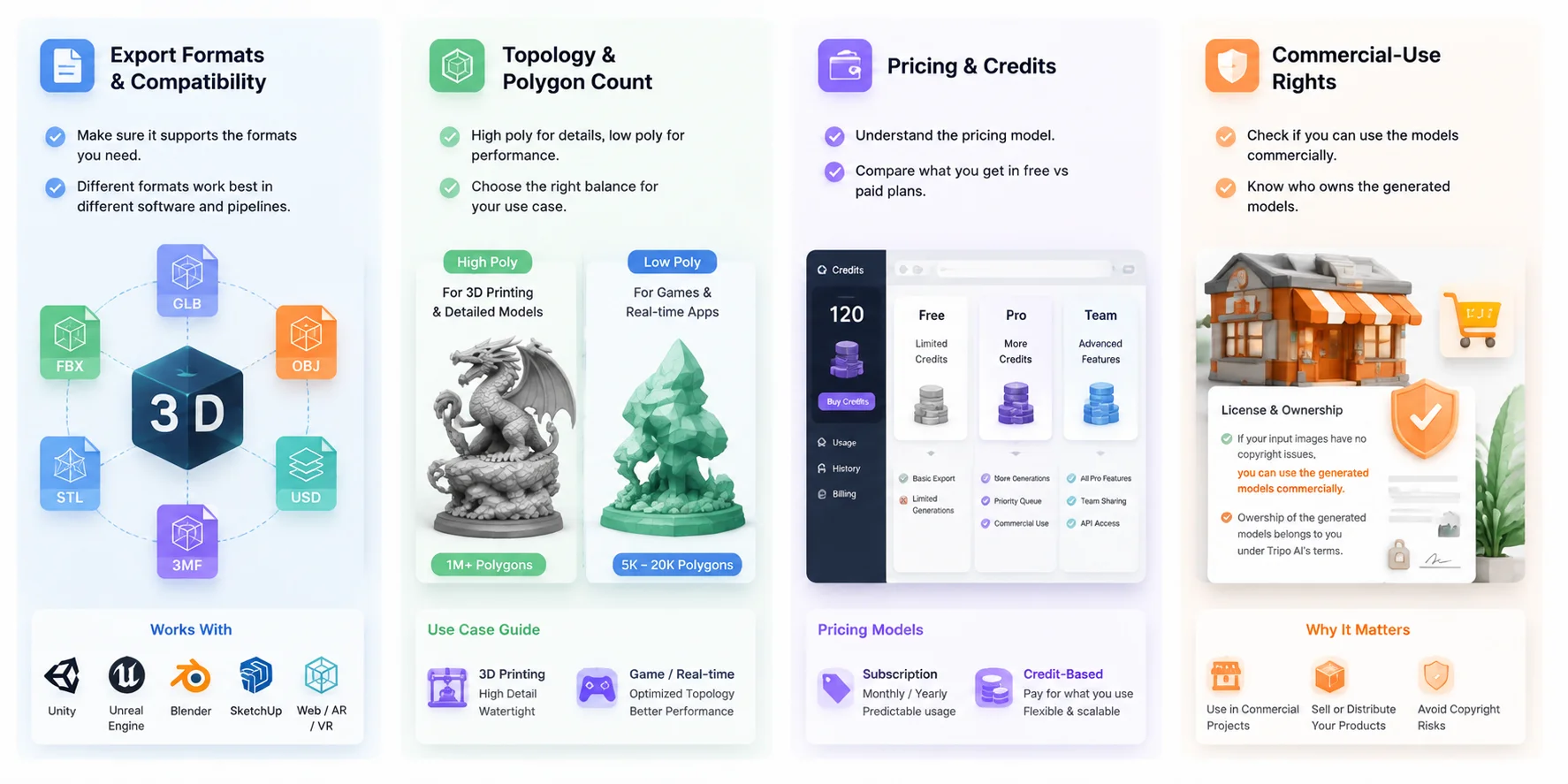
Image-to-3D AI는 실제로 어떻게 작동할까
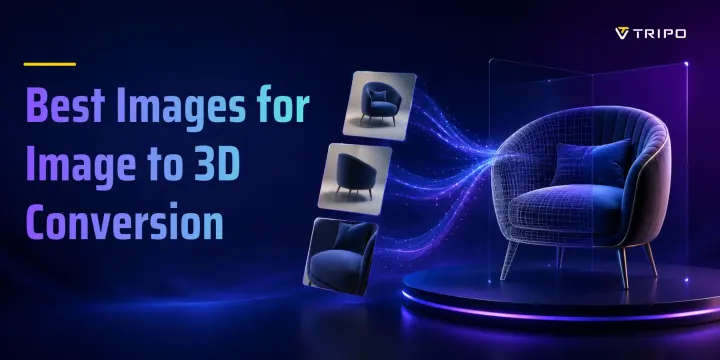
Image to 3D AI 도구는 AI를 사용해 depth, shape, surface detail을 예측함으로써 2D image를 3D model로 바꿉니다. object를 수동으로 modeling하는 대신, system이 visual pattern을 분석하고 mesh를 자동으로 생성합니다.
일반적인 process는 세 단계로 구성됩니다.
- Image analysis → geometry generation
AI가 object의 shape, depth, structure를 감지한 다음 3D mesh를 만듭니다. single image를 사용할 경우 hidden area는 예측되므로, complex object는 추가 reference가 필요할 수 있습니다. - Mesh refinement → texture creation
Geometry를 생성한 뒤 AI는 PBR map을 포함한 texture와 material을 적용해 model을 game, AR, visualization workflow에 적합하게 만듭니다. - Multi-view reconstruction → higher accuracy
여러 각도에서 찍은 여러 image를 사용하면 더 많은 정보를 제공하므로 일반적으로 detail과 proportion이 개선됩니다. Tripo AI 같은 도구는 더 정확한 결과를 얻을 수 있도록 multi-view-to-3D workflow를 지원합니다.
Traditional photogrammetry와 비교하면 AI 3D generation은 더 적은 image를 필요로 하며 asset creation 속도가 더 빠릅니다. Photogrammetry는 reconstruction을 위해 많은 실제 photo를 matching하는 데 의존하지만, AI는 학습된 3D pattern을 바탕으로 누락된 detail을 예측할 수 있습니다. 최선의 선택은 speed, automation, scanning accuracy 중 무엇을 우선시하는지에 따라 달라집니다.
자주 묻는 질문
image to 3D에 가장 좋은 AI 도구는 무엇인가요?
가장 좋은 도구는 목표에 따라 달라집니다. Tripo AI는 빠른 image-to-3D generation, game asset, flexible export에 강한 overall choice이며, 다른 도구는 scanning이나 design 같은 특정 요구에 더 잘 맞을 수 있습니다.
무료 image to 3D AI 도구가 있나요?
예, 많은 image-to-3D AI 도구가 free plan 또는 trial credit을 제공합니다. 무료 version은 테스트에 유용하지만, 일반적으로 credit, speed, export option에 제한이 있습니다.
image-to-3D 도구는 어떤 file format으로 export할 수 있나요?
일반적인 format에는 GLB, OBJ, FBX, STL, USD, USDZ, 3MF가 포함됩니다. game, AR, editing, 3D printing 등 workflow에 맞춰 선택하세요.
AI-generated 3D model을 상업적으로 사용할 수 있나요?
platform의 license와 input material에 따라 달라집니다. AI-generated model을 판매하거나 배포하기 전에 commercial-use term을 항상 확인하세요.
AI-generated 3D model은 3D printing에 충분한가요?
예, 많은 model을 3D printing에 사용할 수 있지만 mesh check와 repair가 필요할 수 있습니다. model이 watertight이며 printer setting에 적합한지 확인하세요.
AI-generated 3D model은 game-ready인가요? (rigged / good topology)
일부는 game-ready에 가깝지만, 많은 model은 optimization이 필요합니다. game engine에서 사용하기 전에 topology, polygon count, UV, texture, rigging을 확인하세요.
Image-to-3D AI와 photogrammetry — 어느 쪽이 더 좋나요?
AI image-to-3D는 더 빠르고 더 적은 image가 필요하며, photogrammetry는 충분한 photo가 있을 때 더 높은 real-world accuracy를 제공합니다. speed가 필요한지 scanning precision이 필요한지에 따라 선택하세요.
결론 — 2026년 최고의 선택
최고의 image to 3D AI 도구는 최종 workflow에 따라 달라집니다. 이 비교에서 설명한 기능을 기준으로, Tripo AI는 image-to-3D generation, mesh optimization workflow, detailed model, flexible export의 균형을 잘 맞춘 에디터 추천 도구입니다. 이미지를 3D로 바꿀 준비가 되셨나요? Tripo AI’s image-to-3D generator를 무료로 사용해 본 뒤, 결과물을 pipeline으로 export하세요.