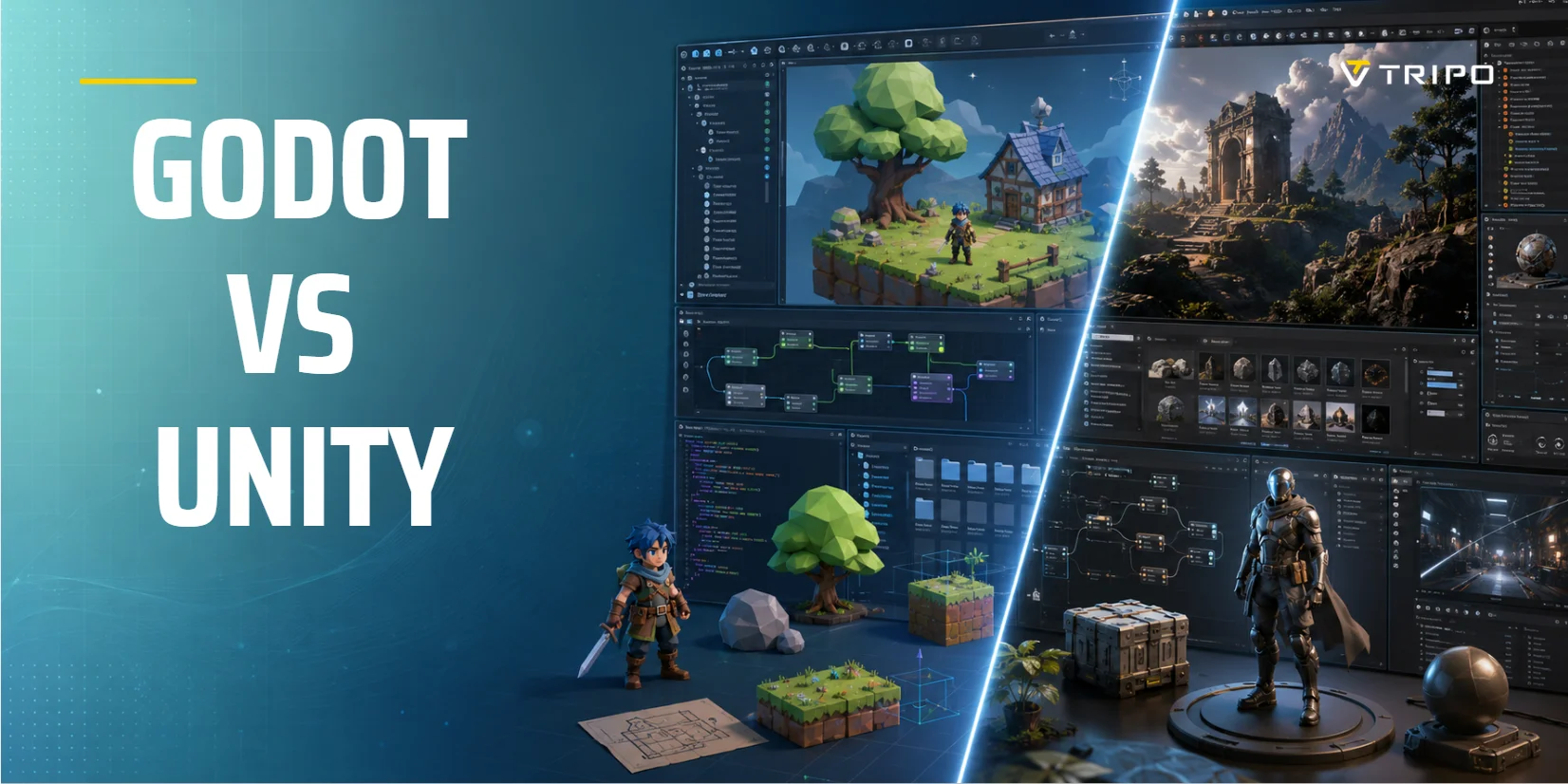
Godot vs Unity (2026): Which Game Engine Should You Choose?
TL;DR
- This neutral guide compares Godot and Unity across licensing, rendering, platforms and development workflows.
- It analyzes Unity's scrapped runtime fee to clarify long-term cost risks for all developers.
- A dedicated segment covers AI tools like Tripo AI to quickly generate usable 3D assets for both engines.
- Godot fits lightweight 2D indie projects; Unity dominates high-end 3D, XR and official console publishing.
- Choose based on your project scope, target platforms and budget; test small prototypes for final judgment.
Choose Godot if you want a free, open-source, lightweight engine that's faster to learn and excels at 2D and small-to-mid 3D games. Choose Unity if you need a mature ecosystem, advanced 3D/VR/AR rendering, a huge asset store, and console publishing for large-scale projects. For beginners on a budget, Godot is the easier start; for studios and high-end 3D, Unity still leads.
What Are Godot and Unity?
Godot is a free, open-source game engine released under the MIT license. It is community-driven, lightweight, and designed around a scene-and-node workflow. You can inspect and modify the engine source code, use it commercially, and avoid royalties or mandatory subscription tiers.
Unity is a mature commercial engine with a much larger established ecosystem. It is widely used for mobile games, 2D and 3D titles, XR projects, console releases, simulation, and interactive applications. Its editor, Asset Store, documentation, training resources, and third-party integrations make it a common choice for teams that need a proven production pipeline.
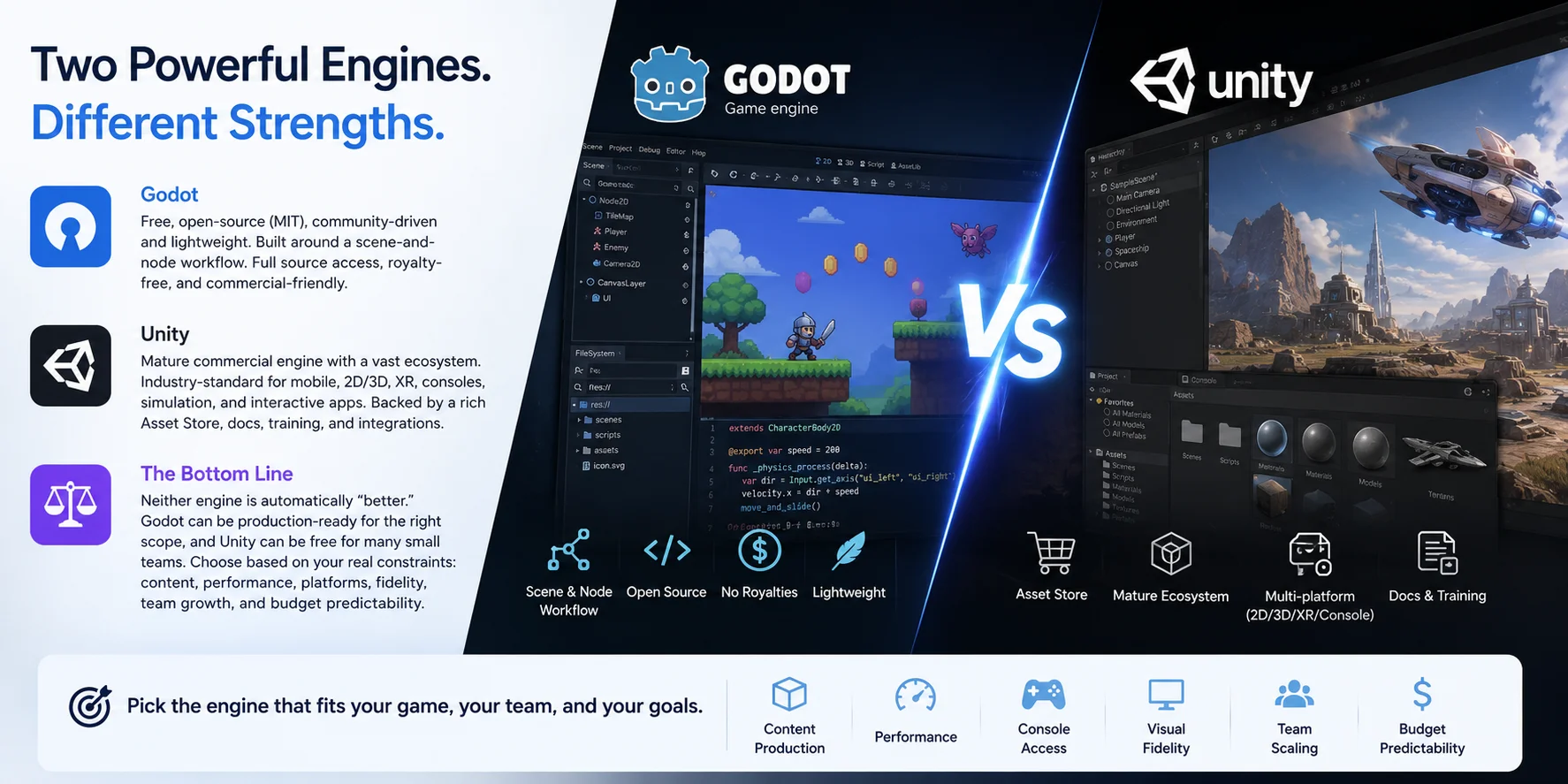
Godot is not simply "the free alternative," and Unity is not automatically "the professional option." Godot can be production-ready for the right scope, while Unity can be free for many small teams. The better choice depends on where your project may become difficult: content production, performance, console access, visual fidelity, team scaling, or budget predictability.
Godot vs Unity at a Glance
| Category | Godot | Unity |
|---|---|---|
| Price and license | Free, open-source, MIT license | Free Personal tier; paid tiers after revenue thresholds |
| Main scripting language | GDScript; also C# and C++ extensions | C# |
| Best fit | 2D games, small teams, open-source workflows, desktop/web projects | Mobile, console, XR, larger 3D projects, established production pipelines |
| Learning curve | Fast initial learning curve | More systems to learn, but far more tutorials |
| Console publishing | Usually requires a third-party porting provider | Direct commercial support with approved platform access |
| Asset ecosystem | Growing Asset Library and open-source tools | Large Asset Store, mature plugins, tutorials, services |
| Source code access | Yes | Limited source access through enterprise arrangements |
| Pick it if… | You want freedom, low overhead, and a focused workflow | You want broad platform support and ecosystem depth |
Choose Godot when simplicity, open-source control, and cost certainty matter most. Choose Unity when you need a broader commercial ecosystem, console pathways, mature XR support, or established production tooling.
Pricing and Licensing: Godot vs Unity
Godot adopts a permanent MIT open-source license: fully free for commercial use, with no revenue caps, royalties or compulsory subscriptions. Developers may freely edit its source code; all core expenses stem from manpower, art assets, middleware, console porting and marketing instead of engine fees.
Unity provides free Personal licenses for teams with trailing 12-month revenue and funds raised under 2,310 per seat yearly / 25 million annually.
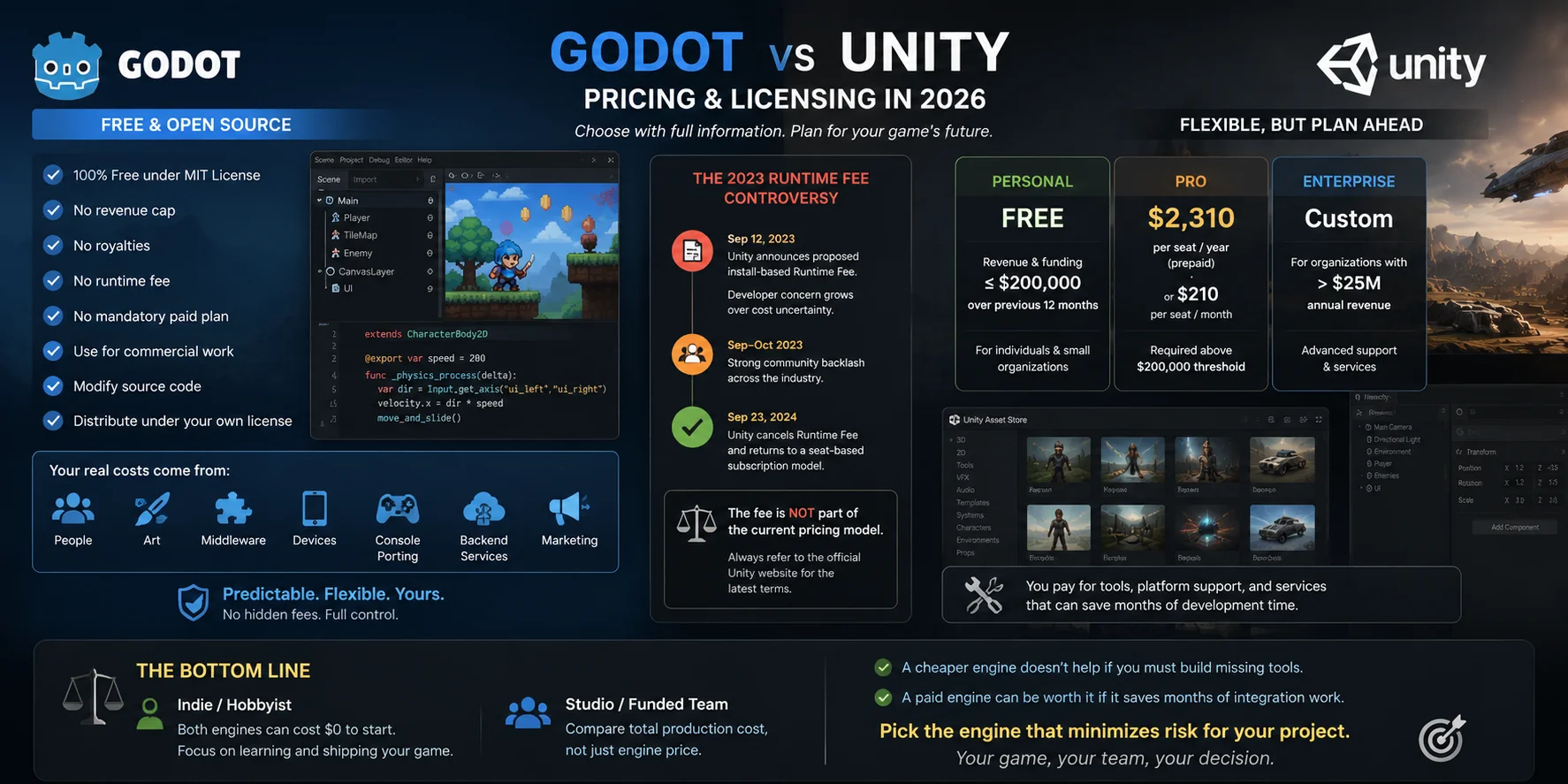
Unity's 2023 proposed install-based Runtime Fee sparked widespread industry anxiety over unpredictable expenditure. The policy was fully revoked in September 2024, reverting entirely to seat-based subscriptions still active today.
This incident raised awareness of licensing risks. Many studios favor Godot's fixed, transparent terms, whereas others prioritize Unity's mature cross-platform tooling and official support despite recurring subscription costs.
Hobbyists and small indies can launch projects on either engine with zero upfront fees. Funded studios should evaluate full lifecycle development costs: free engines may demand custom tool development, while paid subscriptions often offset labor for pipeline integration.
Ease of Use and Learning Curve
Godot usually feels easier during the first week. The editor is relatively compact, projects open quickly, and the Scene and Node system gives beginners a visible way to organize gameplay. A player, camera, collision shape, sound effect, and UI element can all exist as nodes in a scene. This encourages composition rather than building everything from scratch.
Godot is especially friendly for people making their first 2D game. Its built-in tools for tilemaps, UI, animation, input, and scene reuse are easy to discover. The engine also makes it natural to save reusable objects as scenes, such as an enemy, pickup, button, or platform.
Unity has more concepts to absorb: GameObjects, Components, Prefabs, ScriptableObjects, packages, rendering pipelines, import settings, and build profiles. This can feel overwhelming at first. However, the upside is that almost every beginner problem has already been discussed somewhere. Unity Learn, official documentation, YouTube tutorials, forums, Asset Store packages, and third-party courses create a large safety net.
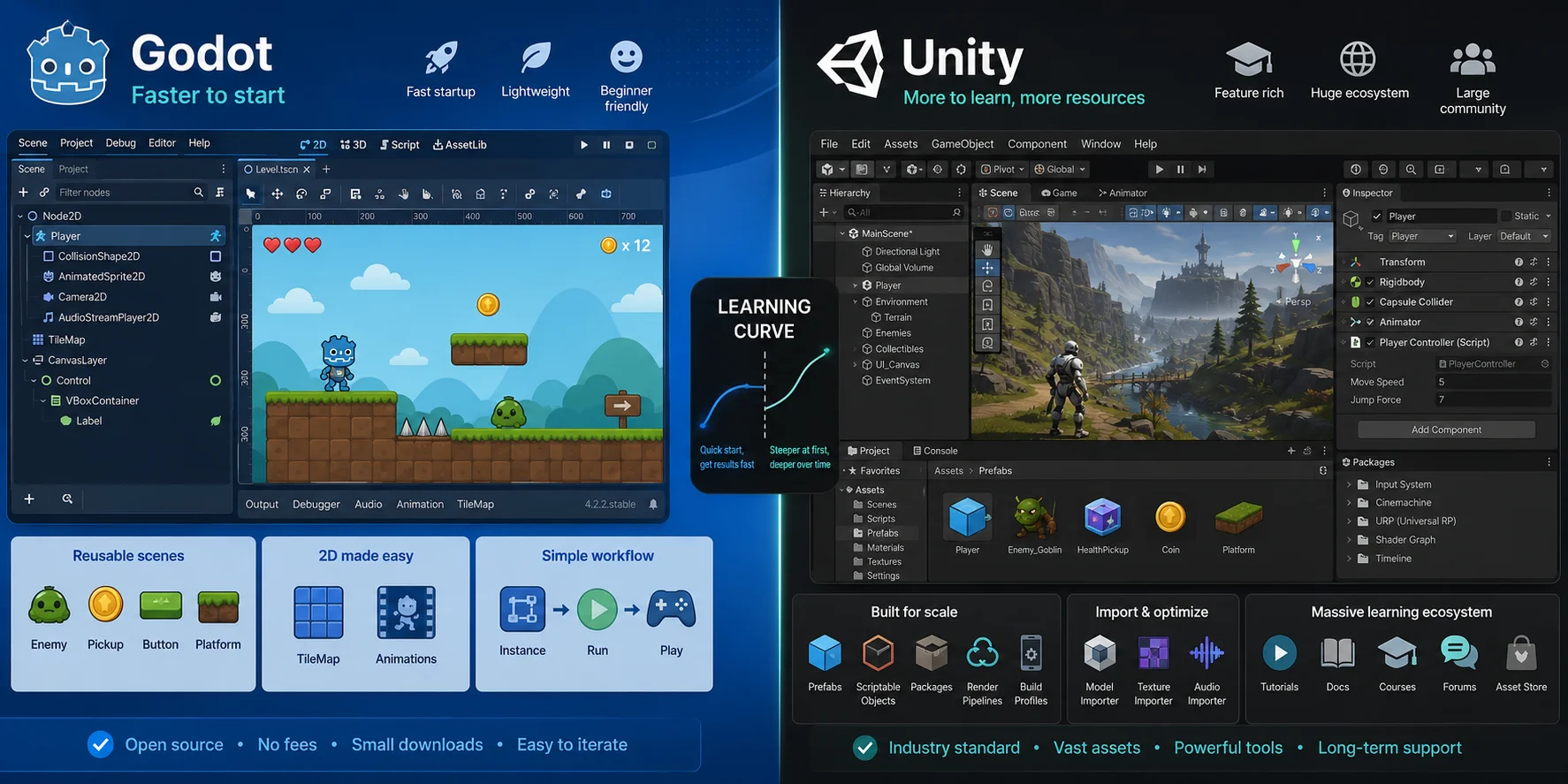
For a beginner building a small 2D prototype, Godot is usually easier to start. For a beginner who wants to learn C#, explore many tutorials, or prepare for Unity-based work later, Unity may be the better long-term investment.
Scripting: GDScript and C# vs Unity's C#
Godot's primary language is GDScript, a high-level language with Python-like syntax designed specifically for Godot. It is concise, tightly integrated with nodes and scenes, and easy to read in small projects.
extends Node2D

@export var speed := 250.0

func _process(delta):
    position.x += speed * delta
Unity uses C#, a widely used object-oriented language. Unity's component model usually places behavior in scripts attached to GameObjects.
using UnityEngine;

public class Mover : MonoBehaviour
{
    [SerializeField] private float speed = 250f;

    void Update()
    {
        transform.position += Vector3.right * speed * Time.deltaTime;
    }
}
Neither syntax is inherently "better." GDScript is faster to read and write for many beginners, especially when working directly with Godot nodes. C# offers stronger typing, a larger general-purpose ecosystem, broader career relevance, and easier reuse of existing .NET knowledge.
Godot also supports C#, but there are trade-offs. You need the .NET version of the editor, and Godot 4 C# projects currently cannot export to the web. C# mobile support exists, but you should test platform requirements early rather than assume feature parity.
Choose GDScript when you want the smoothest Godot learning experience. Choose Unity C# when you want a widely transferable language and a deep pool of examples, libraries, and experienced developers. Choose Godot C# only when its advantages clearly outweigh its current platform limitations.
Performance and Build Times
No engine holds universal performance superiority. Basic 2D titles perform well on both, while unoptimized content underperforms regardless of engine choice. Actual performance is determined by scene complexity, rendering settings, texture memory, physics, scripting rules, hardware, shaders and performance profiling practices.
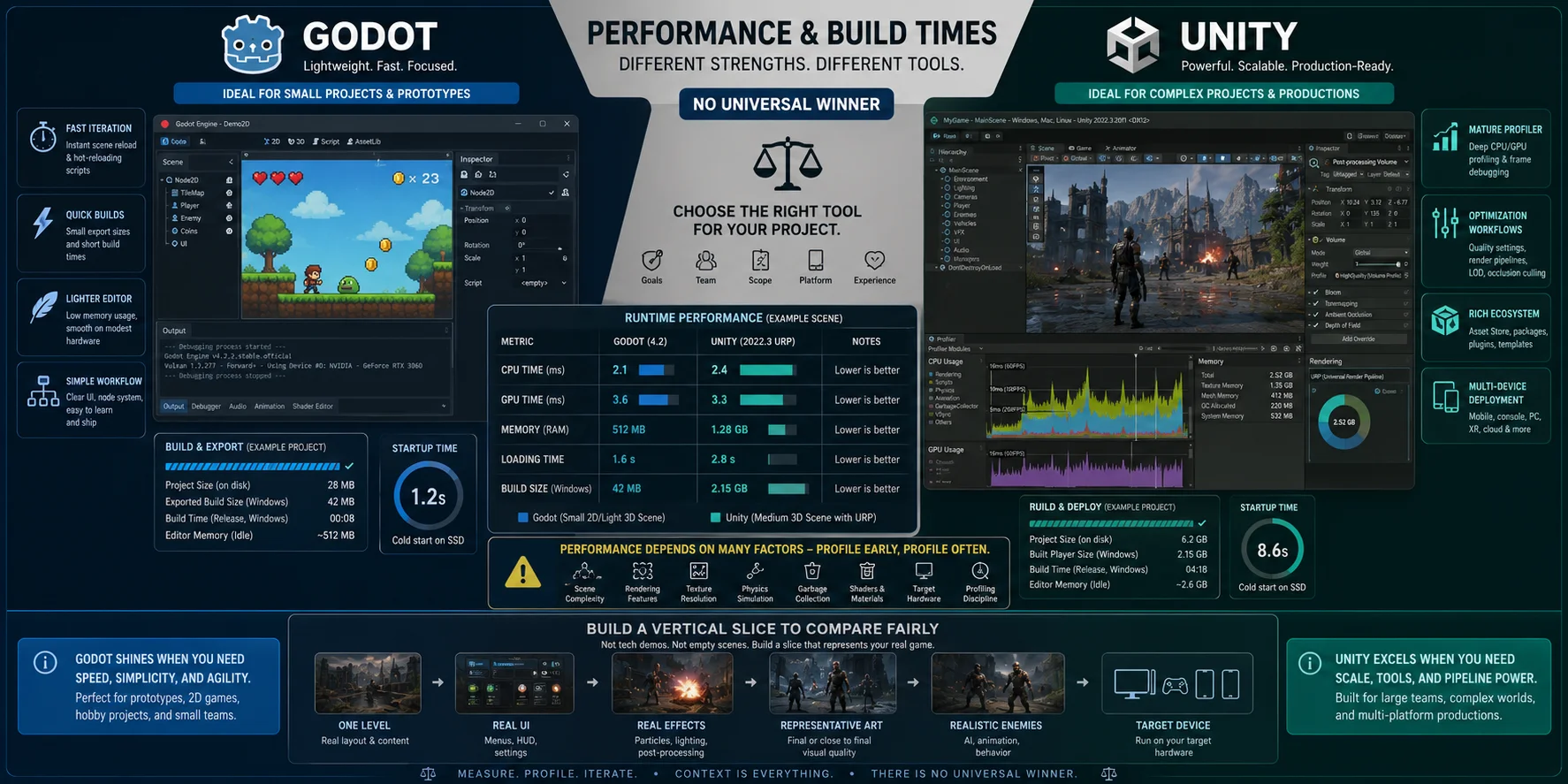
Godot's lightweight editor with minimal dependency overhead enables fast boot, iteration and export for small prototypes, ideal for beginners and mechanical testing.
Unity carries heavier editor overhead in asset-heavy large-scale projects, yet it delivers industry-standard profiling tools, platform-tailored optimization pipelines and standardized workflows for multi-device commercial releases.
Unity boasts a proven runtime performance record for high-demand commercial 3D, mobile, console and XR projects. Though Godot's 3D functionality has matured rapidly, its ecosystem lacks verified industrial solutions for ultra-large 3D productions.
Avoid engine selection based on third-party frame rate tests. Construct a representative vertical slice matching your target art, hardware, UI, effects and enemy count, then profile CPU, GPU, memory, load time and build size for objective evaluation.
Graphics, Rendering, and 2D vs 3D Strengths
Godot dominates 2D creation with native tilemap, animation, shader and node tools, ideal for pixel art, roguelikes and lightweight mobile games. It supports stylized low-poly 3D via Forward+, Mobile and Compatibility renderers, though complex 3D requires early hardware planning.
Unity balances solid 2D functionality with industry-leading high-end 3D pipelines: URP for cross-platform scalability and HDRP for photorealistic graphics. It also boasts a more complete XR toolkit for VR/AR development.
Prioritize Godot for pure 2D work; select Unity for high-fidelity 3D, XR projects or production-ready rendering plugins. Stylized mid-poly 3D can be built on either engine—validate with prototype tests before committing.
Platform Support and Console Publishing
| Platform | Godot | Unity |
|---|---|---|
| Windows, macOS, Linux | Strong support | Strong support |
| Web | Strong with GDScript workflows | Strong support |
| Android and iOS | Supported; ecosystem still developing | Mature support and tooling |
| VR and XR | Supported, but narrower ecosystem | Broad device and package ecosystem |
| PlayStation, Xbox, Nintendo | Usually through third-party porting companies | Official commercial pathway with platform approval |
| Steam Deck | Strong Linux-based target | Supported through Linux builds and testing |
Unity has the clearer route for console development. With an active qualifying license and approval from Sony, Microsoft, or Nintendo, Unity supports console deployment directly through its commercial platform workflow.
Godot can also support consoles, but its official documentation advises developers to turn to third-party porting companies, which will change the budget and schedule. If your game must launch simultaneously on PlayStation, Xbox, and Switch, consult a porting provider before you commit to Godot.
For desktop, web, and smaller mobile projects, Godot is practical. For multi-platform commercial launches, Unity generally reduces uncertainty.
Community, Ecosystem, and Asset Store
Unity's ecosystem is one of its strongest advantages. The Asset Store includes art packs, animations, shaders, templates, networking tools, editor extensions, audio systems, visual scripting tools, and complete starter kits. Its documentation and community content are extensive because Unity has been used widely for many years.
Godot's community is growing quickly and is especially strong in open-source tools, plugins, tutorials, and indie-friendly workflows. Its Asset Library is smaller, which can be positive when you want lightweight tools and transparent code, but it also means you may need to build or adapt more systems yourself.
In practice, Unity saves time when you need an existing solution now. Godot gives you more control when you are comfortable reading code, contributing fixes, or keeping your project lightweight.
Getting 3D Assets for Either Engine (AI-Generated Models)
Choosing an engine does not solve the asset problem. You still need props, environments, materials, animations, UI, sound, characters, and visual consistency. This is where many solo developers lose more time than they expected.
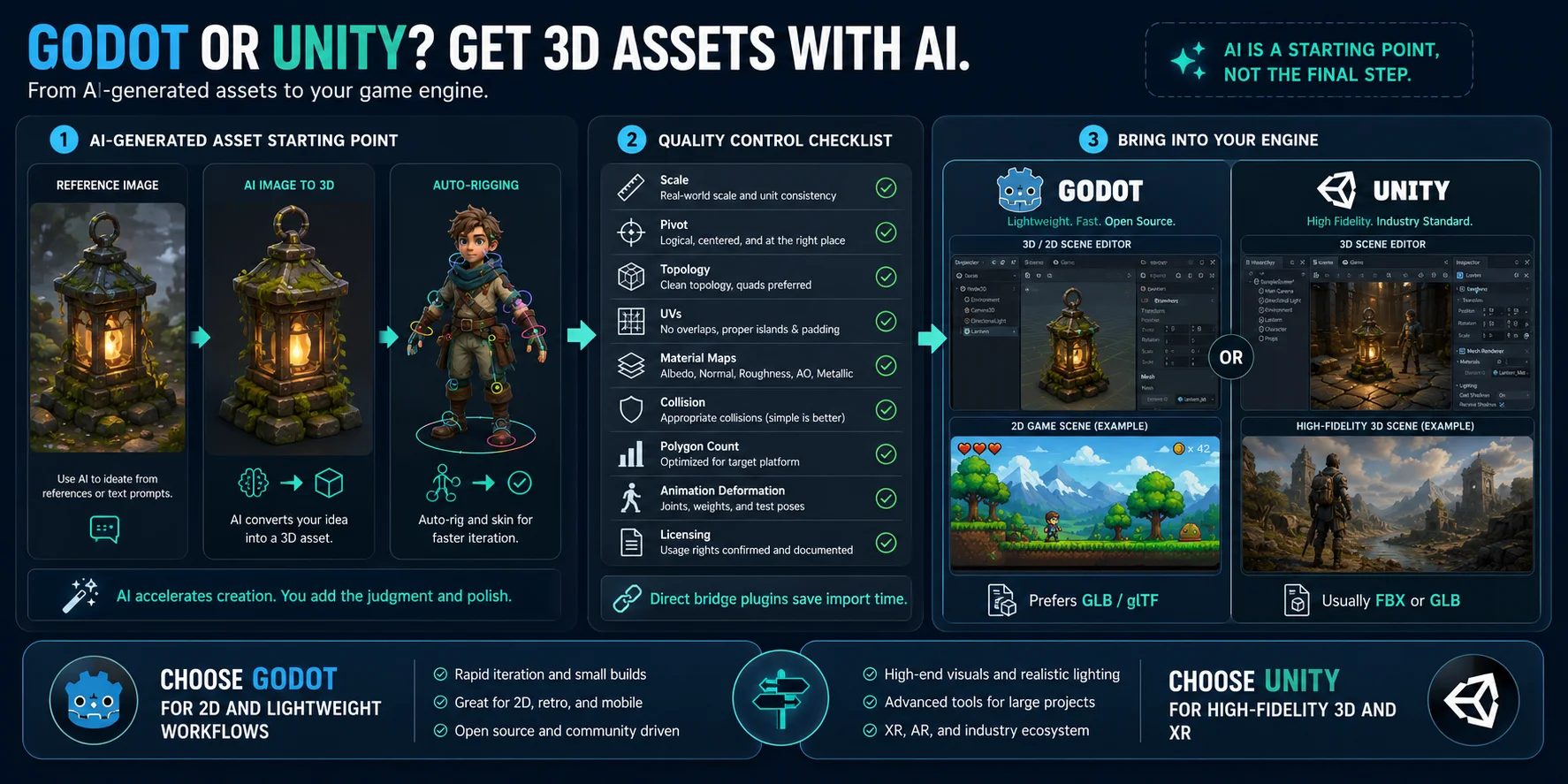
AI-generated 3D tools can help with concept models, placeholder props, stylized environment assets, and early character drafts. A workflow such as Tripo AI Image to 3D can turn a reference image into a starting mesh, while Tripo AI Auto-Rigging can generate a skeleton and skinning for T-pose humanoid characters and standard standing quadruped animals.
The key word is starting. Whether you use Unity or Godot, inspect every generated asset before production use. Check scale, pivot position, topology, UVs, material maps, collision, polygon count, animation deformation, and licensing. AI can reduce the time needed to create a first draft, but it does not remove the need for art direction or optimization.
Both engines can import standard 3D formats. However, the workflow of Godot usually prefers GLB/glTF, while Unity projects typically use FBX or GLB depending on the pipeline. Tripo AI currently provides bridge plugins for Unity and Godot, enabling direct import and saving file processing time.
Real Games Built with Godot and Unity
- Unity's official showcase includes projects such as Genshin Impact, Beat Saber, Outer Wilds, DREDGE, Batman: Arkham Shadow, and Hollow Knight: Silksong. These examples show Unity's range across mobile, VR, large 3D worlds, stylized indies, and multi-platform releases.
- Godot's official showcase includes Slay the Spire 2, Cassette Beasts, Brotato, Dome Keeper, The Case of the Golden Idol, Buckshot Roulette, and Until Then. These games demonstrate that Godot is no longer limited to hobby projects; it is used for successful commercial indie titles across multiple genres.
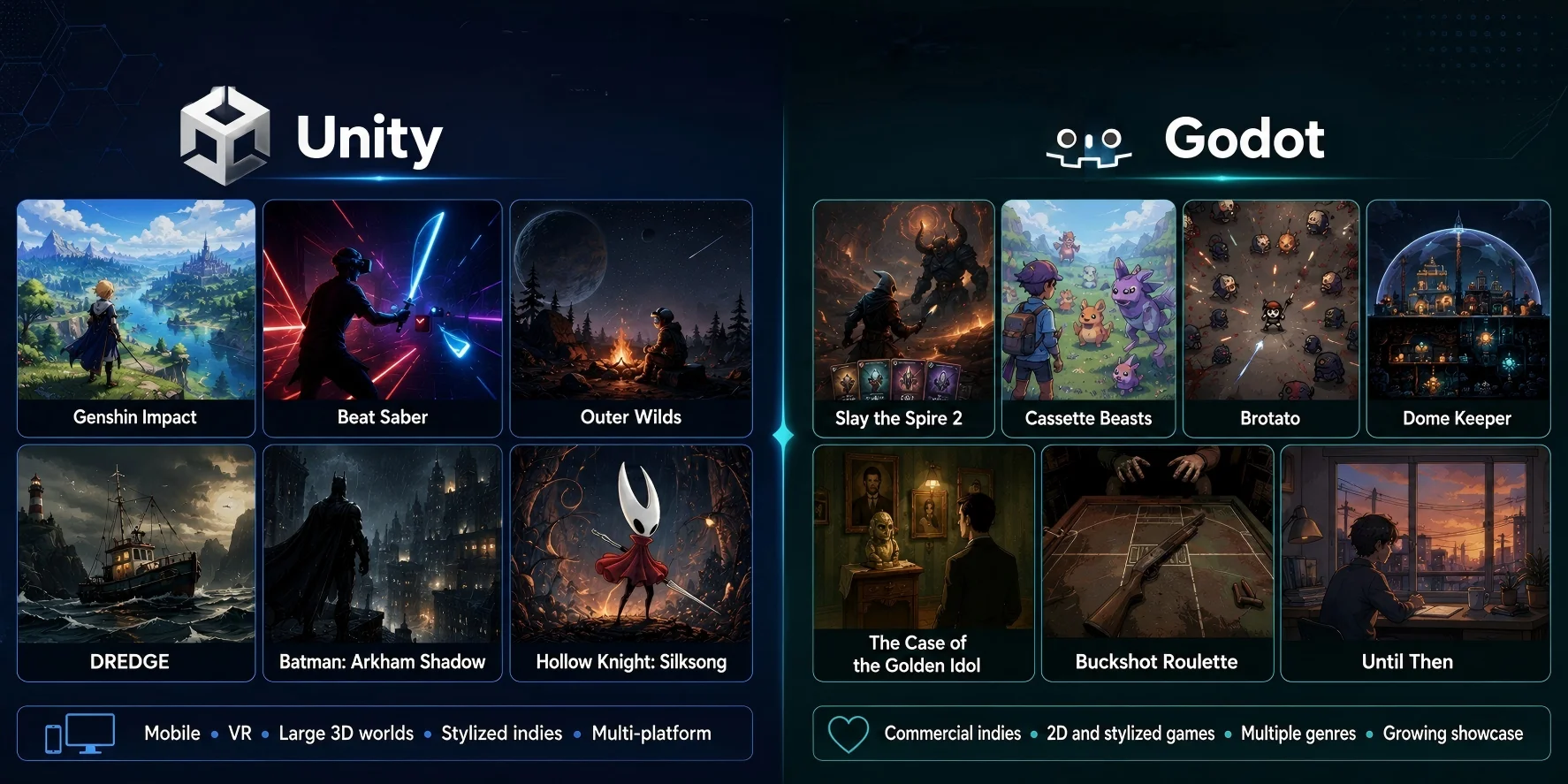
The lesson is not that one engine produces better games. Great games emerge from scope control, gameplay, art direction, testing, and execution. Engine choice mainly affects how easily your team can build and maintain those things.
Is Godot Overtaking Unity? (Momentum in 2026)
Godot has gained visibility, especially among indies who value open-source licensing, low overhead, and transparent tooling. The Unity Runtime Fee controversy also pushed many developers to re-evaluate licensing risk, even though Unity later cancelled the fee.
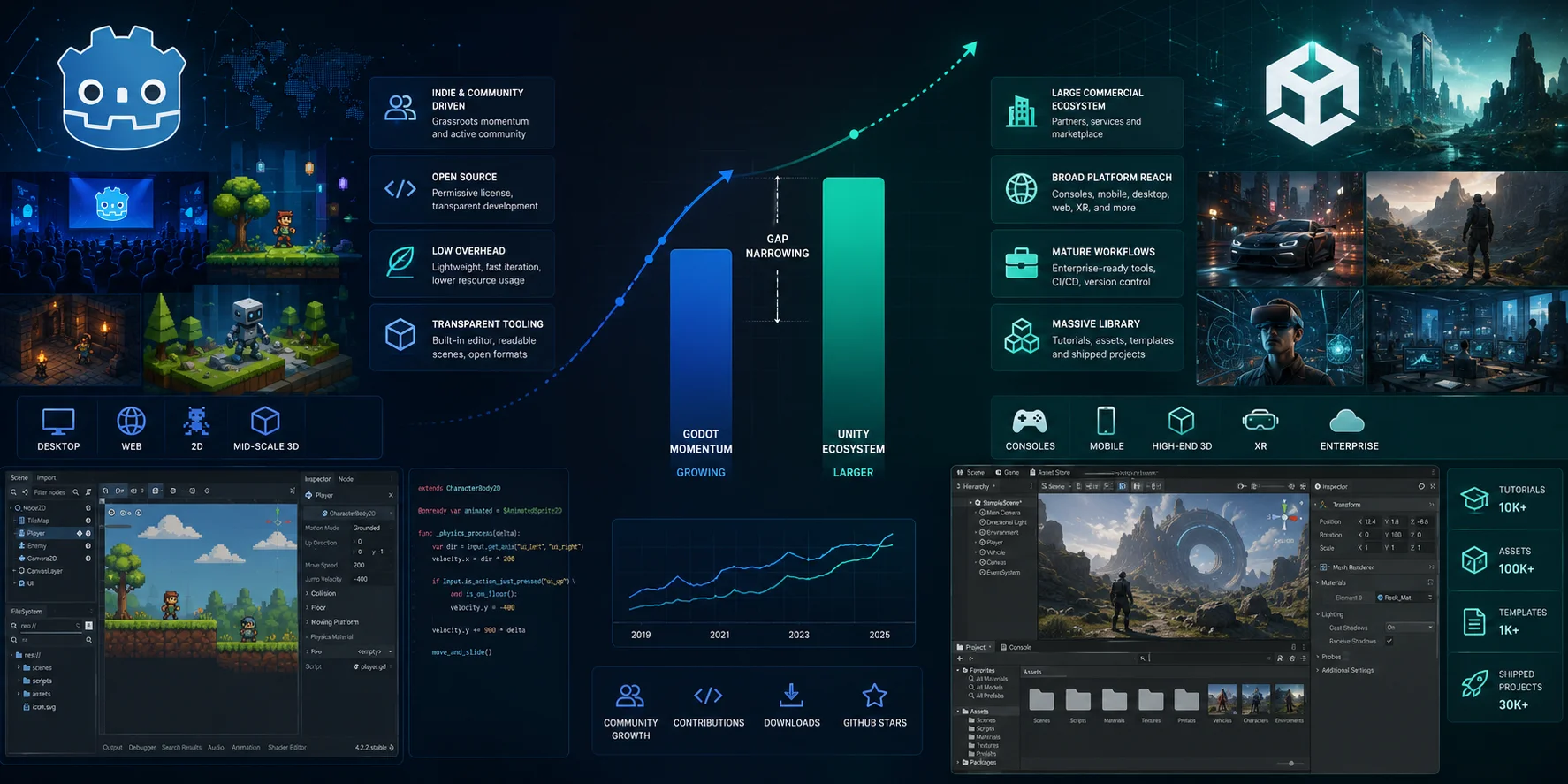
However, "overtaking" is too strong. Unity still has a larger commercial ecosystem, broader platform reach, more established enterprise workflows, and a much larger base of tutorials, assets, specialists, and shipped projects. There is no public, apples-to-apples market-share figure proving that Godot has replaced Unity.
A more accurate statement is that Godot is closing the gap for a growing range of indie, 2D, desktop, web, and mid-scale 3D projects. Unity remains the safer default for teams that need console support, large-scale mobile services, high-end 3D rendering, or established third-party tooling.
Which Should You Choose? (Recommendations by Use Case)
Choose Godot if:
- You are a beginner making a first 2D game or small desktop project.
- You want a free, open-source engine with no royalty or subscription concerns.
- You prefer lightweight projects, simple scene composition, and GDScript.
- You are targeting desktop, web, or a focused indie release.
- You are comfortable building or adapting some tools yourself.
- You want direct access to engine source code and community-driven development.
Choose Unity if:
- You need a clear path to PlayStation, Xbox, Nintendo Switch, or Apple Vision Pro.
- You are building a mobile game with mature monetization, analytics, ad, or service integrations.
- You need high-end 3D rendering, VR, AR, or mixed-reality tooling.
- Your team already knows C# and uses existing Unity packages.
- You need a large Asset Store and want to buy proven solutions rather than build them.
- You expect to hire Unity developers, collaborate with contractors, or enter a Unity-heavy pipeline.
For a solo developer with no strong preference, make a one-week test in both engines. Build the same tiny prototype: player movement, one enemy, UI, audio, a save file, and one exported build. The engine that makes you want to continue working is often the right choice.
Frequently Asked Questions
Should I learn Unity or Godot first?
Pick Godot for fast, free small 2D/desktop game development. Choose Unity if you need C#, abundant resources, mobile, XR or console deployment. Core game development knowledge transfers across both engines.
Is Godot overtaking Unity?
Godot gains traction among indie creators, yet Unity retains a far bigger ecosystem and enterprise-grade production tooling. Godot is a viable alternative for mid-scale indie projects but not the overall market leader.
Is Godot easier to run than Unity?
Godot's lightweight editor delivers smoother iteration for small prototypes. Unity consumes more resources in large asset-heavy projects. Hardware and scene setup, not engine brand, determine real runtime performance.
Did Tesla use Godot?
Unconfirmed public documentation exists for Tesla's Godot in-car graphics applications. 2025 reports noted potential shifts to Unreal Engine for certain visual systems; do not base engine selection on this case alone.
Does Godot support console export?
Godot does not have an official first-party console export path. To ship on PlayStation, Xbox, or Nintendo Switch you need to work with a third-party porting company such as W4 Games, Lone Wolf Technology, or similar providers. This adds cost and schedule that Unity developers publishing directly through Sony, Microsoft, or Nintendo do not face. If console launch is a hard requirement, factor in porting budget before committing to Godot.
Is Godot good for indie developers?
Yes. Godot is one of the most practical choices for indie developers. Its MIT license means zero upfront cost, no royalties, and no revenue-based subscription tiers regardless of how well your game sells. The lightweight editor, GDScript, and built-in 2D tools reduce setup friction for small teams. Most successful Godot releases — Brotato, Dome Keeper, Buckshot Roulette — come from solo developers or very small studios.
GDScript or C#: which should I learn first?
Learn GDScript if you are starting with Godot and want the fastest path to building something. It is designed for Godot's node system, reads like Python, and has no extra setup. Learn C# if you already have .NET experience, want a language with wider career relevance, or plan to work on Unity projects too. Note that Godot C# projects currently cannot export to the web, so confirm your target platforms before choosing.
Can you make mobile games with Godot?
Yes, Godot exports to Android and iOS. For small to mid-scale mobile games it is a practical option. Where it falls behind Unity is in mobile-specific tooling: Unity has more mature integrations for analytics, ads, in-app purchases, and live-ops services that mobile studios rely on. If your mobile game is a simple indie title, Godot works well. If you need a production-grade monetization stack out of the box, Unity reduces integration work significantly.
Conclusion
There is no absolute Godot-versus-Unity winner. Godot offers freedom, low overhead, and a focused workflow; Unity offers ecosystem depth, commercial platform support, and mature production tooling.
No matter which engine you pick, you'll need game-ready 3D assets. Try generating one from an image or text in minutes with Tripo AI.