AI 3D Model File Formats: GLB, OBJ, FBX, STL & USDZ Explained

TL;DR
- Most AI 3D tools export the same core formats: GLB, OBJ, FBX, STL, USDZ/USD and 3MF.
- GLB is the common default for web, AR, ecommerce previews and textured game-ready models.
- OBJ is a universal swap format for static geometry, but it does not carry animation.
- FBX is usually better for animated characters, rigged models and Unity or Unreal workflows.
- STL is for 3D printing when you only need shape, not color, materials or animation.
- USDZ is useful for Apple AR Quick Look; USD is used in larger VFX and animation pipelines.
- 3MF is a modern 3D printing format that can keep color, materials and multiple parts.
- Pick by destination: game engine -> FBX or GLB, printer -> STL or 3MF, web/AR -> GLB or USDZ.
- AI-generated meshes often need topology, scale and watertightness checks before use.
AI 3D model file formats are the export types, such as GLB, OBJ, FBX, STL, USDZ and 3MF, that AI generators save your model in so it works in the right software. The format you pick decides whether your model loads in a game engine, slices for a 3D printer, appears in AR, keeps its textures, or preserves animation. This guide explains what each format is for, how the major AI 3D export formats differ, and how to choose the right one after generating a model in a tool like Tripo Image to 3D.
What Are 3D Model File Formats? And Why AI Tools Give You a Choice
A 3D model file format is a container for the data that makes a 3D asset usable. At the most basic level, it may store mesh geometry: the vertices, edges and faces that define the shape. More advanced formats can also store UVs, textures, PBR materials, skeletons, animation clips, scene hierarchy, cameras, lights, variants and metadata.
That is why AI 3D tools usually offer more than one export option. The model may look the same inside the generator, but the next destination has different requirements. A browser-based viewer needs a compact file. A game engine may need materials, rigging and animation. A 3D printer needs a solid printable shape. A VFX pipeline may care about layered scene data.
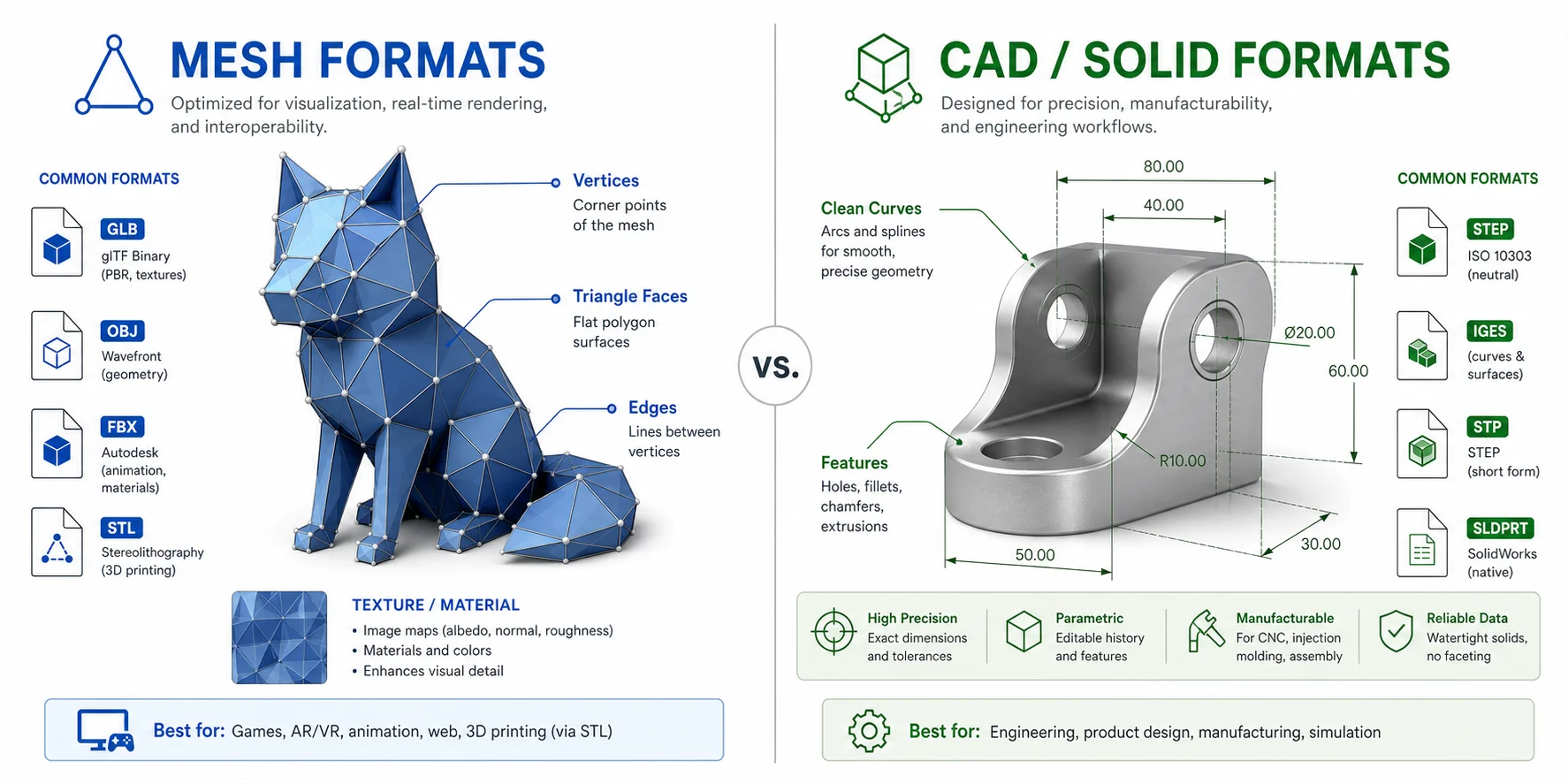
It also helps to separate mesh formats from CAD or solid-modeling formats. AI 3D generators usually create polygonal mesh assets, while CAD files are often based on precise parametric or solid geometry. If you generate a creature, prop, product concept or stylized object with AI, you are usually working with mesh formats such as GLB, OBJ, FBX, STL, USDZ/USD and 3MF.
The Core AI 3D Export Formats at a Glance
Before choosing a file extension, ask where the model is going next. The same AI-generated asset may need GLB for a web preview, FBX for a rigged game character, STL for a single-color print, or 3MF for color 3D printing.
| Format | Best for | Holds color/textures? | Holds animation? | Typical file size | Notes for AI exports |
|---|---|---|---|---|---|
| GLB / glTF | Web, AR, game engines, ecommerce | Yes, often baked into GLB | Yes | Small-medium | Most common AI default; ready to preview and share |
| OBJ | Software-to-software transfer, sculpting, basic print workflows | Basic materials via .mtl | No | Medium | Very compatible, but limited |
| FBX | Game engines, animation, Unity, Unreal, Maya | Yes | Yes, including rigs and clips | Medium-large | Best for rigged AI characters |
| STL | 3D printing, single-color shape output | No, geometry only | No | Small | Check scale and watertightness before slicing |
| USDZ / USD | Apple AR, VFX, animation and collaboration pipelines | Yes | Yes | Medium | USDZ is Apple AR-friendly; USD is pipeline-friendly |
| 3MF | Color and multi-material 3D printing | Yes | No | Small-medium | Modern STL alternative that can preserve color and parts |
This table is a starting point. The safest format is the one your target app, slicer, engine, marketplace or production pipeline expects.
GLB / glTF - The Web, AR and Game Default
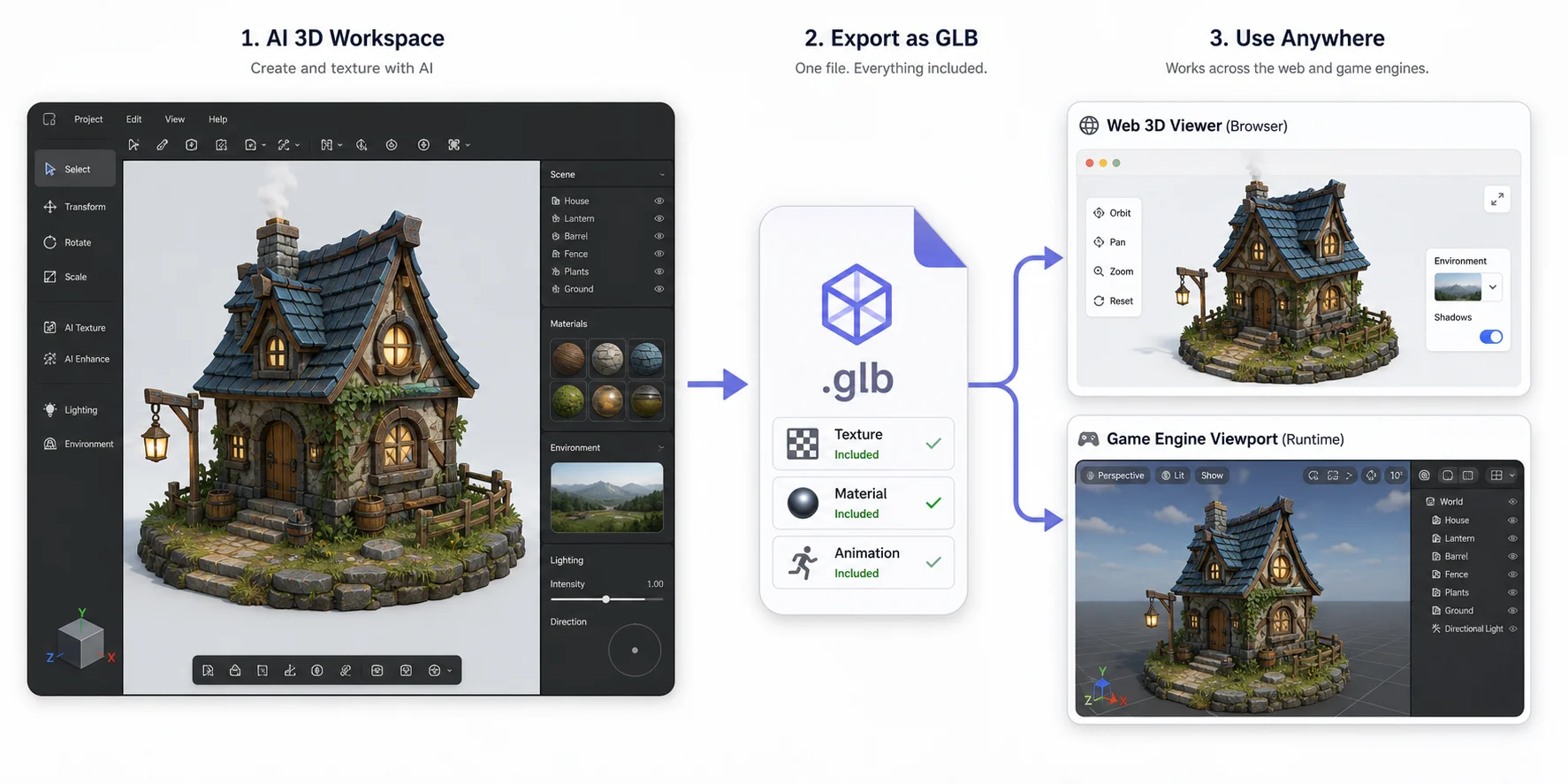
GLB and glTF are often described as the "JPEG of 3D" because they are designed for efficient delivery of 3D assets. glTF is the broader standard, while GLB is the binary, single-file version that can pack mesh geometry, materials, textures, animations and scene data into one portable file.
For AI 3D export formats, GLB is often the easiest first choice. If you want to preview a model in a browser, embed it in a product page, test it in a WebGL scene, or send it to a teammate, GLB is practical because textures can be baked in.
What it is
GLB stores a complete 3D asset in a compact package. Instead of managing a model file plus separate texture folders, you can often keep the model, materials and textures together. That makes it convenient for AI-generated 3D models.
Best for
Use GLB for web viewers, Three.js projects, ecommerce previews, AR/VR previews, quick sharing and many game-engine workflows. If you are not sure where a model will go yet, GLB is often the most practical "start here" export because it keeps visual information and stays relatively portable.
AI export tip
When you export a GLB from an AI tool, inspect the texture quality and orientation before using it downstream. AI-generated models can look good in the source viewer but still need checks in Blender, Unity or a web viewer. Look for missing textures, flipped normals, odd scale, heavy polygon count and unnecessary hidden geometry.
OBJ - The Universal Swap Format
OBJ is one of the oldest and most widely supported 3D model file types. It is useful when you need a neutral transfer format between tools.
What it is
OBJ stores static mesh geometry and can reference a companion .mtl file for basic material information. It is not built for modern PBR material systems, skeletal animation or complex scene pipelines. In plain terms, OBJ is good at moving the shape from one program to another, but it is not the best format for keeping a full production-ready asset intact.
Best for
OBJ is useful for software-to-software transfer, sculpting, basic editing, simple printing prep and intermediate cleanup. If you want to import an AI model into Blender for retopology or manual fixes, OBJ can be a dependable option.
Limits
OBJ does not store rigs or animation. It can also become messy when textures and .mtl files are separated from the main model file. If you are sending a model to someone else, make sure the .obj, .mtl and texture files travel together. Otherwise the model may open as a plain gray shape.
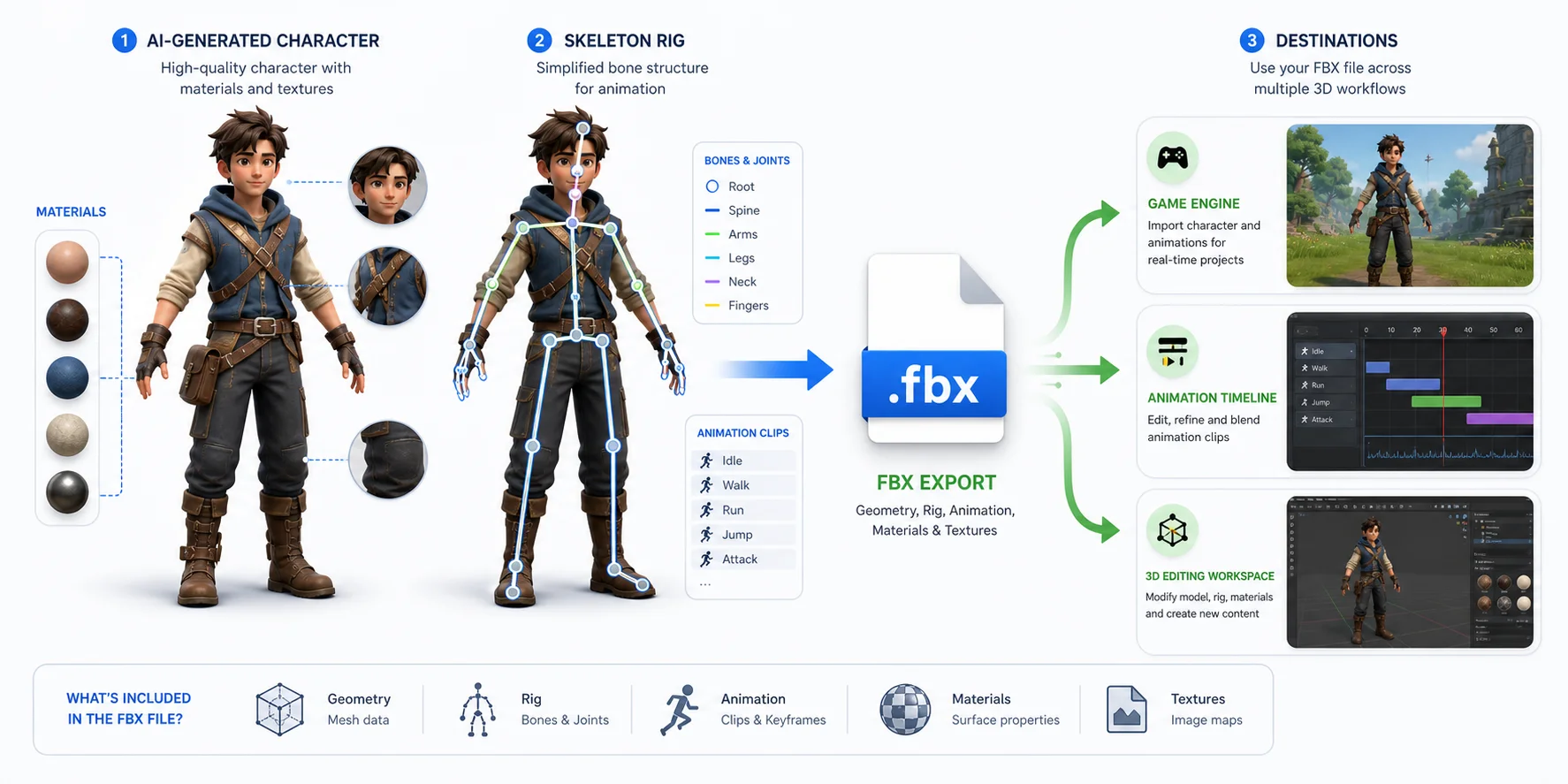
FBX - Animation and Game Engines
FBX is a common production format for animation, rigging and game-engine workflows. It is associated with Autodesk tools, but it is also widely used in Unity, Unreal Engine, Maya, Blender and other DCC applications.
What it is
FBX can store mesh geometry, materials, skeletons, skin weights, animation clips and scene hierarchy. For AI-generated characters, creatures or animated props, FBX is often the format to test first.
Best for
Use FBX when you need a rigged model, animation data, character import, or a game-engine pipeline. If your AI-generated model has a skeleton or you plan to rig it, FBX is usually more useful than STL or OBJ. GLB can also work in some real-time workflows.
AI export tip
AI-generated meshes may need cleanup before they animate well. Check joint placement, skinning, polygon density and topology around elbows, knees, shoulders, mouths and hands. If the model was generated in Tripo Studio, review export settings such as skeleton export, animation count and pivot placement before bringing it into Unity, Unreal or Blender.
STL - The 3D Printing Standard
STL is the classic 3D printing format. It stores surface geometry as triangles and is supported by nearly every slicer.
What it is
STL is geometry only. It does not store color, texture, material, rigging or animation. That limitation is also why it remains simple and widely supported. A slicer mainly needs to understand the shape, wall boundaries, scale and orientation.
Best for
Use STL for single-color FDM prints, resin prints, mechanical-looking shapes, figurines that will be painted later, and quick print tests. If the model only needs to exist as a printable shape, STL is still a practical choice.
AI export tip
AI-generated models should be inspected before printing. Check whether the mesh is watertight, whether thin parts are too fragile, and whether the units are correct. A model can look fine on screen and still fail in a slicer.
Can ChatGPT actually make STL files? A text chatbot can help write simple code for basic shapes, but it is not the same as a dedicated AI 3D generator. Tools such as Tripo are built to generate 3D models from images or prompts and then export usable formats. After export, printing work still happens in a slicer and often includes repair, scaling and support checks.
USDZ & USD - Apple AR and Larger 3D Pipelines
USDZ and USD are related but not identical. USDZ is often associated with Apple AR Quick Look, while USD, also known as Universal Scene Description or OpenUSD, is a broader scene description format used in professional animation, VFX and collaborative workflows.
USDZ for Apple AR
USDZ is useful when the goal is to view a 3D model in AR on iOS or Safari. It packages the asset so users can preview an object through Apple Quick Look. For ecommerce, product visualization and mobile AR, USDZ can be better than OBJ or STL because it is designed around visual viewing.
USD for pro pipelines
USD is built for complex 3D scenes, layered assets, references, variants and production collaboration. For most individual AI 3D model exports, USD may be more than you need. For pipeline-heavy work, it can matter a lot.
AI export tip
Use USDZ when the target experience is Apple AR. Use USD when the target is a professional pipeline that already understands USD. For a simple app handoff, GLB or OBJ may be simpler.
3MF - Color and Multi-Material 3D Printing
3MF is a newer 3D printing format designed to solve some STL limitations. While STL only describes geometry, 3MF can store color, material and multi-part information, depending on the software and printer workflow.
What it is
3MF is a print-oriented container format. It can keep more manufacturing information than STL, which makes it useful for modern slicers and color or multi-material workflows. For AI-generated models, this can be valuable when the visual surface should matter in the print workflow instead of being discarded.
Best for
Use 3MF for color printing, multi-material printing and printer-specific workflows where the slicer supports it. It is especially useful when you do not want to lose color or part structure during export.
AI export tip
If you generated a colorful model and plan to print it through a workflow that supports 3MF, test 3MF before falling back to STL. STL is still the safest compatibility format, but it may throw away exactly the information that made the AI model visually useful.
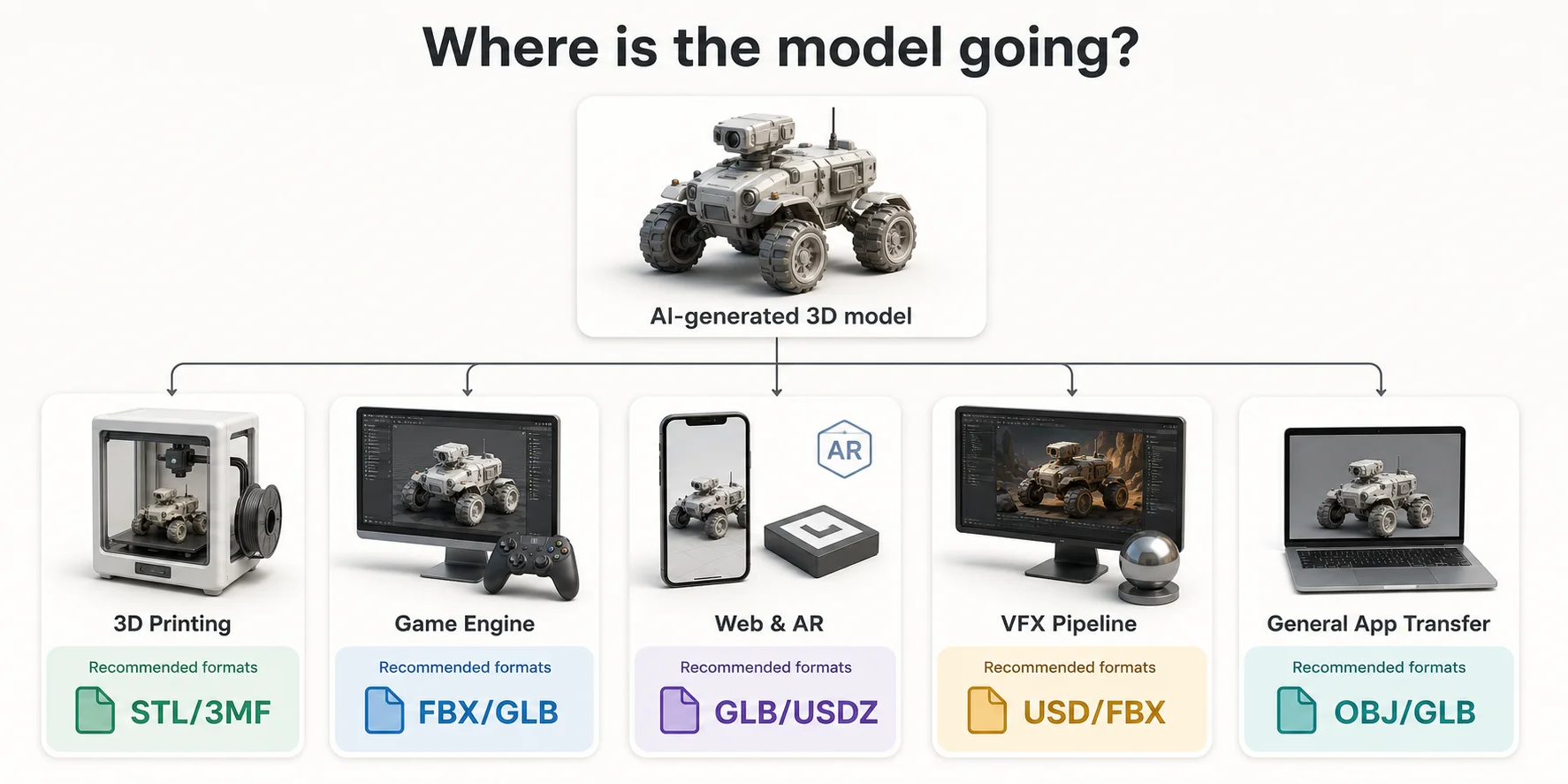
How to Choose the Right AI 3D Export Format
The easiest way to choose between GLB, OBJ, FBX, STL, USDZ and 3MF is to start with the destination. Ask: where does this AI-generated model need to work next?
For 3D printing
Choose STL for simple single-color printing. Choose 3MF if the workflow supports color, materials or multiple parts. Before slicing, check watertightness, wall thickness, scale and fragile details. If a model has floating decorations or very thin features, repair or simplify it before printing.
For game engines
Choose FBX when the model has rigging, animation or character data. Choose GLB when you need a compact textured asset and the target engine or tool handles GLB well. For low-poly assets, review topology and polygon count before importing. Tripo's Smart Mesh workflow can be useful when a project needs cleaner, lighter assets for real-time use.
For web and AR
Choose GLB for web viewers, Three.js, online product previews and many AR workflows. Choose USDZ for Apple AR Quick Look. If the same product model needs to appear on a website and in iOS AR, you may export both GLB and USDZ.
For VFX and professional pipelines
Choose USD when the pipeline already uses USD for scene assembly, variants, collaboration or animation workflows. Choose FBX when the pipeline is more character or animation focused and expects FBX. Choose OBJ only when you need a simple static transfer.
For sending a model to another app
Choose OBJ or GLB if you mainly need compatibility. OBJ is widely accepted and easy to inspect. GLB is better when you want the model to arrive with textures in one file. If the recipient plans to animate the model, FBX is usually a better handoff.
It is normal to export more than one format from the same model. A creator might use GLB for preview, FBX for game-engine testing, STL for print checks and OBJ for cleanup in Blender. The format is the bridge between generation and the next tool.
After You Export - Getting an AI Model Ready to Use
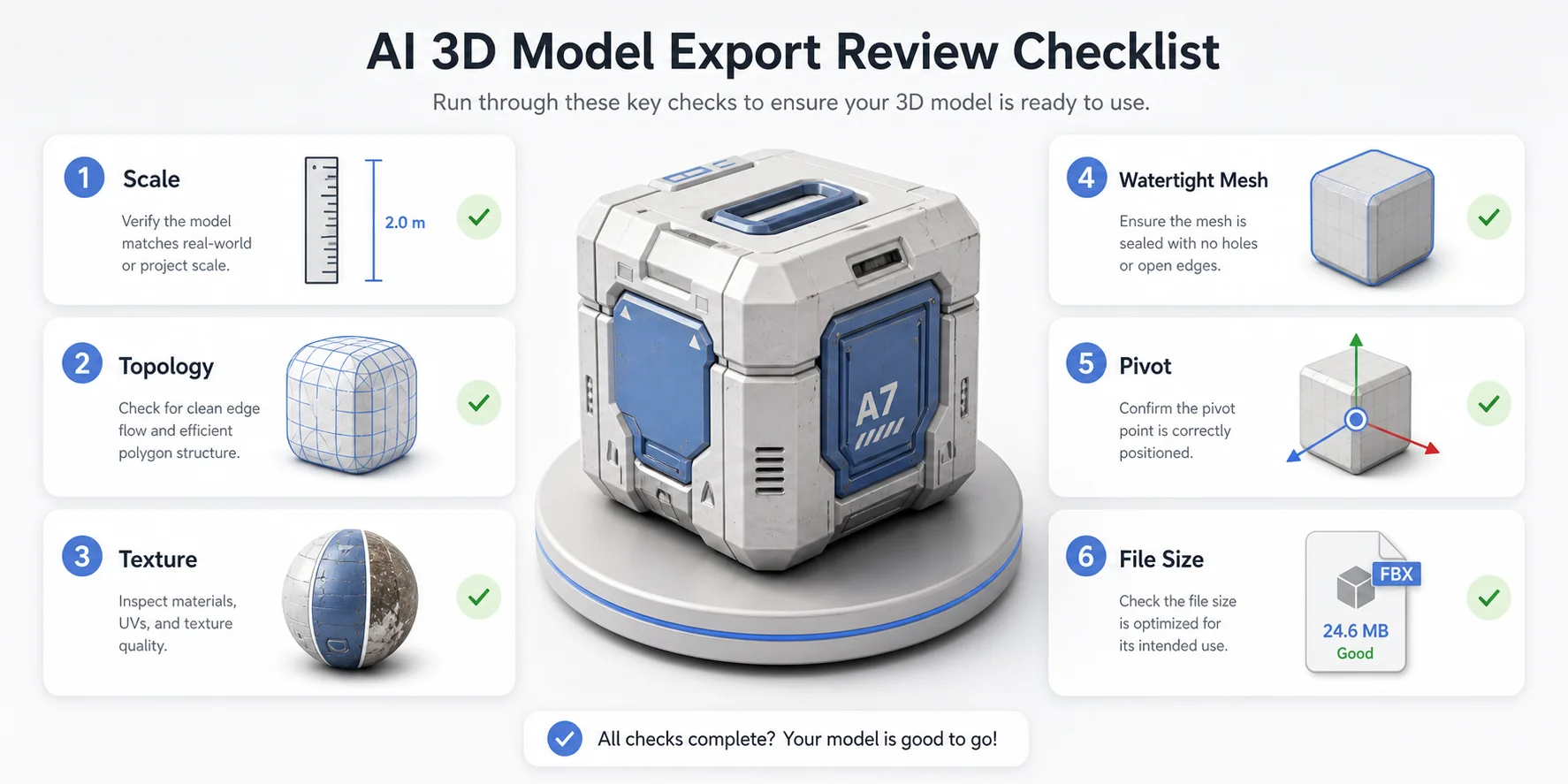
Choosing the right 3D file extension is only part of the workflow. AI-generated 3D models still need review before production, printing or publishing.
Importing into Blender, Unity or Unreal
After export, import the model into the software where it will actually be used. In Blender, check scale, origin, material assignments, UVs and mesh density. For a faster setup, follow the Tripo DCC Bridge for Blender guide. In Unity or Unreal, check whether textures import correctly, whether the pivot is useful, and whether the model's size matches the scene. Unity users can also refer to the Tripo DCC Bridge for Unity guide.
For game workflows, test the model under engine lighting, with the intended camera distance and performance budget. A model that looks good in a preview window may still be too dense for real-time use.
Cleaning up AI topology
AI meshes can include uneven topology, dense triangles, small artifacts or surface details that do not deform well. For static props, this may be acceptable after cleanup. For animated characters, shoulders, knees and mouths need cleaner edge flow.
Retopology, mesh decimation and smart mesh workflows can help prepare the model for downstream use. The goal is to match topology to the use case: lighter for games and web, more detailed for close-up renders, and structurally sound for printing.
Making it printable
For 3D printing, check watertightness, wall thickness, small features and scale. AI-generated models may not arrive in millimeters or with a real-world size that makes sense.
If the print must preserve color, check whether the printer and slicer support 3MF. If the print will be painted by hand, STL may be enough.
Do AI Tools All Export the Same Formats?
No. Many mainstream AI 3D tools support a similar set of formats, but export options vary by product, model type, plan and workflow. Some tools focus on preview and sharing. Others offer downloadable formats, rigging, PBR textures, printing workflows or DCC bridge options.
Before you start a project, check the tool's export list and any subscription limits. This is especially important if your project depends on a specific output. For example, a game character workflow may need FBX with skeleton data, while a print workflow may need STL or 3MF.
Tripo currently supports several common export paths for AI-generated models, including GLB, USD, FBX, OBJ, STL and 3MF. These formats cover common use cases such as web previews, game engines, 3D editing and 3D printing. In a practical workflow, you can generate a model from an image or text prompt, review the result, improve topology or textures if needed, and then export the format your destination requires. That makes the format decision part of the creation process, not an afterthought.
Frequently Asked Questions
What file format are AI 3D models?
AI 3D models are usually exported as mesh formats such as GLB, OBJ, FBX, STL, USDZ/USD or 3MF. GLB is common for web and AR previews, FBX for animation and game engines, STL for 3D printing, and OBJ for software transfer.
What AI models can make STL files?
AI 3D generators that support 3D printing exports can make or export STL files. STL only stores geometry, so check watertightness, scale and slicer readiness after export.
Can ChatGPT actually make STL files?
ChatGPT can help generate simple code for basic STL shapes, but it is not a dedicated 3D modeling tool. For image-to-3D or prompt-to-3D workflows, use an AI 3D generator, then export STL for printing.
What's the difference between GLB and glTF?
glTF is the 3D asset standard, while GLB is the binary single-file version of glTF. In everyday workflows, GLB is often easier to share because it can package the model, textures and materials together instead of spreading them across separate files.
Is FBX or USDZ better for AR?
For Apple AR Quick Look, USDZ is usually the better format. FBX is more useful for animation, rigging and game-engine workflows. If the goal is mobile AR on iOS, test USDZ. If the goal is a rigged character in a game engine, test FBX.
Can I 3D print an OBJ file from an AI generator?
Sometimes, but STL or 3MF is usually safer for printing. OBJ can hold geometry and basic material references, but slicers most commonly expect print-focused formats. If you use OBJ, import it into a slicer or repair tool and check scale, watertightness and surface errors before printing.
Which format should I use to import an AI model into Blender?
For Blender, GLB and OBJ are good choices for static models. FBX is better when the model includes rigging or animation. Import the format that preserves what you need, then export again for the final destination.
Conclusion
The right 3D file format is whichever one your destination needs: STL or 3MF for the printer, FBX or GLB for the game engine, GLB for the web, USDZ for Apple AR and USD for larger production pipelines. For AI-generated models, the best path is to generate once, inspect the mesh, then export the format that matches the next tool.
If you want to create a model from an image or prompt and choose the right export for your project, start in Tripo Studio and export the version your workflow needs.