Types of 3D Printers: 7 Technologies Compared (2026)
TL;DR
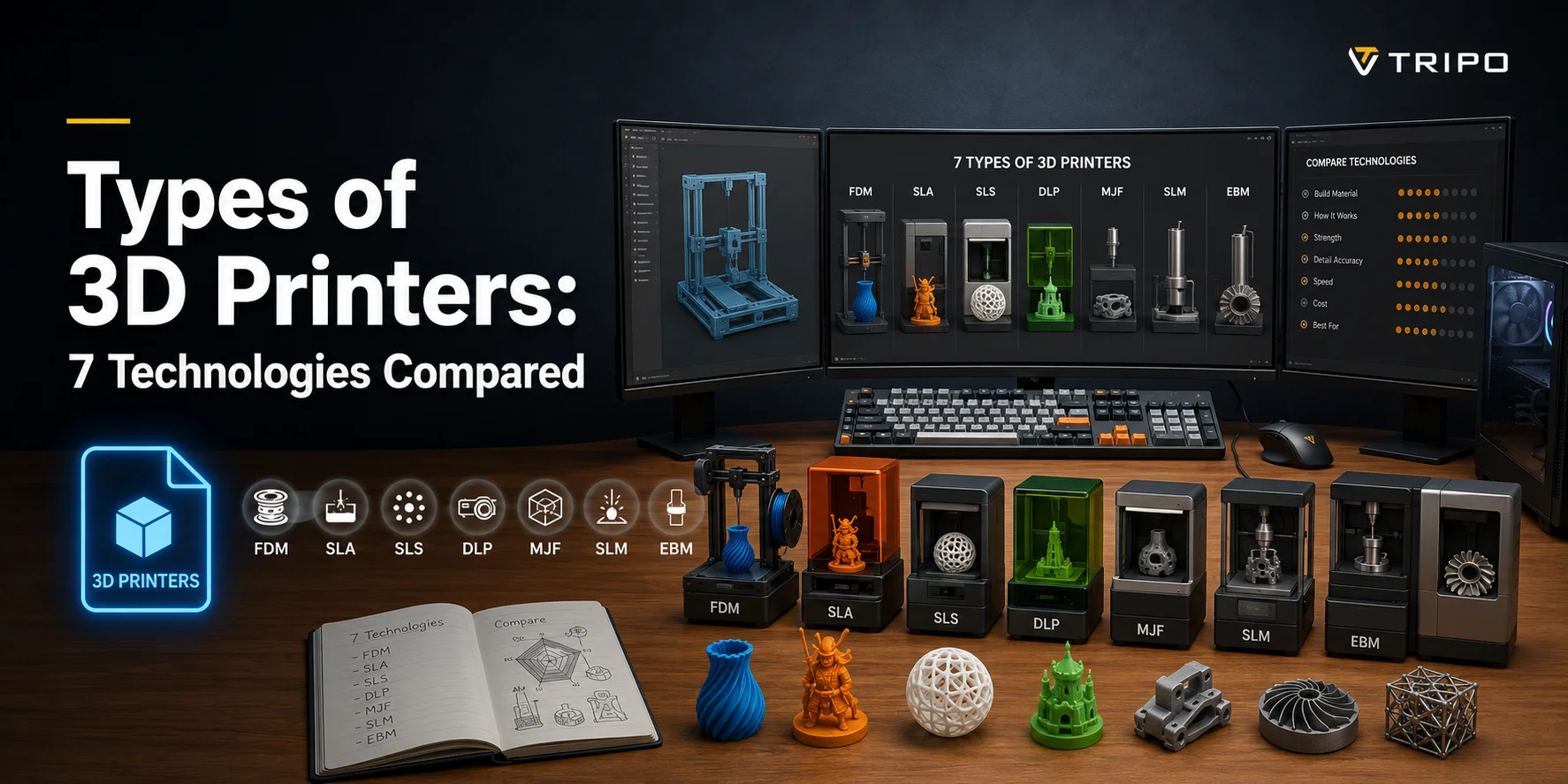
3D printing technologies are grouped into four main categories—FDM, resin (SLA/MSLA/DLP), powder-bed (SLS/MJF/metal), and material jetting (PolyJet)—and each uses a different process to build parts layer by layer. Across these, seven core technologies cover most applications, from low-cost FDM for beginners to high-precision resin printing, strong industrial nylon production, and advanced multi-material or metal systems.
In general, FDM is the most accessible and affordable, resin printers deliver the highest detail and smoothest surfaces, powder-bed systems are best for strong functional parts, and PolyJet and metal printing sit at the high-end for professional and industrial use.
There is no single "best" technology—the right choice depends on your budget, required detail, strength needs, and final application.
There are seven main types of 3D printers, grouped by how they build a part: filament (FDM/FFF), resin (SLA, MSLA, DLP), powder (SLS, MJF), and material jetting (PolyJet). Filament printers are the cheapest and most common; resin gives the finest detail; powder makes the strongest functional parts. The right one depends on your budget, detail, and use case. This guide covers how each of the seven main 3D printing technologies works, their pros and cons, and how to choose the right one for your needs.
What Are the Main Types of 3D Printers?
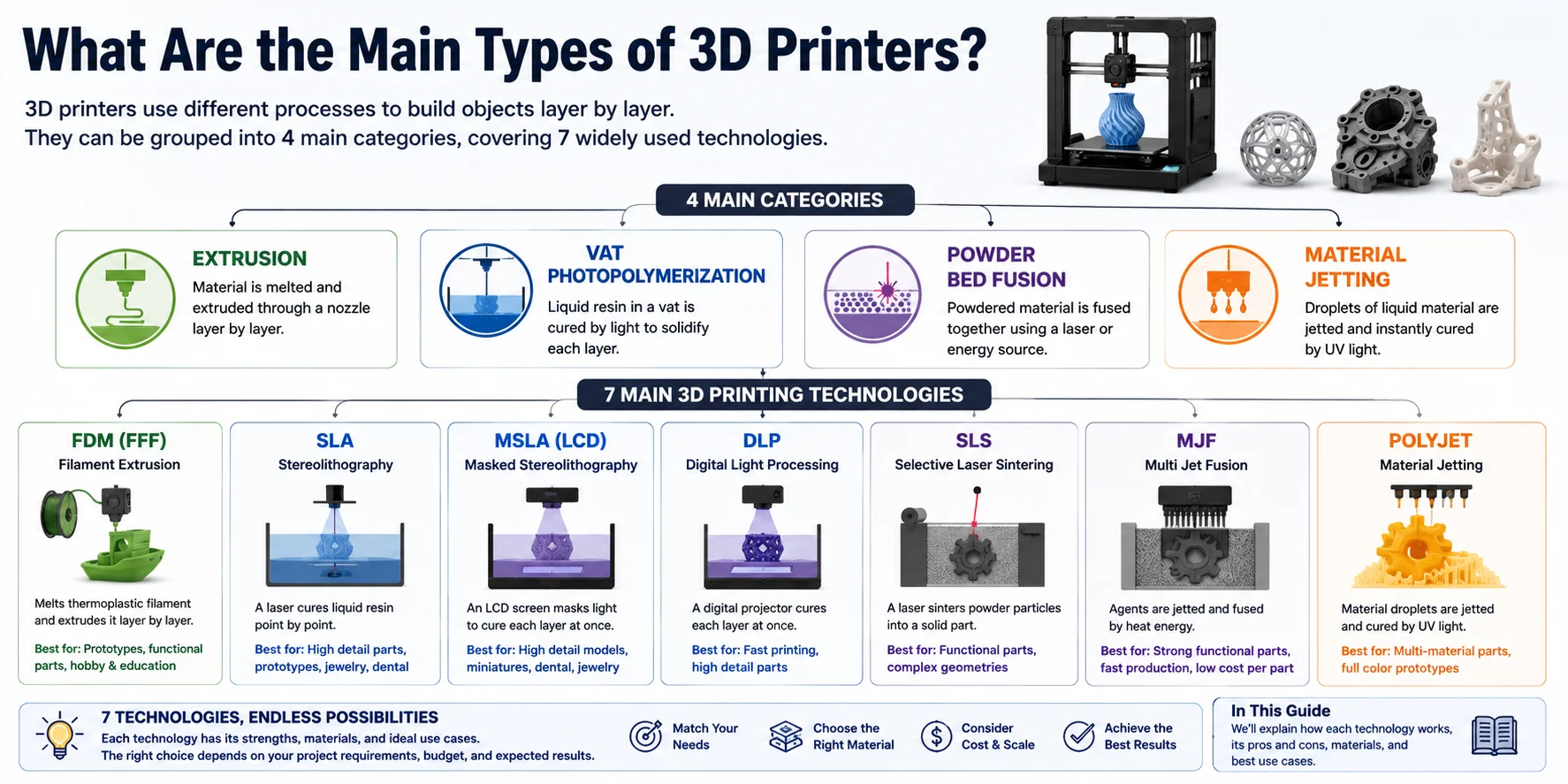
Not all 3D printers work the same way. While they all build objects layer by layer, they use different manufacturing processes, materials, and energy sources. The easiest way to understand modern 3D printing is to group technologies by how the part is formed. From these four major categories come the seven most widely used 3D printing technologies found in consumer, professional, and industrial applications.
The Four Main Categories of 3D Printing
1. Extrusion
Technology: FDM (FFF)
Extrusion printers melt thermoplastic filament and deposit it through a moving nozzle one layer at a time. This is the most affordable, beginner-friendly, and widely used type of 3D printer.
2. Vat Photopolymerization
Technologies: SLA, MSLA, DLP
These printers use liquid photopolymer resin that is cured by light. They produce extremely smooth surfaces and fine details, making them popular for miniatures, jewelry, dental models, and high-precision prototypes.
3. Powder Bed Fusion
Technologies: SLS, MJF, SLM (Metal)
Instead of filament or resin, these machines build parts from a bed of powder. Plastic or metal powder is fused together using a laser or other energy source, creating strong, highly functional components without the need for support structures in most cases.
4. Material Jetting
Technology: PolyJet
Material Jetting printers spray tiny droplets of liquid photopolymer onto the build platform and instantly cure them with UV light. They can combine multiple materials and full-color printing in a single part.
The 7 Main 3D Printing Technologies Covered in This Guide
- FDM (FFF) – Filament extrusion
- SLA – Laser resin printing
- MSLA (LCD) – LCD resin printing
- DLP – Digital Light Processing resin printing
- SLS – Selective Laser Sintering
- MJF – Multi Jet Fusion
- PolyJet – Material Jetting
Together, these seven technologies cover nearly all mainstream desktop and professional 3D printing applications. In the following sections, we'll explain how each one works, its advantages and limitations, the materials it uses, and the projects it's best suited for.
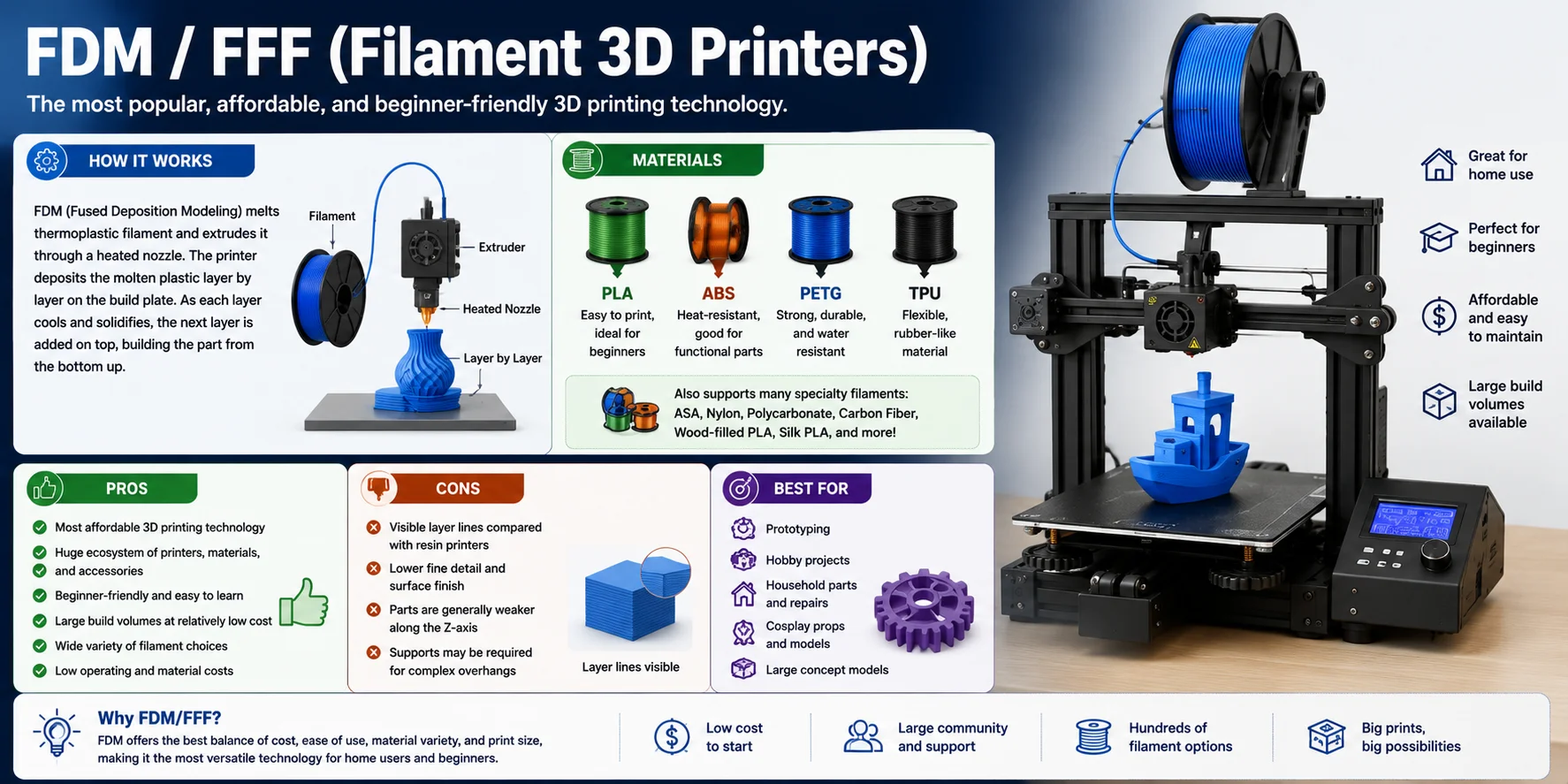
FDM / FFF (Filament 3D Printers)
FDM (Fused Deposition Modeling)—also known as FFF (Fused Filament Fabrication)—is the most popular and widely used 3D printing technology. It powers the vast majority of consumer and hobbyist 3D printers, making it the first choice for beginners, home users, schools, and makers. Thanks to its low cost, wide material selection, and large community, FDM has become the standard entry point into 3D printing.
How It Works
FDM printers create objects by melting a thermoplastic filament and pushing it through a heated nozzle. The printer deposits the molten plastic layer by layer onto the build plate, following the model's toolpath until the object is complete. Once a layer cools and solidifies, the next layer is added on top, gradually building the part from the bottom up.
Materials
FDM printers support the widest range of materials of any desktop 3D printing technology, including:
- PLA – Easy to print and ideal for beginners
- PETG – Strong, durable, and water resistant
- ABS – Heat-resistant and suitable for functional parts
- TPU – Flexible, rubber-like material for wearable and shock-absorbing parts
- Plus many specialty filaments such as ASA, Nylon, Polycarbonate, Carbon Fiber composites, Wood-filled PLA, and Silk PLA
Pros
- Most affordable 3D printing technology
- Huge ecosystem of printers, materials, and accessories
- Beginner-friendly and easy to learn
- Large build volumes available at relatively low cost
- Wide variety of filament choices for different applications
- Low operating and material costs
Cons
- Visible layer lines compared with resin printers
- Lower fine detail and surface finish
- Parts are generally weaker along the Z-axis because they are built layer by layer
- Supports may be required for complex overhangs
Best For
FDM is the best choice for prototyping, hobby projects, educational use, household repairs, functional parts, cosplay props, and large concept models. If you're buying your first 3D printer or need an affordable machine for everyday printing, FDM is almost always the recommended starting point.
SLA (Stereolithography) Resin 3D Printers
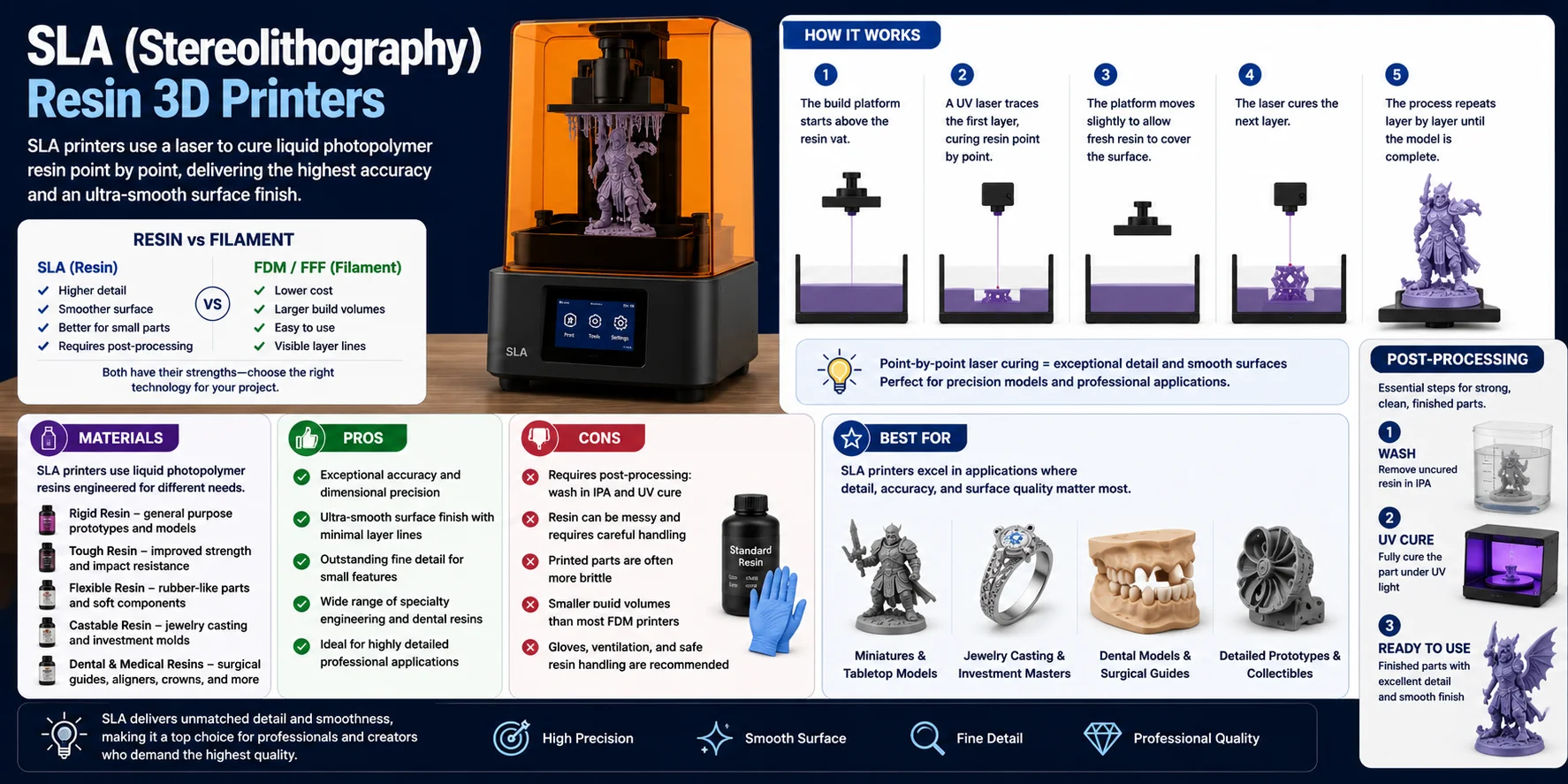
SLA (Stereolithography) is one of the oldest and most accurate 3D printing technologies. Instead of melting plastic filament, it uses a laser to cure liquid photopolymer resin into solid plastic, producing exceptionally smooth surfaces and extremely fine details.
How It Works
An SLA printer contains a vat filled with liquid photopolymer resin. A precision UV laser traces each layer point by point, curing the resin wherever the laser hits. After each layer is completed, the build platform moves, allowing fresh resin to cover the surface before the next layer is cured.
Materials
SLA printers use specialized liquid resins designed for different applications, including standard rigid resin, tough resin, flexible resin, castable resin, and dental and medical resins.
Pros
- Exceptional accuracy and dimensional precision
- Ultra-smooth surface finish with minimal visible layer lines
- Outstanding fine detail for small features
- Wide range of specialty engineering and dental resins
Cons
- Requires post-processing, including washing in isopropyl alcohol (IPA) and UV curing
- Resin can be messy and requires careful handling
- Printed parts are often more brittle than FDM prints
- Smaller build volumes than most filament printers
Best For
SLA printers are best suited for miniatures, tabletop gaming models, jewelry masters, dental applications, highly detailed prototypes, collectibles, and display-quality parts.
MSLA (Masked SLA / LCD) Resin Printers
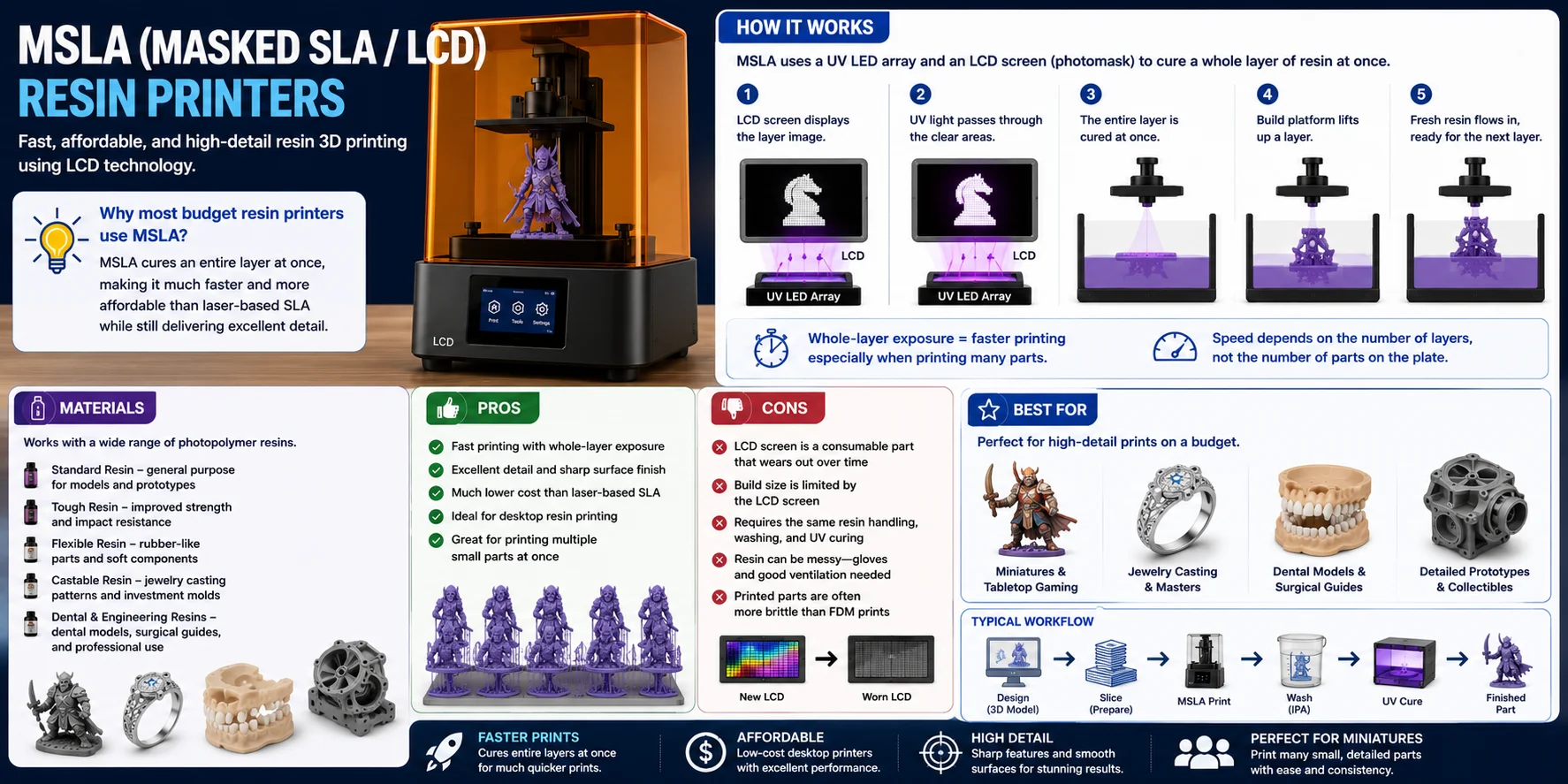
MSLA (Masked Stereolithography)—often called LCD resin printing—is the technology behind most affordable desktop resin 3D printers today. Instead of tracing each layer with a laser, MSLA cures an entire layer at once, making it significantly faster while still delivering exceptional detail.
How It Works
MSLA printers use a UV LED array as the light source and an LCD screen as a photomask. For each layer, the LCD selectively blocks or allows UV light to pass through, exposing only the required areas of the liquid resin. Because the whole layer is cured simultaneously rather than point by point, print speed depends mainly on the number of layers—not the number of parts on the build plate.
Materials
MSLA printers support nearly the same range of photopolymer resins as SLA printers, including standard resin, tough resin, flexible resin, castable resin, and dental and engineering resins.
Pros
- Fast printing thanks to whole-layer exposure
- Excellent detail and sharp surface finish
- Much lower cost than traditional SLA systems
- Perfect for printing multiple small parts at the same time
Cons
- The LCD screen is a consumable part that gradually wears out and will eventually need replacement
- Build volume is largely limited by the size of the LCD screen
- Requires the same resin handling, washing, and UV curing as other resin printers
Best For
MSLA printers are the best choice for affordable, high-detail desktop resin printing, especially miniatures, tabletop gaming figures, collectibles, jewelry masters, dental models, and highly detailed prototypes.
DLP (Digital Light Processing) Resin Printers
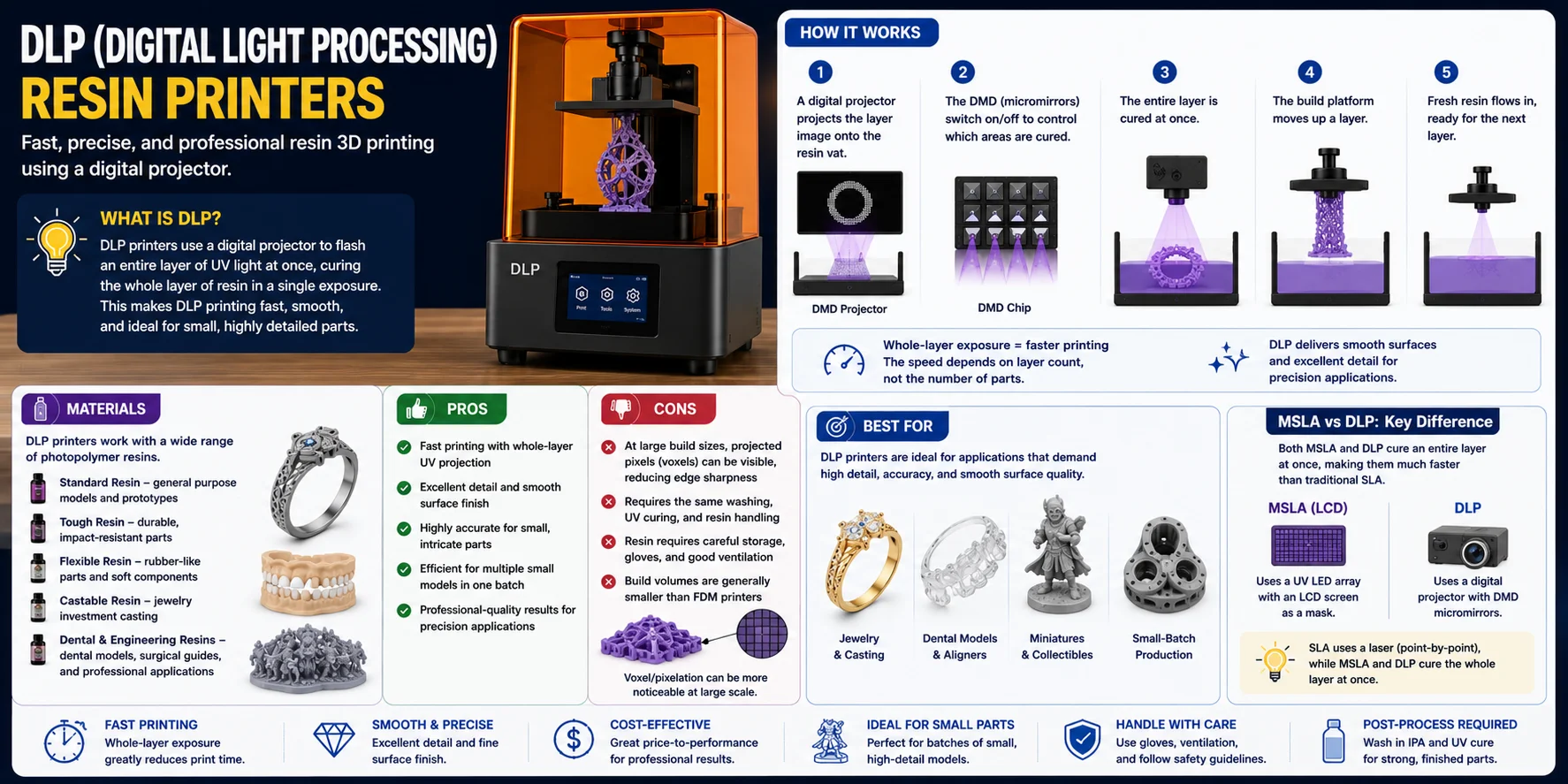
DLP (Digital Light Processing) is another resin-based 3D printing technology that cures an entire layer of liquid photopolymer at once. The key difference from MSLA is how the light is generated: MSLA uses a UV LED array with an LCD screen as a mask, while DLP uses a digital projector that reflects UV light through millions of microscopic mirrors (a DMD chip).
How It Works
A DLP printer projects the image of an entire layer onto the resin vat using a Digital Micromirror Device (DMD). Each microscopic mirror represents a pixel and can rapidly switch on or off to control where UV light reaches the resin. This whole-layer exposure makes DLP both fast and highly precise.
Materials
DLP printers work with many of the same photopolymer resins used by SLA and MSLA systems, including standard resin, tough resin, flexible resin, castable resin, and dental and engineering resins.
Pros
- Fast printing with whole-layer UV projection
- Excellent detail and smooth surface finish
- Highly accurate for small, intricate parts
- Efficient for printing multiple small models in a single batch
Cons
- At larger build sizes, projected pixels (voxels) can become more noticeable
- Requires the same washing, UV curing, and resin handling as other resin technologies
- Build volumes are generally smaller than FDM printers
Best For
DLP printers are ideal for jewelry production, dental laboratories, miniature manufacturing, collectibles, and small-batch, high-detail production. Simple rule: SLA uses a laser, MSLA uses an LCD mask, and DLP uses a digital projector—but both MSLA and DLP cure an entire layer at once, making them significantly faster than traditional SLA.
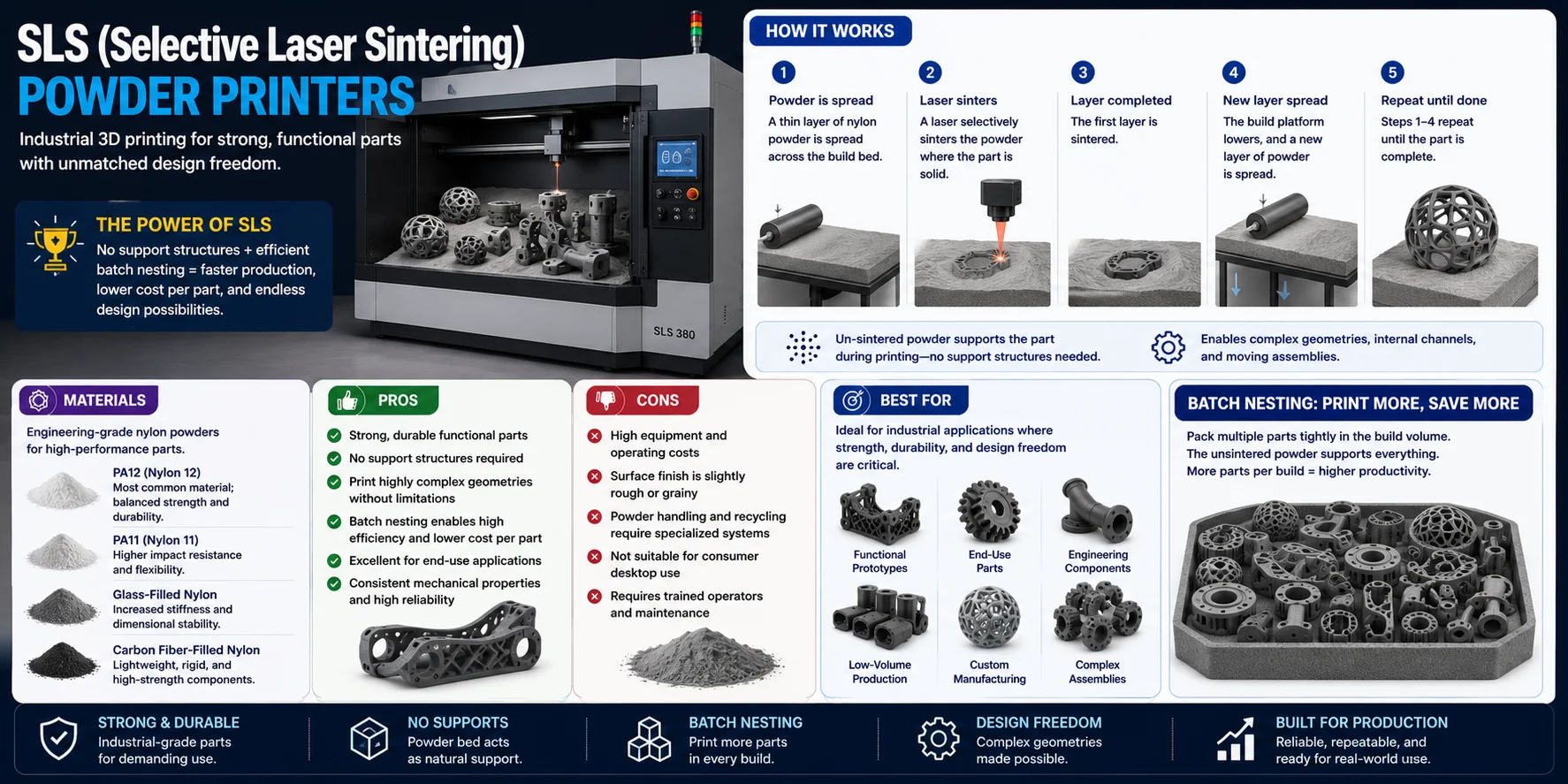
SLS (Selective Laser Sintering) Powder Printers
SLS (Selective Laser Sintering) is one of the most widely used industrial 3D printing technologies for producing strong, functional plastic parts. Unlike FDM or resin printing, SLS builds objects from a bed of fine polymer powder. Its biggest advantage is that the surrounding unsintered powder naturally supports the part during printing, eliminating the need for support structures.
How It Works
SLS printers spread a thin layer of nylon powder across a heated build chamber. A high-powered laser selectively sinters (fuses) the powder wherever the part should be solid. After each layer is completed, a fresh layer of powder is spread over the surface, and the process repeats until the model is finished.
Materials
- PA12 (Nylon 12) – The most common material for functional parts
- PA11 (Nylon 11) – Higher impact resistance and flexibility
- Glass-filled Nylon – Increased stiffness and dimensional stability
- Carbon Fiber-Filled Nylon – Lightweight, rigid, and high-strength components
Pros
- Produces strong, durable functional parts
- No support structures required
- Excellent for complex internal geometries and interlocking assemblies
- Multiple parts can be tightly packed (batch nesting) for efficient production
Cons
- High equipment and operating costs
- Parts have a slightly rough, grainy surface finish
- Powder handling and recycling require specialized equipment
- Not commonly available as a consumer desktop printer
Best For
SLS is ideal for functional prototypes, end-use products, engineering components, custom manufacturing, and low-volume production.
MJF (Multi Jet Fusion) Powder Printers
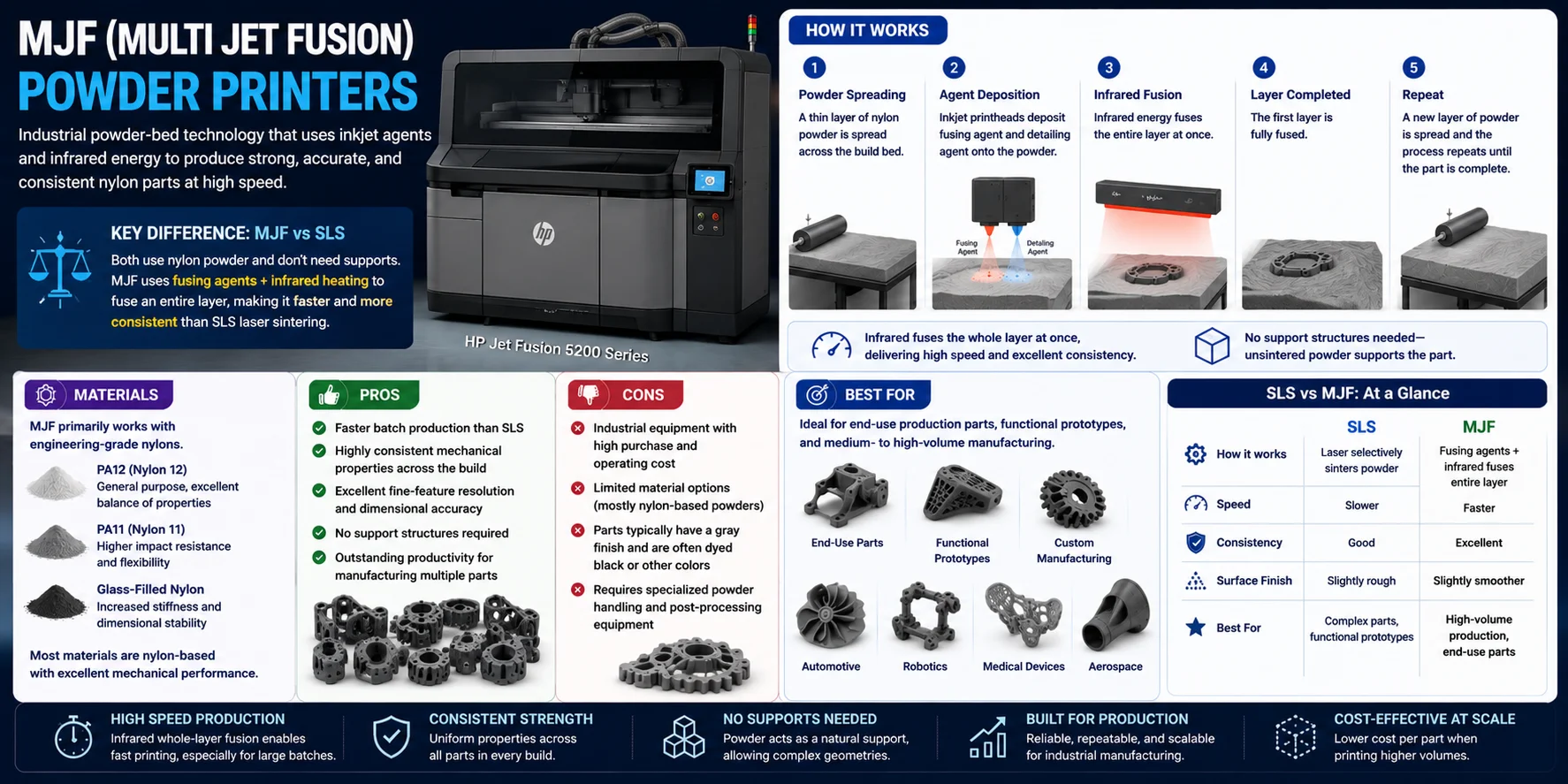
MJF (Multi Jet Fusion) is an industrial powder-bed 3D printing technology developed by HP. Like SLS, it builds strong parts from nylon powder without support structures, but instead of using a laser, MJF deposits fusing and detailing agents before applying infrared energy to fuse an entire layer.
How It Works
MJF printers spread a thin layer of nylon powder across the build chamber. Inkjet printheads deposit two types of agents: a fusing agent that absorbs infrared energy and melts the powder, and a detailing agent that controls edge definition and improves dimensional accuracy. An infrared heating system then fuses the entire layer at once.
Materials
- PA12 (Nylon 12) – The standard material for production parts
- PA11 (Nylon 11) – Greater ductility and impact resistance
- Glass-filled Nylon – Increased stiffness for structural components
Pros
- Faster batch production than SLS
- Highly consistent mechanical properties across the build
- Excellent fine-feature resolution and dimensional accuracy
- No support structures required
Cons
- Industrial equipment with a high purchase and operating cost
- Material options are limited, primarily to nylon-based powders
- Parts typically have a gray finish and are often dyed afterward
- Requires specialized powder handling and post-processing equipment
Best For
MJF is best suited for end-use production parts, functional prototypes, custom manufacturing, and medium- to high-volume production.
SLS vs. MJF: Both technologies print support-free nylon powder parts, but SLS uses a laser to sinter the powder, while MJF uses fusing agents and infrared energy to fuse an entire layer, resulting in faster production speeds and more consistent mechanical properties.
PolyJet (Material Jetting) Printers
How It Works
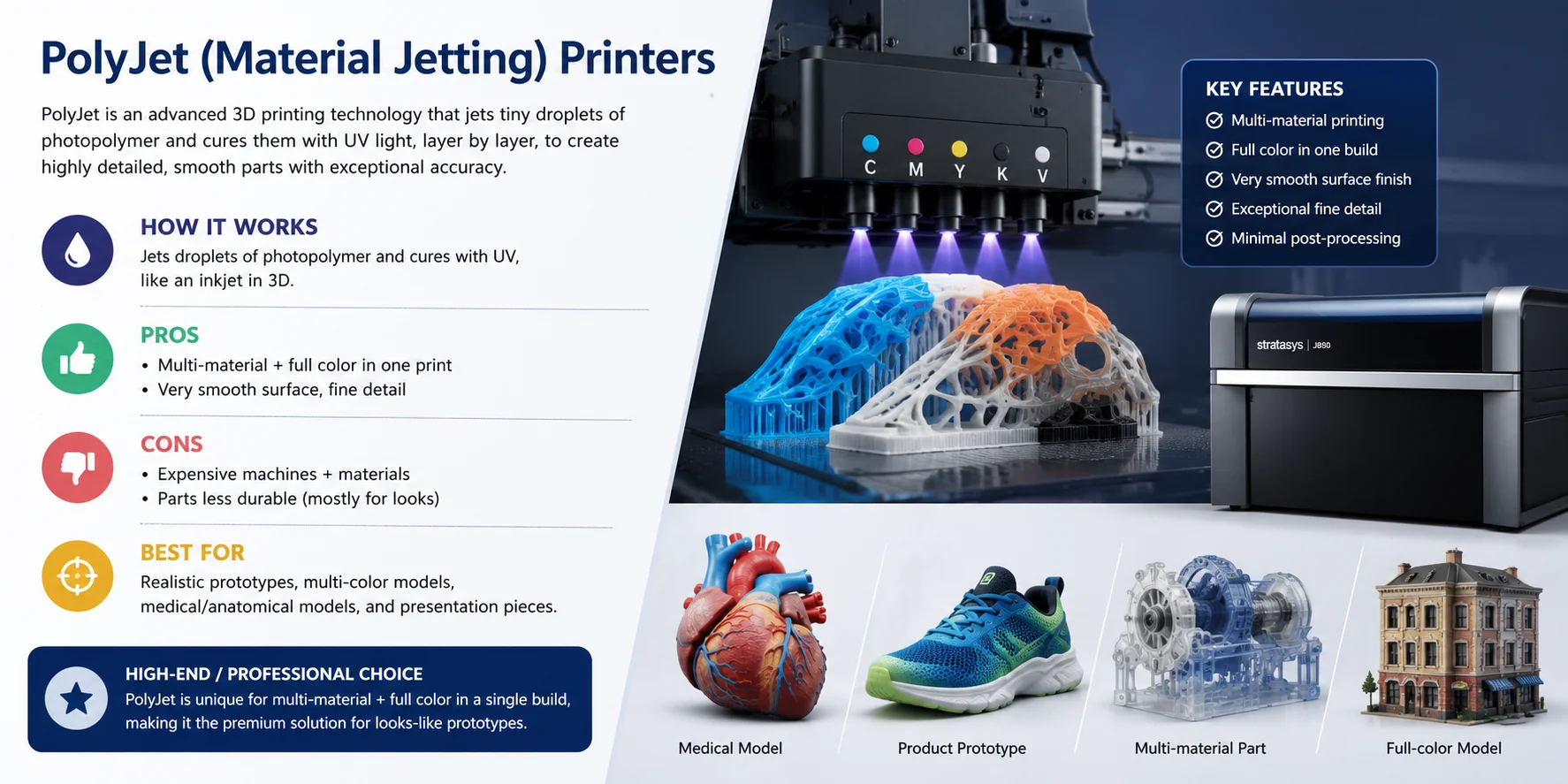
PolyJet printers work much like a 2D inkjet printer but in three dimensions. Thousands of tiny droplets of liquid photopolymer are precisely jetted onto the build platform and instantly cured with UV light, layer by layer. Different material cartridges can be active simultaneously, allowing the printer to combine materials of varying hardness, transparency, or color in a single build.
Materials
- Rigid photopolymer – Standard option for detailed prototypes and concept models
- Flexible photopolymer – Simulates rubber or soft-touch materials
- Transparent photopolymer – Clear or tinted sections for visual inspection parts
- Specialty resins – Dental, biocompatible, and high-temperature variants
Pros
- Prints multiple materials and full color in a single build
- Exceptional surface smoothness with minimal post-processing
- Outstanding fine detail and dimensional accuracy
- Closely replicates final product look and feel for design reviews
- Supports varying hardness levels within one part
Cons
- High equipment and proprietary material costs
- Parts are generally less durable than FDM, SLS, or MJF for mechanical use
- Primarily suited for visual evaluation and short-term functional testing
- Requires post-processing to remove support material (soluble wax)
Best For
PolyJet is best suited for realistic product prototypes, full-color concept models, multi-material assemblies, medical and anatomical models, dental applications, and presentation-quality parts where appearance is just as important as accuracy.
A Quick Word on Metal 3D Printing (DMLS / SLM)
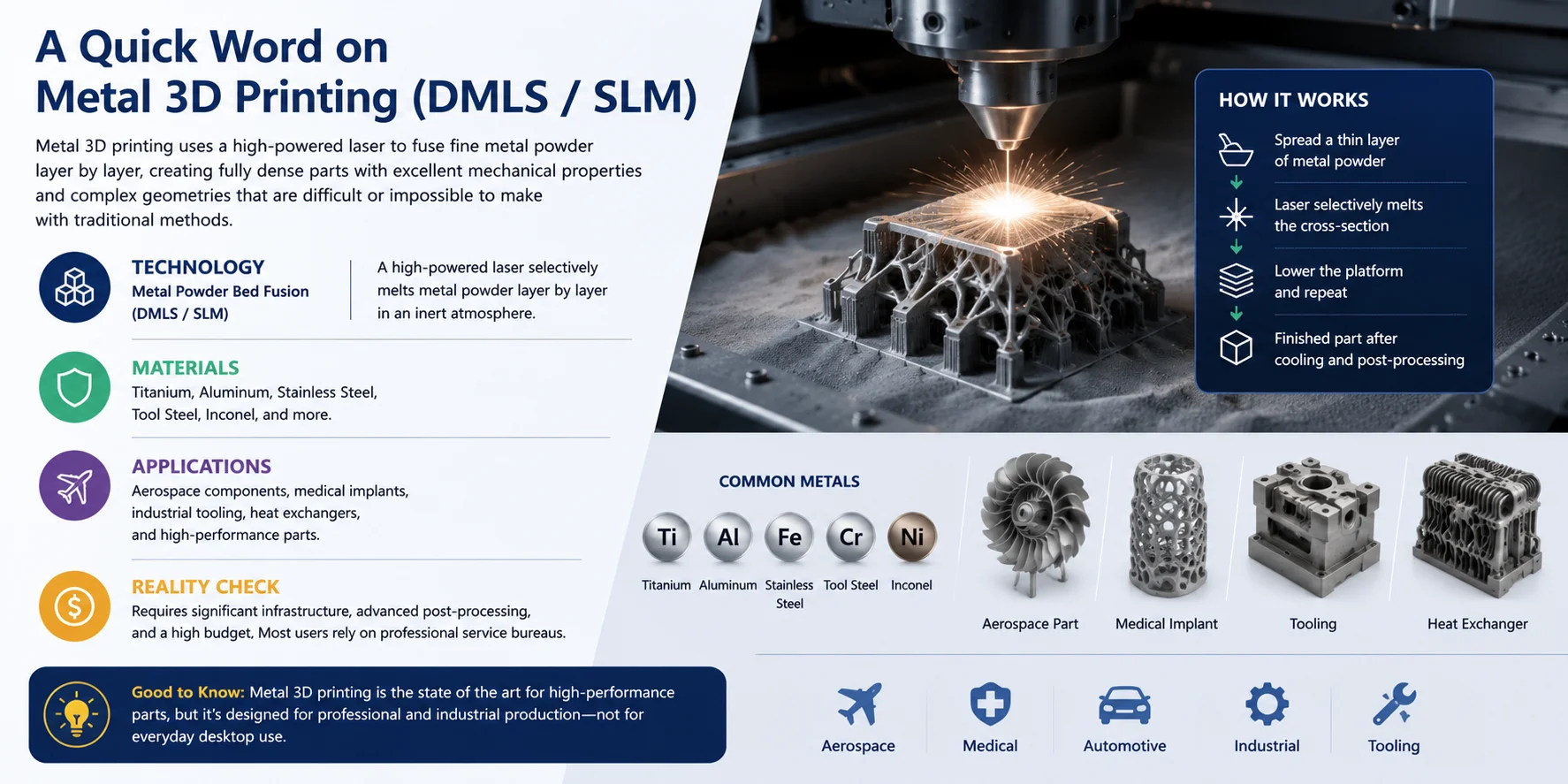
The most common industrial metal technologies are Direct Metal Laser Sintering (DMLS) and Selective Laser Melting (SLM). Both use a high-powered laser to fuse fine metal powder layer by layer, creating fully dense metal parts with excellent mechanical properties and complex internal geometries.
These systems can print engineering metals including titanium, aluminum, stainless steel, tool steel, and Inconel. They are widely used in aerospace, medical, automotive, and industrial manufacturing for lightweight components, custom implants, tooling, heat exchangers, and high-performance production parts.
However, metal 3D printing is in a completely different category from desktop FDM or resin printers. The equipment, metal powders, inert gas systems, post-processing, and safety requirements make it a major investment, with machines often costing hundreds of thousands of dollars. Most users access these technologies through professional service bureaus rather than owning the equipment themselves.
Best for: Aerospace components, medical implants, industrial tooling, and high-performance metal parts.
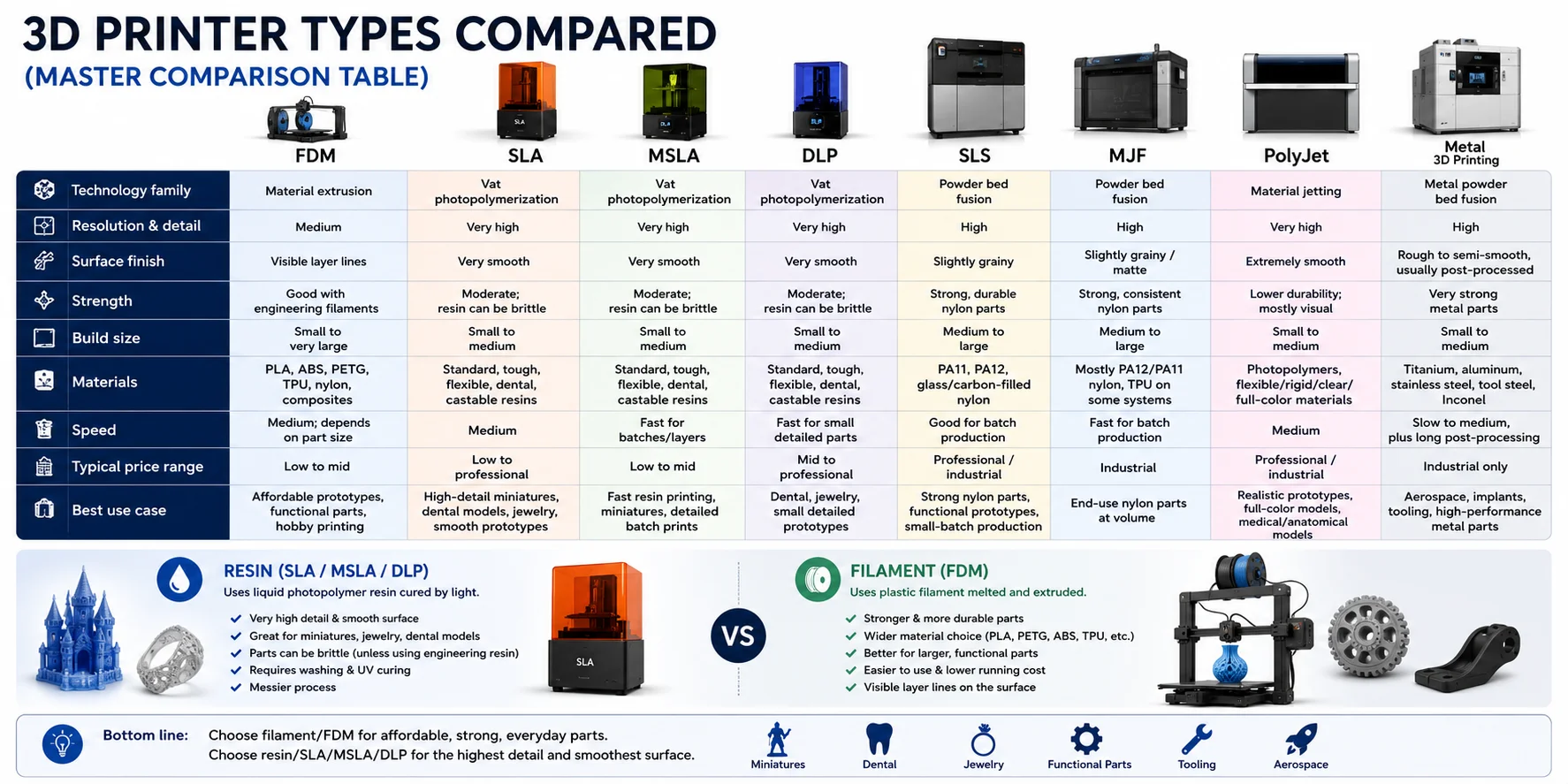
3D Printer Types Compared (Master Comparison Table)
Choosing a 3D printer is much easier when you compare the major technologies side by side. The best option depends on what matters most: part strength, fine detail, surface finish, material choice, color, speed, or budget.
| Technology | Type | Layer Resolution | Speed | Typical Cost Range | Best For |
|---|---|---|---|---|---|
| FDM | Filament extrusion | 0.05–0.3 mm | Medium | 1,000+ | Everyday printing, prototypes, functional parts |
| SLA | Laser resin | 0.025–0.1 mm | Slow–Medium | 5,000+ | High detail, jewelry, dental |
| MSLA (LCD) | LCD resin | 0.01–0.05 mm | Fast | 800 | Miniatures, dental, affordable detail |
| DLP | Projector resin | 0.02–0.1 mm | Fast | 5,000+ | Jewelry, dental, precision production |
| SLS | Powder bed fusion | 0.06–0.15 mm | Medium | 100,000+ | Functional prototypes, end-use parts |
| MJF | Powder bed fusion | ~0.08 mm | Fast | 400,000+ | Production parts, industrial use |
| PolyJet | Material jetting | 0.014–0.032 mm | Medium | 300,000+ | Realistic prototypes, multi-material |
If you only remember one thing: FDM is the most practical all-rounder, resin printers are best for detail and smooth surfaces, and powder-bed systems are best for strong production-grade parts.
Resin vs Filament: What's the Difference?
"Filament printers" usually mean FDM printers, which melt plastic filament such as PLA, PETG, ABS, or TPU and lay it down layer by layer. They are cheaper to run, easier to use for larger parts, and better for practical or functional prints.
"Resin printers" usually mean SLA, MSLA, or DLP printers, which cure liquid photopolymer resin with light. They produce much finer detail and smoother surfaces than FDM, but resin is messier to handle, requires washing and curing, and printed parts are often more brittle.
In simple terms: choose filament/FDM for affordable, strong, everyday parts; choose resin/SLA/MSLA/DLP for miniatures, jewelry, dental models, and anything where fine detail matters most.
How to Choose a 3D Printer (by Use Case & Budget)
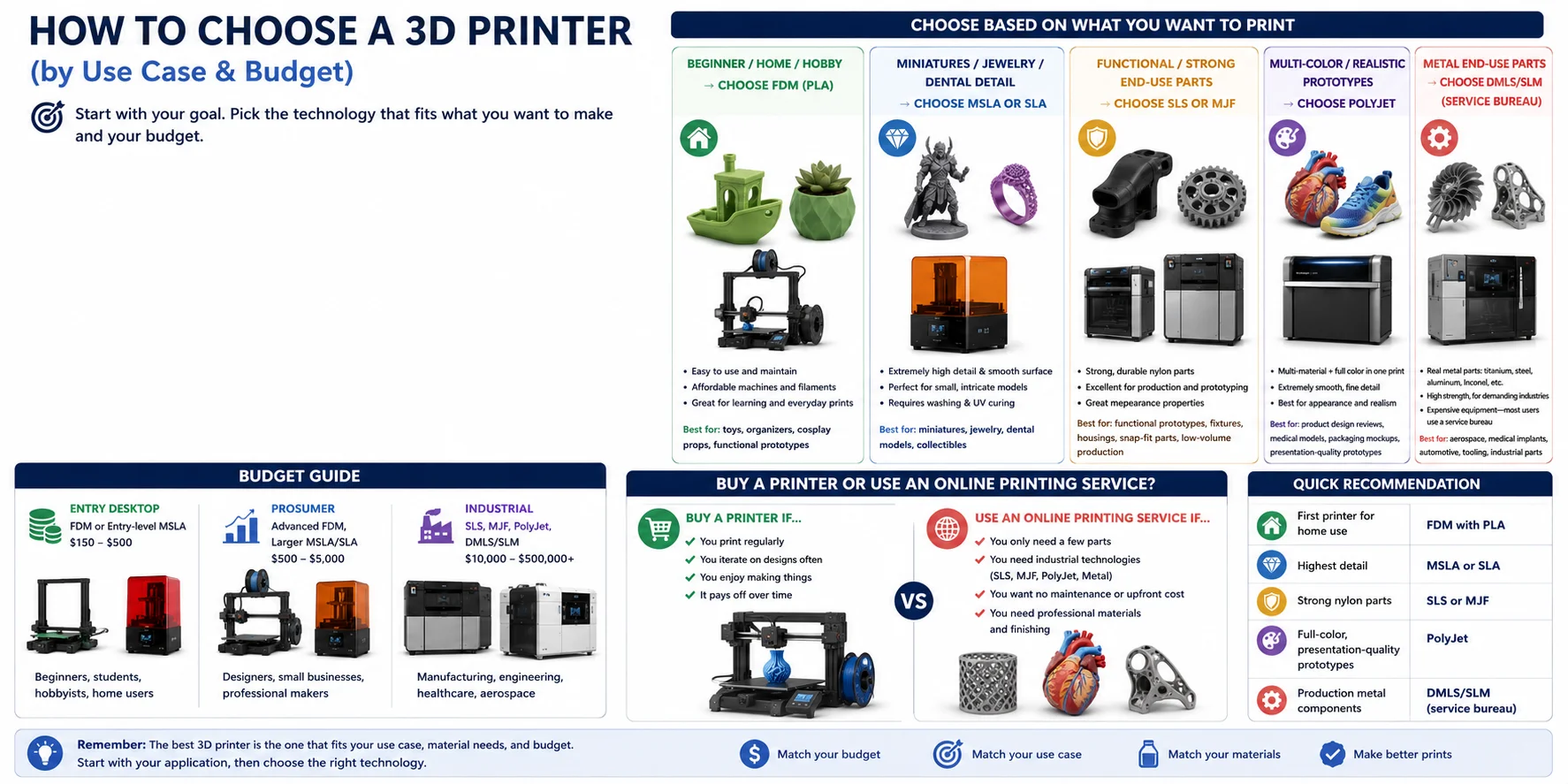
With so many 3D printing technologies available, the "best" printer is simply the one that matches what you want to make. Instead of comparing specifications, start by identifying your primary use case, then choose the technology that fits your needs and budget.
Choose Based on What You Want to Print
You're a beginner, hobbyist, or home user → Choose FDM (PLA) If this is your first 3D printer, an FDM machine is almost always the best choice. PLA is inexpensive, easy to print, and forgiving, making it ideal for learning, household projects, toys, organizers, cosplay props, and functional prototypes.
You print miniatures, jewelry, or highly detailed models → Choose MSLA or SLA Resin printers produce much finer details and smoother surfaces than FDM. They're the preferred option for tabletop miniatures, jewelry masters, dental models, collectibles, and display-quality prints.
You need strong, functional end-use parts → Choose SLS or MJF For engineering prototypes and production-quality components, powder-bed fusion technologies outperform desktop printers. SLS and MJF produce durable nylon parts with excellent mechanical properties.
You need realistic, multi-color prototypes → Choose PolyJet If appearance matters as much as function, PolyJet is the premium option. It can combine multiple materials and full color in a single print.
You need production-ready metal parts → Choose DMLS/SLM (or a service bureau) Metal 3D printing is designed for aerospace, medical, automotive, and industrial manufacturing. Most companies outsource metal printing to professional service providers.
Budget Guide
| Budget | Recommended Technology | Entry Price | Notes |
|---|---|---|---|
| Under $300 | FDM (PLA/PETG) | ~300 | Best for beginners |
| 500 | MSLA Resin | ~400 | Best for high detail on a budget |
| 1,000+ | FDM (advanced) | ~1,000 | Multi-material, fast printers |
| 5,000 | Professional SLA | ~5,000 | Dental, engineering applications |
| $5,000+ | SLS / MJF | $5,000+ | Industrial-grade, usually via service bureaus |
| $30,000+ | PolyJet / DMLS/SLM | $30,000+ | Advanced professional/industrial use |
Should You Buy a Printer or Use an Online Printing Service?
Buying a printer makes sense if you plan to print regularly, iterate on designs, or enjoy making things as a hobby. A desktop FDM or resin printer quickly pays for itself when used frequently.
If you only need a few parts—or require industrial technologies such as SLS, MJF, PolyJet, or metal printing—an online 3D printing service is usually the smarter option.
Quick Recommendation
- First printer for home use: FDM with PLA
- Highest detail: MSLA or SLA
- Strong nylon parts: SLS or MJF
- Full-color, presentation-quality prototypes: PolyJet
- Production metal components: DMLS/SLM through a professional service bureau
3D Printer Brands to Know
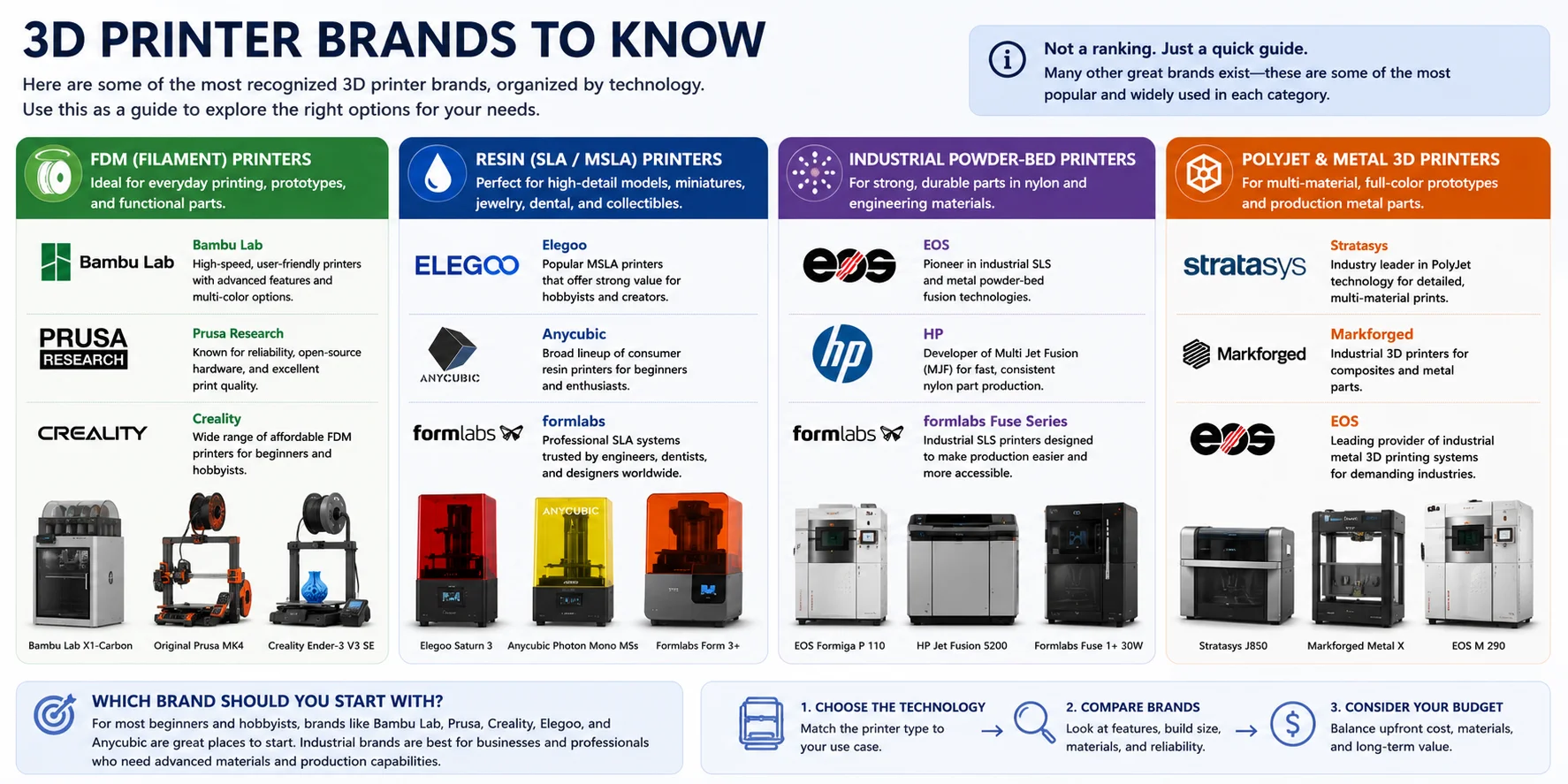
There are dozens of brands of 3D printers, but most specialize in a particular technology or market. Rather than thinking about which brand is "best," it's more helpful to know which companies are known for each category.
FDM (Filament) Printers
- Bambu Lab — High-speed, user-friendly printers with automatic calibration and multi-color printing options.
- Prusa Research — Well-known for reliability, open-source hardware, and excellent print quality.
- Creality — Offers one of the widest ranges of affordable FDM printers for beginners and hobbyists.
Resin (SLA/MSLA) Printers
- Elegoo — Popular MSLA printers that offer strong value for hobbyists and miniature makers.
- Anycubic — A broad lineup of consumer resin printers suitable for beginners and enthusiasts.
- Formlabs — Professional SLA systems widely used in engineering, dentistry, healthcare, and product design.
Industrial Powder-Bed Printers
- EOS — A pioneer in industrial SLS and metal powder-bed fusion technologies.
- HP — Developer of Multi Jet Fusion (MJF), known for fast, consistent production of nylon parts.
- Formlabs (Fuse Series) — Brings SLS printing to smaller businesses with more accessible industrial systems.
PolyJet & Metal 3D Printing
- Stratasys — Industry leader in PolyJet technology, producing highly detailed, multi-material, and full-color prototypes.
- Markforged — Focuses on industrial composite and metal 3D printing for manufacturing and engineering.
- EOS — Also one of the leading suppliers of industrial metal 3D printing systems.
Which Brand Should You Start With?
If you're buying your first 3D printer, you'll most likely compare Bambu Lab, Prusa, Creality, Elegoo, and Anycubic, since these brands focus on desktop FDM and resin printers. Ultimately, choose the technology first, then compare brands within that category.
Frequently Asked Questions
What are the three main types of 3D printers?
The three main types are FDM (melts plastic filament, cheapest and easiest to use), resin (SLA/MSLA/DLP, cures liquid resin with UV light for fine detail), and SLS (fuses nylon powder with a laser for strong, support-free parts). FDM suits beginners and everyday use; resin is best for miniatures and high-detail models; SLS is used for functional engineering parts.
What are the 7 types of 3D printing?
The seven main types are FDM, SLA, MSLA, DLP, SLS, MJF, and PolyJet. They group into four families: filament extrusion (FDM), resin/vat photopolymerization (SLA, MSLA, DLP), powder bed fusion (SLS, MJF), and material jetting (PolyJet). Metal technologies such as DMLS and SLM are sometimes listed as an eighth category for industrial use.
Is PLA or ABS better for beginners?
PLA is the better choice for beginners. It prints at lower temperatures, warps less, and needs no enclosure, making it far easier to work with. ABS is stronger and more heat-resistant but tends to warp and produce fumes, so stick with PLA until you are comfortable with your printer.
What is the difference between FDM and resin 3D printing?
FDM printers melt plastic filament and build parts layer by layer, making them affordable and easy to use for everyday projects. Resin printers (SLA, MSLA, DLP) cure liquid photopolymer with UV light, producing much finer detail and smoother surfaces—but requiring post-processing with washing and UV curing. Choose FDM for affordable, functional parts and resin when surface quality and precision matter most.
How much does a beginner 3D printer cost?
Entry-level FDM printers start around 300 and are the most accessible option for beginners. Desktop resin printers (MSLA) typically cost 500. Industrial technologies like SLS and MJF require significantly higher investment and are generally accessed through 3D printing service bureaus.
Which 3D printer type is best for printing miniatures?
Resin printers—specifically MSLA (LCD) and SLA—are the best choice for miniatures. They deliver the fine surface detail, sharp edges, and smooth finish that small-scale figures require.
What materials can you use with FDM 3D printers?
FDM printers support the widest range of materials of any desktop technology. Common options include PLA, PETG, ABS, TPU, and specialty filaments like ASA, Nylon, Polycarbonate, and carbon fiber composites.
Do resin 3D printers require post-processing?
Yes. All resin printers (SLA, MSLA, DLP) require post-processing: printed parts must be washed in isopropyl alcohol (IPA) to remove uncured resin, then exposed to UV light to fully cure and harden.
Conclusion
There is no single "best" 3D printer type—the right choice depends on your detail needs, strength requirements, budget, and intended use. FDM is great for getting started, resin is best for fine detail, and powder-based systems are used for strong functional parts.