Types of Animation: 5 Main Styles Explained (2026)
TL;DR
- Types of animation are usually grouped by production method: traditional hand-drawn, 2D digital, 3D/CGI, motion graphics, and stop motion.
- Traditional and 2D animation both use drawn visuals, but modern 2D often relies on reusable digital rigs and vector assets.
- 3D/CGI animation uses digital models, rigs, cameras, lighting, and rendering, making it central to films, games, VFX, and AR/VR.
- Motion graphics is best for explaining ideas with text, shapes, icons, and data; stop motion is best for tactile, handcrafted visuals.
- The right style depends on your story, budget, team size, timeline, and learning path.
Animation is the art of creating the illusion of motion by displaying a sequence of images in rapid succession. There are five main types of animation: traditional (hand-drawn), 2D vector, 3D (CGI), motion graphics, and stop motion—each with its own tools, look, and best use cases.
What Is Animation?
Animation is the illusion of movement created by showing a sequence of still images (frames) one after another, fast enough that the human eye perceives continuous motion. This effect is often explained through persistence of vision, where each frame briefly lingers in the brain, blending with the next to form the appearance of life and movement.
When people search for types of animation, they’re usually not just asking about how animation looks, but how it is made. That’s why there are many types of animation styles—they are defined mainly by technique and production process, not just visual appearance. In other words, a cartoon, a realistic CGI scene, and a cut-out puppet film may look completely different, but the real distinction comes from how each frame is created and assembled.
In types of animation in computer graphics, for example, motion is generated digitally using 2D or 3D software, keyframes, and physics systems. In contrast, traditional hand-drawn animation is built frame-by-frame on paper or tablets, while stop motion uses physical objects moved and photographed incrementally.
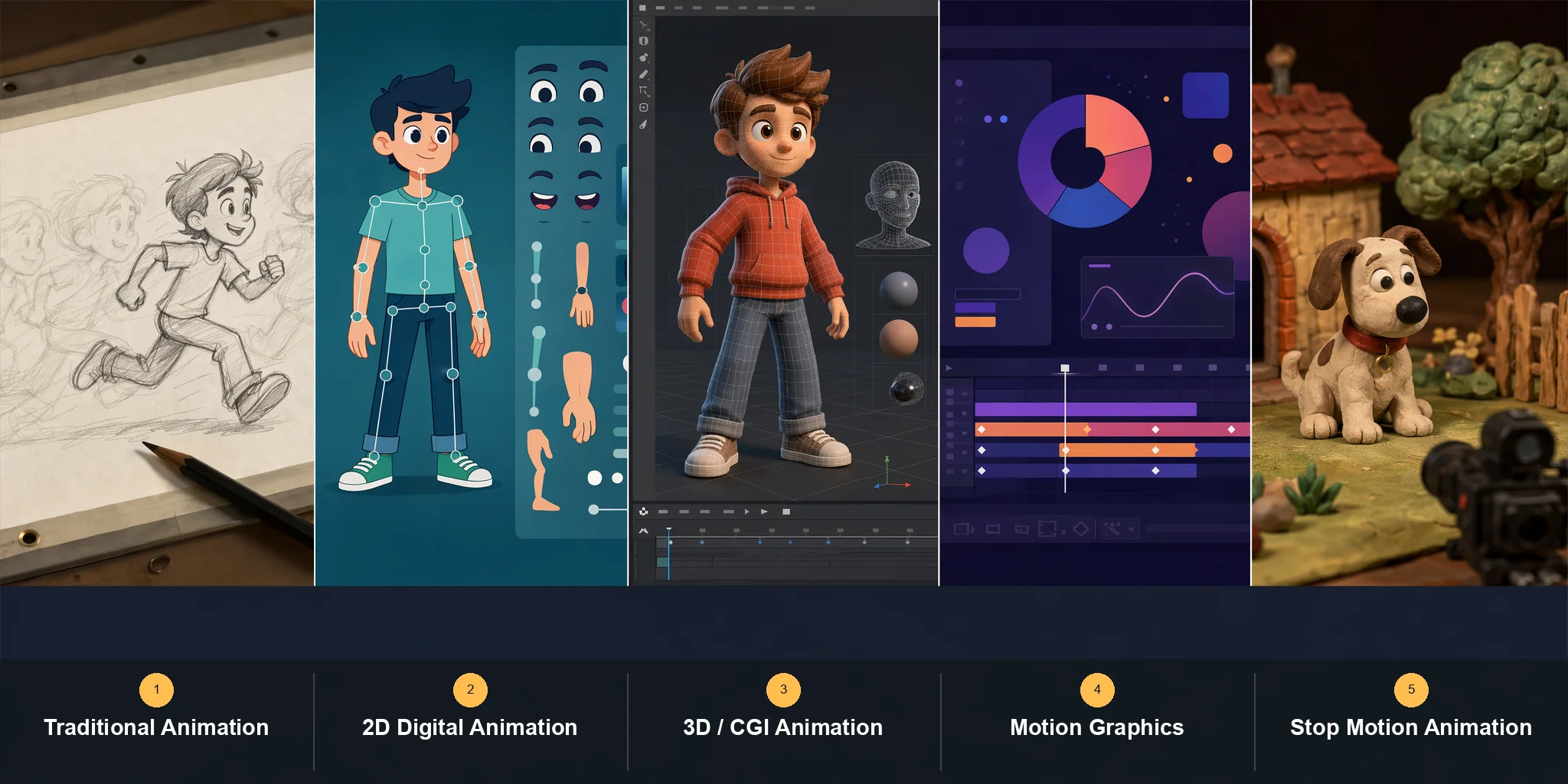
Different sources classify animation in slightly different ways—some list four types, others six or more—but the five most widely recognized styles today are: traditional (hand-drawn) animation, 2D digital animation, 3D (CGI) animation, motion graphics, and stop motion. The sections below cover each one: what it is, how it is made, real examples, tools, and where it is used.
Traditional (Hand-Drawn / Cel) Animation
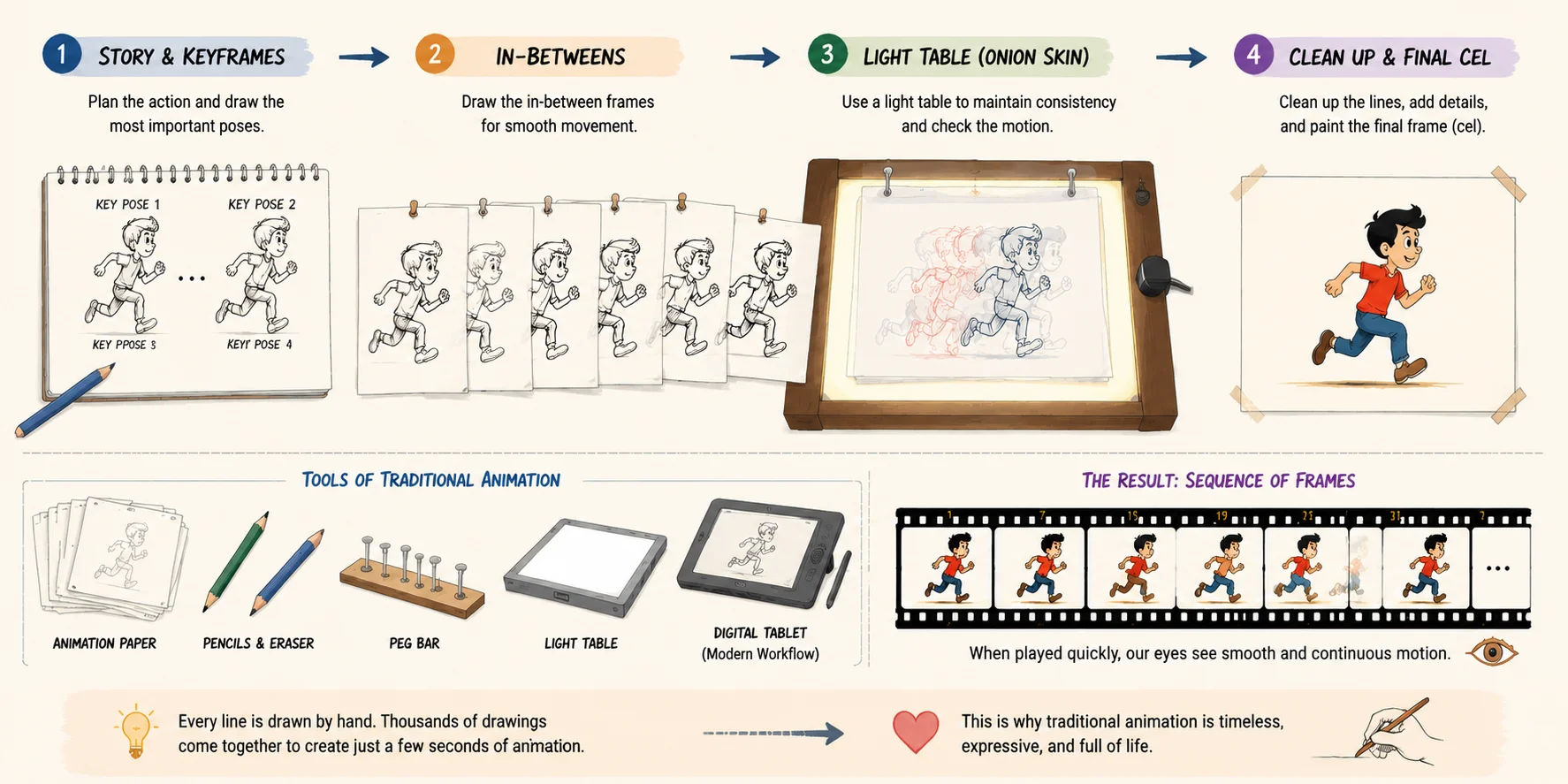
Traditional animation—also called hand-drawn or cel animation—is the oldest and most foundational form among all types of animation styles. It is created by drawing each frame individually, either on paper or digitally, and then sequencing those frames to create the illusion of movement. This is one of the clearest answers to the question what are the 4 types of animation, since it represents the historical starting point of the entire industry and still influences modern types of animation in computer graphics today.
At its core, traditional animation works frame by frame. Artists sketch key poses first (keyframes), then fill in the in-between movements (in-betweens) to create smooth motion. In the classic studio workflow, animators use a light table to trace and maintain consistency across frames, ensuring characters don’t “jump” or lose proportions. Even in digital workflows, the same principle remains—just with tablets instead of paper.
The look and feel of this style is highly distinctive: fluid, expressive, and often slightly imperfect in a way that feels organic and alive. Because every movement is drawn manually, traditional animation tends to carry a strong artistic signature. However, it is also extremely labor-intensive, which is why large studios typically employ teams of hundreds of artists for a single feature film.
Some of the most iconic types of animation examples come from this style. Disney’s Snow White and the Seven Dwarfs (1937) is a landmark early Hollywood cel-animated feature and Disney’s first feature-length animated film. Later classics like The Lion King and early Tom and Jerry shorts further defined how powerful hand-drawn animation could be in storytelling, emotion, and timing.
Modern production still uses this method, but with updated tools. Popular software such as Toon Boom Harmony and TVPaint has replaced much of the paper-based workflow, allowing smoother collaboration and faster revisions while preserving the traditional aesthetic.
Traditional animation is best suited for feature films, stylized storytelling, and artistic shorts where emotional expression matters more than speed of production. Even in today’s digital era, it remains a benchmark for quality and craftsmanship, and it continues to influence both 2D animation and modern hybrid workflows across the animation industry.
Traditional (Hand-Drawn / Cel) Animation
2D Animation (Vector & Frame-by-Frame)
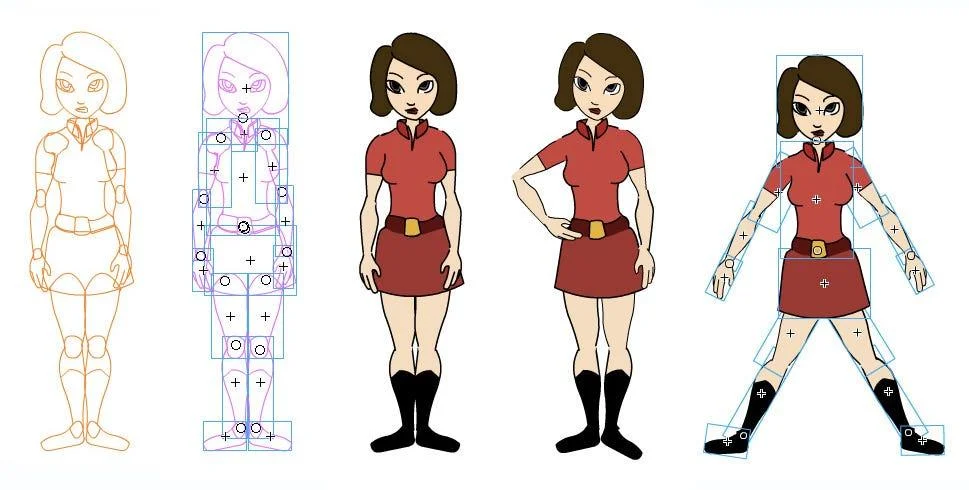
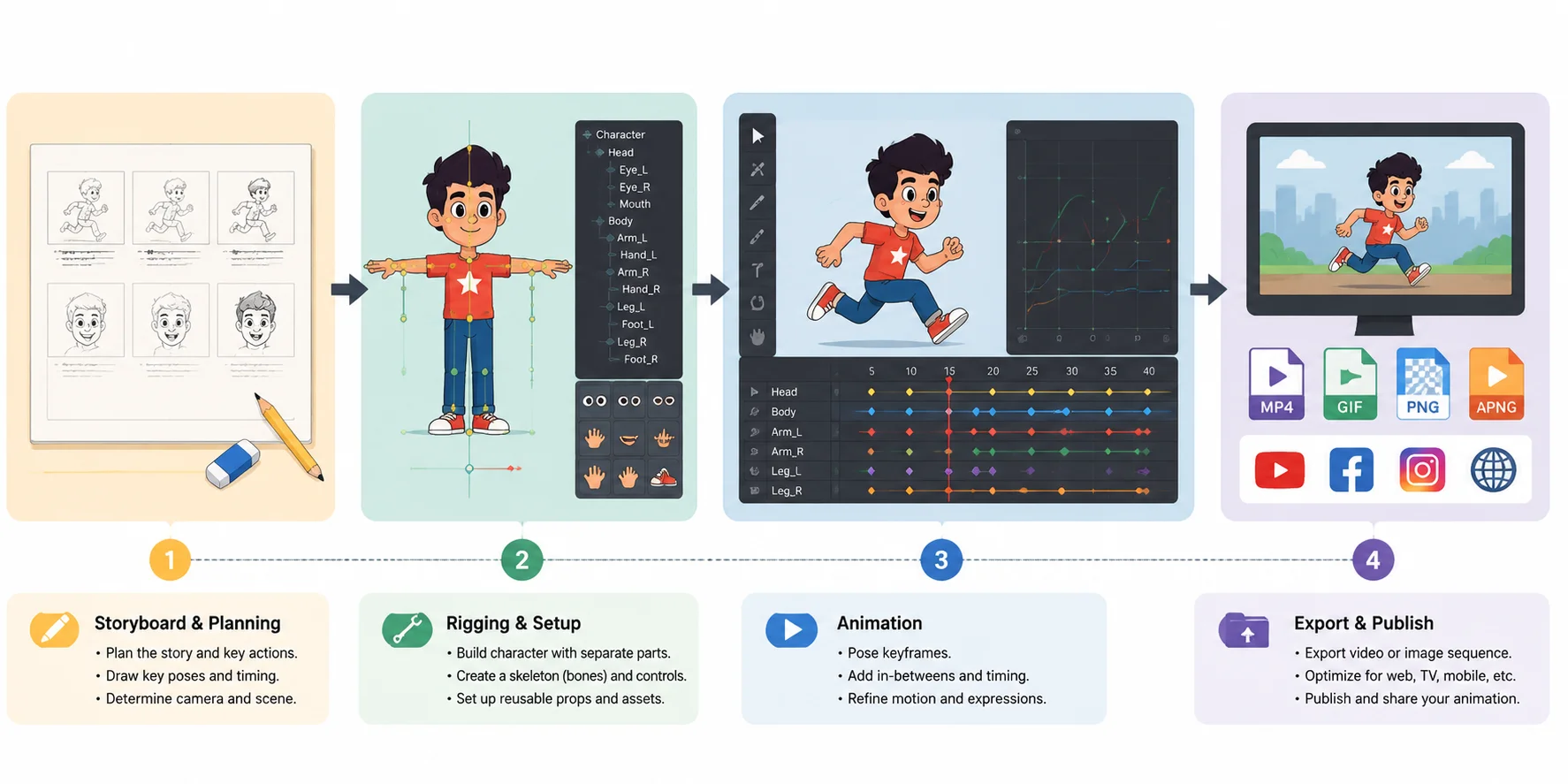
2D animation is one of the most widely used types of animation styles, and it refers to creating motion in a flat, two-dimensional space—using only height and width, without depth. Unlike traditional hand-drawn animation, which is often fully frame-by-frame and physically drawn on paper, modern 2D animation is mostly digital and can be built in two main ways: frame-by-frame drawing or rigged vector animation.
Frame-by-frame 2D animation works similarly to traditional animation, where each movement is drawn individually. This approach gives a very organic and expressive feel, often used when artists want full control over timing and emotion. However, in modern pipelines, a second method is far more common: vector-based rigged animation. Instead of redrawing every frame, characters are built like digital puppets—arms, legs, and facial features are attached to a skeleton (rig), allowing animators to move parts rather than redraw them. This makes production faster and more scalable.
This is where the key difference between 2D animation vs traditional animation becomes important. Traditional animation is usually fully hand-drawn frame-by-frame, while 2D digital animation often reuses assets, rigs characters, and relies heavily on software tools. In other words, 2D animation is not “old-school drawing”—it is a flexible digital system that can mimic traditional motion but with far greater efficiency.
In terms of types of animation examples, 2D animation is everywhere: from TV cartoons and web series to explainer videos, YouTube content, and mobile ads. Shows like Adventure Time or many modern anime productions rely heavily on 2D pipelines, while corporate explainer videos often use simplified vector motion graphics for clarity and speed.
Popular tools for this category include Adobe Animate and Toon Boom Harmony, both of which support frame-by-frame drawing and advanced rigging systems. These tools are industry standards for studios producing serialized content, where consistency and production speed matter more than purely handcrafted frames.
Overall, 2D animation sits between traditional artistry and modern digital efficiency, making it one of the most versatile types of animation in computer graphics. It is especially best suited for TV production, explainer content, comedic storytelling, and web-based series where visual clarity and fast turnaround are essential.
2D Animation Pipeline
3D Animation (CGI)
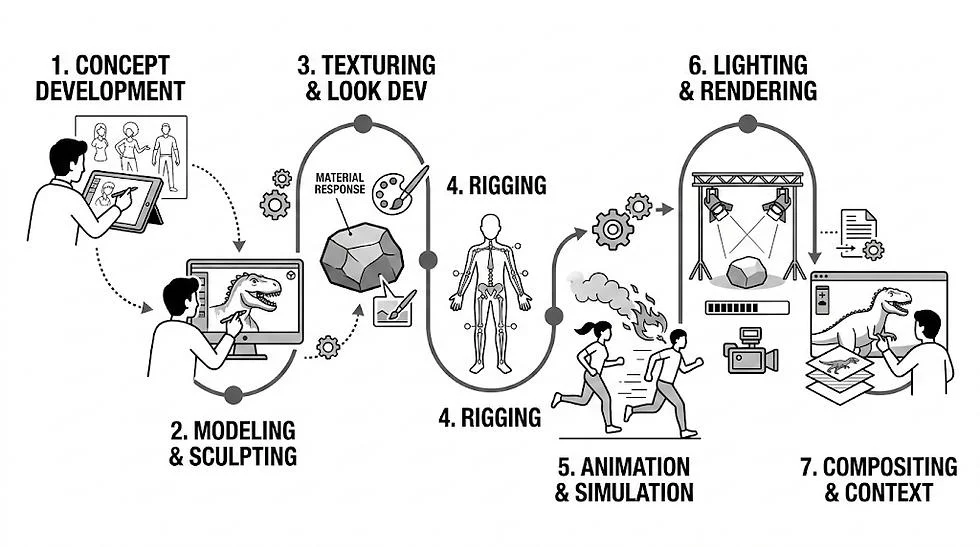
3D animation—also known as CGI (Computer-Generated Imagery)—is one of the most widely used types of animation styles in modern film, games, and digital media. It is created by building digital objects in a three-dimensional space, where artists can control depth (Z-axis), lighting, camera movement, and physically based materials to achieve highly realistic or stylized results.
At its core, 3D animation follows a structured production pipeline. First, a model is created (modeling), then a digital skeleton is added to allow movement (rigging), followed by keyframe-based animation where characters are posed over time. Finally, everything is processed through rendering, where lighting, textures, and effects are calculated to produce the final image or video. In simple terms, the pipeline in one line is: modeling → rigging → animation → rendering.
This workflow makes 3D animation extremely powerful and flexible compared to other types of animation in computer graphics, because it allows full camera control, realistic physics simulation, and reusable assets. Once a character is built, it can be animated from any angle without redrawing frames.
Some of the most iconic types of animation examples come from this category. Pixar’s Toy Story was the first fully 3D-animated feature film, and studios like Pixar and DreamWorks have since defined the global standard for CGI storytelling. Beyond films, 3D animation is also heavily used in video games, architectural visualization, product design, and AR/VR experiences.
Common tools for this pipeline include Blender and Autodesk Maya. Blender is widely used by indie creators due to its free and open-source nature, while Maya remains an industry standard in large studios for character animation and production pipelines.
AI is also starting to accelerate parts of this pipeline. Modern tools can now generate a base 3D model from a text or image prompt in seconds, significantly speeding up the modeling stage. Auto-rigging can then add a skeleton automatically—making a character animation-ready without manual setup, though current support covers T-pose humanoid characters and standard standing quadruped animals. This is especially useful for indie creators and small teams who need fast prototyping.
You can explore this workflow through tools like Tripo AI Text to 3D and Tripo AI Auto-Rigging, which help compress hours of work into minutes.
Overall, 3D animation (CGI) represents the most advanced and production-heavy category among all types of animation styles, making it the backbone of modern feature films, AAA games, and immersive digital experiences.
Motion Graphics
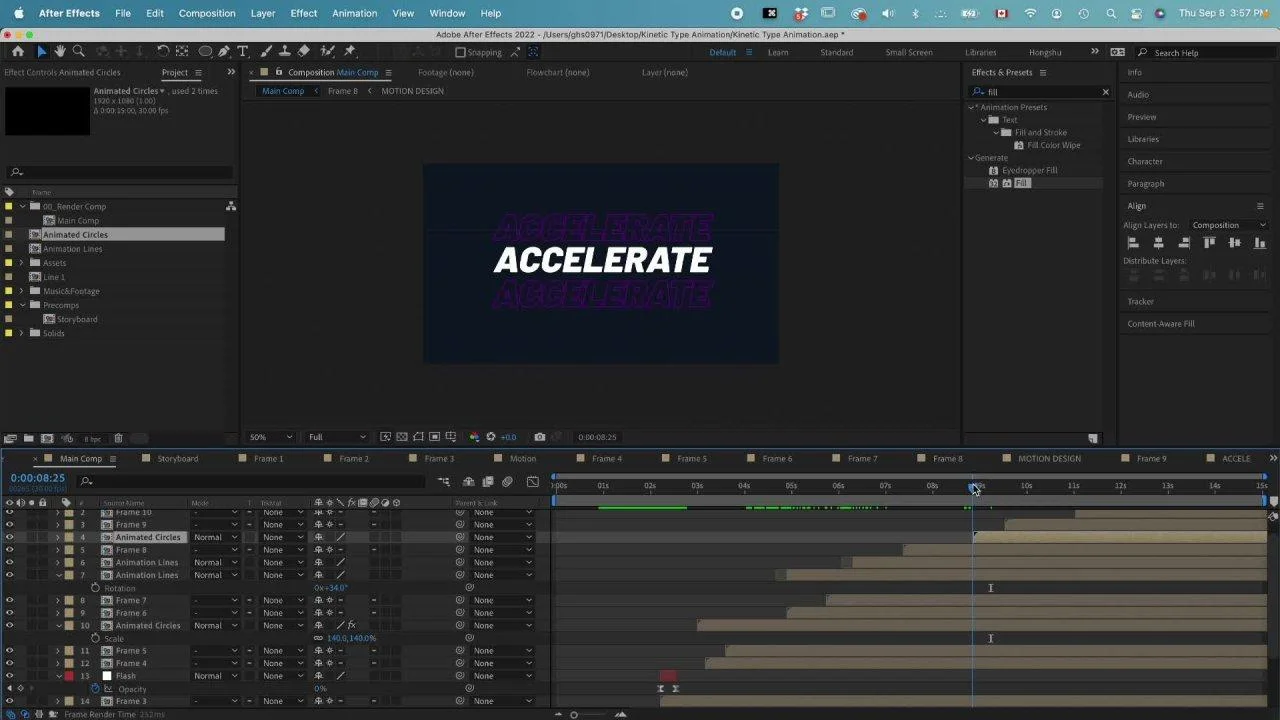
Motion graphics is a unique category among types of animation styles because it focuses on animating graphic design elements rather than characters or storytelling. Instead of following a narrative with acting characters, motion graphics animates shapes, icons, typography, and data-driven visuals. This makes it fundamentally different from character animation, even though both may use similar software and techniques.
The key idea is simple: motion graphics is design in motion. You are not animating a “character with emotions,” but instead building movement from visual elements like text transitions, geometric shapes, UI components, and infographic data. This is why motion graphics is considered a separate category in most types of animation in computer graphics—it is driven by communication and design clarity rather than performance or storytelling.
A helpful way to understand motion graphics vs character animation is to compare their goals. Character animation focuses on emotion, acting, and narrative performance. Motion graphics focuses on delivering information quickly and clearly. Because of this, motion graphics is widely used in commercials, corporate explainers, product demos, UI/UX animations, and title sequences in film and television.
For example, many advertising videos rely on animated typography to highlight product benefits, while SaaS companies use motion graphics to visualize data or workflows. Even the animated opening credits of films often use motion graphics to set tone and mood without introducing characters.
The industry-standard tool for this category is Adobe After Effects, which allows designers to animate layers, text, and vector shapes with keyframes, effects, and expressions. It is also commonly combined with Illustrator and Premiere Pro for full production pipelines.
Among all types of animation examples, motion graphics is one of the most commercially important because it is fast to produce, highly scalable, and extremely effective for communication. It is especially best suited for branding, data visualization, explainer videos, and marketing content where clarity matters more than narrative depth.
Stop Motion (+ Sub-Styles)
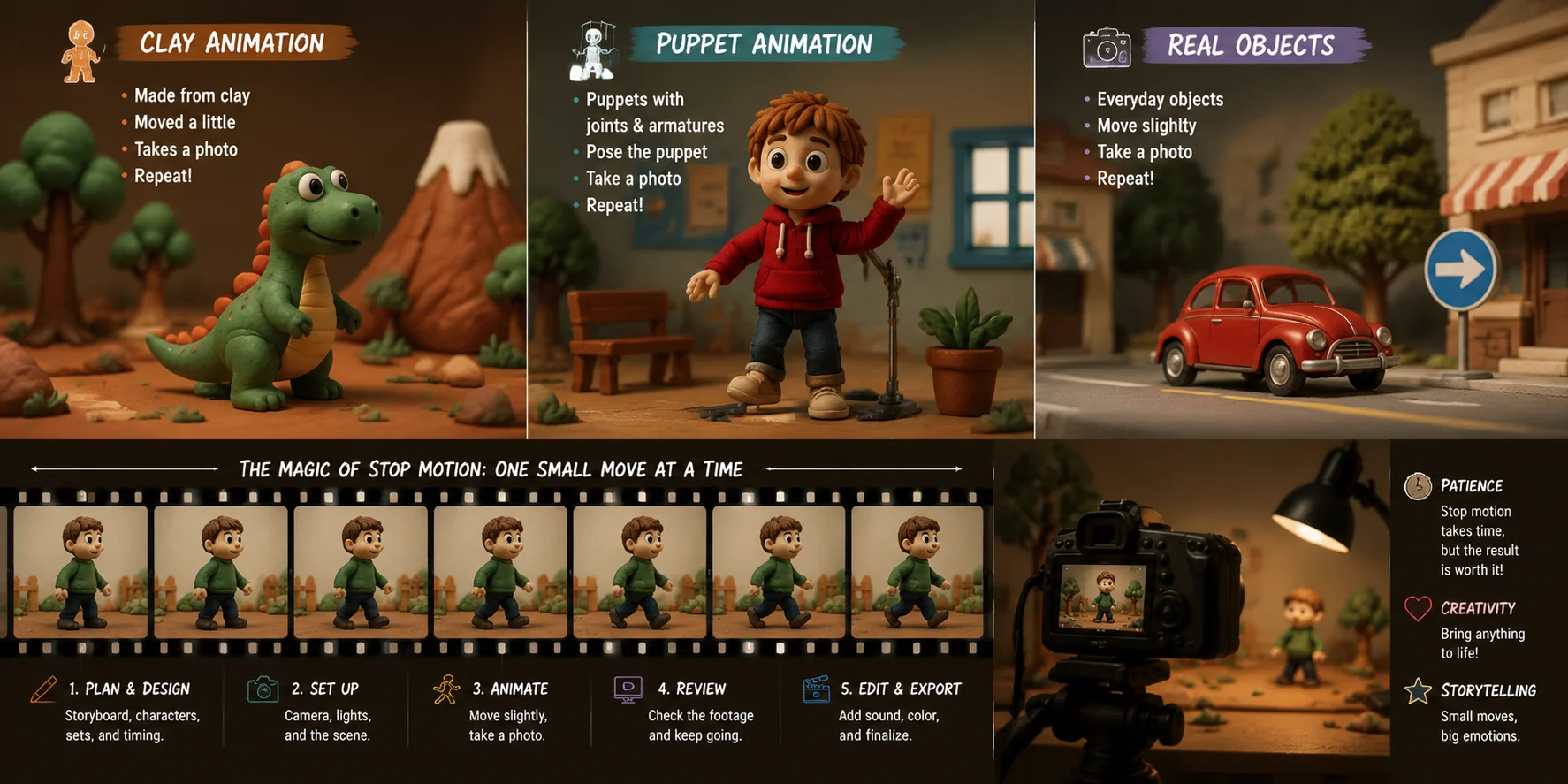
Stop motion animation is one of the most distinctive types of animation styles, because it creates movement by physically manipulating real-world objects frame by frame. Instead of drawing or digitally modeling motion inside a computer, animators physically move objects—such as clay figures, puppets, toys, paper cutouts, or even real actors—and capture each tiny movement with a camera. When these still images are played back in sequence, they form the illusion of motion. This is why stop motion is often described as the most “tactile” form of animation.
Unlike other types of animation in computer graphics, stop motion is entirely grounded in physical reality. Everything you see on screen must exist in the real world before it is photographed. This makes the process extremely time-consuming and detail-sensitive. A single second of animation can require 12, 24, or even more individual photographs depending on the frame rate. Any small change in lighting, object position, or camera alignment can break continuity, so precision is essential throughout the entire production.
Because of this handcrafted nature, stop motion has a very unique visual identity. It often feels slightly imperfect, but that imperfection is part of its charm. It creates a sense of texture, weight, and authenticity that digital animation sometimes cannot replicate. This is also why stop motion is frequently used in artistic projects, indie films, and high-end commercials where a handcrafted aesthetic stands out.
Sub-styles of Stop Motion Animation
Stop motion is not a single technique—it is a family of types of animation styles with examples, each using different materials and creative approaches:
- Claymation (clay figures) — Wallace & Gromit, Shaun the Sheep
- Puppet animation — The Nightmare Before Christmas, Coraline
- Cutout animation — flat paper or fabric pieces moved frame by frame (e.g., early South Park)
- Brickfilm (Lego animation) — LEGO bricks and mini-figures animated incrementally
- Pixilation (real people frame-by-frame) — real actors moving like stop-motion puppets (e.g., experimental films and music videos)
Even though these sub-styles look very different, they all share the same fundamental principle: physical movement + sequential photography = animation.
Production tools and workflow
In professional production pipelines, stop motion requires a combination of hardware and specialized software rather than traditional animation programs. A DSLR or mirrorless camera is typically mounted on a stable rig or tripod to ensure no accidental movement between frames. Lighting setups are carefully controlled to maintain consistency across thousands of images.
Software such as Dragonframe is widely used in studios because it allows animators to preview onion-skin frames, control camera capture, and fine-tune timing with precision. In many cases, physical rigs are also used to hold puppets in place, especially for complex scenes involving jumping, facial expressions, or interaction with environments.
Where stop motion is used
Among all types of animation examples, stop motion occupies a special artistic niche. It is widely used in:
- Feature films (especially stylized or fantasy storytelling)
- Indie short films and festival projects
- High-end advertising campaigns
- Music videos and experimental art films
Its handcrafted nature makes it particularly effective when brands or filmmakers want to stand out visually. Unlike polished CGI or flat motion graphics, stop motion carries a sense of human touch that audiences immediately recognize.
Bonus Techniques (Rotoscoping & Whiteboard)
Beyond the main types of animation styles, there are also a few bonus techniques that don’t always stand as full categories on their own but are widely used in professional pipelines. These methods often sit between traditional and digital workflows, offering unique visual effects and practical production advantages.
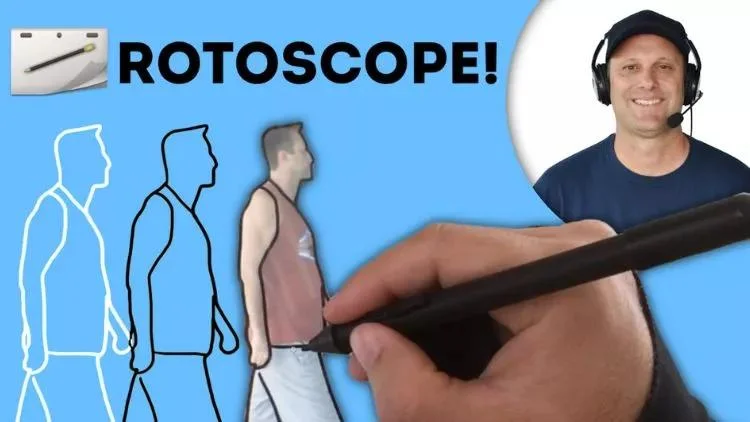
One of the most well-known techniques is rotoscoping. This method involves tracing over live-action footage frame by frame to create highly fluid and realistic animation. Because it is based on real movement, rotoscoping captures natural timing, physics, and human motion in a way that is difficult to achieve through pure keyframe animation. It has been used in stylistically diverse projects such as A Scanner Darkly (which used a surreal, painterly look over live footage) and Loving Vincent, where every frame was painted to resemble Van Gogh’s artwork. In modern pipelines, rotoscoping is also used for visual effects, motion tracking, and refining character animation in types of animation in computer graphics workflows.
Another popular technique is whiteboard animation, which simulates the process of hand-drawn illustrations being created on a white surface, usually synchronized with narration or voiceover. This style is widely used in educational videos, corporate training content, and marketing explainers because it helps simplify complex ideas into clear visual storytelling. The “live drawing” effect keeps viewers engaged while reinforcing information step by step.
Although these techniques are not always listed as core categories in types of animation styles, they are extremely valuable in production environments. They often enhance existing animation types rather than replace them, adding realism, clarity, or instructional value depending on the project.
Together, rotoscoping and whiteboard animation demonstrate how flexible animation can be—blending traditional craftsmanship with digital tools to support storytelling, education, and visual communication across many industries.
All Animation Techniques Map
Types of Animation Compared (Quick Table)
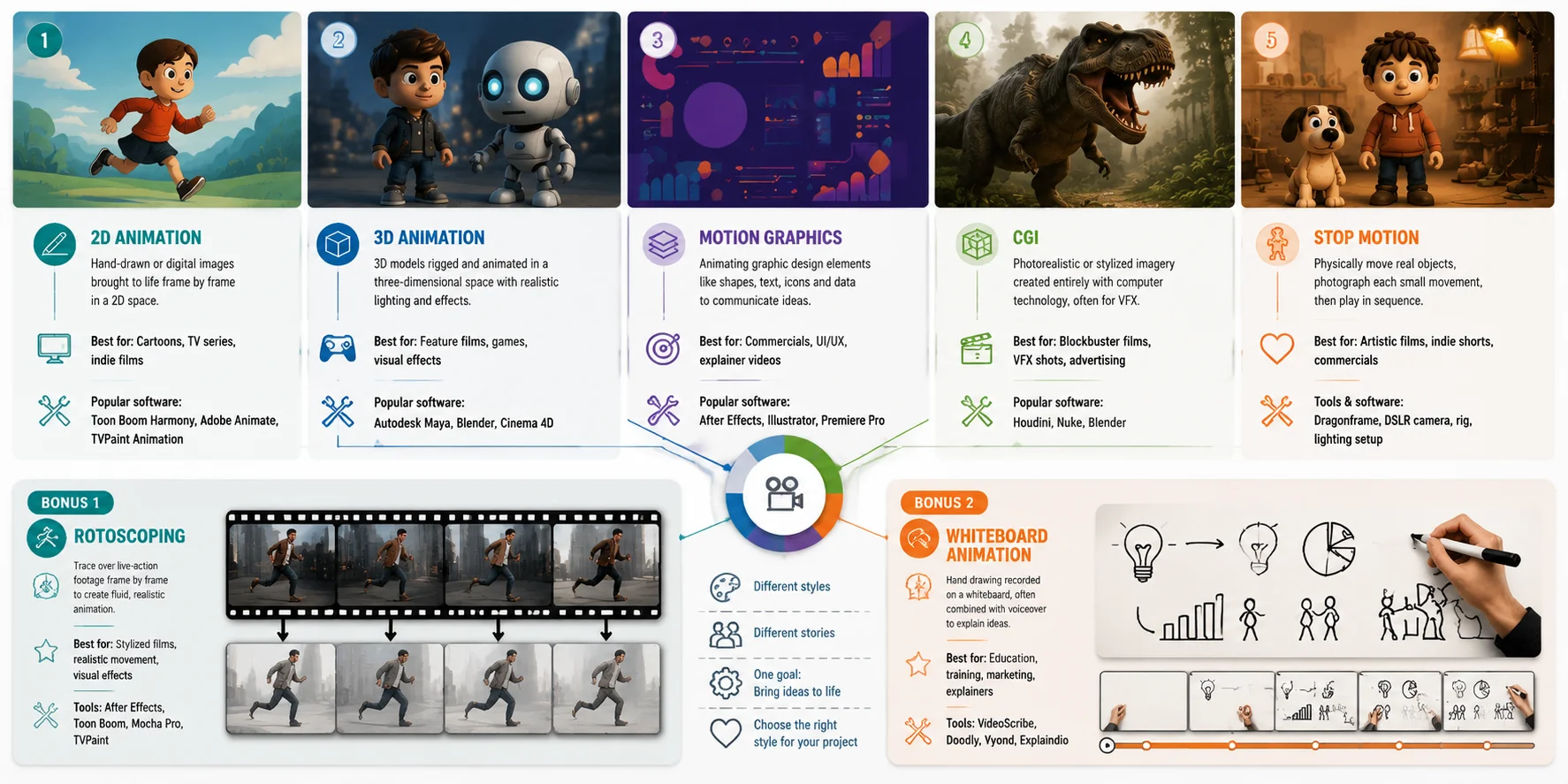
To understand all types of animation styles side by side, it’s useful to compare them by structure, look, tools, and use cases rather than learning each one in isolation. Animation is not defined only by appearance, but by how it is produced—whether it is drawn, modeled, photographed, or designed digitally. The table below gives a fast, scan-friendly overview of the five main animation types so you can quickly decide which approach fits your project.
Quick Comparison Table
| Type | Dimension | Look | Typical Software | Best For | Difficulty |
|---|---|---|---|---|---|
| Traditional Animation | 2D (frame-by-frame) | Hand-drawn, organic, expressive | Pencil / paper, Toon Boom Harmony | Classic films, artistic shorts | High |
| 2D Digital Animation | 2D (vector / rigged) | Clean, stylized, flexible | Adobe Animate, Toon Boom Harmony | TV series, explainers, web content | Medium |
| 3D / CGI Animation | 3D (digital space) | Realistic or stylized, cinematic | Blender, Autodesk Maya | Films, games, VFX | High |
| Motion Graphics | 2D / 2.5D (design-based) | Graphic, minimal, data-driven | After Effects, Illustrator | Ads, branding, UI, explainer videos | Medium |
| Stop Motion Animation | Physical (real world) | Tactile, handmade, textured | Dragonframe, DSLR camera | Indie films, commercials, artistic shorts | High |
This quick table makes it easier to understand types of animation in computer graphics and physical animation together, showing how each style differs not just in appearance but in workflow and production logic. For example, traditional animation and 2D digital animation may look similar on screen, but one is fully hand-drawn while the other often uses reusable rigs. Meanwhile, 3D CGI introduces depth and camera freedom, motion graphics focuses on design communication, and stop motion relies entirely on physical manipulation of real objects.
When looking at types of animation styles with examples, this comparison helps clarify why each style exists and where it is most effective. Instead of asking “which animation is best,” the real question becomes “which animation style fits the story, budget, and purpose.”
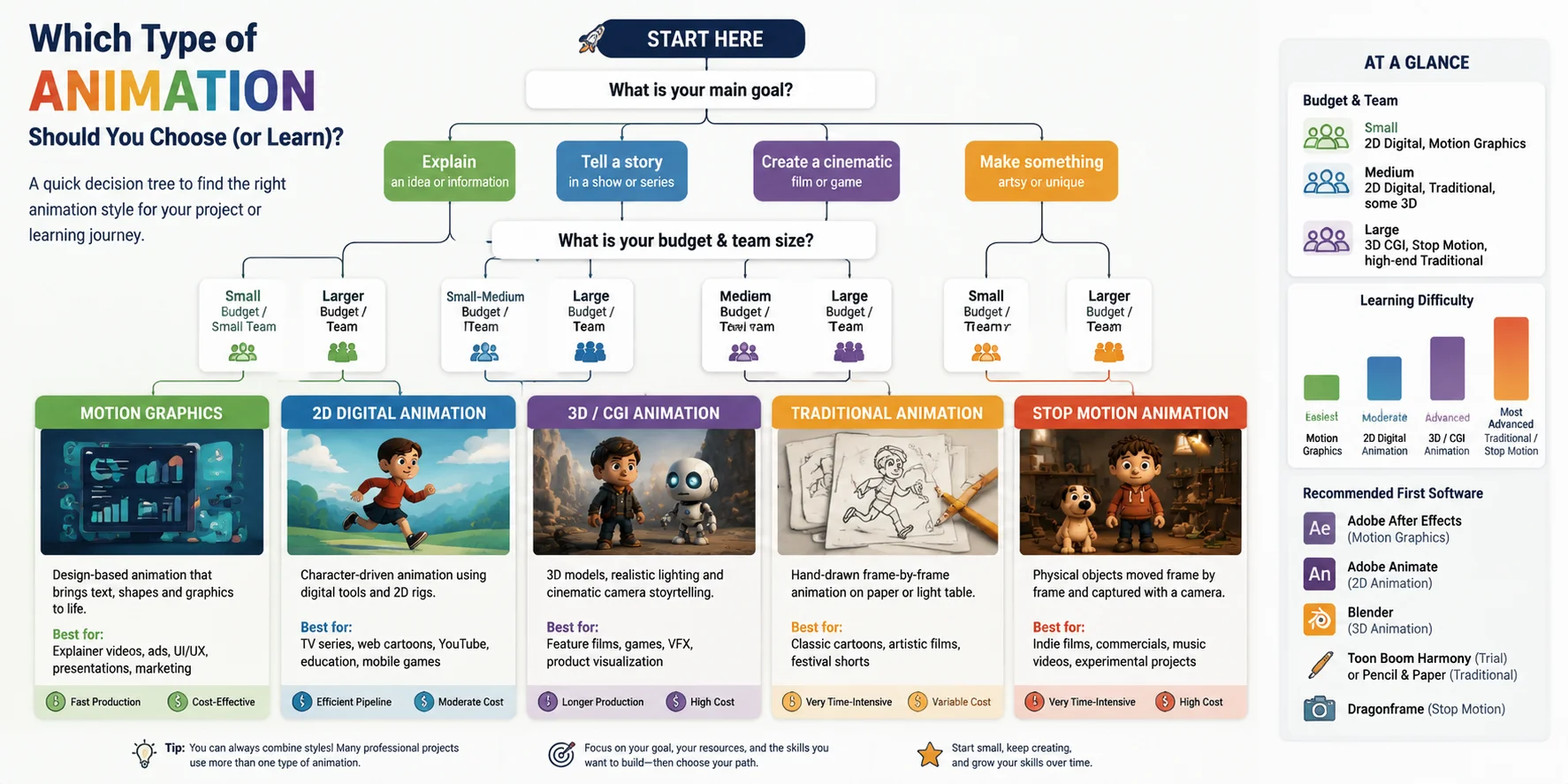
Which Type of Animation Should You Choose (or Learn)?
Choosing between different types of animation styles is not about which one is “best,” but about which one fits your project goals, resources, and learning path. Each animation style solves a different creative problem—some are built for storytelling, some for speed, and others for realism or artistic expression. Below is a practical breakdown to help you decide based on real production needs.
🎯 By project goal (what you want to create)
- If your goal is explainer videos, marketing content, or SaaS demos → Motion Graphics
(fast, design-driven, ideal for communication and branding) - If your goal is feature films, AAA games, or cinematic storytelling → 3D / CGI Animation
(realistic lighting, camera control, industry-standard for modern entertainment) - If your goal is TV series, episodic content, or web animation → 2D Digital Animation
(efficient production, scalable workflows, strong balance of quality and speed) - If your goal is artistic shorts or highly stylized storytelling → Traditional or Stop Motion
(manual craftsmanship, unique visual identity, strong artistic impact)
💰 By budget & team size
- High resource / large teams: 3D CGI, Stop Motion
(require modeling, rigs, physical sets, or complex pipelines) - Medium resources: Traditional animation
(labor-heavy but flexible depending on style) - Low to medium resources / small teams: 2D digital, Motion Graphics
(faster production, reusable assets, software-driven workflows)
📚 By learning path (for beginners)
If you are just starting to learn animation, the easiest entry points are:
- Motion Graphics → easiest to start
(keyframes + shapes + text; minimal drawing skills needed) - 2D Digital Animation → next step
(introduces timing, character movement, basic rigging concepts) - 3D Animation → intermediate to advanced
(requires understanding of space, lighting, rigging, and rendering) - Stop Motion / Traditional → advanced artistic learning path
(requires patience, physical setup, and strong frame-by-frame discipline)
Which Type of Animation Should You Choose (or Learn)?
Frequently Asked Questions
What are the five main types of animation?
The five main types of animation are traditional animation, 2D digital animation, 3D (CGI) animation, motion graphics, and stop motion animation. Each type differs by technique rather than appearance. Traditional and 2D focus on drawing, 3D uses digital modeling, motion graphics is design-based, and stop motion uses real-world objects photographed frame by frame.
What are the 4 types of animation?
A common simplified classification lists four types: traditional animation, 2D animation, 3D animation, and stop motion. This version groups motion graphics as part of digital or 2D animation. Different sources may categorize them differently depending on whether they focus on film production, computer graphics, or design workflows.
What are the 12 basics of animation?
The 12 principles of animation are foundational rules used in both 2D and 3D animation. They include squash and stretch, anticipation, staging, straight ahead action and pose to pose, follow through and overlapping action, slow in and slow out, arcs, secondary action, timing, exaggeration, solid drawing, and appeal. These principles help create more realistic and engaging motion.
What is the oldest cartoon in the world?
One of the earliest animated films is Fantasmagorie (1908) by Émile Cohl, often considered the first fully animated cartoon. It was created using hand-drawn frame-by-frame techniques. Before that, experimental motion visuals existed, but Fantasmagorie is widely recognized as a key milestone in animation history.
What is the difference between 2D and 3D animation?
2D animation creates movement in a flat two-dimensional space using drawing or digital illustration, while 3D animation builds and moves objects in a three-dimensional digital environment—adding depth, camera freedom, and realistic lighting. 2D pipelines tend to be more illustration-driven and faster to produce; 3D requires more technical setup but lets you view a scene from any angle without redrawing. Both use keyframes, just in different dimensions.
What software is used for animation?
The right tool depends on the type of animation: for 2D, Adobe Animate and Toon Boom Harmony are industry standards; for 3D and CGI, Blender (free, open-source) and Autodesk Maya are most widely used; for motion graphics, Adobe After Effects is the go-to; and for stop motion, Dragonframe is common in professional studios. Most beginners start with Blender or After Effects, both of which have large free learning communities.
What is stop motion animation and how does it work?
Stop motion works by physically moving real objects—clay figures, puppets, paper cutouts, or everyday items—in tiny increments and photographing each position. When the images play back in sequence, typically at 12 to 24 frames per second, they produce the illusion of movement. A single second of finished stop motion can require 12 to 24 individual photographs, making it one of the most time-intensive animation techniques.
What is motion graphics and how is it different from character animation?
Motion graphics animates graphic design elements—text, shapes, icons, and data visualizations—to communicate information clearly, without characters or storylines. Character animation focuses on performance, emotion, and narrative. A useful shorthand: if animation tells a story, motion graphics explains an idea. Both use keyframes and timing, but their goals and tools are different.
What is the easiest type of animation to learn for beginners?
Motion graphics is generally the most accessible starting point, since it relies on keyframes, shapes, and text rather than drawing skills—Adobe After Effects is the primary tool. 2D digital animation with rigged characters is the next step up. 3D animation (Blender is free) requires more technical knowledge around modeling, rigging, and rendering. Traditional and stop motion both demand strong artistic discipline and significant hands-on setup time.
What is rotoscoping in animation?
Rotoscoping is a technique where animators trace over live-action footage frame by frame to produce fluid, realistic movement. Originally developed by Max Fleischer in the early 1900s, it captures natural human motion that is hard to replicate through pure keyframe animation. It is used both creatively—films like A Scanner Darkly and Loving Vincent built their entire visual style on it—and practically, for isolating subjects from backgrounds in modern VFX work.
Conclusion
The right type of animation depends on your story, budget, and skills—there is no single “best” one. If you’re exploring the 3D/CGI route, you can turn a text prompt or image into an animation-ready 3D model in minutes with Tripo AI Studio.