Comment la génération 3D par IA étend les possibilités des scans 3D mobiles
Deux outils. Deux rôles différents.
Pour de nombreux créateurs aujourd'hui, la création 3D commence souvent par l'un de ces deux points de départ : une idée, ou le monde réel.
Le premier est la génération par IA. Des outils comme Tripo vous permettent de transformer une invite textuelle (prompt), un croquis ou une image de référence en un modèle 3D en quelques secondes. C'est rapide, créatif et cela ne nécessite aucun équipement de numérisation ni configuration technique.
Le second est le scan 3D mobile. KIRI Engine, par exemple, capture des objets et des environnements qui existent déjà dans le monde réel, en préservant la précision de leur géométrie réelle, de leur texture de surface et des détails de leurs matériaux, le tout à l'aide d'un simple smartphone.
Ce ne sont pas des approches concurrentes. Elles résolvent des problèmes différents. Ensemble, elles couvrent une plus grande partie du pipeline de création que ce que chaque outil pourrait gérer seul.
Ce que le scan 3D mobile fait de mieux
Le scan 3D mobile capture ce qui existe déjà : la forme réelle d'un objet physique, sa texture de surface réelle, la façon dont la lumière interagit avec ses matériaux. C'est une chose que la génération par IA peut approximer, mais pas remplacer complètement lorsque la précision du monde réel est importante, car l'information provient de la réalité elle-même.
KIRI Engine propose trois modes de capture selon ce que vous scannez :
- La photogrammétrie capture des dizaines à des centaines de photos et reconstruit une géométrie et des cartes de couleurs précises. Idéal pour les objets ayant des détails de surface et des textures bien définis.
- Le LiDAR utilise le capteur de profondeur des iPhones compatibles pour un scan spatial rapide à l'échelle réelle, en particulier pour les pièces et les grands espaces. Dans KIRI Engine, les scans LiDAR peuvent également être améliorés par l'IA pour optimiser les détails de surface, ce qui les rend plus utiles comme références spatiales ou bases de scènes.
- Le 3D Gaussian Splatting (3DGS) capture l'apparence visuelle des objets et des scènes sans partir d'une géométrie de maillage (mesh) traditionnelle. Cela peut être utile pour les matériaux complexes, les surfaces organiques et les environnements complets où la photogrammétrie traditionnelle peut être plus difficile à reconstruire proprement. KIRI Engine intègre également une conversion intégrée de 3DGS en maillage, permettant aux créateurs de transformer les captures de splats en ressources de maillage (mesh assets) sur mobile lorsqu'ils ont besoin de modèles polygonaux pour leurs flux de travail en aval.
Le résultat est une capture 3D haute fidélité qui sert de base solide pour d'autres travaux créatifs.
Ce que la génération par IA apporte à un flux de travail de scan
Les scans haute fidélité offrent une base solide ancrée dans le monde réel. Pour différents usages en aval, les créateurs peuvent tout de même avoir besoin de maillages plus légers, de nouvelles orientations de matériaux ou de ressources générées supplémentaires pour compléter une scène. C'est là que Tripo enrichit le flux de travail :
- La rétopologie réduit considérablement le nombre de polygones tout en conservant la géométrie scannée visuellement reconnaissable, produisant une topologie Quad propre adaptée aux flux de travail en temps réel et aux outils 3D.
- La génération de textures remplace ou transforme le matériau de surface d'une ressource scannée, ouvrant la voie à de toutes nouvelles directions visuelles à partir de la même géométrie.
- La génération de ressources crée de nouveaux objets et personnages 3D qui peuvent être placés directement dans des environnements réels scannés.
Chacun de ces éléments élargit les possibilités offertes aux créateurs après la capture d'un scan.
Flux de travail 1 : D'une sculpture du monde réel à une ressource prête pour le jeu
Exemple réel : une figurine peinte scannée avec KIRI Engine
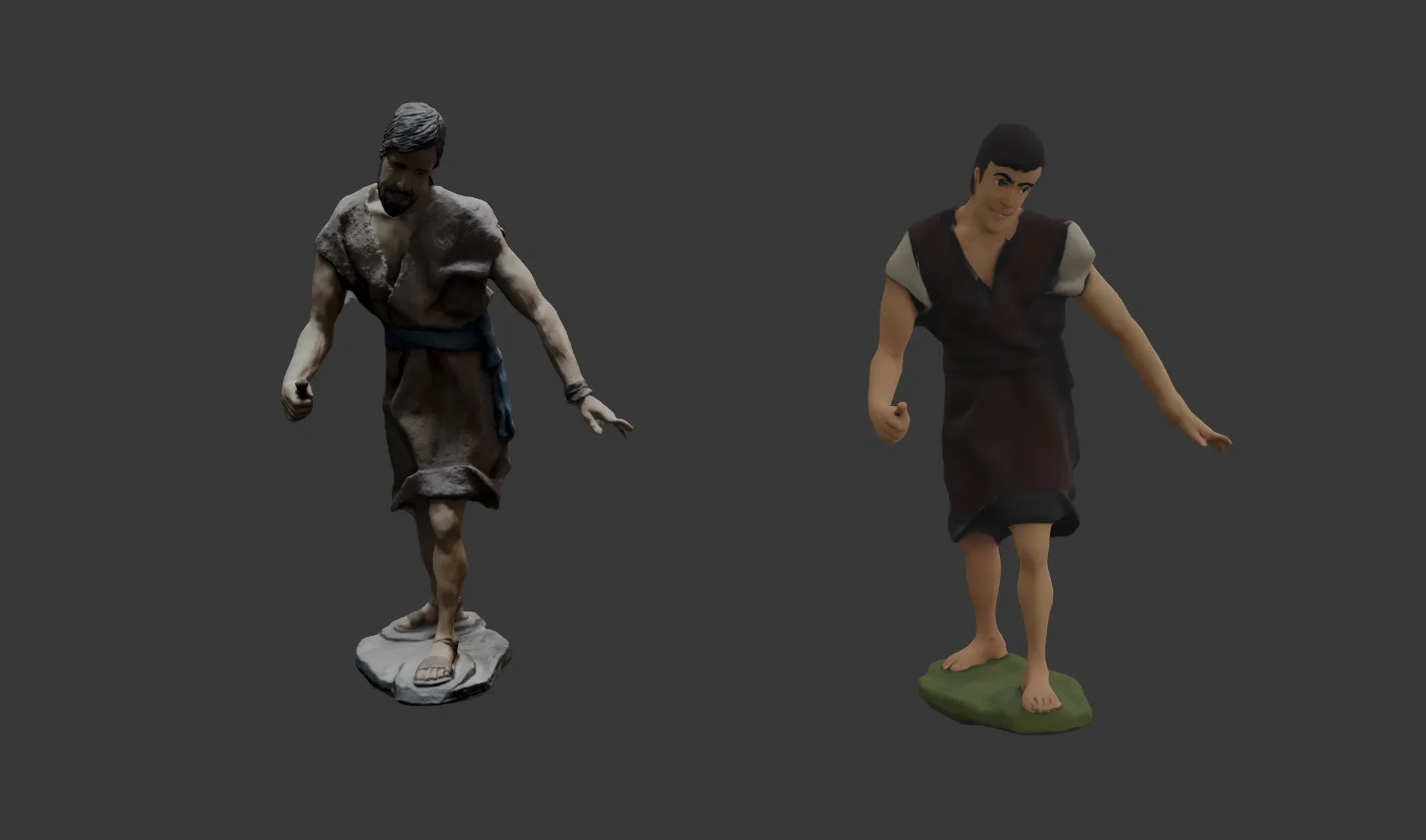
Une figurine détaillée constitue un excellent cas d'école pour ce flux de travail. La pièce d'origine présente des détails de surface complexes au niveau des plis des vêtements, des traits du visage et une pose dynamique en plein mouvement. C'est exactement le type de géométrie qui nécessiterait des heures de modélisation manuelle, mais qui se capture facilement avec la photogrammétrie.
Étape 1 : Scanner avec KIRI Engine
En utilisant le mode Photo Scan, capturez l'objet sous plusieurs angles et hauteurs. Pour une figurine de cette taille, 60 à 80 photos couvrant l'ensemble de la silhouette suffisent généralement. KIRI Engine traite la reconstruction automatiquement et exporte un fichier GLB contenant la géométrie et les cartes de textures intactes.
Étape 2 : Redéfinir le style avec la génération de textures
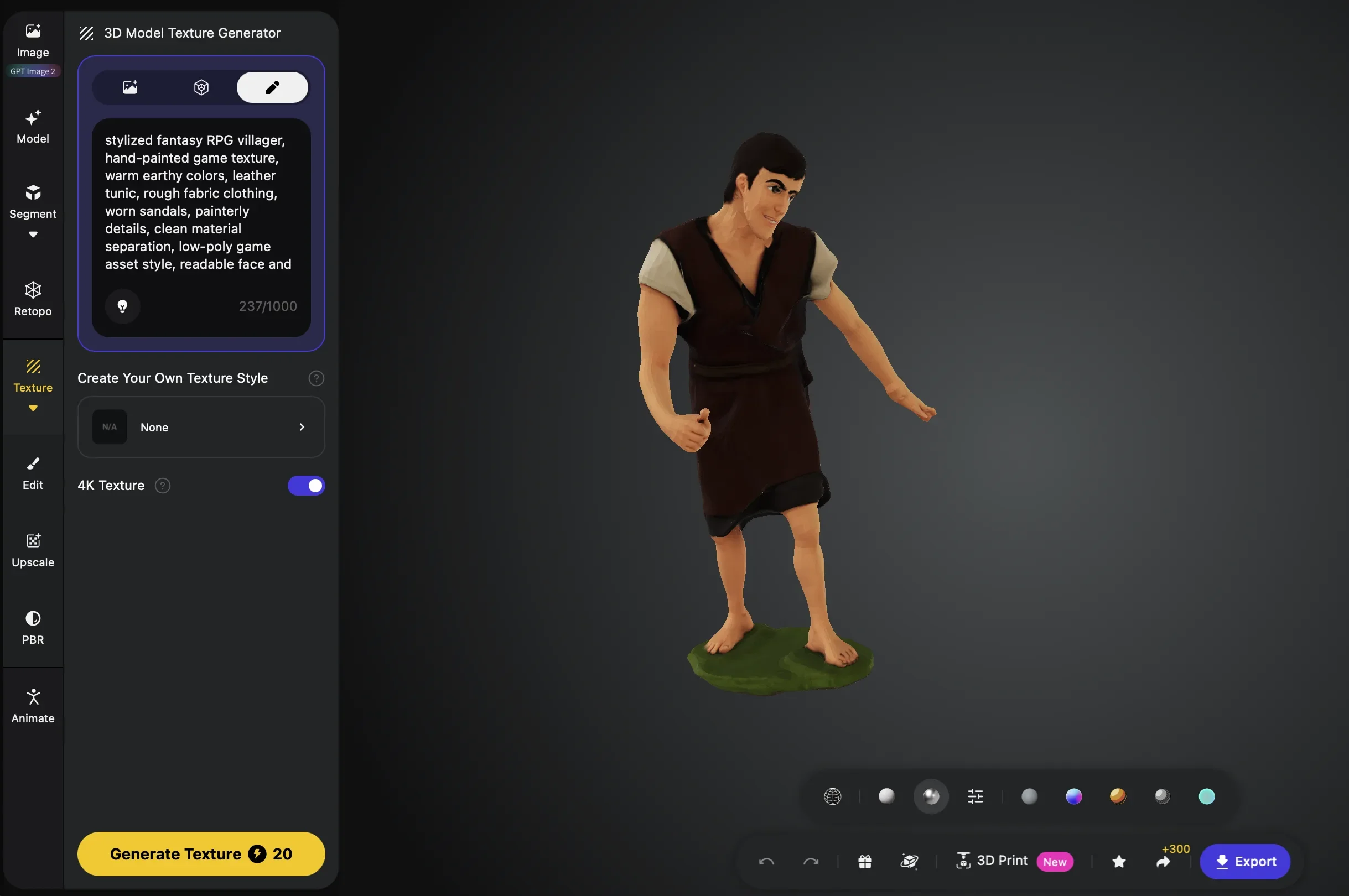
Dans ce test, nous avons constaté que l'exécution de la génération de textures avant la rétopologie produisait de meilleurs résultats. Avec la géométrie complète du scan intacte, Tripo dispose de plus d'informations de surface pour interpréter l'orientation du matériau. Réduire d'abord le nombre de polygones peut limiter certaines des informations de surface disponibles pour la génération de textures.
Dans cette optique, en utilisant le prompt "stylized fantasy RPG villager, hand-painted game texture, warm earthy colors, leather tunic, rough fabric clothing, worn sandals, painterly details, clean material separation, low-poly game asset style", la figurine scannée a été réinterprétée comme un personnage stylisé de style RPG fantastique. La pose et les proportions proviennent du scan du monde réel. Le style visuel provient de Tripo.
Étape 3 : Rétopologiser dans Tripo
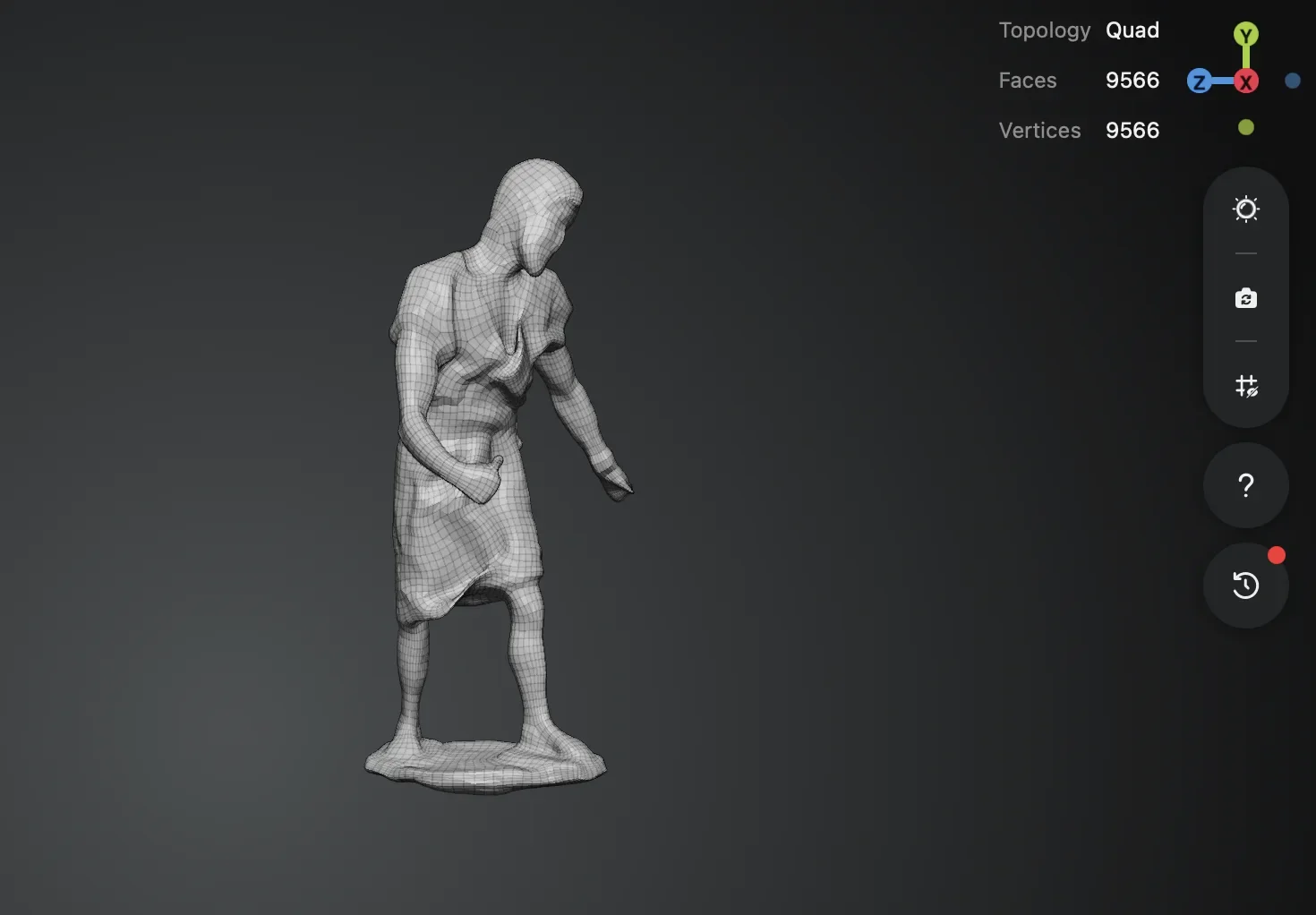
Une fois la direction visuelle établie, la ressource est ensuite rétopologisée pour réduire le nombre de polygones. Le scan d'origine comptait 40 296 triangles. Après rétopologie, le même asset comptait 9 566 faces avec une topologie Quad, soit une réduction d'environ 76 %, tout en conservant la pose, les proportions et la silhouette globale intactes.
Un objet physique. Un scan. Dans ce flux de travail, une sculpture du monde réel peut devenir une ressource de jeu plus légère et stylisée, sans avoir à la reconstruire manuellement de zéro.
Flux de travail 2 : Quand une personne réelle et un personnage IA partagent la même scène
Exemple réel : une personne capturée en 3DGS combinée avec un personnage généré par IA
L'une des utilisations les plus intéressantes du 3D Gaussian Splatting est la capture de personnes réelles. Le 3DGS est particulièrement adapté pour capturer une personne en même temps que son environnement environnant en un seul passage continu, préservant à la fois un éclairage réaliste, les détails des vêtements et le contexte spatial.
Étape 1 : Capturer une personne réelle avec le 3D Gaussian Splatting de KIRI Engine
Scanner une personne avec le 3D Gaussian Splatting nécessite un peu plus de soin que de scanner un objet. Le sujet doit rester aussi immobile que possible pendant la capture, car même de petits mouvements comme la respiration ou un changement de poids peuvent introduire du flou dans la reconstruction. Nous avons demandé au sujet de maintenir une pose détendue et de minimiser ses mouvements tout au long du processus.
Capturez sous trois angles de hauteur : plongée, à hauteur des yeux et contre-plongée, en tournant autour du sujet à chaque hauteur. Cela donne à l'algorithme suffisamment d'informations pour reconstruire fidèlement l'ensemble de la silhouette. KIRI Engine traite les images pour en faire une scène 3DGS qui inclut à la fois la personne et l'environnement qui l'entoure, préservant ainsi l'éclairage réel et le contexte spatial du lieu.
Étape 2 : Générer un personnage avec Tripo
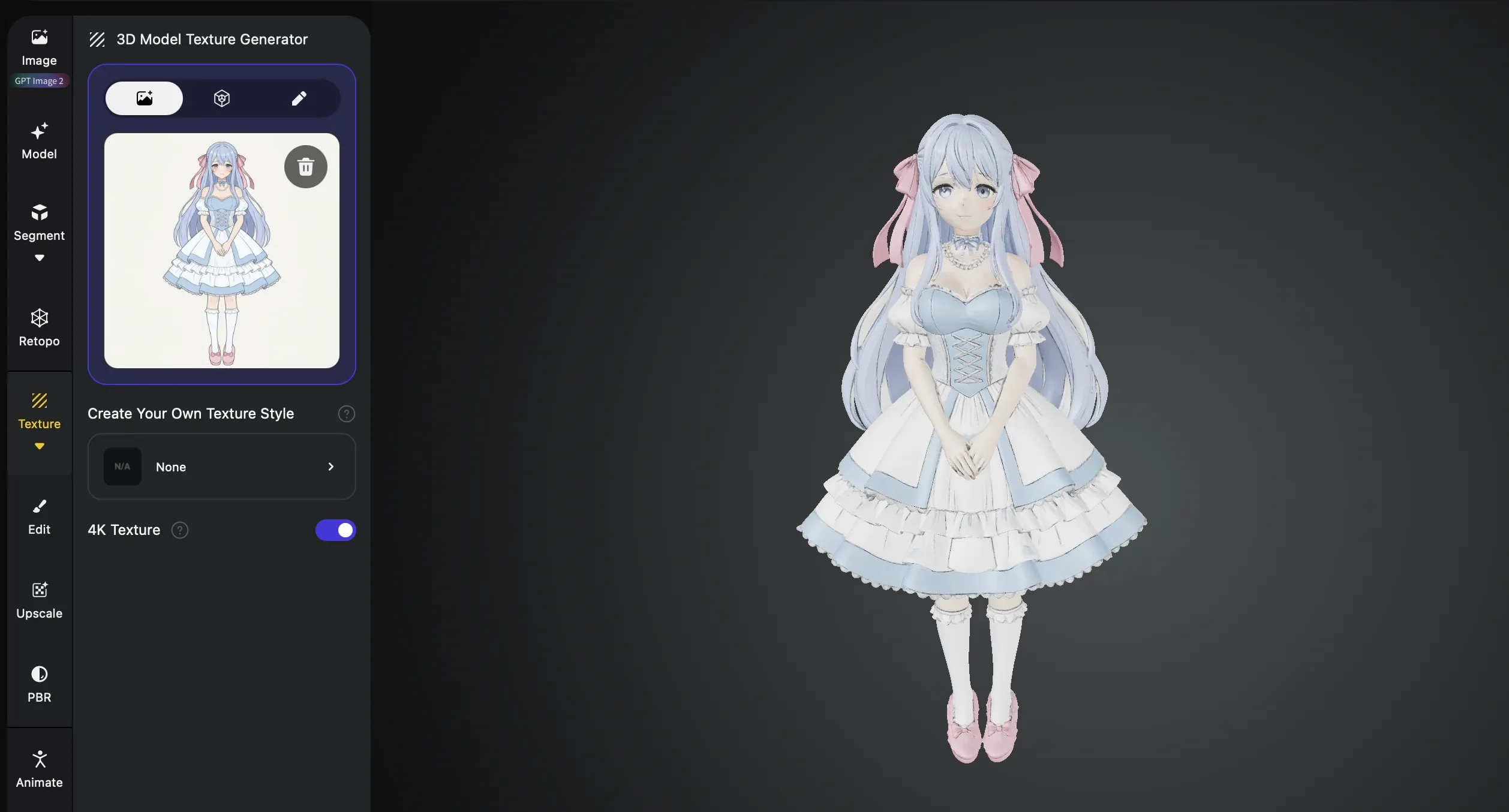
Pour mieux contrôler le résultat final, nous avons d'abord utilisé la génération de texte en image de Tripo pour créer une image de référence, puis nous avons injecté cette image dans le flux de travail image-vers-3D de Tripo. Bien que le texte-vers-3D soit utile pour une conceptualisation rapide, l'utilisation préalable d'une image de référence générée nous a permis de mieux contrôler la direction visuelle finale.
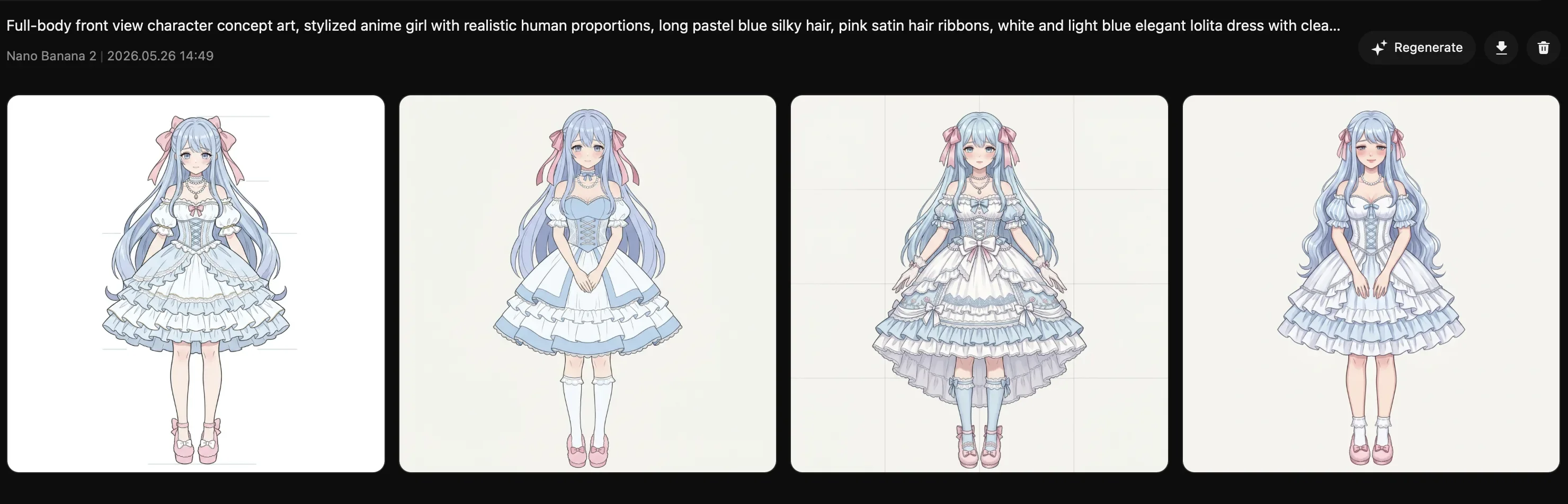
Le personnage obtenu a été exporté sous forme de maillage 3D standard. Son style visuel, avec un ombrage plat, des lignes épurées et des couleurs saturées, contraste de manière intentionnelle avec la silhouette scannée photoréaliste.
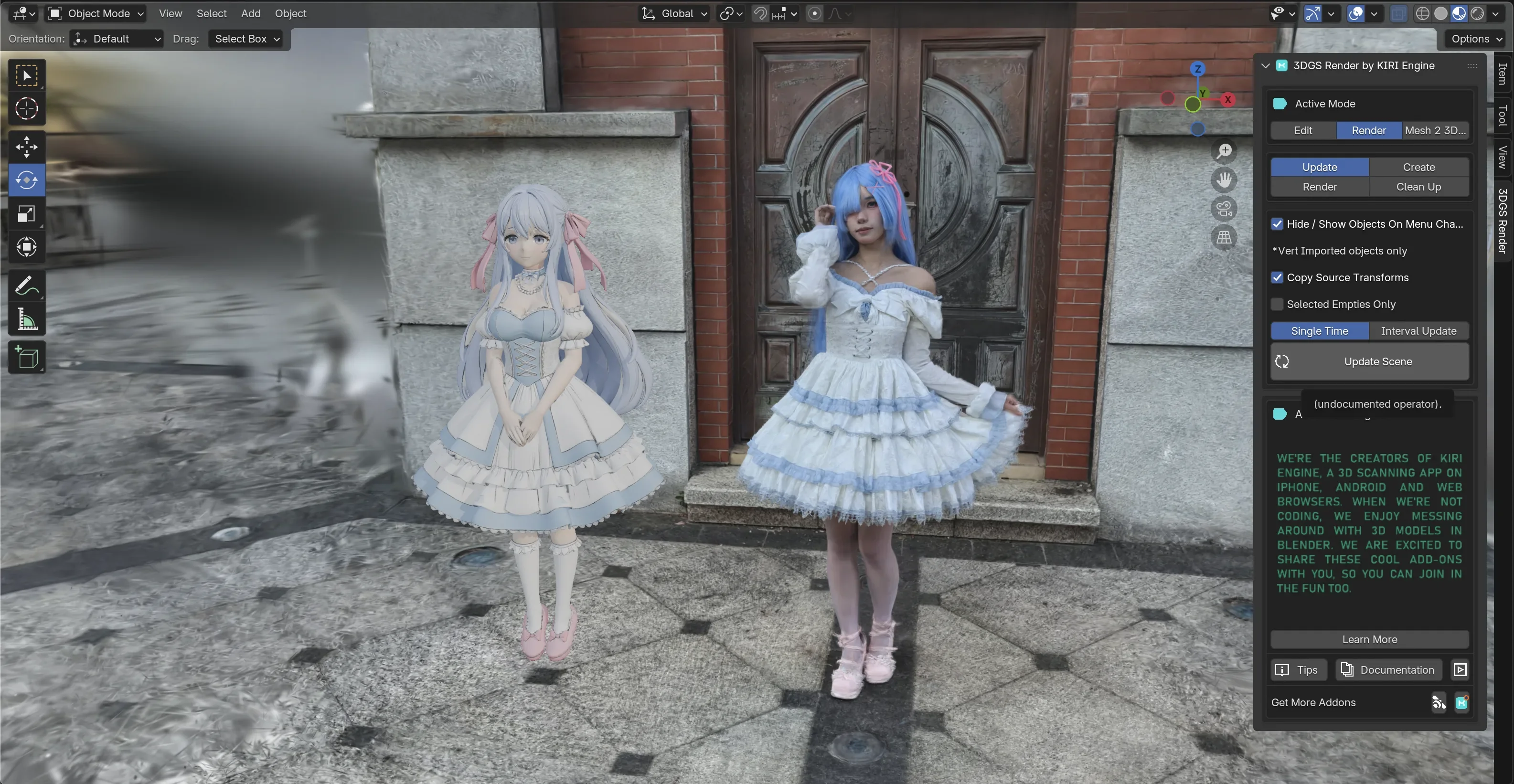
Étape 3 : Combiner dans Blender en utilisant le plugin 3DGS de KIRI Engine
Les scènes 3DGS sont exportées sous forme de fichiers .ply. Pour les importer dans Blender, we used le plugin Blender open source de KIRI Engine, qui charge la scène 3DGS en tant qu'objet natif aux côtés des ressources 3D standard. Le personnage généré par Tripo a été importé sous forme de maillage standard et positionné dans la scène à côté de la silhouette scannée.
Le plugin Blender de KIRI Engine charge la capture 3DGS du monde réel en tant qu'objet de scène, tandis que le personnage généré par Tripo est importé comme un maillage 3D standard. Ensemble, ils créent une scène mixte, mêlant réel et IA, au sein du même espace de travail Blender.
Le résultat est une scène unique où coexistent dans le même espace une personne réelle capturée via 3DGS et un personnage stylisé généré par IA. À partir de là, la scène peut servir de point de départ pour plusieurs directions créatives : prototypage de jeux, visualisation de concepts, tests de production virtuelle ou narration mixte réel-IA.
Les éléments scannés apportent de l'authenticité et un ancrage spatial. Le personnage généré par l'IA ajoute un contenu qui n'existe pas dans le monde physique. Ensemble, ils montrent comment une capture 3DGS du monde réel peut devenir la base d'une scène créative plus large, plutôt que de rester un simple scan statique.
Le scan vous donne le monde réel. La génération par IA vous donne tout le reste.
Aucun de ces outils ne remplace l'autre. Tripo est le bon choix lorsque vous construisez quelque chose à partir de votre imagination, lorsque la ressource n'existe pas encore et que la rapidité et la flexibilité créative importent le plus. KIRI Engine est le bon choix lorsque la précision par rapport à la réalité est essentielle, lorsque l'objet ou l'environnement existe déjà et doit être capturé plutôt qu'inventé.
Utilisés ensemble, ces deux outils couvrent toute la gamme de la création de ressources 3D : de l'imagination pure à la réalité pure, et tout ce qui se trouve entre les deux.
Essayez ce flux de travail par vous-même : capturez un objet réel avec KIRI Engine, générez ou adaptez des ressources créatives avec Tripo, et découvrez comment la capture basée sur le réel et la génération par IA peuvent fonctionner ensemble.