Renderizado de interiores con IA: Luz solar fotorrealista
Técnicas avanzadas para simular luz natural en arquitectura digital
Lograr una iluminación realista sigue siendo uno de los obstáculos persistentes en la visualización arquitectónica, lo que a menudo hace que las habitaciones digitales se vean planas y artificiales. A medida que aumentan las expectativas de los clientes sobre el diseño de interiores 3D con IA inmersivo, la fricción técnica de calcular manualmente la iluminación global y ajustar las trayectorias solares consume horas críticas de proyecto. Los flujos de trabajo generativos modernos resuelven esto utilizando un avanzado Generador de modelos 3D con IA para simular instantáneamente luz solar precisa y fotorrealista, transformando modelos estériles en entornos cálidos y acogedores.
Ideas clave
- Dominar la luz solar direccional requiere modificadores de texto precisos para dictar la hora del día, la suavidad de las sombras y la dispersión atmosférica.
- Las propiedades de los materiales deben equilibrarse meticulosamente con la intensidad de la luz para evitar la sobreexposición en los diseños de interiores digitales.
- El renderizado iterativo permite a los diseñadores ajustar la iluminación global sin los altos costos computacionales asociados con el software de trazado de rayos tradicional.
- Equilibrar la luz natural con fuentes ambientales artificiales es esencial para lograr profundidad espacial y visualizaciones arquitectónicas profesionales.
El papel de la luz solar en el renderizado de interiores con IA
Lograr efectos de luz solar fotorrealistas con el renderizado de interiores con IA transforma conceptos planos en espacios inmersivos. La luz solar dicta el estado de ánimo, resalta las texturas y define la profundidad espacial de los diseños de interiores 3D. Dominar estas dinámicas de iluminación en Tripo AI garantiza que tus visualizaciones arquitectónicas se sientan auténticas, cálidas y elaboradas profesionalmente.
Entender la dinámica de la luz natural en espacios 3D
La luz natural es el elemento crítico en la visualización arquitectónica, actuando como el ancla principal del realismo. En entornos físicos, la luz solar nunca es perfectamente uniforme; posee temperaturas de color, intensidades direccionales y patrones de difusión específicos que cambian continuamente según la hora del día, la ubicación geográfica y las condiciones atmosféricas. Al llevar estos principios a espacios 3D, comprender la física de la luz se vuelve primordial.
La luz solar establece el tono emocional de un interior. Una habitación bañada por la luz fría y azulada de la madrugada (alrededor de 4000K a 5000K) evoca una respuesta psicológica claramente diferente a la misma habitación iluminada por los tonos cálidos y anaranjados del final de la tarde (alrededor de 2500K a 3000K). Además, la luz solar no es simplemente un haz direccional único. Consiste en luz directa, que crea sombras nítidas y de alto contraste, y luz de cielo indirecta, que proporciona una iluminación ambiental suave que rellena las áreas más oscuras de una habitación.
En el renderizado digital, replicar esta dualidad es esencial para la profundidad espacial. Sin el relleno suave de la luz ambiental del cielo, las sombras parecen artificialmente negras; sin el impacto fuerte de la luz solar directa, la habitación carece de contraste y volumen. Dominar la dinámica de la luz natural requiere que los arquitectos y artistas 3D observen cómo la luz se filtra a través del vidrio, cómo se dispersa al chocar con partículas de polvo en el aire y cómo su ángulo acentúa la geometría arquitectónica de un espacio.
Cómo la IA interpreta las sombras, los rebotes y la iluminación global
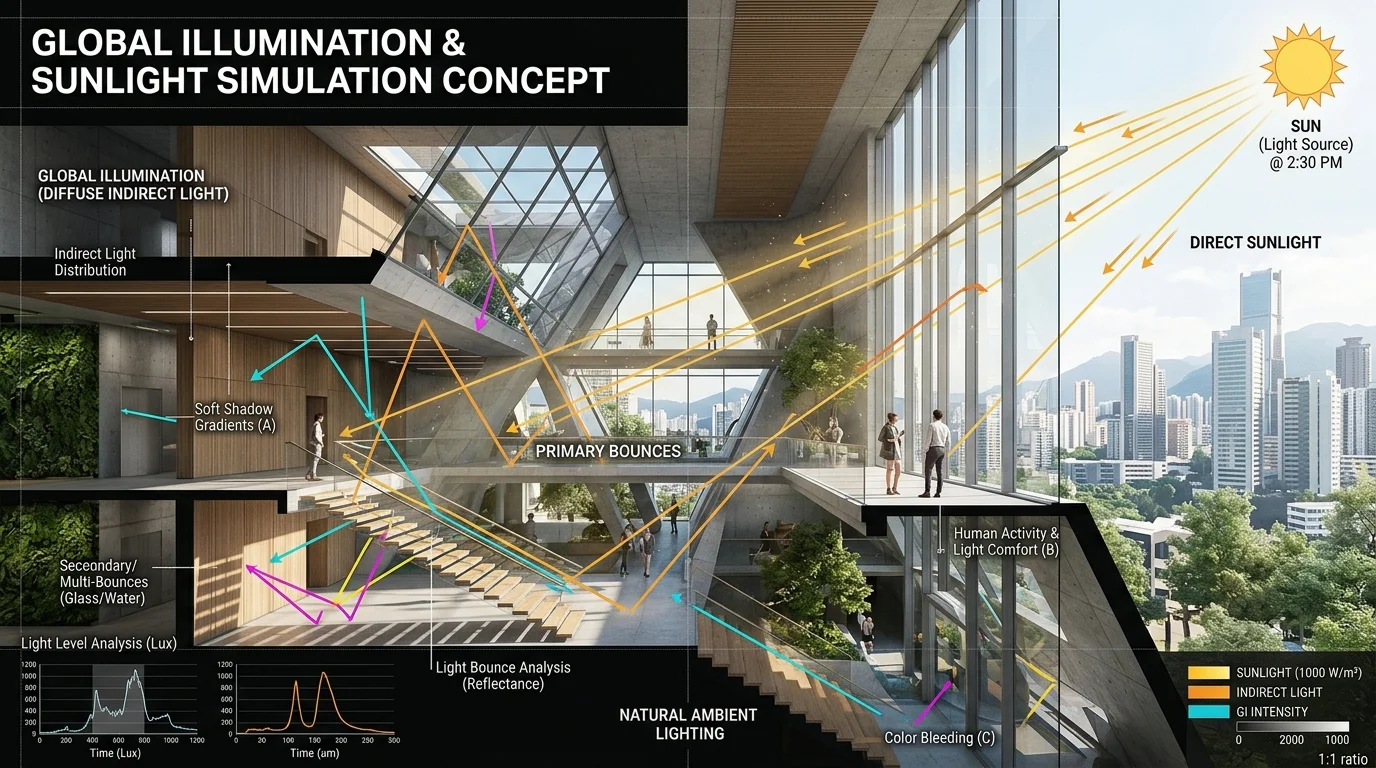
Los motores de renderizado tradicionales dependen de algoritmos de trazado de rayos configurados manualmente para simular cómo los fotones viajan desde una fuente de luz, golpean una superficie y rebotan por una habitación. Este proceso, conocido como iluminación global, es computacionalmente costoso y requiere un amplio conocimiento técnico para optimizarse.
La inteligencia artificial aborda este desafío a través de complejas redes neuronales entrenadas en vastos conjuntos de datos de fotografía del mundo real y renders físicamente precisos. Al calcular estas interacciones complejas, el sistema se basa en una inmensa arquitectura computacional. Impulsado por el Algoritmo 3.1 con más de 200 mil millones de parámetros, Tripo AI analiza la geometría espacial para calcular rebotes de luz precisos y sombras de contacto sin necesidad de configuraciones manuales de trazado de rayos.
Esta inmensa capacidad de procesamiento permite a la IA entender intrínsecamente que un rayo brillante de sol que golpea un piso de madera roja rebotará hacia arriba, proyectando un tinte cálido y rojizo en las paredes blancas adyacentes. Predice el gradiente suave de la oclusión ambiental en las esquinas de una habitación y las sombras de contacto nítidas debajo de los muebles, entregando una iluminación global fotorrealista a velocidades sin precedentes.
Técnicas para efectos de luz solar fotorrealistas con IA
Para dominar la iluminación natural, debes guiar a la IA utilizando prompts precisos y controles de entorno. Al especificar la hora del día, la ubicación de las ventanas y la temperatura de la luz, Tripo AI puede simular con precisión brillos matutinos o rayos intensos de la tarde, elevando el realismo de tu diseño de interiores digital.
Prompts para horas específicas del día (Hora dorada vs. Mediodía)
La precisión en el lenguaje descriptivo es una herramienta altamente efectiva para controlar la luz solar en el renderizado generativo. Los descriptores vagos como "habitación soleada" producen resultados impredecibles, a menudo recurriendo a un entorno genérico y sobreiluminado. Para lograr visuales de grado profesional, los profesionales deben usar modificadores específicos basados en el tiempo que dicten la altitud y el azimut exactos del sol virtual. Utilizando un flujo de trabajo de Texto a modelo 3D, el motor de generación interpreta estas señales semánticas para construir el entorno de iluminación de forma dinámica.
- Hora dorada: Pedir "luz solar de hora dorada" instruye a la IA a bajar el ángulo del sol, extendiendo las sombras por el suelo e infundiendo la escena con un espectro cálido y ámbar. Esto es ideal para salas de estar acogedoras.
- Mediodía: Pedir "sol de mediodía" posiciona la fuente de luz directamente sobre la cabeza, produciendo sombras nítidas de alto contraste y una temperatura de color más fría y neutra, perfecto para cocinas minimalistas.
- Nublado: Términos como "luz diurna ambiental nublada" simulan una iluminación suave y sin sombras, resaltando detalles interiores sutiles.
Control de la luz direccional y ubicación de las ventanas
Incluso la luz solar bellamente simulada es ineficaz si su punto de entrada no tiene sentido arquitectónico. En las plataformas de IA generativa, guiar al sistema para que entienda la ubicación de las ventanas es crucial para establecer la direccionalidad de la luz. Los diseñadores deben incorporar palabras clave estructurales en sus entradas, como "ventanas grandes de piso a techo orientadas al este", "tragaluz estrecho" o "persianas de listones".
Estas descripciones obligan a la IA a calcular cómo interactúa la luz solar con los límites arquitectónicos. Al especificar "persianas de listones", el motor generará patrones de sombra complejos y rayados. Además, especificar la orientación (Norte, Sur, Este, Oeste) ayuda a establecer la intensidad; las ventanas orientadas al sur proporcionan una luz solar fuerte, mientras que las orientadas al norte producen una iluminación más fría y difusa.
Gestión de reflejos de materiales y rebotes de luz
El realismo de la luz solar depende de cómo interactúa con las superficies. Una encimera de mármol pulido refleja una imagen nítida de una ventana soleada, mientras que una alfombra de lana mate absorbe la luz, creando un brillo difuso. Utilizar la generación avanzada de Texturas con IA garantiza que las propiedades de renderizado basado en la física (PBR), como el albedo, la rugosidad y la metalicidad, se asignen correctamente.
Al describir cuidadosamente los acabados, como "suelo de roble mate", "accesorios de latón cepillado" o "azulejos de cerámica brillante", los diseñadores proporcionan a la IA los datos necesarios para calcular la absorción y reflexión de la luz con precisión, evitando reflejos "quemados" y asegurando que la luz solar se comporte de forma natural.
Optimización de tu flujo de trabajo de diseño de interiores 3D en Tripo AI
Integrar luz solar fotorrealista en tu flujo de trabajo requiere equilibrar la intensidad de la luz con las propiedades de los materiales. Tripo AI permite a los diseñadores iterar rápidamente en configuraciones de iluminación, asegurando que la madera, el vidrio y las telas reaccionen naturalmente al sol simulado antes de finalizar el diseño de interiores 3D.
Pruebas iterativas para una exposición perfecta
Una de las ventajas significativas de la IA en la visualización arquitectónica es la velocidad de iteración. Los flujos de trabajo tradicionales podrían tardar horas en eliminar el ruido de un render de prueba. La IA generativa permite docenas de variaciones en minutos. Los profesionales en Tripo Studio pueden ajustar manualmente estas variaciones, modificando los prompts para refinar los niveles de exposición y el estado de ánimo atmosférico.
Una vez que la exposición es perfecta (donde los reflejos son brillantes pero no recortados, y las sombras conservan los detalles), los activos pueden exportarse en formatos como USD, FBX, OBJ, STL, GLB y 3MF. Esto garantiza que los activos perfectamente iluminados puedan integrarse en software posterior o motores de renderizado externos para la entrega final.
Equilibrio de fuentes de luz artificial y natural
La fotografía arquitectónica profesional se basa en equilibrar la luz diurna natural con la iluminación artificial interna. En el renderizado con IA, simular esta interacción añade sofisticación. Los diseñadores deben pedir a la IA que incorpore luces principales, de relleno y de contorno a través de accesorios interiores.
Describir "lámparas colgantes de tungsteno cálido" junto con la luz solar principal crea un hermoso contraste de temperatura de color. La yuxtaposición de la luz diurna fría y azulada con el brillo naranja cálido de una lámpara crea interés visual y profundidad espacial, lo que resulta en una visualización de interiores con calidad de revista.
Preguntas frecuentes
1. ¿Cómo evito que la luz solar sature las texturas interiores en Tripo AI?
Para evitar la sobreexposición, utiliza modificadores de prompt como "luz solar suavemente difusa", "baja exposición" o "rango dinámico equilibrado". Definir explícitamente los materiales como "mate" o "no reflectantes" también ayuda al motor a mantener la visibilidad de la textura en áreas brillantes.
2. ¿Puede Tripo AI generar iluminación volumétrica realista o rayos de luz a través de las ventanas?
Sí. Incluye palabras clave atmosféricas como "partículas de polvo iluminadas por la luz solar", "dispersión atmosférica" o "rayos de luz volumétricos". Posicionar la luz en un ángulo bajo (temprano en la mañana/tarde) mejora significativamente estos efectos.
3. ¿Cómo puedo pedir de manera óptima luz solar suave e indirecta en una habitación orientada al norte?
Evita los descriptores de sol directo. Usa términos como "luz diurna ambiental", "cielo nublado suave", "luz de ventana difusa" e "iluminación de estudio orientada al norte". Estas palabras clave indican a la IA que dependa de la iluminación global indirecta en lugar de rayos direccionales fuertes.
