Cách Nhập Tài nguyên 3D do AI Tạo ra vào Babylon.js và Three.js

Hãy tưởng tượng: Bạn vừa tạo ra một mô hình 3D tuyệt đẹp bằng công nghệ AI tạo mô hình 3D chỉ trong vài giây, nhưng giờ bạn đang bối rối không biết làm thế nào để đưa nó vào trang web. Dù bạn đang xây dựng một trang giới thiệu sản phẩm tương tác, một trò chơi web, hay một trải nghiệm AR nhập vai, việc nhập kiệt tác do AI tạo ra vào các framework web phổ biến không nên giống như giải phương trình tên lửa.
Đó chính xác là điều chúng ta sẽ giải quyết hôm nay—với không chỉ một, mà là hai cách tiếp cận. Chúng ta sẽ bắt đầu với một lối tắt thú vị dựa trên AI giúp mô hình của bạn hoạt động trong vài phút, sau đó đi sâu vào phương pháp mã hóa truyền thống dành cho những ai muốn kiểm soát hoàn toàn. Với hơn 2 triệu nhà sáng tạo đã sử dụng Tripo AI để tạo ra các mô hình 3D chuyên nghiệp chỉ trong 8-10 giây, hãy cùng khám phá những cách nhanh nhất để nhập tài nguyên 3D do AI tạo ra vào cả Babylon.js và Three.js.
Lối tắt AI nhanh chóng: Sử dụng Cursor AI để Nhập Mô hình 3D của Bạn
Đây là điểm đột phá: Bạn không cần viết hàng trăm dòng mã nữa. Các công cụ phát triển được hỗ trợ bởi AI như Cursor AI có thể tạo toàn bộ thiết lập tích hợp cho bạn chỉ trong vài phút, bao gồm cả các tác vụ như tạo mô hình 3D do AI tạo ra. Phương pháp này hoàn hảo cho các nhà thiết kế, nhà tiếp thị và bất kỳ ai muốn tạo nguyên mẫu nhanh mà không cần kiến thức sâu về JavaScript.
Tại sao chọn phương pháp Lối tắt AI?
- Siêu nhanh: Biến hàng giờ viết mã thành thiết lập 5 phút
- Thân thiện với người mới: Không có kinh nghiệm lập trình? Không vấn đề gì
- Không lỗi: AI xử lý các phần phức tạp như cấu hình trình tải
- Kiểm tra ngay: Xem tích hợp web mô hình 3D do AI tạo ra của bạn ngay lập tức
Hướng dẫn từng bước: Phương pháp Cursor AI
1. Xuất Mô hình Tripo AI của Bạn
Khi sử dụng Tripo Studio hoặc nền tảng Tripo AI:
- Tạo mô hình của bạn từ văn bản hoặc hình ảnh
- Nhấp vào nút xuất
- Chọn định dạng GLB (khuyến nghị cho web)
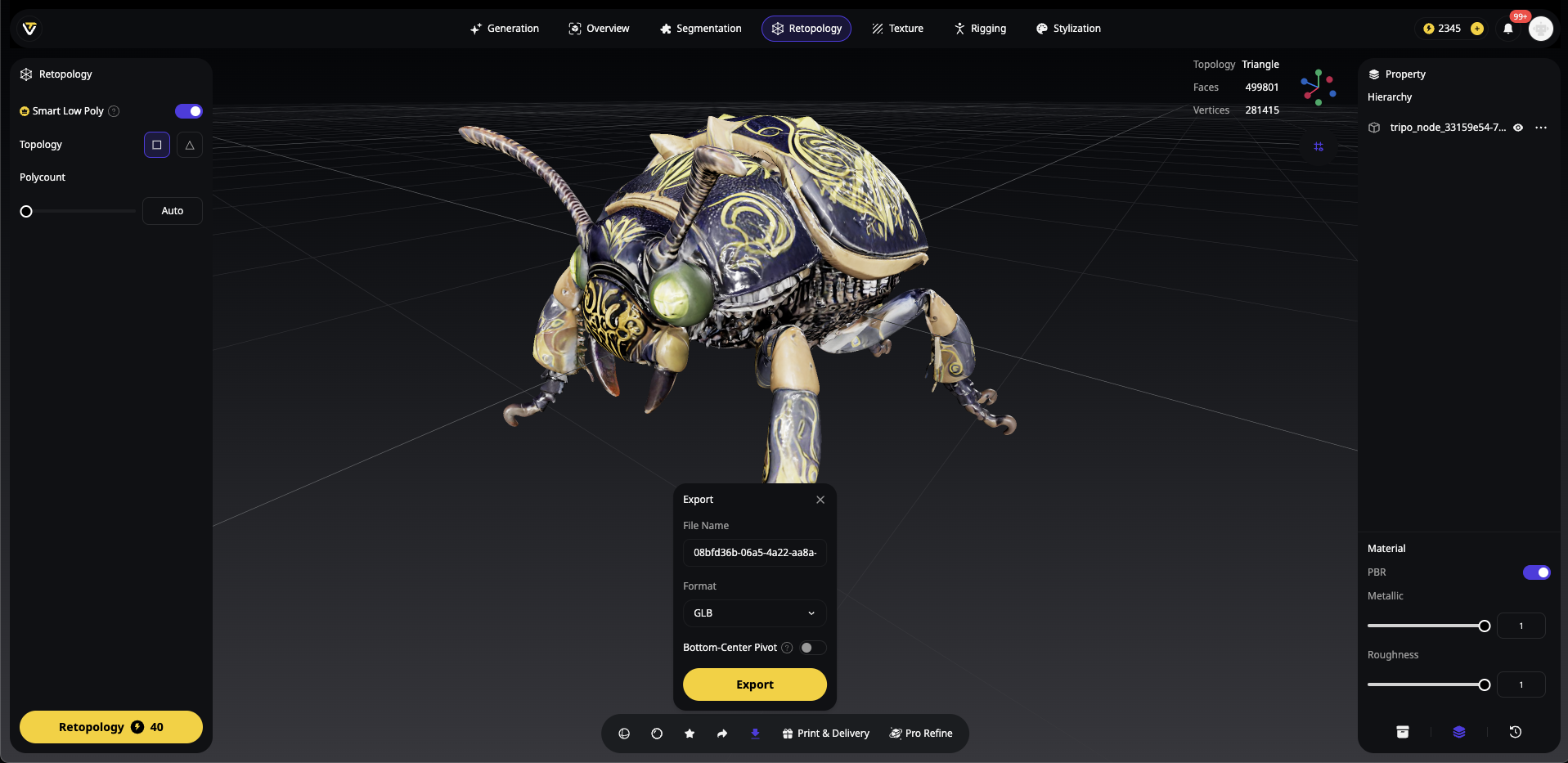
Định dạng thay thế: OBJ, FBX, STL hoặc USDZ
Tạo một thư mục dự án mới và đặt mô hình GLB của bạn trong thư mục con models:
my-3d-project/
├── models/
│   └── your-tripo-model.glb
└── (trống hiện tại)
Bước 2: Mở Cursor AI và Tạo Prompt của Bạn
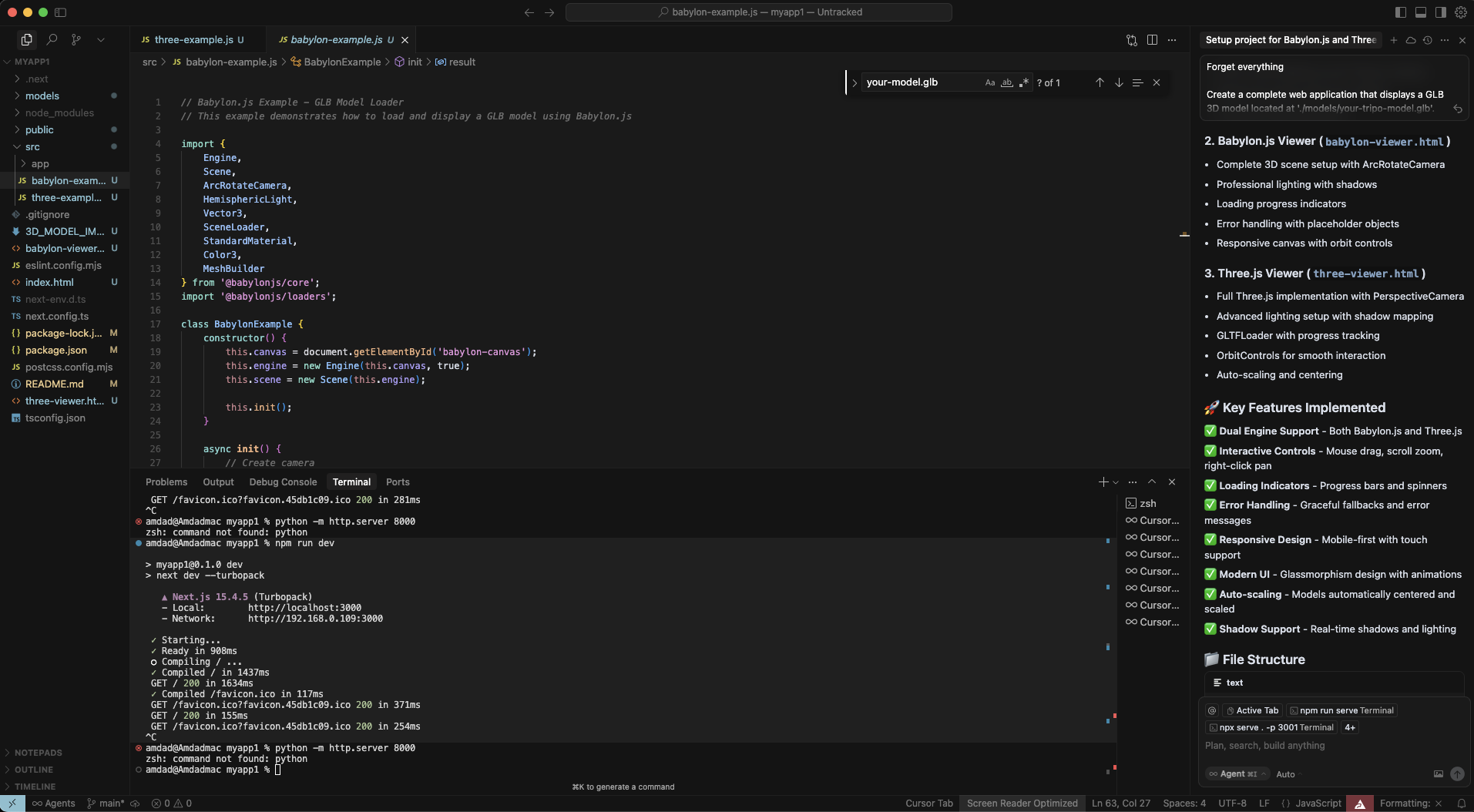
Khởi chạy Cursor AI và mở thư mục dự án của bạn. Sử dụng prompt mạnh mẽ này để tạo mọi thứ:
Tạo một ứng dụng web hoàn chỉnh hiển thị mô hình 3D GLB tại './models/your-tripo-model.glb'.

Yêu cầu:
1. Thiết lập cả hai ví dụ Babylon.js và Three.js trong các tệp HTML riêng biệt
2. Bao gồm tất cả các phụ thuộc cần thiết qua CDN
3. Thêm ánh sáng, điều khiển máy ảnh và canvas đáp ứng phù hợp
4. Triển khai điều khiển quỹ đạo cho tương tác người dùng
5. Thêm chỉ báo tiến trình tải
6. Tạo index.html với liên kết đến cả hai ví dụ
7. Bao gồm xử lý lỗi cho các lần tải mô hình thất bại
8. Thêm chú thích giải thích từng phần
9. Làm cho nó hoạt động với 'python -m http.server' để kiểm tra cục bộ

Mô hình phải được căn giữa, chiếu sáng đúng cách và có thể xoay bằng chuột.
Bước 3: Áp dụng Mã do AI Tạo ra
Cursor AI sẽ tạo ra nhiều tệp. Xem xét và chấp nhận các thay đổi:
index.html - Trang đích với cả hai tùy chọn
babylon-example.html - Triển khai Babylon.js
three-example.html - Triển khai Three.js
Có thể là README.md với hướng dẫn
Bước 4: Kiểm tra Tích hợp của Bạn
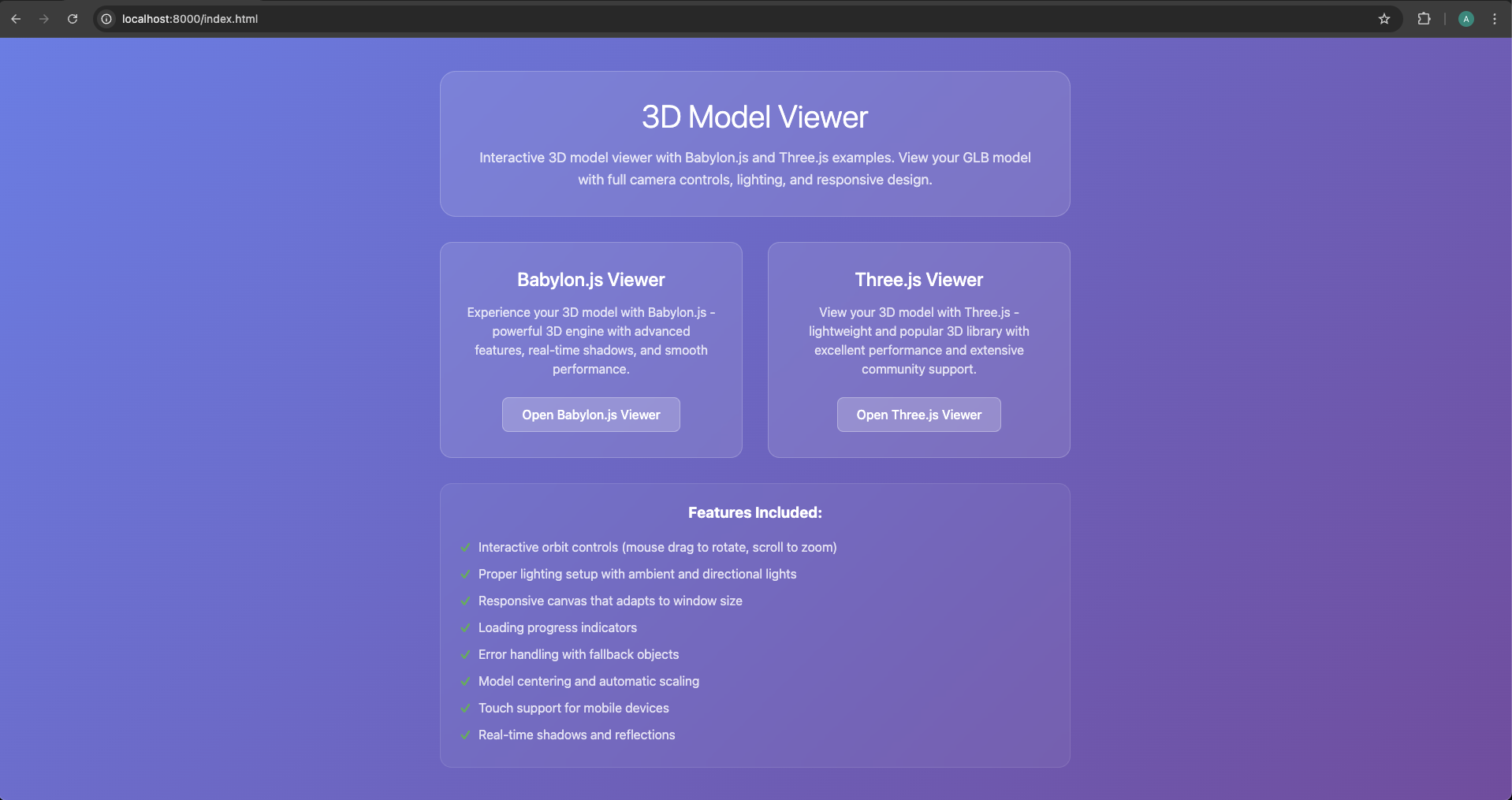
Mở terminal trong thư mục dự án của bạn và chạy:
python -m http.server 8000
# Hoặc nếu bạn thích Node.js:
npx http-server
Điều hướng đến http://localhost:8000 và nhấp vào một trong hai ví dụ để xem mô hình của bạn!
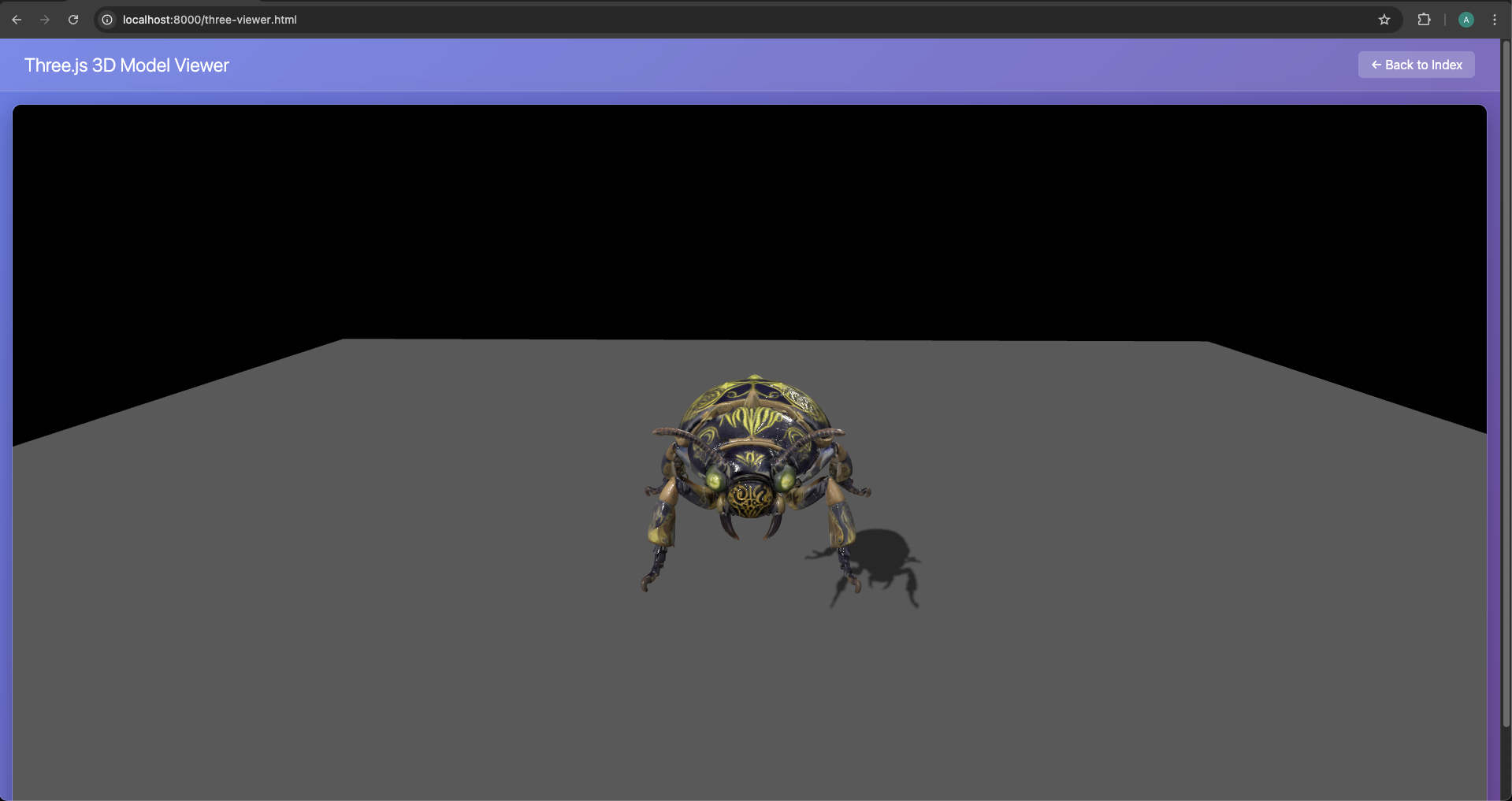
Bước 5: Tùy chỉnh với sự trợ giúp của AI
Cần sửa đổi? Chỉ cần hỏi Cursor AI:
"Thêm nền skybox vào ví dụ Three.js"
"Làm cho mô hình tự động xoay trong Babylon.js"
"Thêm hiệu ứng đổ bóng cho cả hai ví dụ"
"Triển khai màn hình tải với phần trăm"
Ví dụ đầu ra thực tế từ Cursor AI
Đây là những gì Cursor có thể tạo cho triển khai Three.js của bạn:
_// Ví dụ Three.js - Trình tải GLB Model_
_// Ví dụ này minh họa cách tải và hiển thị mô hình GLB bằng Three.js_

import * as THREE from 'three';
import { GLTFLoader } from 'three/examples/jsm/loaders/GLTFLoader.js';
import { OrbitControls } from 'three/examples/jsm/controls/OrbitControls.js';

class ThreeExample {
    constructor() {
        this.container = document.getElementById('three-container');
        this.scene = new THREE.Scene();
        this.camera = new THREE.PerspectiveCamera(
            75,
            window.innerWidth / window.innerHeight,
            0.1,
            1000
        );

        this.renderer = new THREE.WebGLRenderer({ antialias: true });
        this.renderer.setSize(window.innerWidth, window.innerHeight);
        this.renderer.setClearColor(0x000000);
        this.renderer.shadowMap.enabled = true;
        this.renderer.shadowMap.type = THREE.PCFSoftShadowMap;

        this.container.appendChild(this.renderer.domElement);

        this.init();
    }

    **init**() {
        _// Thiết lập máy ảnh_
        this.camera.position.set(5, 5, 5);
        this.camera.lookAt(0, 0, 0);

        _// Thiết lập ánh sáng_
        const ambientLight = new THREE.AmbientLight(0x404040, 0.6);
        this.scene.add(ambientLight);

        const directionalLight = new THREE.DirectionalLight(0xffffff, 0.8);
        directionalLight.position.set(10, 10, 5);
        directionalLight.castShadow = true;
        directionalLight.shadow.mapSize.width = 2048;
        directionalLight.shadow.mapSize.height = 2048;
        this.scene.add(directionalLight);

        _// Thêm OrbitControls_
        this.controls = new OrbitControls(this.camera, this.renderer.domElement);
        this.controls.enableDamping = true;
        this.controls.dampingFactor = 0.05;
        this.controls.screenSpacePanning = false;
        this.controls.minDistance = 1;
        this.controls.maxDistance = 50;

        _// Tải mô hình GLB_
        this.loadModel();

        _// Xử lý thay đổi kích thước cửa sổ_
        window.addEventListener('resize', () => {
            this.camera.aspect = window.innerWidth / window.innerHeight;
            this.camera.updateProjectionMatrix();
            this.renderer.setSize(window.innerWidth, window.innerHeight);
        });

        _// Bắt đầu vòng lặp hoạt hình_
        this.animate();
    }

    **loadModel**() {
        const loader = new GLTFLoader();

        console.log('Đang tải mô hình GLB...');
        loader.load(
            'models/your-model1.glb',
            (_gltf_) => {
                console.log('Mô hình được tải thành công:', _gltf_);

                _// Thêm mô hình vào cảnh_
                this.scene.add(_gltf_.scene);

                _// Căn giữa mô hình_
                this.centerModel(_gltf_.scene);

                _// Thêm mặt phẳng nền để tham chiếu_
                this.createGround();

                _// Bật đổ bóng cho tất cả các lưới_
                _gltf_.scene.traverse((_child_) => {
                    if (_child_.isMesh) {
                        _child_.castShadow = true;
                        _child_.receiveShadow = true;
                    }
                });

            },
            (_progress_) => {
                console.log('Tiến trình tải:', (_progress_.loaded / _progress_.total * 100) + '%');
            },
            (_error_) => {
                console.error('Lỗi tải mô hình:', _error_);
                this.createPlaceholderCube();
            }
        );
    }

    **centerModel**(_model_) {
        _// Tính hộp giới hạn để căn giữa mô hình_
        const box = new THREE.Box3().setFromObject(_model_);
        const center = box.getCenter(new THREE.Vector3());
        const size = box.getSize(new THREE.Vector3());

        _// Căn giữa mô hình_
        _model_.position.sub(center);

        _// Thu nhỏ mô hình về kích thước hợp lý nếu cần_
        const maxDim = Math.max(size.x, size.y, size.z);
        if (maxDim > 10) {
            const scale = 5 / maxDim;
            _model_.scale.setScalar(scale);
        }
    }

    **createGround**() {
        _// Tạo mặt phẳng nền để tham chiếu_
        const groundGeometry = new THREE.PlaneGeometry(20, 20);
        const groundMaterial = new THREE.MeshLambertMaterial({
            color: 0x333333,
            transparent: true,
            opacity: 0.8
        });
        const ground = new THREE.Mesh(groundGeometry, groundMaterial);
        ground.rotation.x = -Math.PI / 2;
        ground.position.y = -2;
        ground.receiveShadow = true;
        this.scene.add(ground);
    }

    **createPlaceholderCube**() {
        _// Tạo một khối lập phương thay thế nếu mô hình không tải được_
        const geometry = new THREE.BoxGeometry(2, 2, 2);
        const material = new THREE.MeshLambertMaterial({ color: 0x8080ff });
        const cube = new THREE.Mesh(geometry, material);
        cube.castShadow = true;
        this.scene.add(cube);
    }

    **animate**() {
        requestAnimationFrame(() => this.animate());

        _// Cập nhật điều khiển_
        this.controls.update();

        _// Kết xuất cảnh_
        this.renderer.render(this.scene, this.camera);
    }
}

_// Khởi tạo khi DOM được tải_
document.addEventListener('DOMContentLoaded', () => {
    new ThreeExample();
});

export default ThreeExample;
So sánh các Phương pháp: Lối tắt AI vs Mã hóa Truyền thống
Phương pháp Truyền thống: Triển khai Thủ công
Trong khi các lối tắt AI rất tuyệt vời để bắt đầu nhanh, các nhà phát triển chuyên nghiệp thường cần kiểm soát hoàn toàn. Hãy khám phá cách tiếp cận truyền thống cho cả nhập mô hình 3D Babylon.js và tải mô hình 3D Three.js.
Babylon.js: Thiết lập Thủ công Hoàn chỉnh
Bước 1: Cấu trúc Dự án
Tạo dự án của bạn theo cách thủ công:
mkdir babylon-3d-project
cd babylon-3d-project
npm init -y
npm install --save babylonjs babylonjs-loaders
Bước 2: Nền tảng HTML
<!DOCTYPE html><html><head><title>Babylon.js - Mô hình Tripo AI</title><style>
        html, body {
            overflow: hidden;
            width: 100%;
            height: 100%;
            margin: 0;
            padding: 0;
        }
        #renderCanvas {
            width: 100%;
            height: 100%;
            touch-action: none;
        }
    </style></head><body><canvas id="renderCanvas"></canvas><script src="https://cdn.babylonjs.com/babylon.js"></script><script src="https://cdn.babylonjs.com/loaders/babylonjs.loaders.min.js"></script><script src="app.js"></script></body></html>
Bước 3: Triển khai JavaScript
// app.jsconst canvas = document.getElementById("renderCanvas");
const engine = new BABYLON.Engine(canvas, true, {
    preserveDrawingBuffer: true,
    stencil: true,
    disableWebGL2Support: false
});

const createScene = async () => {
    const scene = new BABYLON.Scene(engine);
    scene.clearColor = new BABYLON.Color4(0.9, 0.9, 0.9, 1);

    // Camera với vị trí tốt hơnconst camera = new BABYLON.ArcRotateCamera(
        "camera",
        BABYLON.Tools.ConvertDegreesToRadians(45),
        BABYLON.Tools.ConvertDegreesToRadians(60),
        10,
        BABYLON.Vector3.Zero(),
        scene
    );
    camera.attachControl(canvas, true);
    camera.wheelPrecision = 50;
    camera.minZ = 0.1;

    // Thiết lập ánh sáng nâng caoconst hemiLight = new BABYLON.HemisphericLight(
        "hemiLight",
        new BABYLON.Vector3(0, 1, 0),
        scene
    );
    hemiLight.intensity = 0.5;

    const dirLight = new BABYLON.DirectionalLight(
        "dirLight",
        new BABYLON.Vector3(-1, -2, -1),
        scene
    );
    dirLight.position = new BABYLON.Vector3(20, 40, 20);
    dirLight.intensity = 0.5;
    dirLight.shadowEnabled = true;

    // Trình tạo bóng đổconst shadowGenerator = new BABYLON.ShadowGenerator(1024, dirLight);
    shadowGenerator.useBlurExponentialShadowMap = true;

    // Mặt đất cho bóng đổconst ground = BABYLON.MeshBuilder.CreateGround(
        "ground",
        { width: 20, height: 20 },
        scene
    );
    ground.receiveShadows = true;

    // Nhập tài nguyên 3D do AI tạo ra với xử lý lỗitry {
        const result = await BABYLON.SceneLoader.ImportMeshAsync(
            "",
            "./models/",
            "your-tripo-model.glb",
            scene
        );

        // Xử lý các lưới đã nhập
        result.meshes.forEach(mesh => {
            shadowGenerator.addShadowCaster(mesh);
            if (mesh.material) {
                mesh.material.backFaceCulling = false;
            }
        });

        // Căn giữa và thu nhỏ mô hìnhconst rootMesh = result.meshes[0];
        const bounds = rootMesh.getHierarchyBoundingVectors();
        const center = bounds.max.add(bounds.min).scale(0.5);
        rootMesh.position = center.negate();

        // Tự động điều chỉnh camera
        camera.setTarget(BABYLON.Vector3.Zero());
        camera.radius = bounds.max.subtract(bounds.min).length() * 1.5;

    } catch (error) {
        console.error("Không tải được mô hình:", error);
        // Tạo chỉ báo lỗiconst errorText = new BABYLON.GUI.TextBlock();
        errorText.text = "Không tải được mô hình 3D";
        errorText.color = "red";
        errorText.fontSize = 24;
    }

    return scene;
};

// Khởi tạo và chạycreateScene().then(scene => {
    engine.runRenderLoop(() => {
        scene.render();
    });

    // Tối ưu hóa cho di động
    engine.setHardwareScalingLevel(1 / window.devicePixelRatio);
});

// Xử lý đáp ứngwindow.addEventListener("resize", () => {
    engine.resize();
});

// Tối ưu hóa hiệu suất
scene.registerBeforeRender(() => {
    // Thêm bất kỳ cập nhật theo khung hình nào ở đây
});
Three.js: Triển khai Chuyên nghiệp
Đối với tải mô hình 3D Three.js, đây là cách tiếp cận thủ công hoàn chỉnh:
import * as THREE from 'three';
import { GLTFLoader } from 'three/examples/jsm/loaders/GLTFLoader.js';
import { OrbitControls } from 'three/examples/jsm/controls/OrbitControls.js';
import { DRACOLoader } from 'three/examples/jsm/loaders/DRACOLoader.js';

class ThreeJSApp {
    constructor() {
        this.scene = new THREE.Scene();
        this.camera = null;
        this.renderer = null;
        this.controls = null;
        this.model = null;
        this.mixer = null;
        this.clock = new THREE.Clock();

        this.init();
        this.loadModel();
        this.animate();
    }

    init() {
        // Thiết lập cảnhthis.scene.background = new THREE.Color(0xf0f0f0);
        this.scene.fog = new THREE.Fog(0xf0f0f0, 10, 50);

        // Camerathis.camera = new THREE.PerspectiveCamera(
            50,
            window.innerWidth / window.innerHeight,
            0.1,
            1000
        );
        this.camera.position.set(5, 5, 5);

        // Renderer với các tối ưu hóathis.renderer = new THREE.WebGLRenderer({
            antialias: true,
            powerPreference: "high-performance"
        });
        this.renderer.setPixelRatio(Math.min(window.devicePixelRatio, 2));
        this.renderer.setSize(window.innerWidth, window.innerHeight);
        this.renderer.shadowMap.enabled = true;
        this.renderer.shadowMap.type = THREE.PCFSoftShadowMap;
        this.renderer.outputEncoding = THREE.sRGBEncoding;
        this.renderer.toneMapping = THREE.ACESFilmicToneMapping;
        document.body.appendChild(this.renderer.domElement);

        // Đènconst ambient = new THREE.AmbientLight(0xffffff, 0.4);
        this.scene.add(ambient);

        const directional = new THREE.DirectionalLight(0xffffff, 0.6);
        directional.position.set(5, 10, 5);
        directional.castShadow = true;
        directional.shadow.camera.near = 0.1;
        directional.shadow.camera.far = 50;
        directional.shadow.camera.left = -10;
        directional.shadow.camera.right = 10;
        directional.shadow.camera.top = 10;
        directional.shadow.camera.bottom = -10;
        directional.shadow.mapSize.width = 2048;
        directional.shadow.mapSize.height = 2048;
        this.scene.add(directional);

        // Mặt đấtconst groundGeometry = new THREE.PlaneGeometry(50, 50);
        const groundMaterial = new THREE.MeshStandardMaterial({
            color: 0xcccccc,
            roughness: 0.8,
            metalness: 0.2
        });
        const ground = new THREE.Mesh(groundGeometry, groundMaterial);
        ground.rotation.x = -Math.PI / 2;
        ground.receiveShadow = true;
        this.scene.add(ground);

        // Điều khiểnthis.controls = new OrbitControls(this.camera, this.renderer.domElement);
        this.controls.enableDamping = true;
        this.controls.dampingFactor = 0.05;
        this.controls.screenSpacePanning = false;
        this.controls.minDistance = 1;
        this.controls.maxDistance = 50;
        this.controls.maxPolarAngle = Math.PI / 2;

        // Trình nghe sự kiệnwindow.addEventListener('resize', this.onWindowResize.bind(this));
    }

    loadModel() {
        // Trình quản lý tải để theo dõi tiến trìnhconst manager = new THREE.LoadingManager();

        manager.onStart = (url, itemsLoaded, itemsTotal) => {
            console.log(`Bắt đầu tải: ${url}`);
            this.showLoader(true);
        };

        manager.onProgress = (url, itemsLoaded, itemsTotal) => {
            const progress = (itemsLoaded / itemsTotal) * 100;
            this.updateLoader(progress);
        };

        manager.onLoad = () => {
            console.log('Tải hoàn tất!');
            this.showLoader(false);
        };

        manager.onError = (url) => {
            console.error(`Lỗi tải ${url}`);
            this.showError('Không tải được mô hình 3D');
        };

        // Trình tải DRACO cho hình học nén (tùy chọn nhưng được khuyến nghị)const dracoLoader = new DRACOLoader(manager);
        dracoLoader.setDecoderPath('https://www.gstatic.com/draco/v1/decoders/');

        // Trình tải GLTFconst loader = new GLTFLoader(manager);
        loader.setDRACOLoader(dracoLoader);

        // Tải mô hình
        loader.load(
            './models/your-tripo-model.glb',
            (gltf) => {
                this.model = gltf.scene;

                // Căn giữa và thu nhỏ mô hìnhconst box = new THREE.Box3().setFromObject(this.model);
                const center = box.getCenter(new THREE.Vector3());
                const size = box.getSize(new THREE.Vector3());

                // Căn giữa mô hìnhthis.model.position.sub(center);

                // Thu nhỏ để vừa với khung nhìnconst maxDim = Math.max(size.x, size.y, size.z);
                const scale = 5 / maxDim;
                this.model.scale.multiplyScalar(scale);

                // Bật đổ bóngthis.model.traverse((child) => {
                    if (child.isMesh) {
                        child.castShadow = true;
                        child.receiveShadow = true;

                        // Đảm bảo vật liệu hai mặt cho các mô hình do AI tạo raif (child.material) {
                            child.material.side = THREE.DoubleSide;
                        }
                    }
                });

                // Thêm vào cảnhthis.scene.add(this.model);

                // Xử lý hoạt ảnh nếu cóif (gltf.animations && gltf.animations.length > 0) {
                    this.mixer = new THREE.AnimationMixer(this.model);

                    // Phát tất cả hoạt ảnh
                    gltf.animations.forEach((clip) => {
                        const action = this.mixer.clipAction(clip);
                        action.play();
                    });
                }

                // Điều chỉnh camera để vừa với mô hìnhthis.fitCameraToObject(this.model);
            }
        );
    }

    fitCameraToObject(object) {
        const box = new THREE.Box3().setFromObject(object);
        const size = box.getSize(new THREE.Vector3());
        const center = box.getCenter(new THREE.Vector3());

        const maxDim = Math.max(size.x, size.y, size.z);
        const fov = this.camera.fov * (Math.PI / 180);
        const cameraZ = Math.abs(maxDim / 2 / Math.tan(fov / 2));

        this.camera.position.set(cameraZ, cameraZ, cameraZ);
        this.controls.target = center;
        this.controls.update();
    }

    animate() {
        requestAnimationFrame(this.animate.bind(this));

        const delta = this.clock.getDelta();

        // Cập nhật hoạt ảnhif (this.mixer) {
            this.mixer.update(delta);
        }

        // Cập nhật điều khiểnthis.controls.update();

        // Kết xuấtthis.renderer.render(this.scene, this.camera);
    }

    onWindowResize() {
        this.camera.aspect = window.innerWidth / window.innerHeight;
        this.camera.updateProjectionMatrix();
        this.renderer.setSize(window.innerWidth, window.innerHeight);
    }

    showLoader(show) {
        let loader = document.getElementById('loader');
        if (!loader && show) {
            loader = document.createElement('div');
            loader.id = 'loader';
            loader.style.cssText = `
                position: fixed;
                top: 50%;
                left: 50%;
                transform: translate(-50%, -50%);
                background: rgba(0,0,0,0.8);
                color: white;
                padding: 20px;
                border-radius: 10px;
                font-family: Arial, sans-serif;
                z-index: 1000;
            `;
            document.body.appendChild(loader);
        }
        if (loader) {
            loader.style.display = show ? 'block' : 'none';
        }
    }

    updateLoader(progress) {
        const loader = document.getElementById('loader');
        if (loader) {
            loader.textContent = `Đang tải: ${Math.round(progress)}%`;
        }
    }

    showError(message) {
        const loader = document.getElementById('loader');
        if (loader) {
            loader.textContent = message;
            loader.style.background = 'rgba(255,0,0,0.8)';
        }
    }
}

// Khởi tạo ứng dụngconst app = new ThreeJSApp();
Tối ưu hóa Mô hình do AI Tạo ra cho Hiệu suất Web
Cho dù bạn sử dụng lối tắt AI hay phương pháp thủ công, việc tối ưu hóa hiệu suất web mô hình 3D do AI tạo ra là rất quan trọng. Dưới đây là cách đảm bảo trải nghiệm mượt mà:
- Tối ưu hóa định dạng với glTF
Định dạng nhập mô hình glTF là tiêu chuẩn vàng cho web 3D. Đây là lý do và cách tối ưu hóa:
// Tối ưu hóa kết cấu trong quá trình tải
loader.load('./models/your-model.glb', (gltf) => {
    gltf.scene.traverse((child) => {
        if (child.isMesh && child.material) {
            // Tối ưu hóa kết cấuif (child.material.map) {
                child.material.map.minFilter = THREE.LinearMipmapLinearFilter;
                child.material.map.anisotropy = renderer.capabilities.getMaxAnisotropy();
            }

            // Bật GPU instancing cho các lưới lặp lạiif (child.geometry) {
                child.geometry.computeBoundingSphere();
                child.frustumCulled = true;
            }
        }
    });
});
- Hệ thống Mức độ Chi tiết (LOD)
Triển khai LOD để có hiệu suất tốt hơn trên nhiều thiết bị:
class LODManager {
    constructor(scene, camera) {
        this.scene = scene;
        this.camera = camera;
        this.lodGroups = new Map();
    }

    addLODModel(name, levels) {
        const lod = new THREE.LOD();

        levels.forEach(({ url, distance }) => {
            const loader = new GLTFLoader();
            loader.load(url, (gltf) => {
                lod.addLevel(gltf.scene, distance);
            });
        });

        this.scene.add(lod);
        this.lodGroups.set(name, lod);
        return lod;
    }

    update() {
        this.lodGroups.forEach(lod => {
            lod.update(this.camera);
        });
    }
}

// Sử dụngconst lodManager = new LODManager(scene, camera);
lodManager.addLODModel('tripoModel', [
    { url: './models/high-detail.glb', distance: 0 },
    { url: './models/medium-detail.glb', distance: 10 },
    { url: './models/low-detail.glb', distance: 20 }
]);
- Nén Kết cấu
Giảm kích thước kết cấu mà không giảm chất lượng:
// Nén kết cấu trước khi tải lên GPUfunction compressTexture(texture) {
    const canvas = document.createElement('canvas');
    const ctx = canvas.getContext('2d');

    // Thay đổi kích thước thành lũy thừa của 2const size = Math.pow(2, Math.floor(Math.log2(Math.max(texture.image.width, texture.image.height))));
    canvas.width = size;
    canvas.height = size;

    ctx.drawImage(texture.image, 0, 0, size, size);

    // Tạo kết cấu nénconst compressedTexture = new THREE.CanvasTexture(canvas);
    compressedTexture.minFilter = THREE.LinearMipmapLinearFilter;
    compressedTexture.generateMipmaps = true;

    return compressedTexture;
}
- Giám sát Hiệu suất
Theo dõi FPS và tối ưu hóa cho phù hợp:
class PerformanceMonitor {
    constructor() {
        this.fps = 0;
        this.frameCount = 0;
        this.lastTime = performance.now();

        this.createDisplay();
    }

    createDisplay() {
        this.display = document.createElement('div');
        this.display.style.cssText = `
            position: fixed;
            top: 10px;
            left: 10px;
            background: rgba(0,0,0,0.7);
            color: #00ff00;
            padding: 10px;
            font-family: monospace;
            font-size: 14px;
            z-index: 1000;
        `;
        document.body.appendChild(this.display);
    }

    update() {
        this.frameCount++;
        const currentTime = performance.now();

        if (currentTime >= this.lastTime + 1000) {
            this.fps = Math.round((this.frameCount * 1000) / (currentTime - this.lastTime));
            this.frameCount = 0;
            this.lastTime = currentTime;

            this.display.textContent = `FPS: ${this.fps}`;

            // Tự động điều chỉnh chất lượng dựa trên FPSif (this.fps < 30) {
                this.reduceQuality();
            } else if (this.fps > 55) {
                this.increaseQuality();
            }
        }
    }

    reduceQuality() {
        // Triển khai logic giảm chất lượngconsole.log('Đang giảm chất lượng để có hiệu suất tốt hơn');
    }

    increaseQuality() {
        // Triển khai logic tăng chất lượngconsole.log('Đang tăng chất lượng');
    }
}
Các Thực hành Tốt nhất cho Triển khai Sản xuất
- Tự động hóa Quy trình Tài nguyên
Tạo một quy trình xây dựng để tự động tối ưu hóa các mô hình 3D cho web:
// package.json{"scripts": {"optimize-models": "gltf-pipeline -i ./models/raw/*.glb -o ./models/optimized/ -d","build": "npm run optimize-models && webpack"}}
- Triển khai CDN
Phục vụ các mô hình của bạn từ CDN để có hiệu suất toàn cầu:
const MODEL_CDN = 'https://your-cdn.com/models/';

function loadModelFromCDN(modelName) {
    return new Promise((resolve, reject) => {
        const loader = new GLTFLoader();
        loader.load(
            `${MODEL_CDN}${modelName}`,
            resolve,
            (progress) => console.log('Đang tải:', progress.loaded / progress.total * 100 + '%'),
            reject
        );
    });
}
- Chiến lược Tải Dần
Tải mô hình dựa trên tương tác của người dùng:
class ProgressiveLoader {
    constructor() {
        this.loadQueue = [];
        this.isLoading = false;
        this.loadedModels = new Map();
    }

    addToQueue(priority, modelInfo) {
        this.loadQueue.push({ priority, ...modelInfo });
        this.loadQueue.sort((a, b) => b.priority - a.priority);
        this.processQueue();
    }

    async processQueue() {
        if (this.isLoading || this.loadQueue.length === 0) return;

        this.isLoading = true;
        const { url, name, onLoad } = this.loadQueue.shift();

        try {
            const loader = new GLTFLoader();
            const gltf = await loader.loadAsync(url);

            this.loadedModels.set(name, gltf.scene);
            if (onLoad) onLoad(gltf.scene);

        } catch (error) {
            console.error(`Không tải được ${name}:`, error);
        }

        this.isLoading = false;
        this.processQueue();
    }

    preloadCritical(models) {
        models.forEach(model => {
            this.addToQueue(10, model);
        });
    }

    loadOnDemand(modelInfo) {
        if (this.loadedModels.has(modelInfo.name)) {
            return Promise.resolve(this.loadedModels.get(modelInfo.name));
        }

        return new Promise((resolve) => {
            this.addToQueue(5, {
                ...modelInfo,
                onLoad: resolve
            });
        });
    }
}

// Ví dụ sử dụngconst loader = new ProgressiveLoader();

// Tải trước các mô hình quan trọng
loader.preloadCritical([
    { name: 'hero-model', url: './models/hero.glb' },
    { name: 'environment', url: './models/environment.glb' }
]);

// Tải theo tương tác người dùngdocument.getElementById('load-extra').addEventListener('click', async () => {
    const model = await loader.loadOnDemand({
        name: 'extra-model',
        url: './models/extra.glb'
    });
    scene.add(model);
});
- Quản lý Bộ nhớ
Xử lý đúng cách các tài nguyên không sử dụng để tránh rò rỉ bộ nhớ:
class ResourceManager {
    constructor() {
        this.resources = new Map();
    }

    addResource(name, resource) {
        this.resources.set(name, resource);
    }

    disposeResource(name) {
        const resource = this.resources.get(name);
        if (!resource) return;

        resource.traverse((child) => {
            if (child.geometry) {
                child.geometry.dispose();
            }

            if (child.material) {
                if (Array.isArray(child.material)) {
                    child.material.forEach(mat => this.disposeMaterial(mat));
                } else {
                    this.disposeMaterial(child.material);
                }
            }
        });

        this.resources.delete(name);
    }

    disposeMaterial(material) {
        // Xử lý kết cấu
        ['map', 'normalMap', 'roughnessMap', 'metalnessMap', 'aoMap'].forEach(prop => {
            if (material[prop]) {
                material[prop].dispose();
            }
        });

        material.dispose();
    }

    disposeAll() {
        this.resources.forEach((resource, name) => {
            this.disposeResource(name);
        });
    }
}
Các Lỗi Thường Gặp và Giải pháp
Hướng dẫn Khắc phục Sự cố
Tối ưu hóa Cụ thể cho Thiết bị
class DeviceOptimizer {
    constructor(renderer) {
        this.renderer = renderer;
        this.isMobile = /Android|webOS|iPhone|iPad|iPod/i.test(navigator.userAgent);
        this.gpu = this.detectGPU();

        this.applyOptimizations();
    }

    detectGPU() {
        const canvas = document.createElement('canvas');
        const gl = canvas.getContext('webgl') || canvas.getContext('experimental-webgl');
        const debugInfo = gl.getExtension('WEBGL_debug_renderer_info');

        if (debugInfo) {
            return gl.getParameter(debugInfo.UNMASKED_RENDERER_WEBGL);
        }
        return 'unknown';
    }

    applyOptimizations() {
        if (this.isMobile) {
            // Tối ưu hóa di độngthis.renderer.setPixelRatio(Math.min(window.devicePixelRatio, 2));
            this.renderer.shadowMap.enabled = false;

            // Giảm kích thước kết cấuTHREE.DefaultLoadingManager.onLoad = () => {
                this.renderer.capabilities.maxTextureSize = 2048;
            };
        } else {
            // Tối ưu hóa máy tính để bànthis.renderer.setPixelRatio(window.devicePixelRatio);
            this.renderer.shadowMap.type = THREE.PCFSoftShadowMap;
        }

        // Cài đặt cụ thể cho GPUif (this.gpu.includes('Intel')) {
            console.log('Phát hiện GPU Intel, áp dụng cài đặt thận trọng');
            this.renderer.capabilities.precision = 'mediump';
        }
    }

    getRecommendedModelQuality() {
        if (this.isMobile) return 'low';
        if (this.gpu.includes('Intel')) return 'medium';
        return 'high';
    }
}

// Sử dụngconst optimizer = new DeviceOptimizer(renderer);
const quality = optimizer.getRecommendedModelQuality();
Tích hợp với các Framework Hiện đại
Ví dụ Tích hợp React
// TripoModelViewer.jsximport React, { useEffect, useRef } from 'react';
import * as THREE from 'three';
import { GLTFLoader } from 'three/examples/jsm/loaders/GLTFLoader';
import { OrbitControls } from 'three/examples/jsm/controls/OrbitControls';

const TripoModelViewer = ({ modelUrl, width = '100%', height = '500px' }) => {
    const mountRef = useRef(null);
    const sceneRef = useRef(null);

    useEffect(() => {
        const mount = mountRef.current;

        // Thiết lập cảnhconst scene = new THREE.Scene();
        scene.background = new THREE.Color(0xf0f0f0);

        // Cameraconst camera = new THREE.PerspectiveCamera(
            50,
            mount.clientWidth / mount.clientHeight,
            0.1,
            1000
        );
        camera.position.set(5, 5, 5);

        // Rendererconst renderer = new THREE.WebGLRenderer({ antialias: true });
        renderer.setSize(mount.clientWidth, mount.clientHeight);
        mount.appendChild(renderer.domElement);

        // Đènconst ambientLight = new THREE.AmbientLight(0xffffff, 0.6);
        scene.add(ambientLight);

        const directionalLight = new THREE.DirectionalLight(0xffffff, 0.8);
        directionalLight.position.set(5, 10, 5);
        scene.add(directionalLight);

        // Điều khiểnconst controls = new OrbitControls(camera, renderer.domElement);
        controls.enableDamping = true;

        // Tải mô hìnhconst loader = new GLTFLoader();
        loader.load(modelUrl, (gltf) => {
            scene.add(gltf.scene);

            // Tự động căn giữa và thu nhỏconst box = new THREE.Box3().setFromObject(gltf.scene);
            const center = box.getCenter(new THREE.Vector3());
            gltf.scene.position.sub(center);
        });

        // Vòng lặp hoạt hìnhconst animate = () => {
            requestAnimationFrame(animate);
            controls.update();
            renderer.render(scene, camera);
        };
        animate();

        // Xử lý thay đổi kích thướcconst handleResize = () => {
            camera.aspect = mount.clientWidth / mount.clientHeight;
            camera.updateProjectionMatrix();
            renderer.setSize(mount.clientWidth, mount.clientHeight);
        };
        window.addEventListener('resize', handleResize);

        // Lưu tham chiếu cảnh
        sceneRef.current = { scene, camera, renderer, controls };

        // Dọn dẹpreturn () => {
            window.removeEventListener('resize', handleResize);
            mount.removeChild(renderer.domElement);
            renderer.dispose();
        };
    }, [modelUrl]);

    return <div ref={mountRef} style={{ width, height }} />;
};

export default TripoModelViewer;

// Sử dụng trong ứng dụng React của bạnfunction App() {
    return (
        <div>
            <h1>Mô hình Tripo AI của Tôi</h1>
            <TripoModelViewer modelUrl="./models/my-model.glb" />
        </div>
    );
}
Tích hợp Vue.js
// TripoModelViewer.vue
<template>
  <div ref="container" :style="{ width: width, height: height }"></div>
</template>

<script>
import * as THREE from 'three';
import { GLTFLoader } from 'three/examples/jsm/loaders/GLTFLoader';
import { OrbitControls } from 'three/examples/jsm/controls/OrbitControls';

export default {
  name: 'TripoModelViewer',
  props: {
    modelUrl: String,
    width: { type: String, default: '100%' },
    height: { type: String, default: '500px' }
  },
  mounted() {
    this.initThree();
    this.loadModel();
  },
  methods: {
    initThree() {
      // Thiết lập Three.js tương tự như ví dụ React
      this.scene = new THREE.Scene();
      // ... phần còn lại của quá trình khởi tạo
    },
    loadModel() {
      const loader = new GLTFLoader();
      loader.load(this.modelUrl, (gltf) => {
        this.scene.add(gltf.scene);
      });
    }
  },
  beforeDestroy() {
    // Dọn dẹp tài nguyên Three.js
    if (this.renderer) {
      this.renderer.dispose();
    }
  }
};
</script>
Đo điểm chuẩn Hiệu suất
Theo dõi và tối ưu hóa hiệu suất web mô hình 3D do AI tạo ra của bạn:
class PerformanceBenchmark {
    constructor() {
        this.metrics = {
            loadTime: 0,
            frameRate: [],
            memoryUsage: [],
            drawCalls: 0
        };
    }

    startLoadTimer() {
        this.loadStart = performance.now();
    }

    endLoadTimer() {
        this.metrics.loadTime = performance.now() - this.loadStart;
        console.log(`Mô hình được tải trong ${this.metrics.loadTime.toFixed(2)}ms`);
    }

    measureFrame(renderer) {
        // Tốc độ khung hìnhthis.metrics.frameRate.push(renderer.info.render.frame);

        // Sử dụng bộ nhớif (performance.memory) {
            this.metrics.memoryUsage.push({
                used: performance.memory.usedJSHeapSize / 1048576,
                total: performance.memory.totalJSHeapSize / 1048576
            });
        }

        // Số lần gọi vẽthis.metrics.drawCalls = renderer.info.render.calls;
    }

    getReport() {
        const avgFrameRate = this.metrics.frameRate.reduce((a, b) => a + b, 0) / this.metrics.frameRate.length;
        const avgMemory = this.metrics.memoryUsage.reduce((a, b) => a + b.used, 0) / this.metrics.memoryUsage.length;

        return {
            loadTime: `${this.metrics.loadTime.toFixed(2)}ms`,
            avgFrameRate: avgFrameRate.toFixed(2),
            avgMemoryMB: avgMemory.toFixed(2),
            drawCalls: this.metrics.drawCalls
        };
    }
}
Kết luận: Tương lai của Phát triển Web 3D
Chúng ta đã trình bày hai phương pháp mạnh mẽ để nhập tài nguyên 3D do AI tạo ra vào các framework web. Lối tắt hỗ trợ AI với Cursor AI dân chủ hóa phát triển web 3D, giúp các nhà sáng tạo không có kiến thức lập trình sâu có thể tiếp cận. Trong khi đó, phương pháp thủ công truyền thống cung cấp khả năng kiểm soát chi tiết mà các nhà phát triển chuyên nghiệp cần cho các ứng dụng phức tạp.
Sự kết hợp giữa khả năng tạo mô hình 3D AI tức thì của Tripo AI và các framework web hiện đại tạo ra những cơ hội chưa từng có:
- Tạo nguyên mẫu nhanh: Từ ý tưởng đến 3D tương tác chỉ trong vài phút, không phải vài tuần
- Hiệu quả chi phí: Không cần nghệ sĩ 3D đắt đỏ cho mọi dự án
- Khả năng mở rộng: Tạo và triển khai hàng nghìn mô hình độc đáo
- Khả năng tiếp cận: Bất kỳ ai cũng có thể tạo trải nghiệm web 3D chuyên nghiệp
Cho dù bạn đang xây dựng một trang thương mại điện tử với chế độ xem sản phẩm 3D, một trò chơi web hay một nền tảng giáo dục, quy trình từ Tripo AI đến triển khai web chưa bao giờ mượt mà hơn. Với Thuật toán 2.5 tạo ra các mô hình ấn tượng chỉ trong 8-10 giây và các phương pháp nhập mà chúng tôi đã trình bày, bạn được trang bị để tạo ra những trải nghiệm mà vài năm trước là điều không thể.
Sẵn sàng chuyển đổi các dự án web của bạn với nội dung 3D do AI hỗ trợ? Tham gia cùng hơn 2 triệu nhà sáng tạo đã sử dụng Tripo AI. Tạo mô hình miễn phí đầu tiên của bạn và thấy nó trở nên sống động trong trình duyệt của bạn chỉ trong vài phút. Tương lai của web 3D không nằm ở các quy trình phức tạp—mà là biến ý tưởng thành hiện thực ngay lập tức.
Bắt đầu sáng tạo ngay hôm nay và khám phá lý do tại sao Tripo AI là lựa chọn ưa thích của các nhà phát triển và nhà thiết kế trên toàn thế giới. Trải nghiệm web 3D đột phá tiếp theo của bạn chỉ cách vài cú nhấp chuột!