Tripo Team Plan — Artık Yayında

3D asset oluşturma artık nadiren tek kişinin yürüttüğü bir iş akışı.
Birçok ekipte insanlar aynı araçlara erişmek için tek bir hesabı paylaşıyor ya da asset’leri ayrı ayrı oluşturup dosyaları manuel olarak birbirine aktarıyor. Bu bir süre işe yarıyor, ancak hızla sorunlar yaratıyor: paylaşılan kimlik bilgileri, cihaz giriş çakışmaları, dağınık dosyalar, belirsiz sahiplik ve ekip kullanımını yönetmenin kolay bir yolunun olmaması.
İşte bu yüzden Tripo Team Plan’ı geliştirdik.
Tripo Team, ekibinize üyelerin hesap paylaşmadan veya dosyaları farklı cihazlar ve klasörler arasında taşımak zorunda kalmadan birlikte 3D asset oluşturabileceği, yönetebileceği ve düzenleyebileceği özel bir çalışma alanı sunar. Stüdyolar, oyun ekipleri, tasarım grupları, ecommerce ekipleri, ajanslar ve AI 3D creation ile daha hızlı ilerlemek isteyen tüm yaratıcı ekipler için tasarlandı.
Lansmanı kutlamak için, Tripo Team Plan sınırlı bir süre için şimdi %60 indirimli.
Neden Tripo Team Plan?
Bir ekip AI 3D araçlarını ciddi şekilde kullanmaya başladığında, bireysel hesaplar yeterli olmaz.
Bir kişi asset üretebilir, başka biri bunları gözden geçirmek isteyebilir ve bir başkasının da üretim için düzenlemeye, dışa aktarmaya veya organize etmeye devam etmesi gerekebilir. Herkes ayrı hesaplardan çalışıyorsa iş akışı parçalanır. Herkes aynı hesabı paylaşıyorsa iş akışı riskli hale gelir.
Tripo Team, ekibinize 3D creation için tek bir ortak çalışma alanı sunarak bunu çözer.
Ekibiniz aynı kredi havuzundan çalışabilir, asset’leri düzenli bir kütüphanede tutabilir, üyeleri merkezi bir sayfadan yönetebilir ve dosyaları manuel olarak dolaştırmanın yarattığı karmaşadan kaçınabilir. Herkes kendi erişimine sahip olurken ekip de asset’ler, kullanım ve iş birliği üzerinde ortak kontrolü korur.
Başka bir deyişle: artık "giriş bilgileri kimde?" ve "o modeli bana tekrar gönderebilir misin?" kaosu yok. Harika.
Hızlı Hareket Eden Ekipler İçin Tasarlandı
Tripo Team Plan, aynı iş akışında hız, ölçek ve düzen gerektiren ekipler için tasarlandı.
Team Plan ile çalışma alanınız şunları içerir:
| Özellik | Ekibiniz İçin Anlamı |
|---|---|
| 45K+ paylaşılan kredi | Tüm ekip için tek bir ortak kredi havuzu; kimseyi yavaşlatan koltuk başı sınırlar yok |
| 200 eşzamanlı üretim | Daha az bekleyerek büyük ölçekte üretim yapın; böylece birden fazla ekip arkadaşı tam hızda çalışabilir |
| Tek ekip çalışma alanı | Asset’leri, projeleri ve üyeleri tek bir özel stüdyo çalışma alanında bir arada tutun |
| Merkezi üye yönetimi | Ekip arkadaşlarını davet edin, rolleri ayarlayın, üyeleri kaldırın ve erişimi tek bir yerden yönetin |
| Ekip asset kütüphanesi | Kişisel, ekip ve paylaşılan asset’leri manuel aktarımlar olmadan düzenleyin |
| Kullanım görünürlüğü | Yönetim sayfasından ekip bakiyesini ve her üyenin kullanım geçmişini takip edin |
Ekibinizi Dakikalar İçinde Kurun
Tripo Team Plan ile başlamak çok basit.
Fiyatlandırma sayfasına gidin, Team Plan’ı seçin, koltuk sayısını belirleyin ve ödeme işlemini tamamlayın.
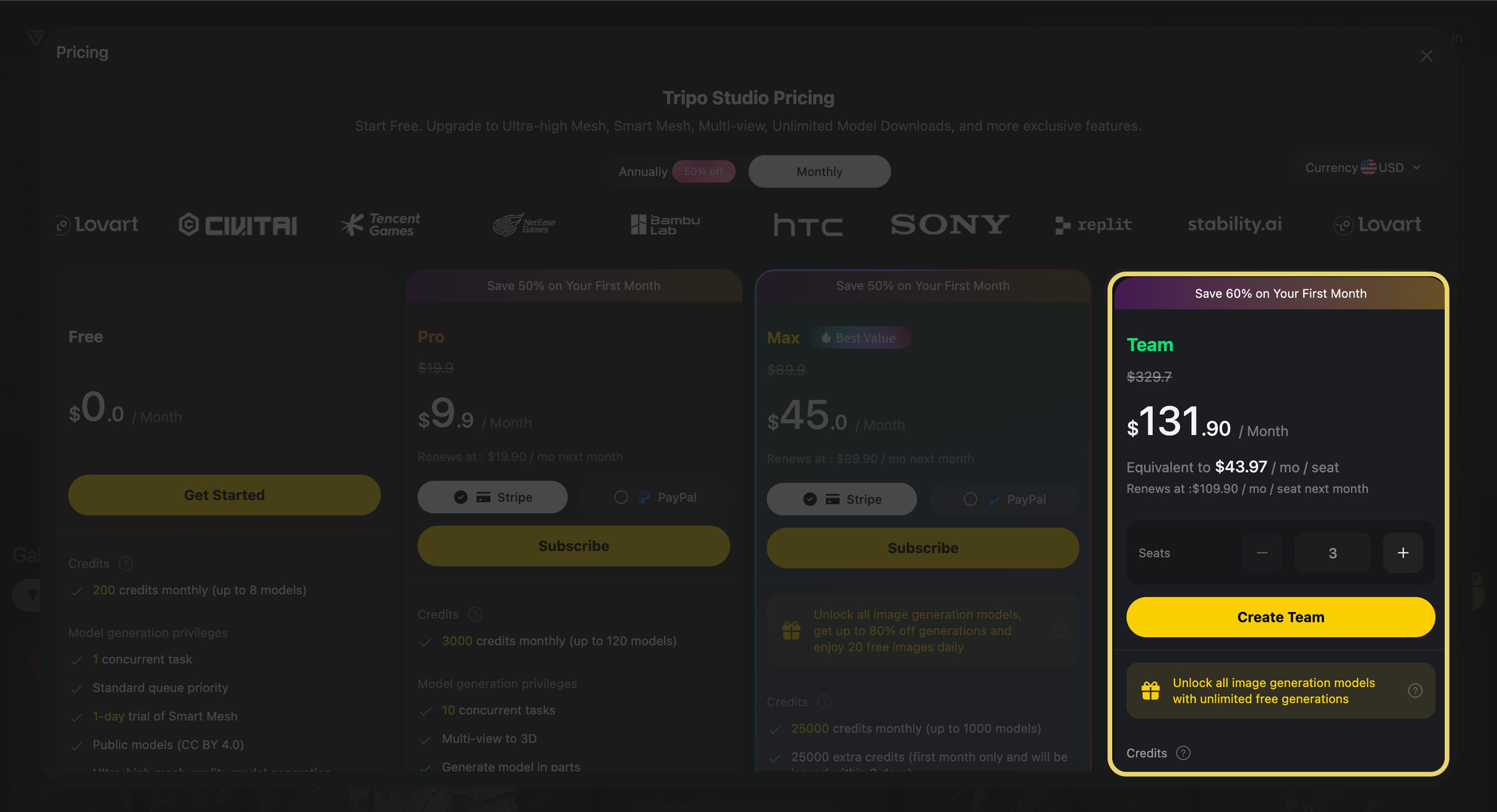
Ödeme tamamlandıktan sonra ekip hesabına geçebilirsiniz.
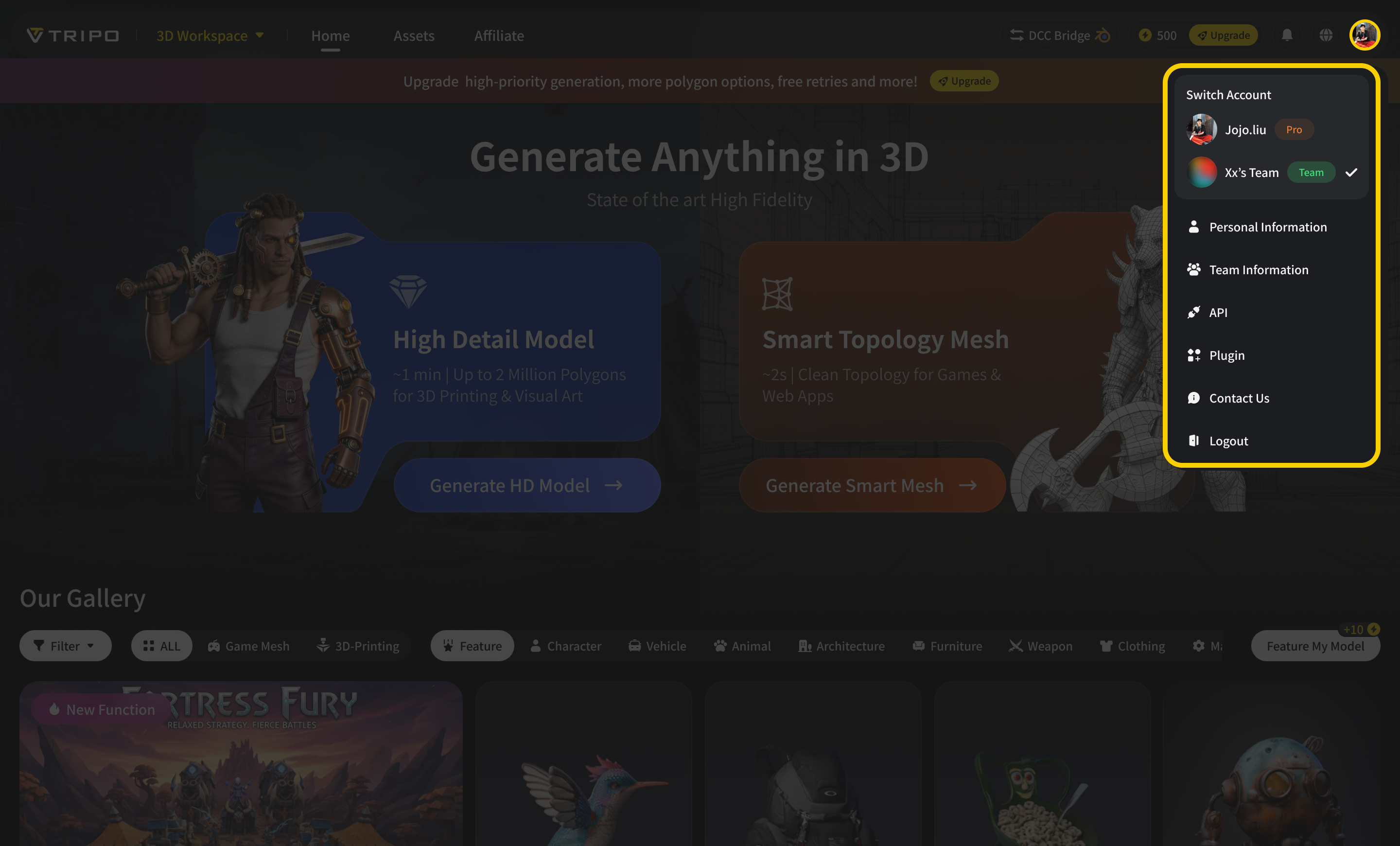
Buradan üyeleri davet edebilir, erişimi yönetebilir ve ortak çalışma alanınızı hemen oluşturmaya başlayabilirsiniz. Her ekip arkadaşı kendi davet bağlantısını alır, böylece paylaşılan bir giriş kullanmadan ekibe katılabilir.
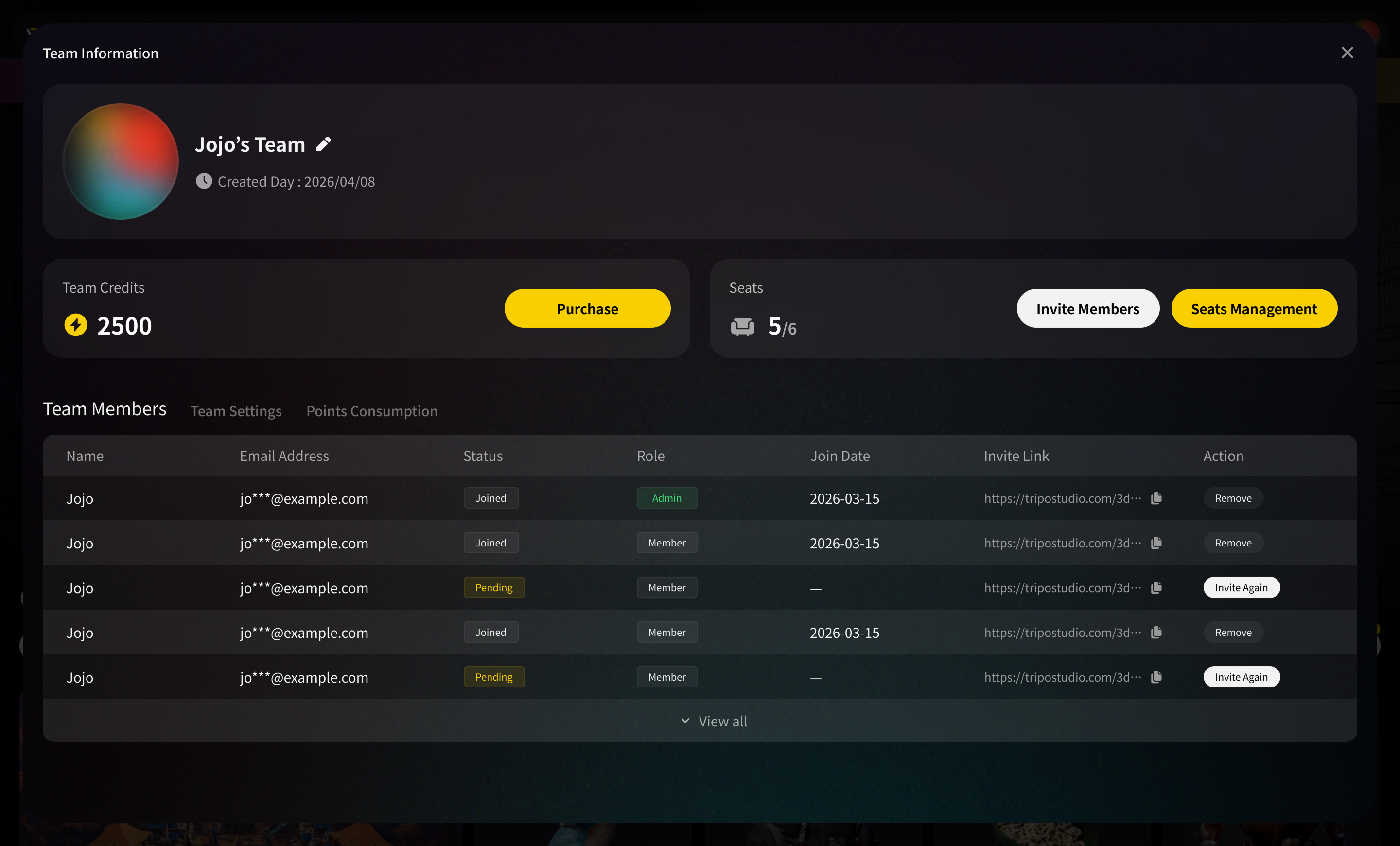
Bu kurulum, ekibinize ilk günden itibaren daha temiz bir iş birliği yöntemi sunar. Herkesin kendi hesabı vardır, ancak ekip tek bir ortak üretim ortamında çalışır.
Her Ekip Asset’i İçin Tek Bir Çalışma Alanı
Tripo Team Plan ile sağ üst köşedeki avatar menüsünden kişisel çalışma alanınız ile ekip çalışma alanınız arasında geçiş yapabilirsiniz.
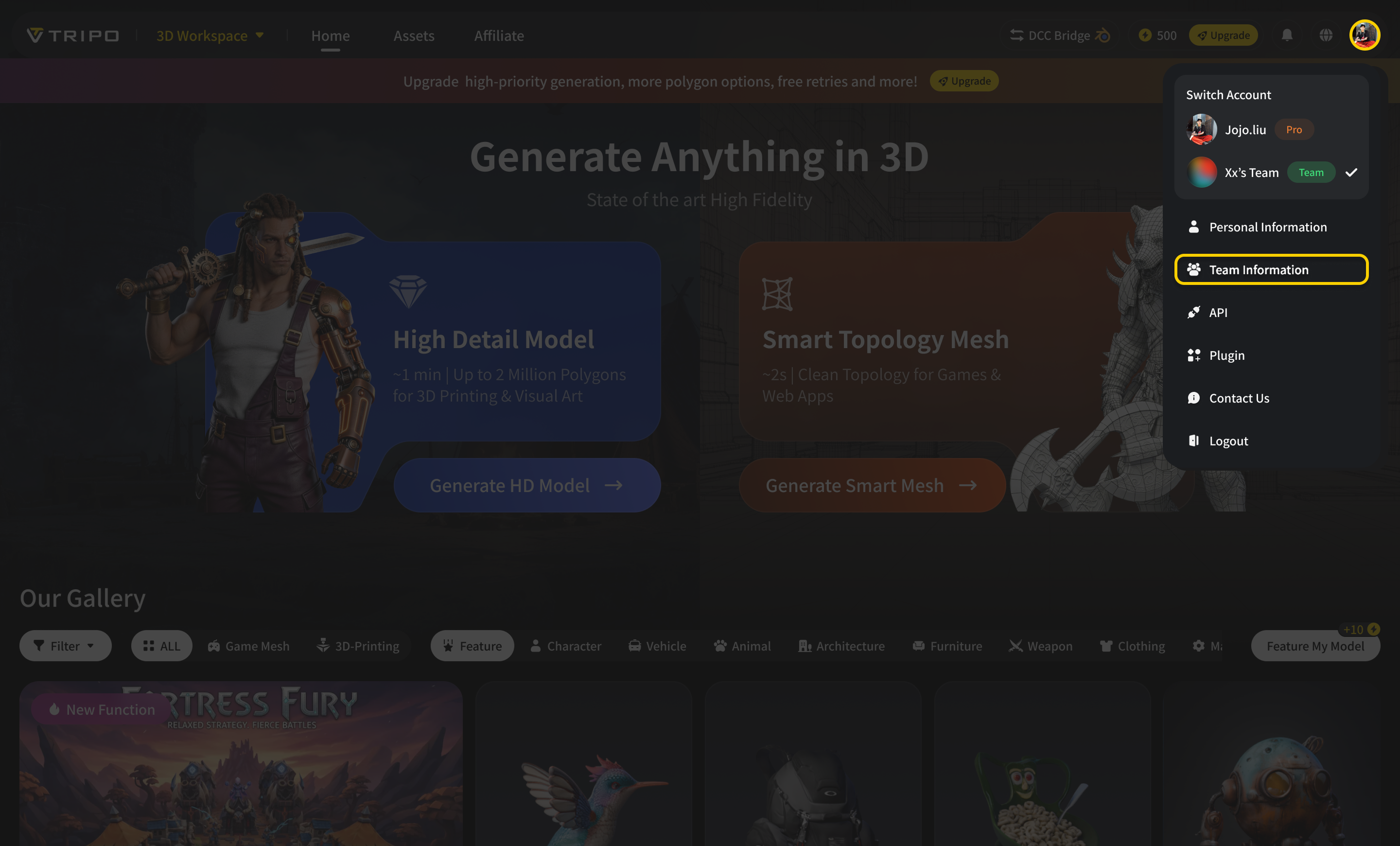
Ekip modunda üretilen her şey doğrudan ortak ekip kütüphanesine gider; böylece ekip arkadaşları manuel dosya aktarımı olmadan asset’leri bulabilir ve yönetebilir. Bu, ekip çalışmalarını kişisel çalışmalardan ayrı tutarken iki bağlam arasında geçiş yapmayı da kolaylaştırır.
Kişisel ve ekip çalışma alanları tamamen izoledir; bu da kişisel üretimlerinizin kişisel kalacağı ve ekip asset’lerinizin ekip çalışma alanında kalacağı anlamına gelir. Tripo ayrıca sayfa yenilendiğinde en son kullandığınız çalışma alanını hatırlar, böylece iş akışınız kaldığınız yerden devam eder.
Zaten bir Pro planına sahip olan üyeler için, kişisel çalışma alanına geri geçildiğinde kişisel plan avantajları kullanılmaya devam eder. Bu, içerik üreticilerine Tripo’yu hem bireysel olarak hem de bir ekibin parçası olarak kullanma esnekliği sağlar.
Üyeler ve Krediler, Tek Yerde Yönetilir
Team Management sayfası, yöneticilere ekibin nasıl çalıştığını kontrol etmek için merkezi bir alan sunar.
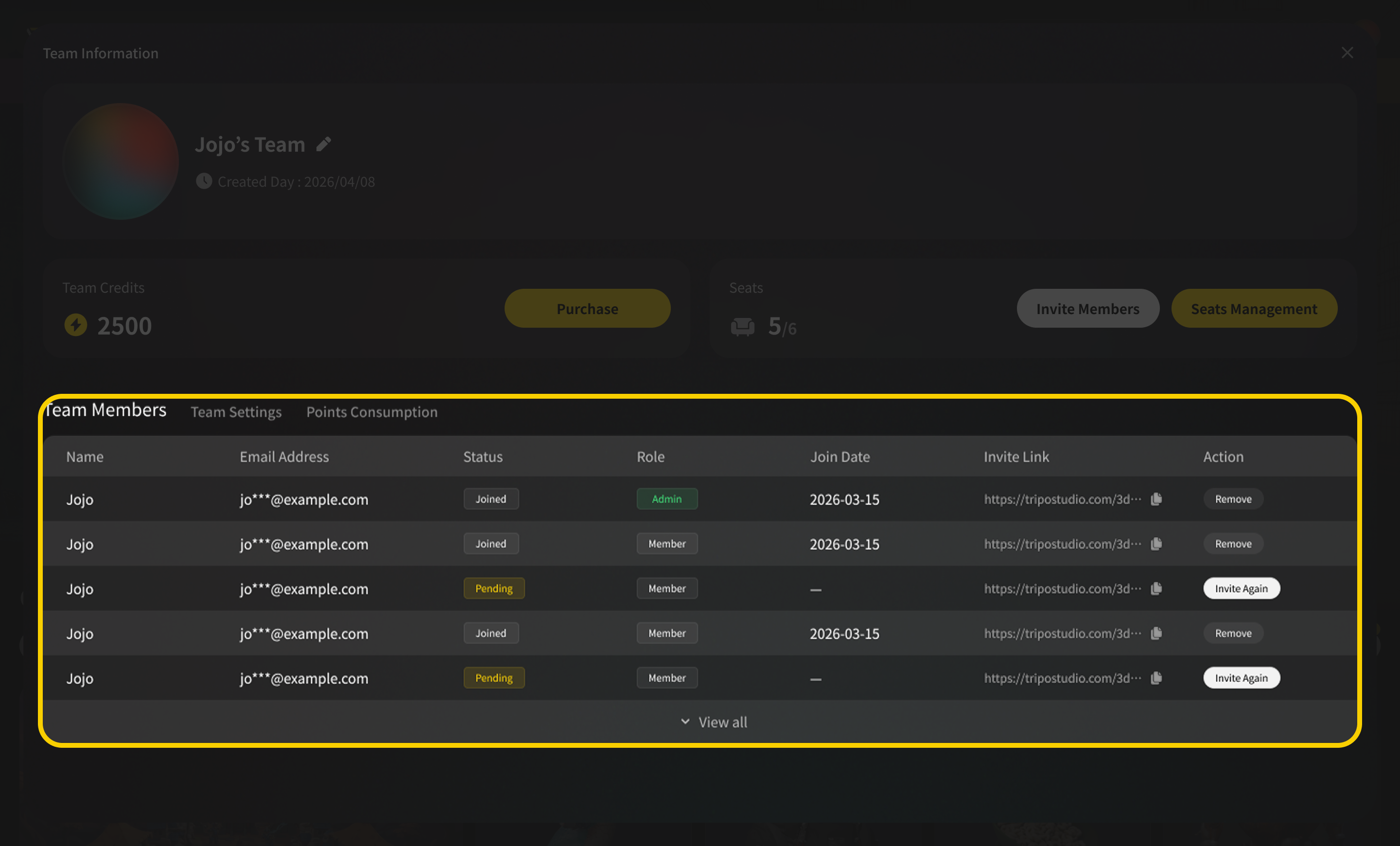
Team Members bölümünde yöneticiler ekip arkadaşlarını e-posta ile davet edebilir, rolleri ayarlayabilir ve gerektiğinde üyeleri kaldırabilir. Davet edilen her üye benzersiz bir davet bağlantısı alır; bu da tüm ekipte tek bir hesabı paylaşmaya kıyasla katılım sürecini daha kolay ve daha güvenli hale getirir.
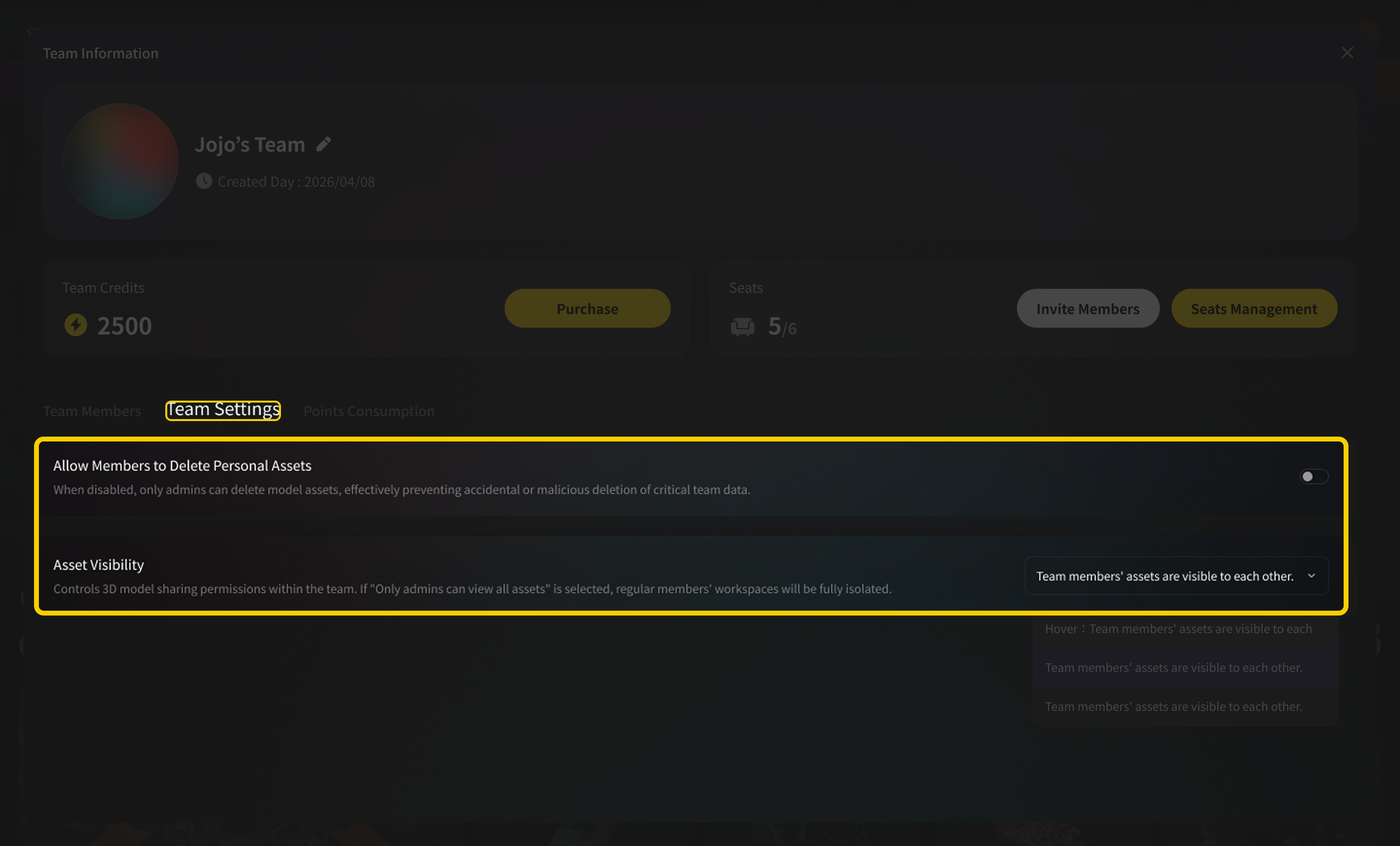
Team Settings bölümünde yöneticiler asset’lerin çalışma alanı içinde nasıl yönetileceğine karar verebilir. Üyelerin kendi asset’lerini silmesine izin verilebilir ve bu ayar varsayılan olarak açıktır. Yöneticiler ayrıca ekibin nasıl iş birliği yapmayı tercih ettiğine bağlı olarak asset görünürlüğünü ayarlayabilir: asset’ler tüm ekip genelinde görünür olabilir ya da üyeler yalnızca kendi asset’lerini görecek şekilde sınırlandırılabilir; yöneticiler ise tam görünürlüğü korur.
Points Consumptions bölümünde yöneticiler toplam ekip bakiyesini görebilir, her üyenin kullanım geçmişini kontrol edebilir, koltuk ekleyip kaldırabilir ve tek tıkla kredi yükleyebilir.
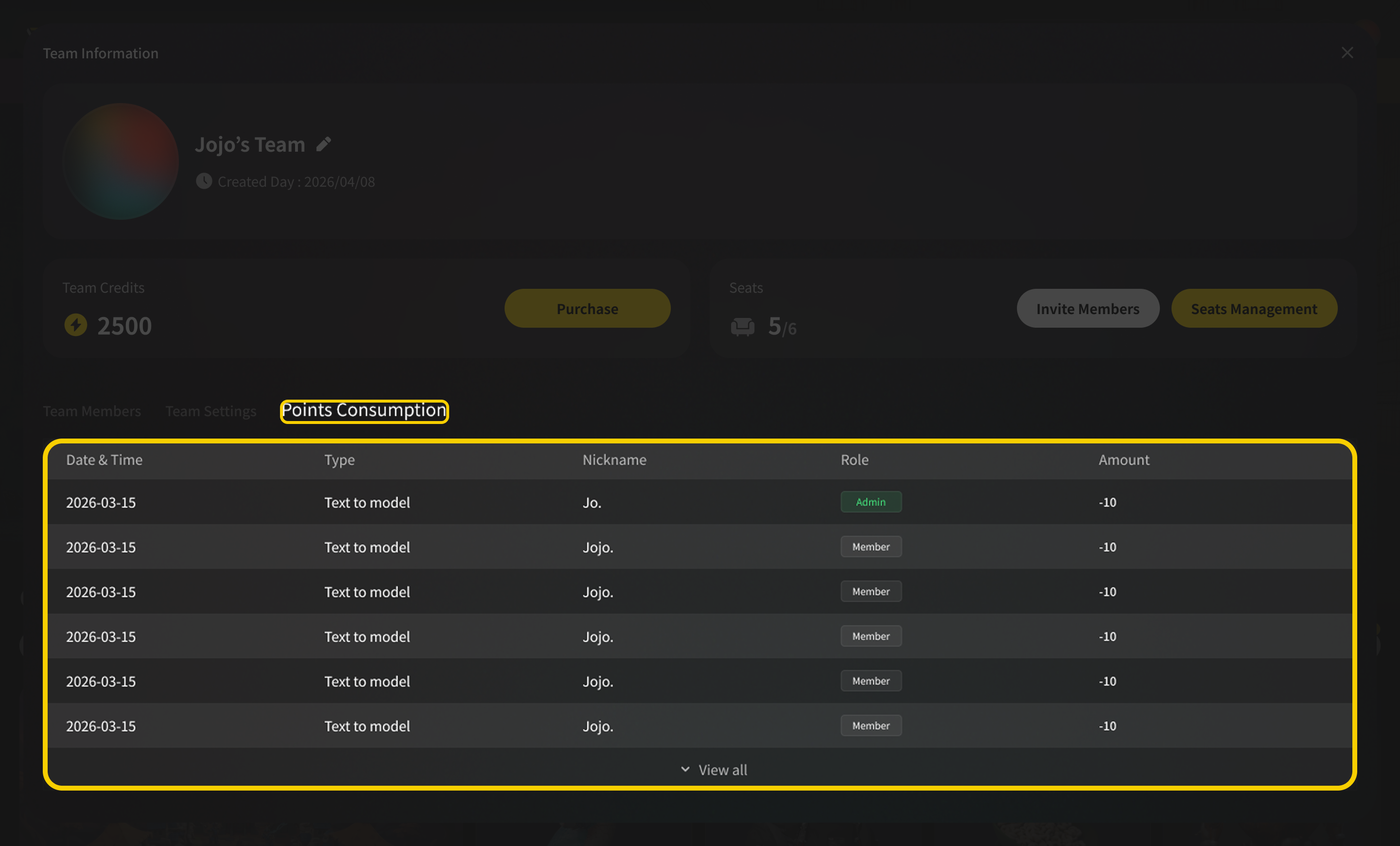
Bu, ekiplere ihtiyaç duydukları kontrolü sağlar; hem de asset yönetimini operasyonel bir baş ağrısına dönüştürmeden.
Asset’leriniz, Düzenli Şekilde
Ortak bir çalışma alanı ancak insanlar ihtiyaç duyduklarını gerçekten bulabiliyorsa faydalıdır.
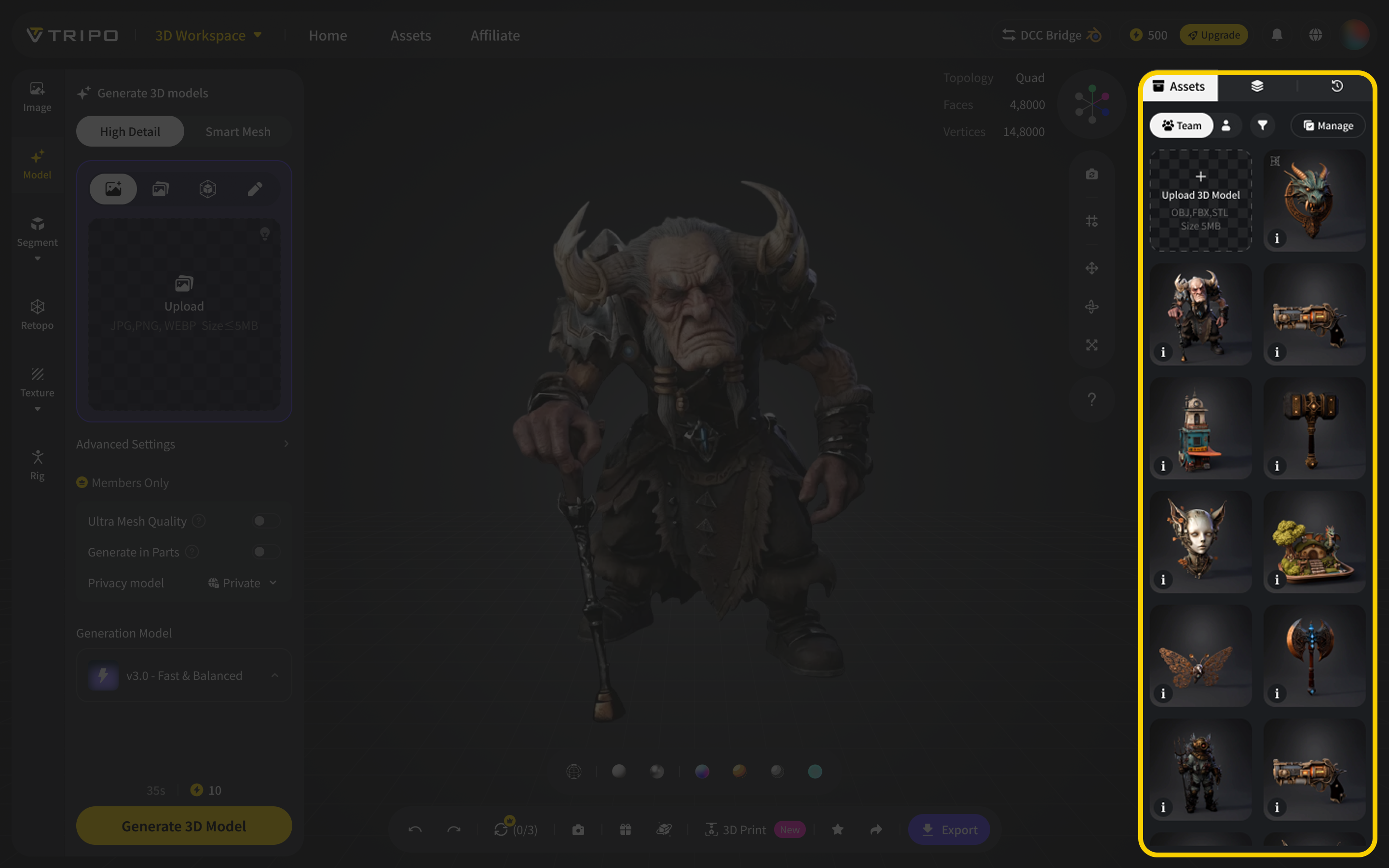
Tripo Team kütüphanesinde asset’ler All, Personal veya Team Shared olarak filtrelenebilir; bu da ekip genelinde işleri düzenlemeyi ve bulmayı kolaylaştırır.
| Kütüphane Filtresi | Gösterdiği İçerik |
|---|---|
| All | Ekip çalışma alanındaki her şey |
| Personal | Kendi üretimleriniz ve yüklemeleriniz |
| Team Shared | Tüm ekip üyelerine görünür asset’ler |
Üyeler, ekibin görünürlük ayarlarına göre paylaşılan asset’lere erişebilirken yöneticiler çalışma alanındaki her şeyi görebilir. Bu da kütüphaneyi hem açık iş birliği hem de daha kontrollü üretim iş akışları için yeterince esnek hale getirir.
Ekibiniz ister oyun asset’leri, ister ürün konseptleri, karakter fikirleri, pazarlama görselleri veya tasarım prototipleri üretiyor olsun, ortak kütüphane işleri ayrı hesaplar ve dosya klasörleri arasında dağılmak yerine düzenli tutmaya yardımcı olur.
Birlikte 3D Üretmenin Daha İyi Bir Yolu
Tripo Team Plan, ekiplerin AI 3D creation’ı alışılagelmiş iş birliği sürtüşmeleri olmadan ciddi şekilde kullanabilmesi için tasarlandı.
Parola paylaşmak, cihaz giriş sınırlarıyla uğraşmak, dosyaları ileri geri dışa aktarmak veya kimin ne ürettiğini takip edememek yerine, ekibiniz paylaşılan krediler, merkezi yönetim, düzenli asset’ler ve yüksek hacimli üretim kapasitesiyle tek bir özel çalışma alanında çalışabilir.
Bu, iş birliği yapmak için daha temiz bir yol, üretmek için daha hızlı bir yol ve ekibinizin 3D çalışmalarını tek bir yerde tutmak için daha güvenilir bir yoldur.
Bugün Tripo Team’e Geçin
Tripo Team Plan artık yayında ve sınırlı bir süre için %60 indirimle sunuluyor.
Ekip çalışma alanınızı oluşturun, ekip arkadaşlarınızı davet edin, paylaşılan kredileri yönetin ve 3D creation stüdyonuzu Tripo içinde kurun.