3D Prototipten Videoya: Tripo ve PixVerse, Ekiplerin İlk Fotoğraf Çekiminden Önce Ürün Hikayelerini Test Etmesine Nasıl Yardımcı Olur
İlk Fotoğraf Çekiminden Önceki Pazarlama Boşluğu
Ürün ekipleri, ürün geleneksel bir fotoğraf çekimi için hazır olmadan önce lansman içeriğine sıklıkla ihtiyaç duyar. Bir hardware startup hâlâ numunesini son haline getiriyor olabilir. Bir ecommerce markasının ambalajı henüz elinde olmayabilir. Bir crowdfunding ekibi, tasarım hâlâ inceleme sürecindeyken bir landing page, teaser video ve yatırımcı sunumuna ihtiyaç duyabilir. Her durumda, pazarlama fiziksel üretimin yetişmesini her zaman bekleyemez.
Bu boşluk önemlidir çünkü erken kampanya materyalleri, ekiplerin ürünü nasıl anlattığını, talebi nasıl test ettiğini ve paydaşları nasıl hizaladığını şekillendirir. Sabit bir eskiz bir fikri gösterebilir, ancak nadiren ürünün hareket halinde nasıl hissedileceğini, malzemesinin ışığı nasıl yakaladığını veya hangi görsel açının bir lansman sayfası için yeterince güçlü olduğunu gösterir. Bunu erken çözen ekipler, stüdyo prodüksiyonuna para harcamadan önce daha iyi yaratıcı kararlar alabilir.
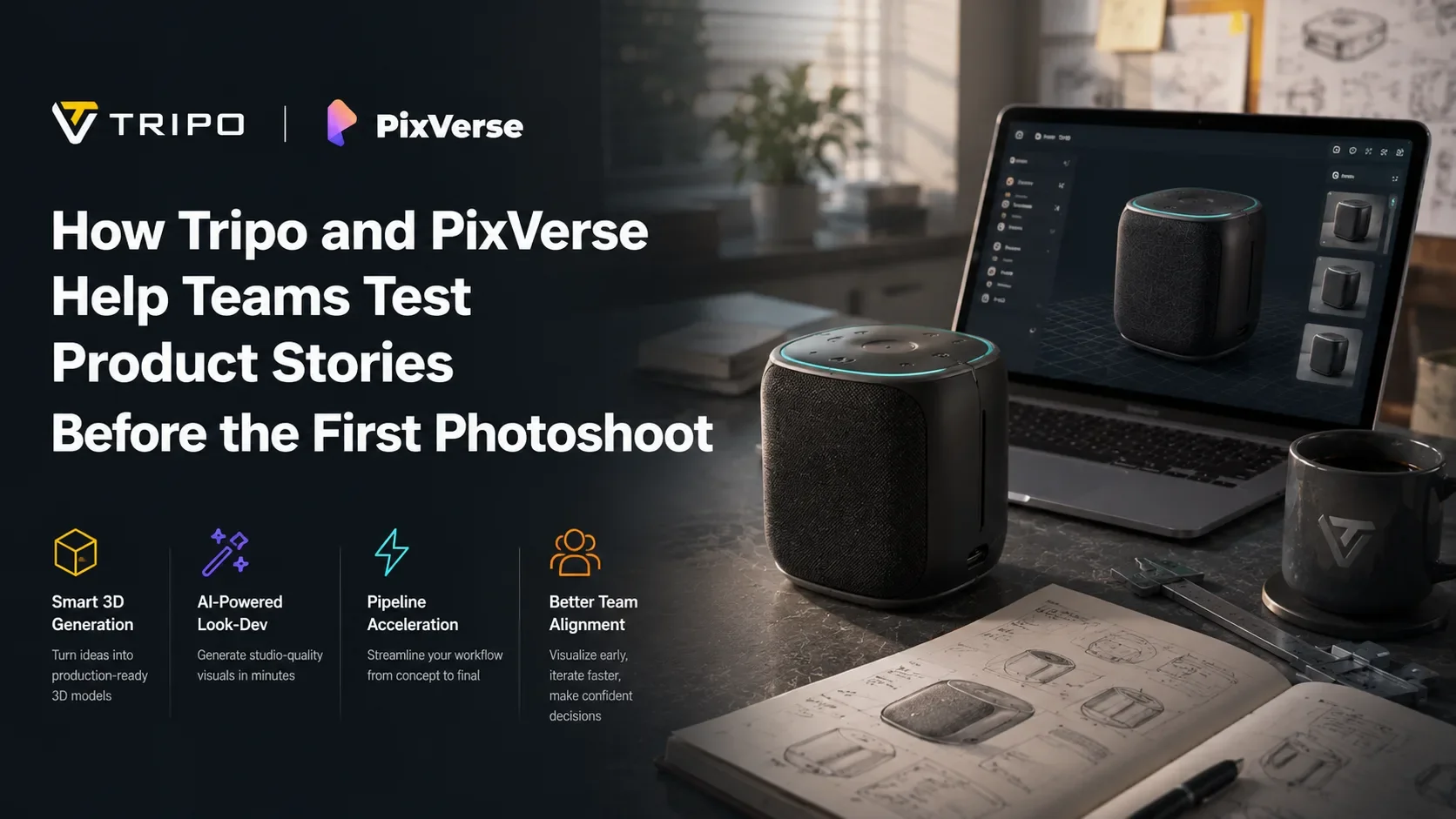
Bu makale, örnek bir ürün olan Nova Mini Speaker'ı izliyor; masalar, yatak odaları ve modern oturma odaları için kompakt, premium bir akıllı hoparlör. Bu örnek, Tripo ve PixVerse'ün ürün ve pazarlama ekiplerinin ilk fotoğraf çekiminden önce 3D prototipten videoya uzanan bir iş akışında ilerlemesine nasıl yardımcı olabileceğini gösteriyor.
Not: Nova Mini Speaker, Tripo + PixVerse iş akışını göstermek için oluşturulmuş kurgusal bir örnektir. Gerçek bir ürün, marka veya ticari cihaz değildir. Bu örnek yalnızca bir ürün ekibinin ilk fotoğraf çekiminden önce 3D prototipten lansman öncesi kampanya videolarına nasıl ilerleyebileceğini göstermek için kullanılmıştır.
Yeni Bir Kampanya Başlangıç Noktası: 3D Prototipten Videoya
Bir 3D ürün prototipi, bir kampanya için ilk sağlam görsel temel hâline gelebilir. Her kanal için birbiriyle alakasız konsept görseller oluşturmak yerine, bir ekip tek bir ürün doğruluk kaynağıyla başlayabilir: biçim, oran, malzeme yönü, detaylar ve görsel kimlik tek bir 3D modelde temsil edilir.
Tripo, bu iş akışının ilk yarısına uyar. Ekiplerin ürün fikirlerini, görselleri veya prompt'ları görüntülenebilen, iyileştirilebilen ve farklı açılardan yakalanabilen 3D modellere dönüştürmesine yardımcı olur. Bir ürün ekibi için bu, kampanyanın gevşek bir mood board yerine somut bir nesneyle başlayabileceği anlamına gelir.
PixVerse ise ikinci yarıya uyar. Ekip kullanışlı prototip görünümlerine sahip olduğunda, PixVerse bu kareleri ürün tanıtımlarına, özellik yakın planlarına, lifestyle reklamlara, crowdfunding teaser'larına ve sunum kliplerine dönüştürebilir. Ekipler ayrıca bu prototip görünümlerini hareket halinde test etmeye hazır olduklarında PixVerse'ü bir ai video generator olarak da açabilir. Ticari çekim planlayan ekipler için PixVerse V6 review özellikle önemlidir çünkü daha kapsamlı bir video prodüksiyon iş akışının parçası olarak çok çekimli hikaye anlatımı, 1080p çıktı ve native audio konularını ele alır.
Birleşik değer basittir: Tripo ürünün ne olduğunu tanımlamaya yardımcı olurken, PixVerse ürünün pazara nasıl çıkması gerektiğini test etmeye yardımcı olur. Birlikte, tek seferlik bir 3D-to-video deneyi yerine lansman öncesi bir kampanya iş akışı oluştururlar.
Tripo + PixVerse 3D Prototipten Videoya İş Akışı
Adım 1: Tripo'da Tek ve Tutarlı Bir Ürün Prototipi Oluşturun
Nova Mini Speaker için ekip, tek bir birleşik 3D ürün prototipiyle başlar. Amaç, yalnızca kabaca birbirine benzeyen beş farklı ürün görseli üretmek değildir. Amaç, daha sonraki her kampanya varlığını sabitleyebilecek tutarlı bir model oluşturmaktır.
Önerilen Tripo prompt'u:
Kompakt premium bir akıllı hoparlör ürün prototipi, silindirik yuvarlatılmış-dikdörtgen şekil, mat siyah alüminyum gövde, ön ve yanları kaplayan koyu kömür rengi dokuma kumaş mesh, üst yüzeyde hafif parlayan bir LED halka, minimal fiziksel düğmeler, arkada küçük bir USB-C portu, yumuşak kauçuk taban, temiz modern consumer electronics tasarımı, premium minimalist tech brand stili, son derece detaylı ürün modeli, temiz geometri, gerçekçi malzeme ayrımı, logo yok, metin yok, insan eli yok.
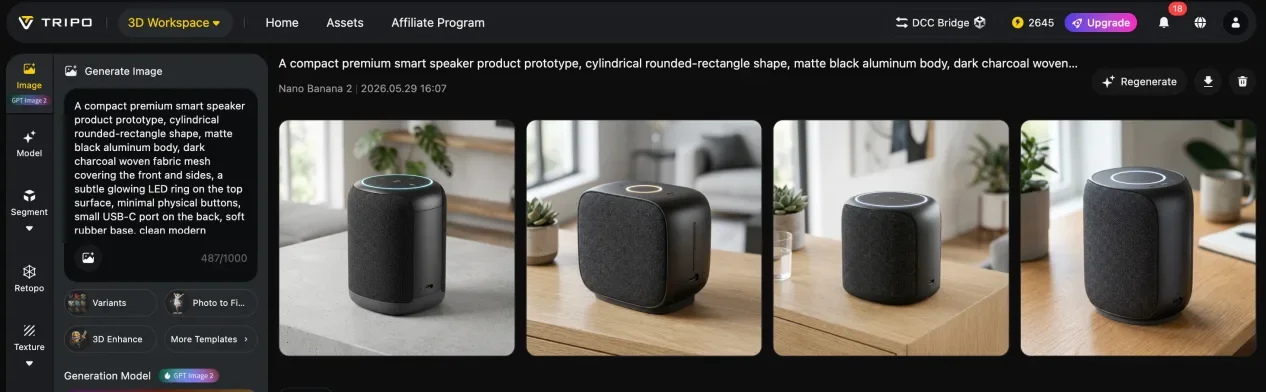
Bu prototiple ekip; hoparlörün yeterince premium hissedip hissettirmediğini, LED halkanın ayırt edici olup olmadığını, kumaş mesh'in net okunup okunmadığını ve genel şeklin birden fazla açıdan işe yarayıp yaramadığını gözden geçirebilir. Bunlar tasarım soruları olduğu kadar kampanya sorularıdır da. Ürün bir 3D nesne olarak görsel açıdan güçlü durmuyorsa, daha sonra videoda tanıtılması da muhtemelen daha zor olacaktır.
Adım 2: Aynı Prototipten Bir Lansman Kare Sistemi Oluşturun
Prototip hazır olduktan sonra ekip, aynı Nova Mini Speaker modelinden küçük bir kampanya referans kareleri seti yakalar. Pratik bir lansman kare sistemi; 45 derecelik bir hero angle, bir LED halka yakın planı, bir kumaş mesh yakın planı, bir lifestyle bağlam karesi ve ürün-artı-ambalaj karesini içerebilir.
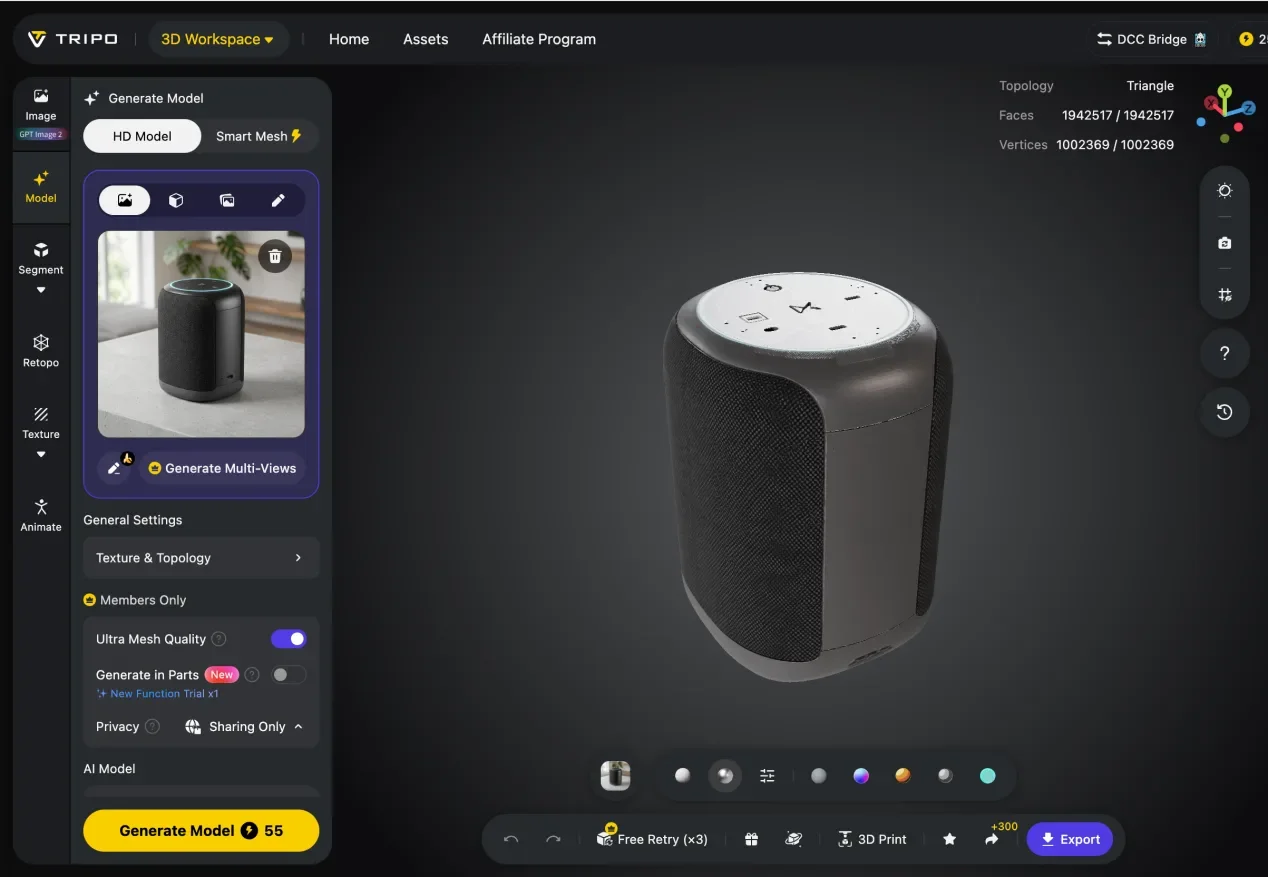
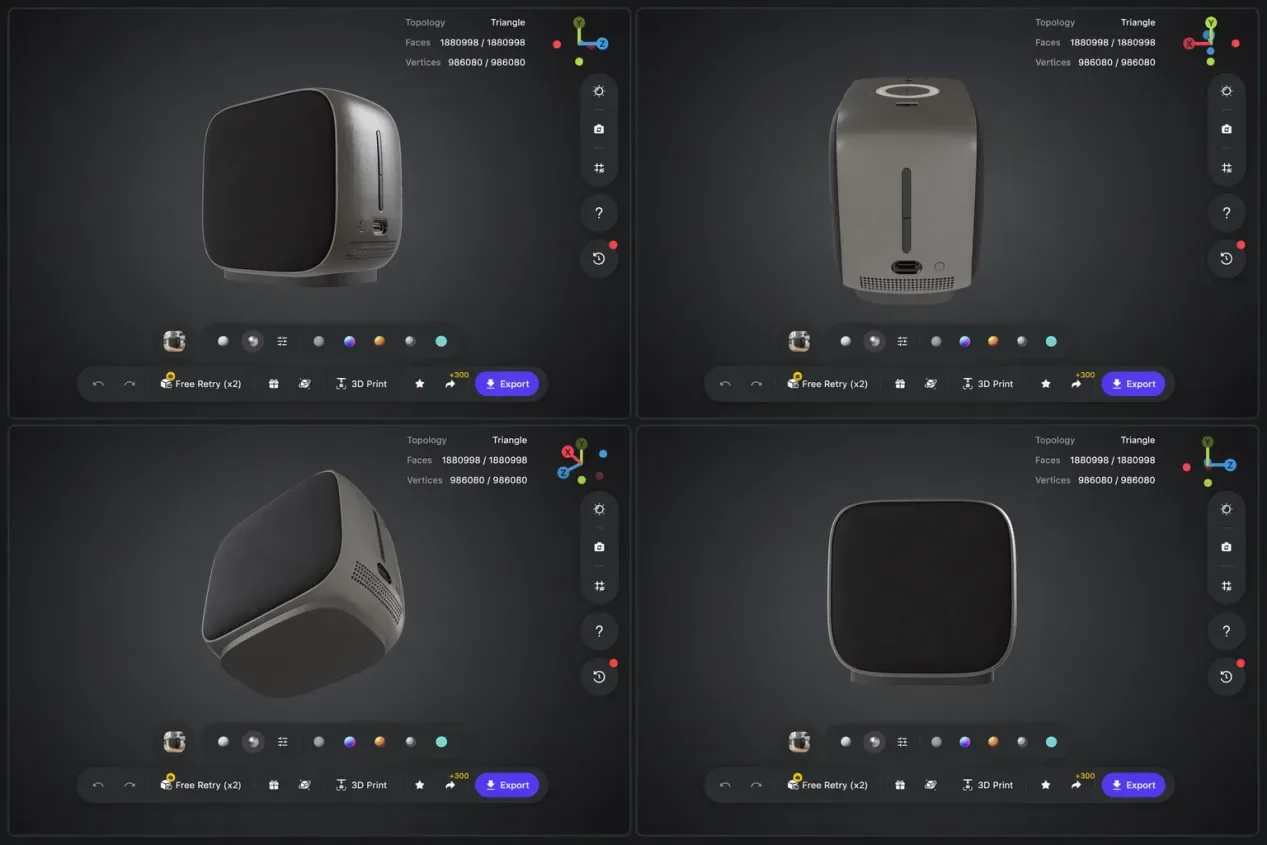
Bu kareler rastgele screenshot'lar değildir. Seçilmiş kampanya referanslarıdır. Hero angle bir landing page videosuna yön verebilir. LED karesi bir özellik vurgusuna yön verebilir. Malzeme yakın planı premium konumlandırmayı destekleyebilir. Lifestyle karesi, sosyal reklamların daha ilişkilendirilebilir hissettirmesine yardımcı olabilir. Ambalaj karesi, crowdfunding ve sunum materyallerini destekleyebilir.
Kareler aynı 3D prototipten geldiği için ürün, birden fazla varlıkta görsel olarak tutarlı kalır. Bu tutarlılık, ürünü her testte farklı göstermeden birden fazla kampanya yönüne ihtiyaç duyan ekipler için önemlidir.
Adım 3: 3D Prototip Karelerini PixVerse ile Lansman Öncesi Videolara Dönüştürün
Ekip en güçlü kareleri seçtikten sonra, PixVerse her kareyi belirli bir video konseptine dönüştürmeye yardımcı olabilir. 45 derecelik hero karesi bir website reveal hâline gelebilir. LED yakın planı bir özellik klibi hâline gelebilir. Lifestyle karesi 9:16 bir sosyal reklama dönüşebilir. Ambalaj karesi bir crowdfunding teaser'ı olabilir.
Örnek PixVerse prompt'u:
Mat siyah bir akıllı hoparlör için 12 saniyelik sinematik bir ürün lansman teaser'ı. Yavaş dönen kamera, yumuşak stüdyo yansımaları, kumaş mesh dokusunda macro yakın plan, parlayan LED halka, premium tech brand stili, sıcak ambient sound, 16:9.
Bu prompt bilinçli olarak somuttur. Ürünü, kamera davranışını, yüzey detayını, ışıklandırmayı, marka havasını, ses yönünü ve en-boy oranını tanımlar. Bu özgüllük, videonun genel bir teknoloji reklamına kaymak yerine ürün hikayesine bağlı kalmasına yardımcı olur.
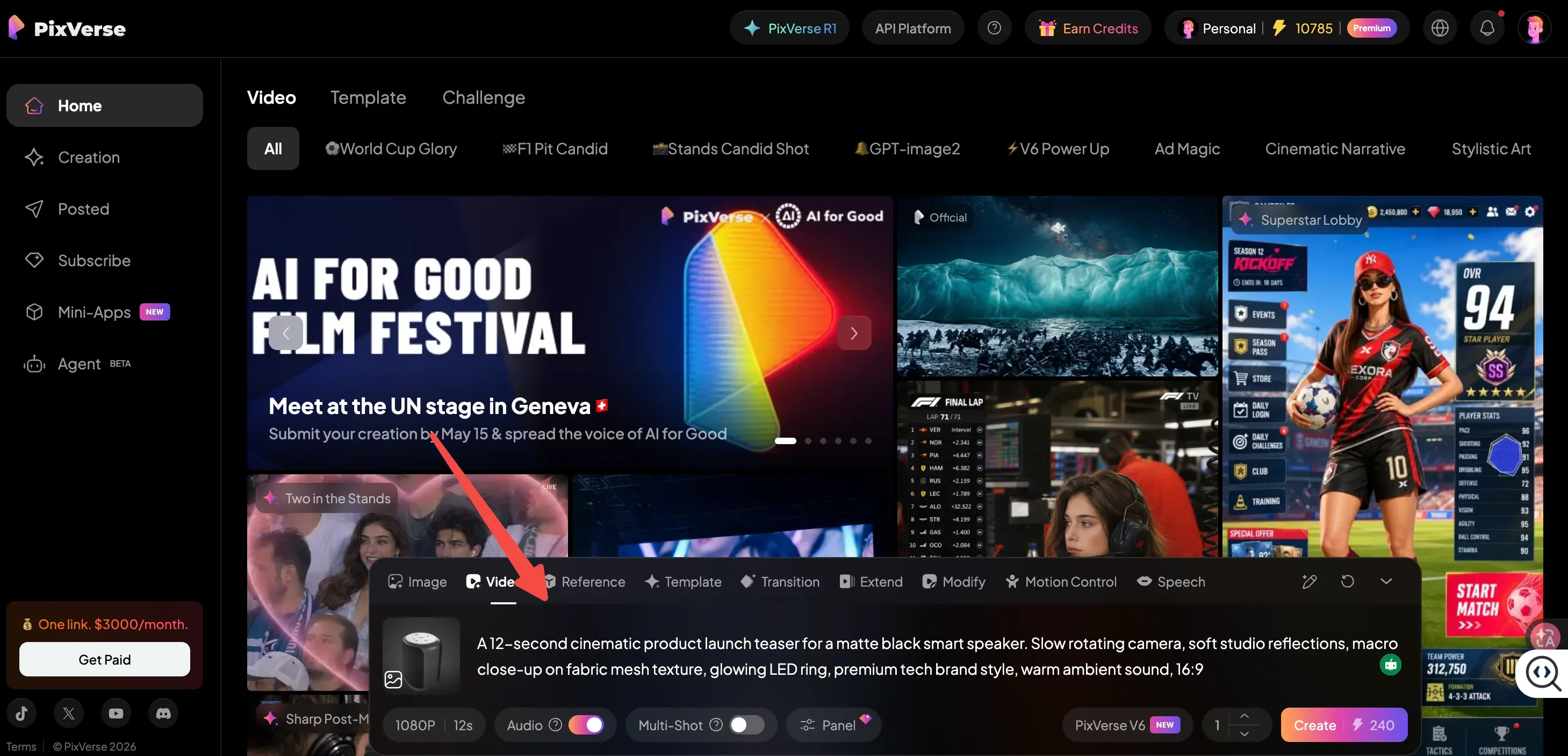
Performance ve paid social ekipleri için yaratıcı testlerin faydalı hâle geldiği yer de burasıdır. PixVerse, bir AI video ad generator for performance marketing and social ads kullanımından söz ediyor ve aynı ilke burada da geçerli: ekipler, bir prodüksiyon çekimi planlamadan önce birden fazla hook, ürün açısı ve formatı test edebilir.
Adım 4: Prototipi ve Ürün Hikayesini İyileştirmek İçin Video Geri Bildirimini Kullanın
PixVerse videolarının ilk turu, ekibe ürünü değerlendirmek için yeni bir yol sunar. Statik bir 3D görünümde LED halka zarif ve hafif görünebilir. Hareket halinde kaybolabilir. Siyah alüminyum gövde bir karede premium görünebilir ama koyu bir arka planda fazla düz kalabilir. Ön görünüm tasarım incelemesi için doğru hissettirebilirken, 45 derecelik açı lansman hikayesi için daha iyi çalışabilir.
Bu geri bildirim doğrudan Tripo'ya geri dönebilir. Ekip LED detayını iyileştirebilir, malzeme kontrastını artırabilir, yüzey bitişini ayarlayabilir veya daha güçlü bir referans karesi yakalayabilir. Ardından güncellenmiş Tripo kareleri, ikinci tur kampanya videoları için tekrar PixVerse'e dönebilir.
İş akışının gerçek avantajı bu döngüdür: Tripo prototipi, PixVerse videosu, kampanya geri bildirimi, iyileştirilmiş Tripo prototipi, geliştirilmiş PixVerse lansman varlıkları. Bu süreç, tasarım ve pazarlama ekiplerine üretim numunelerine, fotoğrafçılığa veya tam bir prodüksiyon takvimine bağlı kalmadan önce ortak bir görsel dil sunar.
Lansmandan Önce Bu Neden Önemli?
En büyük fayda zamandır. Ekipler, fiziksel ürün hâlâ geliştirme sürecindeyken kampanya planlamasına başlayabilir. Bu, nihai fotoğrafçılığın veya cilalı post-production'ın yerini almaz, ancak ekiplere konumlandırma, hikaye anlatımı ve yaratıcı yön konusunda güçlü bir başlangıç sağlar.
İkinci fayda tutarlılıktır. Tek bir 3D prototip, birkaç lansman varlığı için doğruluk kaynağı olur. Website hero'su, sosyal reklam, sunum klibi ve crowdfunding teaser'ı; dağınık ve birbiriyle ilgisiz mockup'lar yerine aynı görsel kimlikten başlayabilir.
Üçüncü fayda daha iyi geri bildirimdir. Tasarım incelemesinde etkileyici görünen bir ürün detayı, hareket halinde akılda kalıcı olmayabilir. Tek başına premium hissettiren bir renk seçimi, mobilde daha fazla kontrasta ihtiyaç duyabilir. Ürün ekibinin sevdiği bir özellik, müşteriler onu anlamadan önce videoda daha net bir ana ihtiyaç duyabilir.
Nova Mini Speaker için bu; LED halkayı daha parlak yapmak, daha açık bir arka plan seçmek veya kumaş mesh yakın planını ana premium işaret olarak kullanmak anlamına gelebilir. Başka bir ürün içinse bu, hero angle'ı değiştirmek, ölçeği daha net göstermek veya teknik bir demo'dan lifestyle bir hikayeye geçmek anlamına gelebilir.
Bu lansman öncesi iş akışı, fiziksel numuneler geldikten sonra da devam edebilir. Daha sonra ürün fotoğrafçılığını tamamlanmış reklam konseptlerine dönüştürmek isteyen ekipler, PixVerse'ün turn product photos into video ads rehberini inceleyebilir. Bu anlamda, prototip tabanlı video testleri ve fotoğraf tabanlı reklam prodüksiyonu, aynı lansman döngüsünün farklı aşamalarını destekleyebilir.
Sonuç
Tripo ve PixVerse, sıklıkla birbirinden ayrılan iki aşamayı birbirine bağlar: ürün geliştirme ve lansman öncesi hikaye anlatımı. Tripo, ekiplerin üzerine inşa edebileceği tutarlı bir 3D ürün prototipi sunar. PixVerse ise seçilmiş prototip görünümlerini, ürünün pazarda nasıl hissedilebileceğini ortaya koyan kampanya videolarına dönüştürür.
Nova Mini Speaker için bu, tek bir prototipin bir hero video, bir özellik vurgusu, bir malzeme yakın planı, bir sosyal reklam konsepti ve bir crowdfunding teaser'ına dönüşebileceği anlamına gelir. Daha da önemlisi, videolar ekip tam kapsamlı bir çekime yatırım yapmadan önce ürün görselleştirmesine geri besleme sağlayabilir.
İlk fotoğraf çekiminden önce ekiplerin her nihai varlığa ihtiyacı yoktur. Net bir ürün hikayesine, tutarlı bir görsel temele ve en güçlü lansman yönünü seçebilecek kadar hareket tabanlı geri bildirime ihtiyaçları vardır. Bir Tripo + PixVerse iş akışı, onlara bunu başarmak için pratik bir yol sunar.