Yapay Zeka Tarafından Üretilen 3D Varlıkları Babylon.js ve Three.js Projelerine Nasıl Aktarırsınız?

Şöyle düşünün: Yapay zeka destekli 3D model oluşturucu teknolojisini kullanarak saniyeler içinde harika bir 3D model oluşturdunuz, ancak şimdi bunu web ortamında nasıl hayata geçireceğinizi kara kara düşünüyorsunuz. İster etkileşimli bir ürün tanıtımı, ister web tabanlı bir oyun, isterse sürükleyici bir AR deneyimi hazırlıyor olun, yapay zekayla oluşturulmuş bu başyapıtı popüler web çerçevelerine aktarmak deveye hendek atlatmak gibi hissettirmemeli.
İşte bugün tam olarak bu sorunu çözeceğiz—hem de tek değil, iki farklı yaklaşımla. İlk olarak modelinizi dakikalar içinde yayına alacak heyecan verici ve yapay zeka destekli bir kestirme yolla başlayacağız, ardından tam kontrol isteyenler için geleneksel kodlama yöntemine derinlemesine dalacağız. Profesyonel 3D modelleri sadece 8-10 saniyede üretmek için halihazırda Tripo AI kullanan 2 milyondan fazla içerik oluşturucu varken, yapay zeka ile üretilmiş 3D varlıkları hem Babylon.js hem de Three.js projelerine aktarmanın en hızlı yollarını gelin birlikte keşfedelim.
Hızlı Yapay Zeka Kestirmesi: 3D Modelinizi Aktarmak İçin Cursor AI Kullanımı
İşleri kökten değiştirecek yenilik şu: Artık yüzlerce satır kod yazmanıza gerek yok. Cursor AI gibi yapay zeka destekli geliştirme araçları, yapay zeka ile 3D model oluşturma gibi işlemler de dahil olmak üzere, entegrasyon kurulumunun tamamını sizin için dakikalar içinde hazırlayabilir. Bu yöntem; tasarımcılar, pazarlamacılar ve derin JavaScript bilgisi olmadan hızlıca prototip üretmek isteyen herkes için mükemmeldir.
Neden Yapay Zeka Kestirme Yöntemini Seçmelisiniz?
- Işık Hızında: Saatler süren kodlama sürecini 5 dakikalık bir kuruluma dönüştürün
- Başlangıç Dostu: Kodlama deneyiminiz yok mu? Hiç sorun değil
- Hatasız: Yükleyici konfigürasyonu gibi karmaşık kısımları yapay zeka halleder
- Anında Test: Yapay zeka ile oluşturulmuş 3D modellerinizin web entegrasyonunu anında görün
Adım Adım: Cursor AI Yöntemi
1. Tripo AI Modelinizi Dışa Aktarın
Tripo Studio veya Tripo AI platformunu kullanırken:
- Metinden veya görselden modelinizi oluşturun
- Dışa aktar (export) butonuna tıklayın
- GLB formatını seçin (web için önerilir)
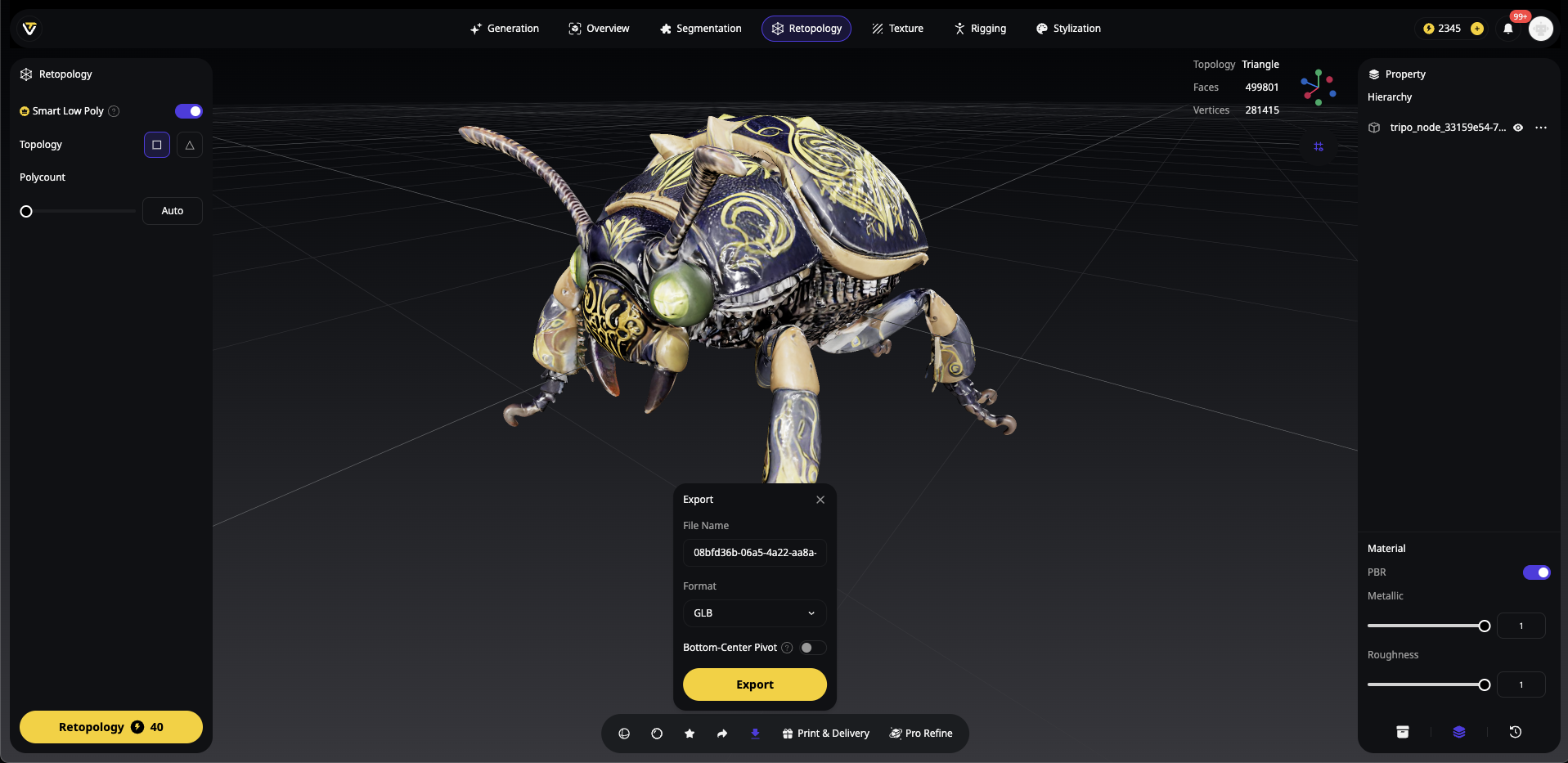
Alternatif formatlar: OBJ, FBX, STL veya USDZ
Yeni bir proje klasörü oluşturun ve GLB modelinizi models alt klasörüne yerleştirin:
my-3d-project/
├── models/
│   └── your-tripo-model.glb
└── (şimdilik boş)
Adım 2: Cursor AI'ı Açın ve İstemlerinizi (Prompt) Yazın
Cursor AI'ı başlatın ve proje klasörünüzü açın. Her şeyi oluşturmak için bu güçlü istemi kullanın:
Create a complete web application that displays a GLB 3D model located at './models/your-tripo-model.glb'.

Requirements:
1. Set up both Babylon.js and Three.js examples in separate HTML files
2. Include all necessary dependencies via CDN
3. Add proper lighting, camera controls, and responsive canvas
4. Implement orbit controls for user interaction
5. Add loading progress indicators
6. Create an index.html with links to both examples
7. Include error handling for failed model loads
8. Add comments explaining each section
9. Make it work with 'python -m http.server' for local testing

The model should be centered, properly lit, and rotatable with mouse controls.
Adım 3: Yapay Zeka Tarafından Üretilen Kodu Uygulayın
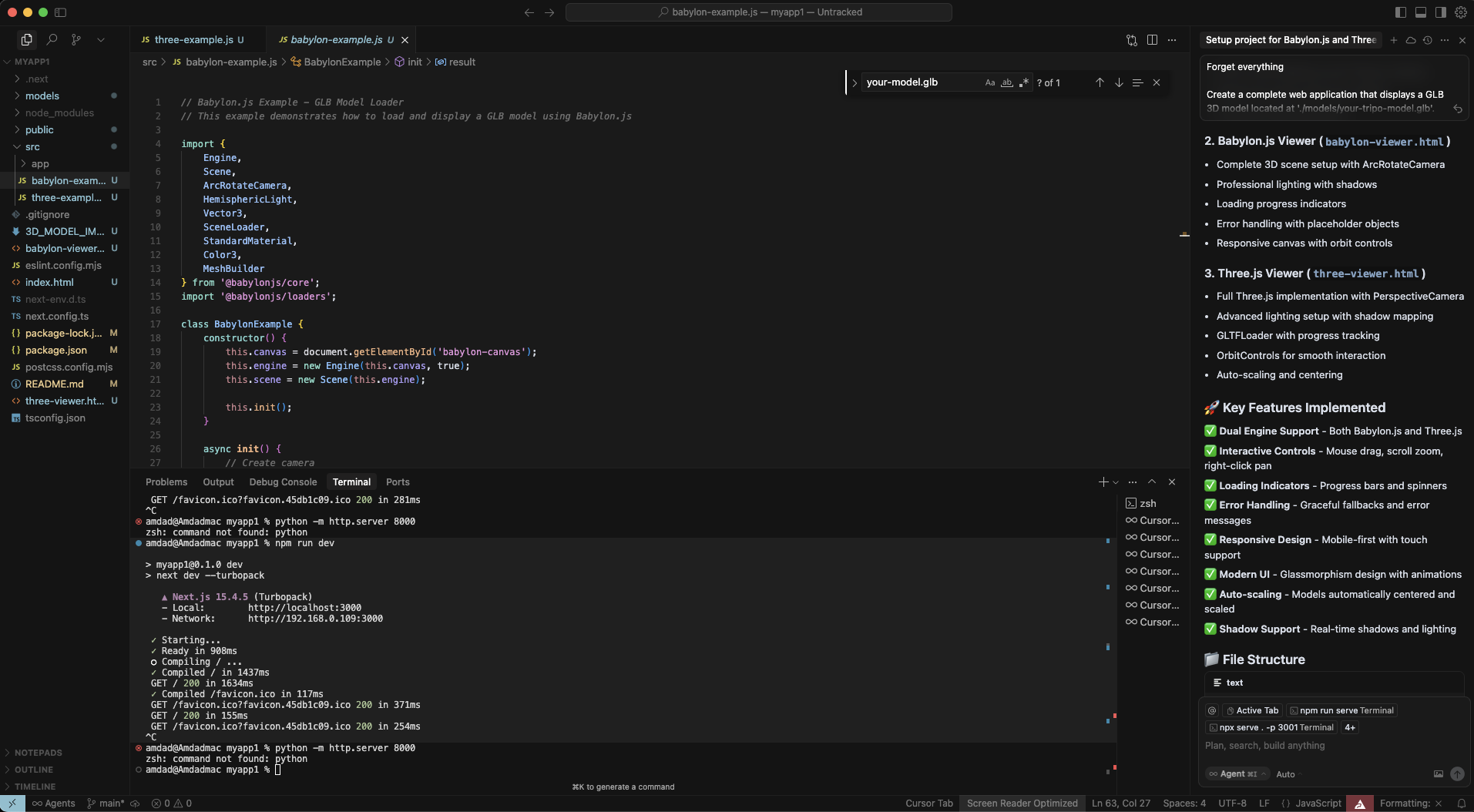
Cursor AI birden fazla dosya oluşturacaktır. Değişiklikleri inceleyin ve kabul edin:
index.html - Her iki seçeneği de barındıran ana sayfa
babylon-example.html - Babylon.js uygulaması
three-example.html - Three.js uygulaması
Muhtemelen yönergeleri içeren bir README.md dosyası da eklenecektir.
Adım 4: Entegrasyonunuzu Test Edin
Proje klasörünüzde terminali açın ve şu komutu çalıştırın:
python -m http.server 8000
# Veya Node.js tercih ediyorsanız:
npx http-server
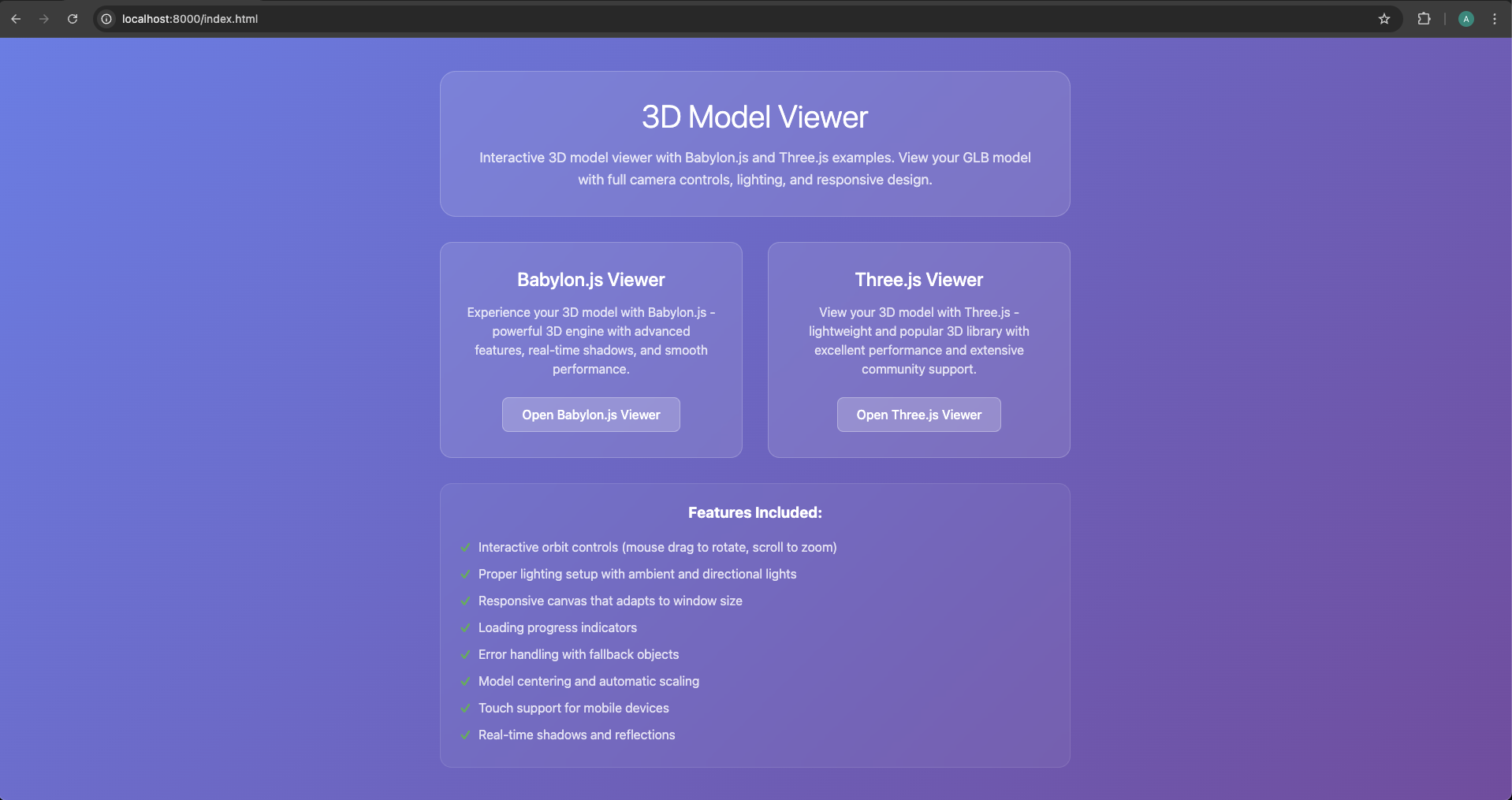
http://localhost:8000 adresine gidin ve modelinizi görmek için örneklerden birine tıklayın!
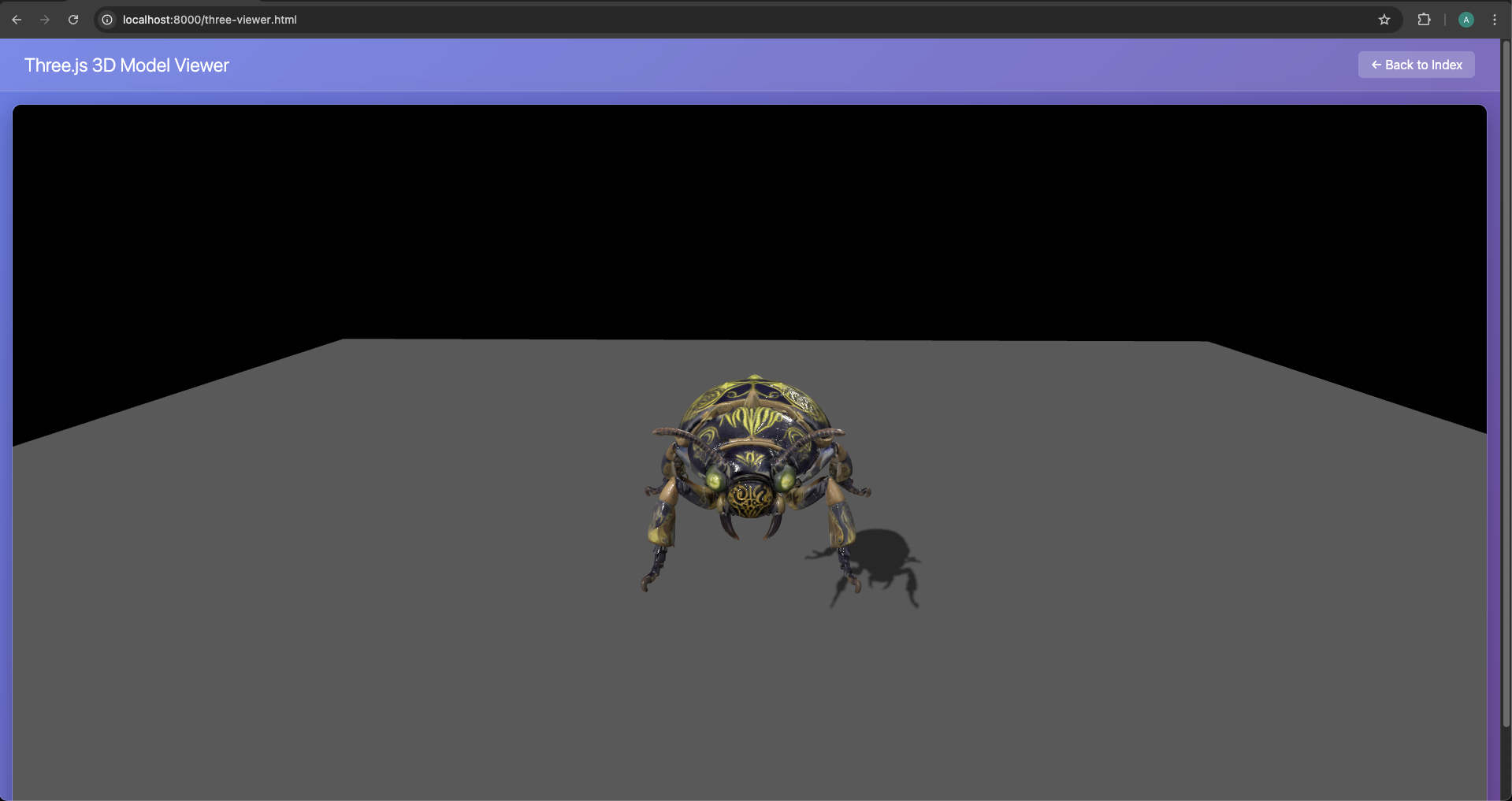
Adım 5: Yapay Zeka Desteği ile Özelleştirin
Değişiklik yapmaya mı ihtiyacınız var? Cursor AI'a sormanız yeterli:
"Three.js örneğine bir skybox arka planı ekle"
"Modelin Babylon.js'de otomatik olarak dönmesini sağla"
"Her iki örneğe de gölge efektleri ekle"
"Yüzdeli bir yükleme ekranı oluştur"
Cursor AI'dan Örnek Çıktı
Cursor'ın Three.js uygulamanız için üretebileceği kod şu şekildedir:
_// Three.js Example - GLB Model Loader_
_// This example demonstrates how to load and display a GLB model using Three.js_

import * as THREE from 'three';
import { GLTFLoader } from 'three/examples/jsm/loaders/GLTFLoader.js';
import { OrbitControls } from 'three/examples/jsm/controls/OrbitControls.js';

class ThreeExample {
    constructor() {
        this.container = document.getElementById('three-container');
        this.scene = new THREE.Scene();
        this.camera = new THREE.PerspectiveCamera(
            75,
            window.innerWidth / window.innerHeight,
            0.1,
            1000
        );

        this.renderer = new THREE.WebGLRenderer({ antialias: true });
        this.renderer.setSize(window.innerWidth, window.innerHeight);
        this.renderer.setClearColor(0x000000);
        this.renderer.shadowMap.enabled = true;
        this.renderer.shadowMap.type = THREE.PCFSoftShadowMap;

        this.container.appendChild(this.renderer.domElement);

        this.init();
    }

    **init**() {
        _// Set up camera_
        this.camera.position.set(5, 5, 5);
        this.camera.lookAt(0, 0, 0);

        _// Set up lighting_
        const ambientLight = new THREE.AmbientLight(0x404040, 0.6);
        this.scene.add(ambientLight);

        const directionalLight = new THREE.DirectionalLight(0xffffff, 0.8);
        directionalLight.position.set(10, 10, 5);
        directionalLight.castShadow = true;
        directionalLight.shadow.mapSize.width = 2048;
        directionalLight.shadow.mapSize.height = 2048;
        this.scene.add(directionalLight);

        _// Add OrbitControls_
        this.controls = new OrbitControls(this.camera, this.renderer.domElement);
        this.controls.enableDamping = true;
        this.controls.dampingFactor = 0.05;
        this.controls.screenSpacePanning = false;
        this.controls.minDistance = 1;
        this.controls.maxDistance = 50;

        _// Load the GLB model_
        this.loadModel();

        _// Handle window resize_
        window.addEventListener('resize', () => {
            this.camera.aspect = window.innerWidth / window.innerHeight;
            this.camera.updateProjectionMatrix();
            this.renderer.setSize(window.innerWidth, window.innerHeight);
        });

        _// Start animation loop_
        this.animate();
    }

    **loadModel**() {
        const loader = new GLTFLoader();

        console.log('Loading GLB model...');
        loader.load(
            'models/your-model1.glb',
            (_gltf_) => {
                console.log('Model loaded successfully:', _gltf_);

                _// Add the model to the scene_
                this.scene.add(_gltf_.scene);

                _// Center the model_
                this.centerModel(_gltf_.scene);

                _// Add ground plane for reference_
                this.createGround();

                _// Enable shadows for all meshes_
                _gltf_.scene.traverse((_child_) => {
                    if (_child_.isMesh) {
                        _child_.castShadow = true;
                        _child_.receiveShadow = true;
                    }
                });

            },
            (_progress_) => {
                console.log('Loading progress:', (_progress_.loaded / _progress_.total * 100) + '%');
            },
            (_error_) => {
                console.error('Error loading model:', _error_);
                this.createPlaceholderCube();
            }
        );
    }

    **centerModel**(_model_) {
        _// Calculate bounding box to center the model_
        const box = new THREE.Box3().setFromObject(_model_);
        const center = box.getCenter(new THREE.Vector3());
        const size = box.getSize(new THREE.Vector3());

        _// Center the model_
        _model_.position.sub(center);

        _// Scale model to reasonable size if needed_
        const maxDim = Math.max(size.x, size.y, size.z);
        if (maxDim > 10) {
            const scale = 5 / maxDim;
            _model_.scale.setScalar(scale);
        }
    }

    **createGround**() {
        _// Create a ground plane for reference_
        const groundGeometry = new THREE.PlaneGeometry(20, 20);
        const groundMaterial = new THREE.MeshLambertMaterial({
            color: 0x333333,
            transparent: true,
            opacity: 0.8
        });
        const ground = new THREE.Mesh(groundGeometry, groundMaterial);
        ground.rotation.x = -Math.PI / 2;
        ground.position.y = -2;
        ground.receiveShadow = true;
        this.scene.add(ground);
    }

    **createPlaceholderCube**() {
        _// Create a placeholder cube if model fails to load_
        const geometry = new THREE.BoxGeometry(2, 2, 2);
        const material = new THREE.MeshLambertMaterial({ color: 0x8080ff });
        const cube = new THREE.Mesh(geometry, material);
        cube.castShadow = true;
        this.scene.add(cube);
    }

    **animate**() {
        requestAnimationFrame(() => this.animate());

        _// Update controls_
        this.controls.update();

        _// Render the scene_
        this.renderer.render(this.scene, this.camera);
    }
}

_// Initialize when DOM is loaded_
document.addEventListener('DOMContentLoaded', () => {
    new ThreeExample();
});

export default ThreeExample;
Yöntemlerin Karşılaştırılması: Yapay Zeka Kestirmesi vs Geleneksel Kodlama
Geleneksel Yöntem: Manuel Uygulama
Yapay zeka kestirmeleri hızlı başlangıçlar için harika olsa da, profesyonel geliştiriciler genellikle tam kontrole ihtiyaç duyar. Hem Babylon.js 3D model aktarımı hem de Three.js 3D model yükleme işlemleri için geleneksel yaklaşımları inceleyelim.
Babylon.js: Komple Manuel Kurulum
Adım 1: Proje Yapısı
Projenizi manuel olarak oluşturun:
mkdir babylon-3d-project
cd babylon-3d-project
npm init -y
npm install --save babylonjs babylonjs-loaders
Adım 2: HTML Altyapısı
<!DOCTYPE html><html><head><title>Babylon.js - Tripo AI Model</title><style>
        html, body {
            overflow: hidden;
            width: 100%;
            height: 100%;
            margin: 0;
            padding: 0;
        }
        #renderCanvas {
            width: 100%;
            height: 100%;
            touch-action: none;
        }
    </style></head><body><canvas id="renderCanvas"></canvas><script src="https://cdn.babylonjs.com/babylon.js"></script><script src="https://cdn.babylonjs.com/loaders/babylonjs.loaders.min.js"></script><script src="app.js"></script></body></html>
Adım 3: JavaScript Uygulaması
// app.jsconst canvas = document.getElementById("renderCanvas");
const engine = new BABYLON.Engine(canvas, true, {
    preserveDrawingBuffer: true,
    stencil: true,
    disableWebGL2Support: false
});

const createScene = async () => {
    const scene = new BABYLON.Scene(engine);
    scene.clearColor = new BABYLON.Color4(0.9, 0.9, 0.9, 1);

    // Camera with better positioningconst camera = new BABYLON.ArcRotateCamera(
        "camera",
        BABYLON.Tools.ConvertDegreesToRadians(45),
        BABYLON.Tools.ConvertDegreesToRadians(60),
        10,
        BABYLON.Vector3.Zero(),
        scene
    );
    camera.attachControl(canvas, true);
    camera.wheelPrecision = 50;
    camera.minZ = 0.1;

    // Enhanced lighting setupconst hemiLight = new BABYLON.HemisphericLight(
        "hemiLight",
        new BABYLON.Vector3(0, 1, 0),
        scene
    );
    hemiLight.intensity = 0.5;

    const dirLight = new BABYLON.DirectionalLight(
        "dirLight",
        new BABYLON.Vector3(-1, -2, -1),
        scene
    );
    dirLight.position = new BABYLON.Vector3(20, 40, 20);
    dirLight.intensity = 0.5;
    dirLight.shadowEnabled = true;

    // Shadow generatorconst shadowGenerator = new BABYLON.ShadowGenerator(1024, dirLight);
    shadowGenerator.useBlurExponentialShadowMap = true;

    // Ground for shadowsconst ground = BABYLON.MeshBuilder.CreateGround(
        "ground",
        { width: 20, height: 20 },
        scene
    );
    ground.receiveShadows = true;

    // Import AI generated 3D assets with error handlingtry {
        const result = await BABYLON.SceneLoader.ImportMeshAsync(
            "",
            "./models/",
            "your-tripo-model.glb",
            scene
        );

        // Process imported meshes
        result.meshes.forEach(mesh => {
            shadowGenerator.addShadowCaster(mesh);
            if (mesh.material) {
                mesh.material.backFaceCulling = false;
            }
        });

        // Center and scale modelconst rootMesh = result.meshes[0];
        const bounds = rootMesh.getHierarchyBoundingVectors();
        const center = bounds.max.add(bounds.min).scale(0.5);
        rootMesh.position = center.negate();

        // Auto-fit camera
        camera.setTarget(BABYLON.Vector3.Zero());
        camera.radius = bounds.max.subtract(bounds.min).length() * 1.5;

    } catch (error) {
        console.error("Failed to load model:", error);
        // Create error indicatorconst errorText = new BABYLON.GUI.TextBlock();
        errorText.text = "Failed to load 3D model";
        errorText.color = "red";
        errorText.fontSize = 24;
    }

    return scene;
};

// Initialize and runcreateScene().then(scene => {
    engine.runRenderLoop(() => {
        scene.render();
    });

    // Optimization for mobile
    engine.setHardwareScalingLevel(1 / window.devicePixelRatio);
});

// Responsive handlingwindow.addEventListener("resize", () => {
    engine.resize();
});

// Performance optimization
scene.registerBeforeRender(() => {
    // Add any per-frame updates here
});
Three.js: Profesyonel Uygulama
Three.js ile 3D model yüklemek için eksiksiz manuel yaklaşım şu şekildedir:
import * as THREE from 'three';
import { GLTFLoader } from 'three/examples/jsm/loaders/GLTFLoader.js';
import { OrbitControls } from 'three/examples/jsm/controls/OrbitControls.js';
import { DRACOLoader } from 'three/examples/jsm/loaders/DRACOLoader.js';

class ThreeJSApp {
    constructor() {
        this.scene = new THREE.Scene();
        this.camera = null;
        this.renderer = null;
        this.controls = null;
        this.model = null;
        this.mixer = null;
        this.clock = new THREE.Clock();

        this.init();
        this.loadModel();
        this.animate();
    }

    init() {
        // Scene setupthis.scene.background = new THREE.Color(0xf0f0f0);
        this.scene.fog = new THREE.Fog(0xf0f0f0, 10, 50);

        // Camerathis.camera = new THREE.PerspectiveCamera(
            50,
            window.innerWidth / window.innerHeight,
            0.1,
            1000
        );
        this.camera.position.set(5, 5, 5);

        // Renderer with optimizationsthis.renderer = new THREE.WebGLRenderer({
            antialias: true,
            powerPreference: "high-performance"
        });
        this.renderer.setPixelRatio(Math.min(window.devicePixelRatio, 2));
        this.renderer.setSize(window.innerWidth, window.innerHeight);
        this.renderer.shadowMap.enabled = true;
        this.renderer.shadowMap.type = THREE.PCFSoftShadowMap;
        this.renderer.outputEncoding = THREE.sRGBEncoding;
        this.renderer.toneMapping = THREE.ACESFilmicToneMapping;
        document.body.appendChild(this.renderer.domElement);

        // Lightsconst ambient = new THREE.AmbientLight(0xffffff, 0.4);
        this.scene.add(ambient);

        const directional = new THREE.DirectionalLight(0xffffff, 0.6);
        directional.position.set(5, 10, 5);
        directional.castShadow = true;
        directional.shadow.camera.near = 0.1;
        directional.shadow.camera.far = 50;
        directional.shadow.camera.left = -10;
        directional.shadow.camera.right = 10;
        directional.shadow.camera.top = 10;
        directional.shadow.camera.bottom = -10;
        directional.shadow.mapSize.width = 2048;
        directional.shadow.mapSize.height = 2048;
        this.scene.add(directional);

        // Groundconst groundGeometry = new THREE.PlaneGeometry(50, 50);
        const groundMaterial = new THREE.MeshStandardMaterial({
            color: 0xcccccc,
            roughness: 0.8,
            metalness: 0.2
        });
        const ground = new THREE.Mesh(groundGeometry, groundMaterial);
        ground.rotation.x = -Math.PI / 2;
        ground.receiveShadow = true;
        this.scene.add(ground);

        // Controlsthis.controls = new OrbitControls(this.camera, this.renderer.domElement);
        this.controls.enableDamping = true;
        this.controls.dampingFactor = 0.05;
        this.controls.screenSpacePanning = false;
        this.controls.minDistance = 1;
        this.controls.maxDistance = 50;
        this.controls.maxPolarAngle = Math.PI / 2;

        // Event listenerswindow.addEventListener('resize', this.onWindowResize.bind(this));
    }

    loadModel() {
        // Loading manager for progress trackingconst manager = new THREE.LoadingManager();

        manager.onStart = (url, itemsLoaded, itemsTotal) => {
            console.log(`Started loading: ${url}`);
            this.showLoader(true);
        };

        manager.onProgress = (url, itemsLoaded, itemsTotal) => {
            const progress = (itemsLoaded / itemsTotal) * 100;
            this.updateLoader(progress);
        };

        manager.onLoad = () => {
            console.log('Loading complete!');
            this.showLoader(false);
        };

        manager.onError = (url) => {
            console.error(`Error loading ${url}`);
            this.showError('Failed to load 3D model');
        };

        // DRACO loader for compressed geometry (optional but recommended)const dracoLoader = new DRACOLoader(manager);
        dracoLoader.setDecoderPath('https://www.gstatic.com/draco/v1/decoders/');

        // GLTF loaderconst loader = new GLTFLoader(manager);
        loader.setDRACOLoader(dracoLoader);

        // Load the model
        loader.load(
            './models/your-tripo-model.glb',
            (gltf) => {
                this.model = gltf.scene;

                // Center and scale the modelconst box = new THREE.Box3().setFromObject(this.model);
                const center = box.getCenter(new THREE.Vector3());
                const size = box.getSize(new THREE.Vector3());

                // Center the modelthis.model.position.sub(center);

                // Scale to fit viewconst maxDim = Math.max(size.x, size.y, size.z);
                const scale = 5 / maxDim;
                this.model.scale.multiplyScalar(scale);

                // Enable shadowsthis.model.traverse((child) => {
                    if (child.isMesh) {
                        child.castShadow = true;
                        child.receiveShadow = true;

                        // Ensure double-sided materials for AI-generated modelsif (child.material) {
                            child.material.side = THREE.DoubleSide;
                        }
                    }
                });

                // Add to scenethis.scene.add(this.model);

                // Handle animations if presentif (gltf.animations && gltf.animations.length > 0) {
                    this.mixer = new THREE.AnimationMixer(this.model);

                    // Play all animations
                    gltf.animations.forEach((clip) => {
                        const action = this.mixer.clipAction(clip);
                        action.play();
                    });
                }

                // Adjust camera to fit modelthis.fitCameraToObject(this.model);
            }
        );
    }

    fitCameraToObject(object) {
        const box = new THREE.Box3().setFromObject(object);
        const size = box.getSize(new THREE.Vector3());
        const center = box.getCenter(new THREE.Vector3());

        const maxDim = Math.max(size.x, size.y, size.z);
        const fov = this.camera.fov * (Math.PI / 180);
        const cameraZ = Math.abs(maxDim / 2 / Math.tan(fov / 2));

        this.camera.position.set(cameraZ, cameraZ, cameraZ);
        this.controls.target = center;
        this.controls.update();
    }

    animate() {
        requestAnimationFrame(this.animate.bind(this));

        const delta = this.clock.getDelta();

        // Update animationsif (this.mixer) {
            this.mixer.update(delta);
        }

        // Update controlsthis.controls.update();

        // Renderthis.renderer.render(this.scene, this.camera);
    }

    onWindowResize() {
        this.camera.aspect = window.innerWidth / window.innerHeight;
        this.camera.updateProjectionMatrix();
        this.renderer.setSize(window.innerWidth, window.innerHeight);
    }

    showLoader(show) {
        let loader = document.getElementById('loader');
        if (!loader && show) {
            loader = document.createElement('div');
            loader.id = 'loader';
            loader.style.cssText = `
                position: fixed;
                top: 50%;
                left: 50%;
                transform: translate(-50%, -50%);
                background: rgba(0,0,0,0.8);
                color: white;
                padding: 20px;
                border-radius: 10px;
                font-family: Arial, sans-serif;
                z-index: 1000;
            `;
            document.body.appendChild(loader);
        }
        if (loader) {
            loader.style.display = show ? 'block' : 'none';
        }
    }

    updateLoader(progress) {
        const loader = document.getElementById('loader');
        if (loader) {
            loader.textContent = `Loading: ${Math.round(progress)}%`;
        }
    }

    showError(message) {
        const loader = document.getElementById('loader');
        if (loader) {
            loader.textContent = message;
            loader.style.background = 'rgba(255,0,0,0.8)';
        }
    }
}

// Initialize the appconst app = new ThreeJSApp();
Yapay Zeka ile Üretilen Modelleri Web Performansı İçin Optimize Etme
İster yapay zeka kestirmesini ister manuel yöntemi kullanın, yapay zeka ile üretilmiş 3D modellerinizin web performansını optimize etmek çok önemlidir. Sorunsuz bir kullanıcı deneyimi sunmak için yapılması gerekenler:
- glTF ile Format Optimizasyonu
glTF model aktarım formatı, web 3D dünyasının altın standardıdır. İşte optimizasyon yapmanın yolları ve nedenleri:
// Optimize textures during loading
loader.load('./models/your-model.glb', (gltf) => {
    gltf.scene.traverse((child) => {
        if (child.isMesh && child.material) {
            // Optimize texturesif (child.material.map) {
                child.material.map.minFilter = THREE.LinearMipmapLinearFilter;
                child.material.map.anisotropy = renderer.capabilities.getMaxAnisotropy();
            }

            // Enable GPU instancing for repeated meshesif (child.geometry) {
                child.geometry.computeBoundingSphere();
                child.frustumCulled = true;
            }
        }
    });
});
- Detay Seviyesi (LOD) Sistemi
Farklı cihazlarda daha iyi performans için LOD sistemini uygulayın:
class LODManager {
    constructor(scene, camera) {
        this.scene = scene;
        this.camera = camera;
        this.lodGroups = new Map();
    }

    addLODModel(name, levels) {
        const lod = new THREE.LOD();

        levels.forEach(({ url, distance }) => {
            const loader = new GLTFLoader();
            loader.load(url, (gltf) => {
                lod.addLevel(gltf.scene, distance);
            });
        });

        this.scene.add(lod);
        this.lodGroups.set(name, lod);
        return lod;
    }

    update() {
        this.lodGroups.forEach(lod => {
            lod.update(this.camera);
        });
    }
}

// Usageconst lodManager = new LODManager(scene, camera);
lodManager.addLODModel('tripoModel', [
    { url: './models/high-detail.glb', distance: 0 },
    { url: './models/medium-detail.glb', distance: 10 },
    { url: './models/low-detail.glb', distance: 20 }
]);
- Doku (Texture) Sıkıştırma
Kaliteden ödün vermeden doku boyutlarını küçültün:
// Compress textures before upload to GPUfunction compressTexture(texture) {
    const canvas = document.createElement('canvas');
    const ctx = canvas.getContext('2d');

    // Resize to power of 2const size = Math.pow(2, Math.floor(Math.log2(Math.max(texture.image.width, texture.image.height))));
    canvas.width = size;
    canvas.height = size;

    ctx.drawImage(texture.image, 0, 0, size, size);

    // Create compressed textureconst compressedTexture = new THREE.CanvasTexture(canvas);
    compressedTexture.minFilter = THREE.LinearMipmapLinearFilter;
    compressedTexture.generateMipmaps = true;

    return compressedTexture;
}
- Performans İzleme
FPS değerlerini takip edin ve buna göre optimizasyon yapın:
class PerformanceMonitor {
    constructor() {
        this.fps = 0;
        this.frameCount = 0;
        this.lastTime = performance.now();

        this.createDisplay();
    }

    createDisplay() {
        this.display = document.createElement('div');
        this.display.style.cssText = `
            position: fixed;
            top: 10px;
            left: 10px;
            background: rgba(0,0,0,0.7);
            color: #00ff00;
            padding: 10px;
            font-family: monospace;
            font-size: 14px;
            z-index: 1000;
        `;
        document.body.appendChild(this.display);
    }

    update() {
        this.frameCount++;
        const currentTime = performance.now();

        if (currentTime >= this.lastTime + 1000) {
            this.fps = Math.round((this.frameCount * 1000) / (currentTime - this.lastTime));
            this.frameCount = 0;
            this.lastTime = currentTime;

            this.display.textContent = `FPS: ${this.fps}`;

            // Auto-adjust quality based on FPSif (this.fps < 30) {
                this.reduceQuality();
            } else if (this.fps > 55) {
                this.increaseQuality();
            }
        }
    }

    reduceQuality() {
        // Implement quality reduction logicconsole.log('Reducing quality for better performance');
    }

    increaseQuality() {
        // Implement quality increase logicconsole.log('Increasing quality');
    }
}
Canlıya Alım (Production Deployment) İçin En İyi Pratikler
- Otomatik Varlık Süreci (Asset Pipeline)
3D modellerinizi web için otomatik olarak optimize eden bir derleme süreci oluşturun:
// package.json{"scripts": {"optimize-models": "gltf-pipeline -i ./models/raw/*.glb -o ./models/optimized/ -d","build": "npm run optimize-models && webpack"}}
- CDN Dağıtımı
Küresel performans için modellerinizi bir CDN üzerinden sunun:
const MODEL_CDN = 'https://your-cdn.com/models/';

function loadModelFromCDN(modelName) {
    return new Promise((resolve, reject) => {
        const loader = new GLTFLoader();
        loader.load(
            `${MODEL_CDN}${modelName}`,
            resolve,
            (progress) => console.log('Loading:', progress.loaded / progress.total * 100 + '%'),
            reject
        );
    });
}
- Kademeli Yükleme Stratejisi
Modelleri kullanıcı etkileşimine göre yükleyin:
class ProgressiveLoader {
    constructor() {
        this.loadQueue = [];
        this.isLoading = false;
        this.loadedModels = new Map();
    }

    addToQueue(priority, modelInfo) {
        this.loadQueue.push({ priority, ...modelInfo });
        this.loadQueue.sort((a, b) => b.priority - a.priority);
        this.processQueue();
    }

    async processQueue() {
        if (this.isLoading || this.loadQueue.length === 0) return;

        this.isLoading = true;
        const { url, name, onLoad } = this.loadQueue.shift();

        try {
            const loader = new GLTFLoader();
            const gltf = await loader.loadAsync(url);

            this.loadedModels.set(name, gltf.scene);
            if (onLoad) onLoad(gltf.scene);

        } catch (error) {
            console.error(`Failed to load ${name}:`, error);
        }

        this.isLoading = false;
        this.processQueue();
    }

    preloadCritical(models) {
        models.forEach(model => {
            this.addToQueue(10, model);
        });
    }

    loadOnDemand(modelInfo) {
        if (this.loadedModels.has(modelInfo.name)) {
            return Promise.resolve(this.loadedModels.get(modelInfo.name));
        }

        return new Promise((resolve) => {
            this.addToQueue(5, {
                ...modelInfo,
                onLoad: resolve
            });
        });
    }
}

// Usage exampleconst loader = new ProgressiveLoader();

// Preload critical models
loader.preloadCritical([
    { name: 'hero-model', url: './models/hero.glb' },
    { name: 'environment', url: './models/environment.glb' }
]);

// Load on user interactiondocument.getElementById('load-extra').addEventListener('click', async () => {
    const model = await loader.loadOnDemand({
        name: 'extra-model',
        url: './models/extra.glb'
    });
    scene.add(model);
});
- Bellek Yönetimi
Bellek sızıntılarını önlemek için kullanılmayan varlıkları düzgün bir şekilde bellekten atın (dispose):
class ResourceManager {
    constructor() {
        this.resources = new Map();
    }

    addResource(name, resource) {
        this.resources.set(name, resource);
    }

    disposeResource(name) {
        const resource = this.resources.get(name);
        if (!resource) return;

        resource.traverse((child) => {
            if (child.geometry) {
                child.geometry.dispose();
            }

            if (child.material) {
                if (Array.isArray(child.material)) {
                    child.material.forEach(mat => this.disposeMaterial(mat));
                } else {
                    this.disposeMaterial(child.material);
                }
            }
        });

        this.resources.delete(name);
    }

    disposeMaterial(material) {
        // Dispose textures
        ['map', 'normalMap', 'roughnessMap', 'metalnessMap', 'aoMap'].forEach(prop => {
            if (material[prop]) {
                material[prop].dispose();
            }
        });

        material.dispose();
    }

    disposeAll() {
        this.resources.forEach((resource, name) => {
            this.disposeResource(name);
        });
    }
}
Yaygın Sorunlar ve Çözümleri
Sorun Giderme Kılavuzu
Cihaza Özel Optimizasyonlar
class DeviceOptimizer {
    constructor(renderer) {
        this.renderer = renderer;
        this.isMobile = /Android|webOS|iPhone|iPad|iPod/i.test(navigator.userAgent);
        this.gpu = this.detectGPU();

        this.applyOptimizations();
    }

    detectGPU() {
        const canvas = document.createElement('canvas');
        const gl = canvas.getContext('webgl') || canvas.getContext('experimental-webgl');
        const debugInfo = gl.getExtension('WEBGL_debug_renderer_info');

        if (debugInfo) {
            return gl.getParameter(debugInfo.UNMASKED_RENDERER_WEBGL);
        }
        return 'unknown';
    }

    applyOptimizations() {
        if (this.isMobile) {
            // Mobile optimizationsthis.renderer.setPixelRatio(Math.min(window.devicePixelRatio, 2));
            this.renderer.shadowMap.enabled = false;

            // Reduce texture sizesTHREE.DefaultLoadingManager.onLoad = () => {
                this.renderer.capabilities.maxTextureSize = 2048;
            };
        } else {
            // Desktop optimizationsthis.renderer.setPixelRatio(window.devicePixelRatio);
            this.renderer.shadowMap.type = THREE.PCFSoftShadowMap;
        }

        // GPU-specific settingsif (this.gpu.includes('Intel')) {
            console.log('Intel GPU detected, applying conservative settings');
            this.renderer.capabilities.precision = 'mediump';
        }
    }

    getRecommendedModelQuality() {
        if (this.isMobile) return 'low';
        if (this.gpu.includes('Intel')) return 'medium';
        return 'high';
    }
}

// Usageconst optimizer = new DeviceOptimizer(renderer);
const quality = optimizer.getRecommendedModelQuality();
Modern Framework'ler ile Entegrasyon
React Entegrasyon Örneği
// TripoModelViewer.jsximport React, { useEffect, useRef } from 'react';
import * as THREE from 'three';
import { GLTFLoader } from 'three/examples/jsm/loaders/GLTFLoader';
import { OrbitControls } from 'three/examples/jsm/controls/OrbitControls';

const TripoModelViewer = ({ modelUrl, width = '100%', height = '500px' }) => {
    const mountRef = useRef(null);
    const sceneRef = useRef(null);

    useEffect(() => {
        const mount = mountRef.current;

        // Scene setupconst scene = new THREE.Scene();
        scene.background = new THREE.Color(0xf0f0f0);

        // Cameraconst camera = new THREE.PerspectiveCamera(
            50,
            mount.clientWidth / mount.clientHeight,
            0.1,
            1000
        );
        camera.position.set(5, 5, 5);

        // Rendererconst renderer = new THREE.WebGLRenderer({ antialias: true });
        renderer.setSize(mount.clientWidth, mount.clientHeight);
        mount.appendChild(renderer.domElement);

        // Lightsconst ambientLight = new THREE.AmbientLight(0xffffff, 0.6);
        scene.add(ambientLight);

        const directionalLight = new THREE.DirectionalLight(0xffffff, 0.8);
        directionalLight.position.set(5, 10, 5);
        scene.add(directionalLight);

        // Controlsconst controls = new OrbitControls(camera, renderer.domElement);
        controls.enableDamping = true;

        // Load modelconst loader = new GLTFLoader();
        loader.load(modelUrl, (gltf) => {
            scene.add(gltf.scene);

            // Auto-center and scaleconst box = new THREE.Box3().setFromObject(gltf.scene);
            const center = box.getCenter(new THREE.Vector3());
            gltf.scene.position.sub(center);
        });

        // Animation loopconst animate = () => {
            requestAnimationFrame(animate);
            controls.update();
            renderer.render(scene, camera);
        };
        animate();

        // Handle resizeconst handleResize = () => {
            camera.aspect = mount.clientWidth / mount.clientHeight;
            camera.updateProjectionMatrix();
            renderer.setSize(mount.clientWidth, mount.clientHeight);
        };
        window.addEventListener('resize', handleResize);

        // Store scene reference
        sceneRef.current = { scene, camera, renderer, controls };

        // Cleanupreturn () => {
            window.removeEventListener('resize', handleResize);
            mount.removeChild(renderer.domElement);
            renderer.dispose();
        };
    }, [modelUrl]);

    return <div ref={mountRef} style={{ width, height }} />;
};

export default TripoModelViewer;

// Usage in your React appfunction App() {
    return (
        <div>
            <h1>My Tripo AI Model</h1>
            <TripoModelViewer modelUrl="./models/my-model.glb" />
        </div>
    );
}
Vue.js Entegrasyonu
// TripoModelViewer.vue
<template>
  <div ref="container" :style="{ width: width, height: height }"></div>
</template>

<script>
import * as THREE from 'three';
import { GLTFLoader } from 'three/examples/jsm/loaders/GLTFLoader';
import { OrbitControls } from 'three/examples/jsm/controls/OrbitControls';

export default {
  name: 'TripoModelViewer',
  props: {
    modelUrl: String,
    width: { type: String, default: '100%' },
    height: { type: String, default: '500px' }
  },
  mounted() {
    this.initThree();
    this.loadModel();
  },
  methods: {
    initThree() {
      // Similar Three.js setup as React example
      this.scene = new THREE.Scene();
      // ... rest of initialization
    },
    loadModel() {
      const loader = new GLTFLoader();
      loader.load(this.modelUrl, (gltf) => {
        this.scene.add(gltf.scene);
      });
    }
  },
  beforeDestroy() {
    // Cleanup Three.js resources
    if (this.renderer) {
      this.renderer.dispose();
    }
  }
};
</script>
Performans Karşılaştırması (Benchmarking)
Yapay zeka tarafından üretilen 3D modellerinizin web performansını takip edin ve optimize edin:
class PerformanceBenchmark {
    constructor() {
        this.metrics = {
            loadTime: 0,
            frameRate: [],
            memoryUsage: [],
            drawCalls: 0
        };
    }

    startLoadTimer() {
        this.loadStart = performance.now();
    }

    endLoadTimer() {
        this.metrics.loadTime = performance.now() - this.loadStart;
        console.log(`Model loaded in ${this.metrics.loadTime.toFixed(2)}ms`);
    }

    measureFrame(renderer) {
        // Frame ratethis.metrics.frameRate.push(renderer.info.render.frame);

        // Memory usageif (performance.memory) {
            this.metrics.memoryUsage.push({
                used: performance.memory.usedJSHeapSize / 1048576,
                total: performance.memory.totalJSHeapSize / 1048576
            });
        }

        // Draw callsthis.metrics.drawCalls = renderer.info.render.calls;
    }

    getReport() {
        const avgFrameRate = this.metrics.frameRate.reduce((a, b) => a + b, 0) / this.metrics.frameRate.length;
        const avgMemory = this.metrics.memoryUsage.reduce((a, b) => a + b.used, 0) / this.metrics.memoryUsage.length;

        return {
            loadTime: `${this.metrics.loadTime.toFixed(2)}ms`,
            avgFrameRate: avgFrameRate.toFixed(2),
            avgMemoryMB: avgMemory.toFixed(2),
            drawCalls: this.metrics.drawCalls
        };
    }
}
Sonuç: 3D Web Geliştirmenin Geleceği
Yapay zeka ile oluşturulmuş 3D varlıkları web arayüzlerine aktarmak için iki güçlü yöntemi ele aldık. Cursor AI ile yapılan yapay zeka destekli kestirme yol, 3D web geliştirmeyi herkes için erişilebilir kılarak derin kodlama bilgisi olmayan yaratıcıların da bu dünyaya adım atmasını sağlıyor. Diğer taraftan, geleneksel manuel yaklaşım ise profesyonel geliştiricilerin karmaşık uygulamalar için ihtiyaç duyduğu hassas kontrolü sunuyor.
Tripo AI'ın anında çıktı veren yapay zeka 3D model oluşturucu yetenekleri ile modern web framework'lerinin birleşimi, benzeri görülmemiş fırsatlar yaratıyor:
- Hızlı Prototipleme: Fikirden etkileşimli 3D tasarıma haftalar değil, dakikalar içinde geçiş
- Maliyet Tasarrufu: Her proje için pahalı 3D sanatçılarına bütçe ayırma zorunluluğunun ortadan kalkması
- Ölçeklenebilirlik: Binlerce benzersiz model üretme ve yayına alma imkanı
- Erişilebilirlik: Herkesin profesyonel düzeyde 3D web deneyimleri oluşturabilmesi
İster 3D ürün görsellerine sahip bir e-ticaret sitesi, ister web tabanlı bir oyun, isterse bir eğitim platformu hazırlıyor olun, Tripo AI'dan web ortamına geçiş süreci hiç bu kadar kolay olmamıştı. Algoritma 2.5'in sadece 8-10 saniyede göz alıcı modeller üretebilmesi ve burada ele aldığımız aktarım yöntemleri sayesinde, birkaç yıl öncesine kadar hayal bile edilemeyecek deneyimler yaratmaya artık hazırsınız.
Web projelerinizi yapay zeka destekli 3D içeriklerle dönüştürmeye hazır mısınız? Halihazırda Tripo AI kullanan 2 milyondan fazla içerik oluşturucunun arasına katılın. İlk modelinizi ücretsiz oluşturun ve dakikalar içinde tarayıcınızda hayat bulmasını izleyin. Web 3D'nin geleceği karmaşık süreçlerle değil, fikirleri anında gerçeğe dönüştürmekle şekilleniyor.
Bugün üretmeye başlayın ve dünya genelindeki geliştirici ile tasarımcıların neden Tripo AI'ı tercih ettiğini keşfedin. Bir sonraki çığır açıcı 3D web deneyiminiz sadece birkaç tıklama uzakta!